
Animated captions API, TikTok styles in one call
Caption a video with animated word-by-word styles in one API call. See three presets on one clip, the FFmpeg ASS karaoke route, and where it breaks.
 Abdelrahman Essawy 7 MIN READ
An animated captions API takes a video with speech and returns it with the words burned in and highlighted one at a time as they are spoken, the style TikTok and Reels made standard. Rendobar’s captions.animate does it in one call: it transcribes the audio, splits the words into short phrases, and renders them in a preset such as hormozi, karaoke or pill. Below is the same clip in three presets, the FFmpeg route you would build yourself, and the places that route breaks.
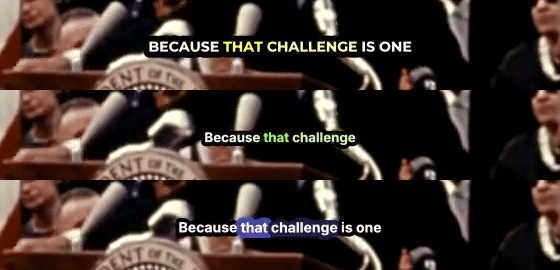
The source is 27.5 seconds of President Kennedy’s 1962 Rice University speech, starting at “not because they are easy”. The recording is NASA’s and in the public domain, and I took it from the Wikimedia Commons copy. It is 640x480, 1962 film audio, with a crowd in the room, so it is harder than a podcast mic. To cut the same clip:
ffmpeg -ss 557.5 -i "President_Kennedy's_Speech_at_Rice_University.ogv" -t 27.5 \ -c:v libx264 -crf 20 -pix_fmt yuv420p -c:a aac -b:a 128k \ -movflags +faststart rice-moon.mp4What an animated caption needs
A static subtitle needs a line of text and a start and end time. An animated caption needs a start and end time for every word, because the highlight moves on each one. That splits the work in two:
- Word timestamps, from a speech recogniser with word-level output, usually Whisper or one of its ports.
- A renderer that can highlight a word on cue. In FFmpeg that means an ASS subtitle file and libass, through the
assorsubtitlesfilter.
Static burning, where FFmpeg draws an SRT or ASS file onto the picture as-is, has its own guide: burning subtitles into a video with FFmpeg. It covers the filter escaping and force_style. This post is about the moving highlight.
The DIY route, Whisper plus ASS karaoke
ASS has karaoke tags built in. {\k50} holds the next syllable for 50 centiseconds, then switches it from the style’s SecondaryColour to its PrimaryColour. {\kf50} sweeps the colour across the word from left to right over the same half second, which is the look most people mean by karaoke captions. {\ko50} does it with the outline instead.
Getting word timestamps from the reference Whisper looks like this. I did not run this step for the post, because Whisper is not installed on the machine I wrote it on:
pip install -U openai-whisperwhisper rice-moon.mp4 --model small.en --word_timestamps True --output_format jsonThe JSON it writes carries segments[].words[], each with word, start and end in seconds.
To show the rendering step, I wrote the first two lines of the clip by hand. The timings below are typed in, rounded to centiseconds from the word timestamps the Rendobar job returned, not produced by Whisper on my machine:
[Script Info]ScriptType: v4.00+PlayResX: 640PlayResY: 480
[V4+ Styles]Format: Name, Fontname, Fontsize, PrimaryColour, SecondaryColour, OutlineColour, BackColour, Bold, Italic, Underline, StrikeOut, ScaleX, ScaleY, Spacing, Angle, BorderStyle, Outline, Shadow, Alignment, MarginL, MarginR, MarginV, EncodingStyle: Karaoke,Arial,34,&H0000FFFF,&H00FFFFFF,&H00000000,&H80000000,-1,0,0,0,100,100,0,0,1,3,0,2,20,20,150,1
[Events]Format: Layer, Start, End, Style, Name, MarginL, MarginR, MarginV, Effect, TextDialogue: 0,0:00:00.58,0:00:02.40,Karaoke,,0,0,0,,{\kf50}not {\kf33}because {\kf13}they {\kf46}are {\kf30}easy,Dialogue: 0,0:00:02.42,0:00:04.80,Karaoke,,0,0,0,,{\kf42}but {\kf25}because {\kf12}they {\kf38}are {\k8}{\kf113}hard.
ASS colours are &HAABBGGRR, so &H0000FFFF is yellow and &H00FFFFFF is white. PlayResX and PlayResY set the coordinate space the font size is measured in. Match them to the video, or a size of 34 means something else at render time. The {\k8} before “hard.” is an 8-centisecond silent gap, because \k durations run back to back and a pause has to be spelled out.
Then burn it:
ffmpeg -i rice-moon.mp4 -vf "ass=karaoke.ass" -c:v libx264 -crf 20 -c:a copy out.mp4That ran on FFmpeg 8.0 with libass 0.17.4 and produced the sweep:

To go from Whisper’s JSON to a full file, you group the words into lines and write one Dialogue per line. This is the shortest version I would trust to run, and I tested it by feeding it the job’s word timestamps in Whisper’s shape:
import json, sys
HEADER = open("header.ass", encoding="utf-8").read()  # the [Script Info] and [V4+ Styles] above
def ts(t):    cs = round(t * 100)    return f"{cs // 360000}:{cs // 6000 % 60:02}:{cs // 100 % 60:02}.{cs % 100:02}"
def lines(words, max_words=5, max_gap=0.3):    line = []    for w in words:        if line and (len(line) == max_words or w["start"] - line[-1]["end"] > max_gap):            yield line            line = []        line.append(w)    if line:        yield line
words = [w for seg in json.load(open(sys.argv[1]))["segments"] for w in seg["words"]]out = [HEADER, "\n[Events]\nFormat: Layer, Start, End, Style, Name, MarginL, MarginR, MarginV, Effect, Text\n"]for line in lines(words):    text, cursor = "", line[0]["start"]    for w in line:        gap = round((w["start"] - cursor) * 100)        if gap > 0:            text += f"{{\\k{gap}}}"        text += f"{{\\kf{max(round((w['end'] - w['start']) * 100), 1)}}}{w['word'].strip()} "        cursor = w["end"]    out.append(f"Dialogue: 0,{ts(line[0]['start'])},{ts(line[-1]['end'])},Karaoke,,0,0,0,,{text.strip()}\n")open("captions.ass", "w", encoding="utf-8").write("".join(out))
It renders. It also shows every problem in the next section.
Where the DIY route breaks
Word timing
Raw word timestamps are not what a viewer hears. On this clip the recogniser reported “easy,” as 42 milliseconds long and “skills.” the same, which a \kf sweep turns into a flash. It went the other way on “hard.”, which it gave 1.13 seconds. FFmpeg’s silencedetect at -30 dB puts a 0.85 s pause right where that word starts, so most of the sweep crawls through silence. Each of these sat at the end of a clause, just before punctuation.
In my hand-written file I stretched “easy,” to 30 centiseconds. The converter passes the raw values through, which is safe to write and wrong to watch. Fixing it means rules about minimum durations and pauses, and checking the audio levels to decide where a word really ends. Whisper’s own CLI labels --word_timestamps experimental, and this clip shows why.
Line breaking
The converter splits a line at a 0.3 s gap or after five words. On this clip that stranded “postpone,” alone on screen for 0.12 seconds, because the five-word limit fell one word before the end of the clause:
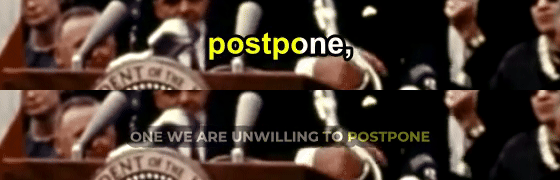
The job’s caption data split the same 27.5 seconds into 13 phrases of two to six words, mostly ending at punctuation and pauses: “not because they are easy,” then “but because they are hard.” Getting there takes punctuation, pause length and a width budget in pixels, not a word count, because “unwilling” and “to” do not take the same room. ASS will also wrap a line that is too wide by itself (WrapStyle 0 balances the lines), but a wrapped karaoke line jumps mid-sweep, so it is better to never hand libass a line that needs wrapping.
Fonts
The styles people want use display faces such as Bebas Neue or Montserrat Black, which are not on a render server by default. libass does not fail when a font is missing. I changed Fontname to Bebas Neue on a machine without it, and FFmpeg rendered the file anyway, in Arial:
[Parsed_ass_0 @ 000001a30dde5980] fontselect: (Bebas Neue, 700, 0) -> Arial-BoldMT, 0, Arial-BoldMTThe fix is to ship the font file and point the filter at it with ass=karaoke.ass:fontsdir=fonts, and to use the family name stored inside the file, which is not always the filename. Why custom fonts in a video API fail silently goes through that failure in detail.
RTL and other scripts
Arabic, Hebrew and Persian need text shaping and bidirectional layout. The ass filter has a shaping option, and complex shaping (HarfBuzz) has to be in effect for joined scripts to render correctly. You also need a font that covers the script. The karaoke tags on top of that are the part I would test by eye before trusting on right-to-left text. I did not test RTL for this post.
The one-call version
Three runs of captions.animate on the same clip, one per preset in the figure above:
| Preset | Look | Job | Cost |
|---|---|---|---|
hormozi | Bold capitals, spoken word in yellow | job_25590f0ee8fe4858 | $0.0106 |
karaoke | Two to three words at a time, spoken word in green | job_4d62ca0a850c40d0 | $0.0098 |
pill | Sentence case, a box behind the spoken word | job_034a09aeda314fd6 | $0.0097 |
Each was one request with the video as the only input. The hormozi run also set captionData: true, which returns the word timestamps, an SRT and a VTT alongside the video. That is where the timings in the DIY section came from. Other presets include mrbeast, tiktok, word-pop, neon, gold and reveal, and a style object overrides the font, size, colours, highlight and position on top of any of them. Fonts take any Google Fonts family by name, or your own file as the font input.
The hormozi run from this post. Point source at your own clip, or at rice-moon.mp4 cut with the command above.
import { createClient } from "@rendobar/sdk";
const rb = createClient({ apiKey: process.env.RENDOBAR_API_KEY });
const job = await rb.jobs.create({  type: "captions.animate",  inputs: { source: "https://example.com/rice-moon.mp4" },  params: {    preset: "hormozi",    // Also return the word timestamps, an SRT and a VTT on output.data.    captionData: true,  },});
console.log(job.id);
Install with npm i @rendobar/sdk. jobs.run() submits and waits, so it returns the finished job in one call.
curl -X POST https://api.rendobar.com/jobs \ -H "Authorization: Bearer $RENDOBAR_API_KEY" \ -H "Content-Type: application/json" \ -d '{ "type": "captions.animate", "inputs": { "source": "https://example.com/rice-moon.mp4" }, "params": { "preset": "hormozi", "captionData": true } }'Returns immediately with a job id. Poll GET /jobs/{id} or register a webhook rather than blocking on the request.
It is English-only. The language parameter accepts en and nothing else today, and the default and fast modes run English-only speech models. translateTo can turn English speech into Spanish, French, German, Portuguese, Italian or Dutch captions, all Latin script. There is no way to caption Arabic, Hebrew, Hindi or Chinese speech with this job right now, and no RTL output. For those, the Whisper and ASS route above is the one that works today. You can burn that ASS file with your own FFmpeg, or pass it as an inline input to Rendobar’s FFmpeg API and run the same ass filter there.
The job does not make word timing perfect. It uses the same class of recogniser, and its timestamps for “easy,” and “hard.” are the ones quoted above. What it saves you is the rest: installing and running a model, the phrase splitting, the font files and the preset styling, which is most of the code in the DIY route. On this 640x480 source the presets also rendered smaller than I would ship, and style.fontSize is the override for that.
If your speech is English, I would use the job and spend the saved time reviewing the output. If it is not, write the ASS file yourself, with phrase breaks at punctuation, a minimum duration on every word, and the font file shipped next to it.
Frequently asked questions
Can I animate captions from my own transcript instead of auto transcription?
Yes. Pass an SRT or VTT file as the subtitles input to captions.animate and it animates your text instead of transcribing. That is also the way around recognition mistakes on names and jargon.
How much do animated captions cost per minute of video?
About 2 cents per minute of video, going by the three runs in this post. Cost tracks run time, so treat it as a range, not a fixed rate.