
Opus vs AAC vs MP3, requested vs delivered bitrate
Compare what Opus, AAC, MP3 and FLAC deliver against the bitrate you ask for. Opus at 64k wrote 29 percent more bytes than requested, AAC within 3 percent.
 Abdelrahman Essawy 4 MIN READ
Ask FFmpeg for an audio bitrate and AAC and MP3 deliver close to it. Opus does not. On a 5-second clip, AAC and MP3 landed within 3% of bitrate times duration, while libopus wrote 19% over at 128k and 29% over at 64k, because it encodes variable bitrate by default. If you size storage or bandwidth from the bitrate you request, measure the codec you actually ship.
ffmpeg -i in.mp4 -vn -c:a libopus -b:a 64k out.opusEach variant strips the video and encodes the same 5 seconds of audio. That audio is already AAC at about 96 kbps, which matters further down. The rest of the setup is on the page describing how the benchmarks run.
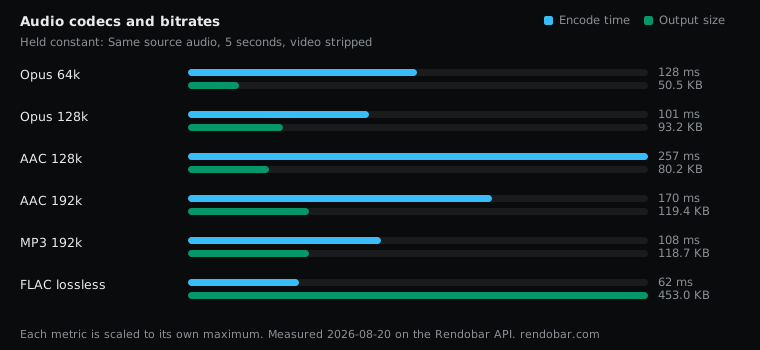
| Variant | Encode | Size | Cost |
|---|---|---|---|
| Opus 64k | 128 ms | 50.5 KB | $0.0022 |
| Opus 128k | 101 ms | 93.2 KB | $0.0016 |
| AAC 128k | 257 ms | 80.2 KB | $0.0017 |
| AAC 192k | 170 ms | 119.4 KB | $0.0017 |
| MP3 192k | 108 ms | 118.7 KB | $0.0016 |
| FLAC lossless | 62 ms fastest | 453.0 KB | $0.0016 |
Requested against delivered
Five seconds at 128 kbps is 80,000 bytes. Here is what each setting was asked for and what it wrote, container included:
| Setting | Requested | Delivered | Difference |
|---|---|---|---|
| Opus 64k | 40,000 B | 51,704 B | +29.3% |
| Opus 128k | 80,000 B | 95,449 B | +19.3% |
| AAC 128k | 80,000 B | 82,076 B | +2.6% |
| AAC 192k | 120,000 B | 122,303 B | +1.9% |
| MP3 192k | 120,000 B | 121,580 B | +1.3% |
| FLAC | no target | 463,919 B | about 742 kbps |
The delivered bytes include each container’s headers, which are a larger share of a 5-second file than of a song. That overhead is small and fixed, though, and it cannot account for an Opus file running 11,704 bytes over at 64k.
Why Opus overshoots
libopus encodes variable bitrate unless told otherwise, so -b:a sets the average it aims for, and the encoder spends more where the audio is harder. On a short or dense clip that average can land well above the number you passed. How much of the 29% survives on a full-length track, this sweep does not show.
When the budget is hard, FFmpeg’s libopus wrapper takes -vbr off for constant bitrate, or -vbr constrained for variable bitrate held closer to the target. Either trades some of the encoder’s freedom for a predictable file.
AAC and MP3 behave differently here. -c:a aac is FFmpeg’s built-in AAC encoder, and libmp3lame with -b:a encodes constant bitrate, so both land near the request. libfdk_aac, which the FFmpeg AAC guide rates above the built-in encoder, needs a build compiled with non-free components, and a non-free build cannot be redistributed, so prebuilt binaries do not include it.
FLAC stored the lossy audio losslessly
FLAC wrote 5.7x the bytes of AAC at 128k. On this clip it holds nothing more, because the input was already 96 kbps AAC. FLAC reproduced the decoded AAC exactly, including everything that encode had thrown away. The same limit applies to the lossy rows: an AAC or MP3 encode at 192k cannot restore detail a 96 kbps source never had.
So the practical rule runs before any codec choice. If the audio already suits the target container, -c:a copy keeps it as it is with no second generation of loss. Re-encode only when you have to.
Speed is not a reason to choose
Every variant encoded in under 260 ms, against roughly 900 ms for the 720p video encode used as the control across this blog. The gaps between the audio codecs are single samples, and most are under 2x, so this sweep cannot rank them by speed. Audio is rarely where an encode pipeline spends its time.
What to pick
This sweep measured bytes, not quality, so it cannot tell you which codec sounds best at a given bitrate. It can tell you what each one delivers against its request, and where each one plays.
- Audio inside an MP4 for broad playback: AAC. It plays everywhere MP4 video does and delivers close to the bitrate you set.
- Voice and real-time audio: Opus. WebRTC requires it (RFC 7874), and it is the codec to reach for when the player supports it. Budget from measured output or set
-vbr off. - MP3 when a device or platform accepts nothing else.
- FLAC for masters made from lossless audio, not for delivery.
Every row was a single API call against the same file, so checking a codec’s real output size on your own audio before you commit a storage plan takes one call per setting.
I would plan audio storage from measured bytes and never from the bitrate flag. For Opus in particular I would either set -vbr off or add a 30% margin, because the default can overshoot by that much on short, dense clips.