
AV1 vs VP9 vs HEVC vs H.264 at default settings
Compare H.264, HEVC, VP9 and two AV1 encoders at their usual CRF on one clip, by size, encode time and cost, and see why the AV1 encoder mattered.
 Abdelrahman Essawy 4 MIN READ
At each encoder’s usual CRF on one 720p clip, SVT-AV1 beat VP9 on size, encode time and cost, and libaom-av1 wrote the smallest file of the five. Those settings do not produce equal quality, so this page ranks bytes, speed and cost at conventional settings and says nothing about which codec looks better. For quality, AV1 vs H.264 at a matched file size held every codec to 150 KB and scored it with VMAF, and AV1 came out about 20 points ahead of H.264.
Each row is one API job on the same 5-second 1280x720 clip with audio stripped. The clip, the FFmpeg build and the timing rules are on how we benchmark.
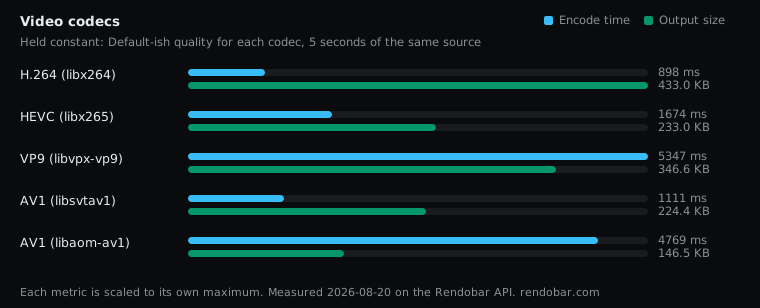
| Variant | Encode | Size | Cost |
|---|---|---|---|
| H.264 (libx264) | 898 ms fastest | 433.0 KB | $0.0024 |
| HEVC (libx265) | 1674 ms | 233.0 KB | $0.0032 |
| VP9 (libvpx-vp9) | 5347 ms | 346.6 KB | $0.0071 |
| AV1 (libsvtav1) | 1111 ms | 224.4 KB | $0.0026 |
| AV1 (libaom-av1) | 4769 ms | 146.5 KB | $0.0062 |
The commands, exactly as they ran:
ffmpeg -i https://cdn.rendobar.com/assets/examples/sample.mp4 -c:v libx264 -crf 23 -preset medium -an -t 5 out.mp4ffmpeg -i https://cdn.rendobar.com/assets/examples/sample.mp4 -c:v libx265 -crf 28 -preset medium -an -t 5 out.mp4ffmpeg -i https://cdn.rendobar.com/assets/examples/sample.mp4 -c:v libvpx-vp9 -crf 32 -b:v 0 -an -t 5 out.webmffmpeg -i https://cdn.rendobar.com/assets/examples/sample.mp4 -c:v libsvtav1 -crf 35 -preset 8 -an -t 5 out.mp4ffmpeg -i https://cdn.rendobar.com/assets/examples/sample.mp4 -c:v libaom-av1 -crf 35 -cpu-used 8 -an -t 5 out.mkvEach codec ran at the CRF its own documentation and community treat as a sensible default: 23 for x264, 28 for x265, 32 for VP9 and 35 for both AV1 encoders. CRF is not a shared scale, so the same number across codecs would look rigorous and compare nothing. Read the table as what you get at each codec’s normal setting.
VP9 lost at libvpx defaults
SVT-AV1 at preset 8 wrote 35% fewer bytes than VP9, encoded 4.8x faster and cost 63% less. Look at the VP9 command before reading that as a verdict on the format. It sets no -row-mt 1, no -cpu-used and no -deadline, so libvpx ran at its own defaults, which are slow, against an AV1 encoder at a fast preset. I did not rerun it with those flags, so the fair claim is narrow. At libvpx defaults, VP9 lost to SVT-AV1 on all three axes. With row threading and a faster -cpu-used the time gap would narrow, by an amount this sweep did not measure.
VP9 keeps one argument the table cannot show. Hardware VP9 decoders shipped in phones and TVs years before AV1 decoders did, and that matters more than encode time if your audience holds older devices.
The AV1 encoder mattered as much as the codec
The two AV1 rows are the same format at the same CRF number. libaom wrote a file 35% smaller than SVT-AV1 and took 4.3x as long. A benchmark that says “AV1” without naming the encoder and its speed setting has not told you which of those you get. The same CRF number is not guaranteed to mean the same quality across two AV1 encoders either, so even that 35% is a size, not a quality result.
Against x264, libaom’s 150,038 bytes were 66% fewer than H.264’s 443,351. That 66% is the size gap at conventional settings, not a saving at matched quality. Both AV1 rows also used fast settings (-preset 8 and -cpu-used 8), and slower settings on either would shrink the files further at more encode time. A 5-second clip also flatters fast encoders, because a slow encoder has less footage over which to spread its analysis.
H.264 and HEVC
x264 wrote the largest file of the five. HEVC at CRF 28 wrote a little over half of H.264’s bytes. HEVC’s encode took longer on this run, but by less than 2x from a single sample, which is inside the spread identical work shows between runs, and H.264 and SVT-AV1 encoded in about the same time. None of those timing gaps is a finding.
HEVC’s problem has never been its numbers. It is the patent licensing, and browser playback that still depends on the device having a hardware decoder.
Running it yourself
The sweep was five API calls with only the command changing between them, and the five together billed about two cents. The SVT-AV1 row runs as written:
import { createClient } from "@rendobar/sdk";
const rb = createClient({ apiKey: process.env.RENDOBAR_API_KEY });
const job = await rb.jobs.run({type: "ffmpeg",params: {  command:    "ffmpeg -i https://cdn.rendobar.com/assets/examples/sample.mp4 -c:v libsvtav1 -crf 35 -preset 8 -an -t 5 out.mp4",},});
console.log(job.output.file.url);
Install with npm i @rendobar/sdk. jobs.run() submits and waits, so it returns the finished job in one call.
curl -X POST https://api.rendobar.com/jobs \-H "Authorization: Bearer $RENDOBAR_API_KEY" \-H "Content-Type: application/json" \-d '{ "type": "ffmpeg", "params": { "command": "ffmpeg -i https://cdn.rendobar.com/assets/examples/sample.mp4 -c:v libsvtav1 -crf 35 -preset 8 -an -t 5 out.mp4" }}'Returns immediately with a job id. Poll GET /jobs/{id} or register a webhook rather than blocking on the request.
Swap in your own input URL and the other four commands to repeat the comparison on your footage. Grain and motion move codec rankings more than almost anything else, so one clip of slow animation is a starting point, not a result for your library.
The video codec comparison puts this sweep next to the matched-size VMAF test, hardware encoding and the SVT-AV1 preset curve. Taken together, for a new web pipeline I would encode SVT-AV1 with an H.264 fallback and drop VP9, unless the audience leans on older hardware with VP9 decoders and no AV1 support.
Frequently asked questions
How do I make libvpx-vp9 encode faster in FFmpeg?
Add -row-mt 1 for row-based multithreading and set -deadline good with a -cpu-used value, where higher values trade compression for speed. The FFmpeg VP9 guide lists the ranges. This sweep ran VP9 without any of them, so it does not measure how much they help.