
AVIF vs WebP vs JPEG, file size at common settings
Compare AVIF, WebP, JPEG and PNG encoded from one frame at each format's usual quality setting. AVIF wrote the smallest file, with quality left unmatched.
 Abdelrahman Essawy 4 MIN READ
At each format’s everyday quality setting, AVIF wrote the smallest file from the same frame, 13.4 KB against 23.4 KB for JPEG at -q:v 8 and 24.6 KB for WebP at quality 80. Those settings are not equal quality, so this is not a ranking of how efficiently each format compresses. For that question, Google’s equal-SSIM study of WebP is the reference, and the numbers here neither confirm nor dispute it.
# The three lossy encodes, from the frame at the 2-second markffmpeg -ss 2 -i in.mp4 -frames:v 1 -q:v 8 out.jpgffmpeg -ss 2 -i in.mp4 -frames:v 1 -c:v libwebp -quality 80 out.webpffmpeg -ss 2 -i in.mp4 -frames:v 1 -c:v libaom-av1 -crf 30 -cpu-used 8 out.avifThe frame comes from the 720p clip every benchmark here uses, described with the rest of the setup on the benchmark setup page. It is a rendered animation frame, mostly a smooth sky and clouds with a band of foliage along the bottom, decoded from H.264 at about 459 kbps. Smooth gradients are the kind of content AV1’s tools handle well, and the frame already carries one round of video compression. A detailed camera photo, or an image with text, could order these formats differently.
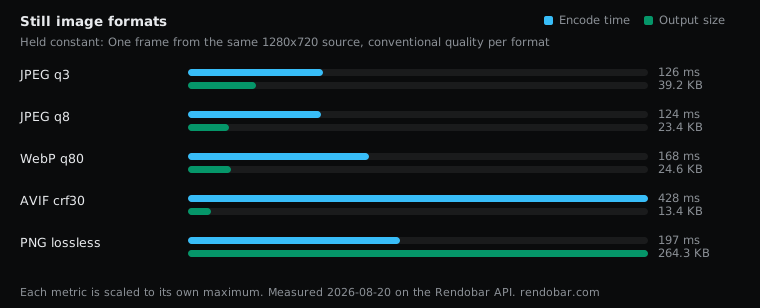
| Variant | Encode | Size | Cost |
|---|---|---|---|
| JPEG q3 | 126 ms | 39.2 KB | $0.0015 |
| JPEG q8 | 124 ms fastest | 23.4 KB | $0.0022 |
| WebP q80 | 168 ms | 24.6 KB | $0.0015 |
| AVIF crf30 | 428 ms | 13.4 KB | $0.0017 |
| PNG lossless | 197 ms | 264.3 KB | $0.0016 |
What each quality setting means
Every format here takes a different quality scale, and none of them map onto each other:
- JPEG
-q:vruns from 2 (best) to 31 (worst), the opposite direction to the others. That is why-q:v 8wrote a smaller file than-q:v 3. - WebP
-qualityruns from 0 to 100, higher is better. - AVIF through libaom takes
-crffrom 0 to 63, lower is better.-cpu-used 8is one of its fastest effort settings.
So the table compares four files a person might plausibly produce, not four files of the same quality. At these settings AVIF came out 43% smaller than JPEG q8 and 45% smaller than WebP q80. Whether its picture matches theirs, this sweep did not score.
WebP and JPEG landed close, and that is not a rebuttal
WebP at quality 80 wrote a file 5% larger than JPEG at -q:v 8. Google reports WebP lossy images as 25 to 34% smaller than JPEG at equal SSIM. Both can be true, because nothing here held SSIM equal. If -q:v 8 gives a lower-quality picture than WebP at 80, which is plausible for a setting that far down JPEG’s scale, the result is consistent with Google’s.
The JPEG row has a second caveat. It comes from FFmpeg’s built-in mjpeg encoder, not from mozjpeg or libjpeg-turbo, which are what image pipelines such as sharp and libvips usually run. mozjpeg in particular exists to write smaller JPEGs at the same quality, so the JPEG row is not the best JPEG you could make.
PNG is lossless, and it shows
PNG wrote 264.3 KB, 19.7x the AVIF. Lossless means it keeps every pixel exactly, including the softness and artefacts the video encode left in this frame. That is the right behaviour for screenshots, diagrams and text, where a lossy format smears hard edges. For a photographic or rendered frame it is the wrong trade.
Encode time
AVIF took 428 ms against 124 ms for JPEG, about 3.5x from single samples. That is past the 2x noise threshold, so AVIF is slower to encode, but it is still under half a second for a 720p frame at this effort setting. Lower -cpu-used values compress harder and take much longer, which is why AVIF is usually generated once at upload rather than on each request.
Getting a matched comparison
The right test encodes each format to the same score on a perceptual metric such as SSIMULACRA2 or butteraugli, then compares sizes. Rendobar’s compress.target job does that search for images: it looks for the smallest AVIF, WebP or JPEG that holds a SSIMULACRA2 target and reports the score it reached. The sweep on this page was simpler, one API call per format, which is enough to show sizes at everyday settings and not enough for a quality verdict.
For delivery, the usual answer does not need the verdict. A <picture> element with an AVIF source first and a JPEG fallback lets each browser take the best format it supports, as MDN’s image format guide describes.
I would ship AVIF with a JPEG fallback, and I would set each format’s quality by scoring a sample of my own images, not by the settings in this table.