
FFmpeg CRF vs bitrate, and why ABR overshoots
Compare CRF, target bitrate and VBV-capped modes in FFmpeg on one clip. Single-pass 700k ABR overshot by 13%, and adding a VBV cap landed within 0.2% of target.
 Abdelrahman Essawy 4 MIN READ
Single-pass -b:v 700k overshot its own target by about 13% on a 5-second clip. The same target with a VBV cap (-maxrate and -bufsize) landed within 0.2% of it, so the cap, not the target, is what made the bitrate predictable. For streaming I would use CRF with that cap, and for a hard size limit a two-pass or target-size encode. The shared clip and setup are on how we benchmark.
# the four modes, libx264 preset medium, audio strippedffmpeg -i sample.mp4 -c:v libx264 -preset medium -crf 23 -an -t 5 out.mp4ffmpeg -i sample.mp4 -c:v libx264 -preset medium -b:v 700k -an -t 5 out.mp4ffmpeg -i sample.mp4 -c:v libx264 -preset medium -b:v 700k -maxrate 900k -bufsize 1400k -an -t 5 out.mp4ffmpeg -i sample.mp4 -c:v libx264 -preset medium -crf 23 -maxrate 900k -bufsize 1400k -an -t 5 out.mp4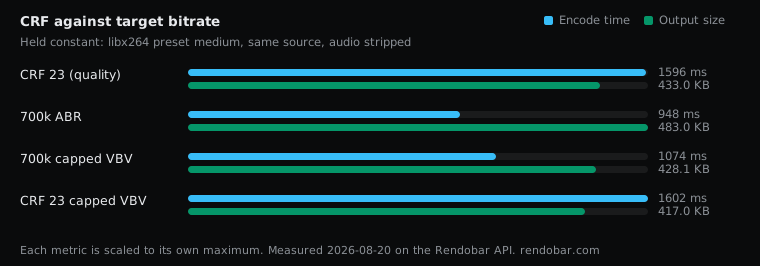
| Variant | Encode | Size | Cost |
|---|---|---|---|
| CRF 23 (quality) | 1596 ms | 433.0 KB | $0.0031 |
| 700k ABR | 948 ms fastest | 483.0 KB | $0.0023 |
| 700k capped VBV | 1074 ms | 428.1 KB | $0.0025 |
| CRF 23 capped VBV | 1602 ms | 417.0 KB | $0.0030 |
Plain ABR missed its own target
700 kbps for 5 seconds is 437,500 bytes, which is 427.2 KB. The plain ABR encode wrote 494,611 bytes (483.0 KB), about 13% over the target. An earlier version of this post said 10.4%, because it set 437.5 decimal kB against the binary KB in the table. The file was the same, the arithmetic was wrong.
This is normal behaviour. Single-pass -b:v aims at a target without knowing what is coming, so it corrects as it goes and lands near the target, not on it.
The practical point matches the one in Opus vs AAC vs MP3 vs FLAC: if you size storage from bitrate times duration, add margin.
The cap is what hit the target
Adding -maxrate 900k -bufsize 1400k to the same 700k target produced 438,402 bytes, 0.2% over the arithmetic. Plain ABR did not come close. On this clip the VBV constraint, not the average target, is what held the bitrate where it was asked to be.
This is the most useful row in the sweep, and the one I would design around.
Capped CRF gives quality with a ceiling
-crf 23 -maxrate 900k -bufsize 1400kThis encodes to a constant quality of 23 but never lets the bitrate exceed 900 kbps over a 1,400 kbit buffer. Quality drives the encode, and the cap only steps in on the hardest passages.
Plain CRF gives consistent quality with unbounded peaks, which can stall a player on a complex scene. Plain ABR gives a predictable average with no quality floor, so simple scenes waste bits and hard scenes fall apart. Capped CRF gives quality with a ceiling, and that bounded peak is the reason to use it.
Capped CRF also wrote a smaller file than plain CRF. That is not a win on its own. A file shrinks under a cap because the cap lowered quality on the passages where it bound, and I have no VMAF score for these four outputs to say how much. Read the size column as what each mode delivers, not as a quality ranking.
What -bufsize does
-maxrate is the ceiling. -bufsize is the buffer the ceiling is measured over, and it is the flag people omit or copy without understanding.
A large buffer lets the encoder average over a long stretch, spending heavily on a hard scene and recovering later. A small one keeps it near the cap moment to moment, which is stricter and costs more quality.
-maxrate without -bufsize is ignored outright in libx264. With no buffer size there is no VBV window to measure against, and x264 logs a warning saying the maxrate was ignored. It is one of the most common half-configured flags in FFmpeg.
A 5-second clip barely exercises the buffer model. VBV behaviour matters most over minutes, with real scene changes to budget across, so treat the capped result as a clean pass on an easy case.
Which I would use
For download or archive, plain CRF. Peaks do not matter when nothing streams, and quality stays consistent.
For streaming, an ABR ladder or anything with a player buffer, capped CRF.
For a hard file-size limit, two-pass ABR. I did not run two-pass in this sweep, but it is the standard fix for the overshoot above:
ffmpeg -y -i in.mp4 -c:v libx264 -preset medium -b:v 700k -pass 1 -an -f null /dev/nullffmpeg -i in.mp4 -c:v libx264 -preset medium -b:v 700k -pass 2 -an out.mp4The alternative is to let a job search for the size, which is what compress video to a target size covers.
Running the four modes through the API made them cheap to compare: each mode was one job on the same source, and the output size came back exact with each result.
Rate control is one of the settings in FFmpeg encoding settings compared. I would drop plain single-pass ABR entirely. It is the one mode here that guarantees neither the quality nor, as measured, the bitrate.
Frequently asked questions
What -bufsize should I use with -maxrate?
One to two times -maxrate is the usual starting point. I used 1400k with a 900k cap. A smaller buffer holds the bitrate closer to the cap moment to moment, which is safer for live players and costs quality on hard scenes.
Does two-pass encoding work with CRF?
No. Two-pass is a bitrate mode: the first pass analyses the whole file so the second can spend a fixed budget well. CRF has no budget to plan, so it runs in one pass.