
FFmpeg CRF explained, and what each step saves
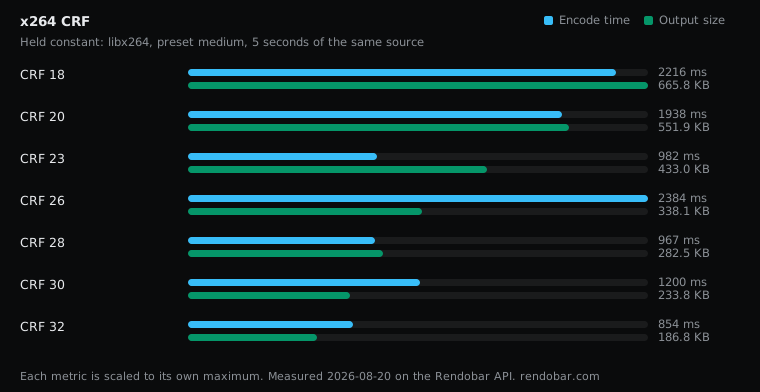
Compare FFmpeg CRF 18 to 32 on one clip. Each 3 points of CRF removed about a quarter of the file, while encode time showed no pattern at all.
 Abdelrahman Essawy 3 MIN READ
On this clip, every 3 points of CRF removed about 24% of the file, and the size halved roughly every 7.6 points. Encode time did not follow CRF at all. So the dial trades file size against quality, and this post measures the size half of that trade and says plainly where the quality half is missing.
The command is x264’s default with one number changed:
ffmpeg -i in.mp4 -c:v libx264 -preset medium -crf 26 -an out.mp4The sweep ran CRF 18 to 32 on the same 5-second clip used across this blog. Its source, FFmpeg build and noise rules are on the page that documents the benchmark setup.
| Variant | Encode | Size | Cost |
|---|---|---|---|
| CRF 18 | 2216 ms | 665.8 KB | $0.0038 |
| CRF 20 | 1938 ms | 551.9 KB | $0.0036 |
| CRF 23 | 982 ms | 433.0 KB | $0.0025 |
| CRF 26 | 2384 ms | 338.1 KB | $0.0038 |
| CRF 28 | 967 ms | 282.5 KB | $0.0025 |
| CRF 30 | 1200 ms | 233.8 KB | $0.0026 |
| CRF 32 | 854 ms fastest | 186.8 KB | $0.0023 |
What CRF changes inside the encoder
CRF stands for constant rate factor. It does not fix a bitrate or a quantizer. x264 chooses a quantizer per frame and per block, raising it where detail is less likely to be seen (fast motion, busy texture) and lowering it where it will be. CRF sets the overall level of that curve. Lower values spend more bytes everywhere, higher values fewer, and the encoder keeps redistributing them by content.
That is why CRF is a quality target and not a size target. Feed the same CRF a grainy, high-motion source and the file comes out far larger, because holding the same level on grain costs more bits.
Every step removes a similar fraction
| Step | Change | Per CRF point |
|---|---|---|
| 18 to 20 | −17.1% | −9.0% |
| 20 to 23 | −21.6% | −7.8% |
| 23 to 26 | −21.9% | −7.9% |
| 26 to 28 | −16.4% | −8.6% |
| 28 to 30 | −17.3% | −9.0% |
| 30 to 32 | −20.1% | −10.6% |
The steps in the sweep are two or three points apart, so compare the last column. Each point removed 8% to 11% of what was left, and across the whole range CRF 18 wrote 3.6x the bytes of CRF 32. The FFmpeg wiki’s rule of thumb is that +6 halves the size. On this clip it took a little more than that.
The useful model is multiplicative: +3 CRF keeps about three quarters of the file. The absolute bytes will not travel to your footage. The ratio is the part to check on a sample of your own before you rely on it.
Encode time showed no pattern
The runs took 854 to 2,384 ms with no slope. CRF 26 was the slowest run and CRF 28, two points higher, was among the fastest. Each is a single sample, and the same command on identical work has ranged from 898 to 1,912 ms, so this spread is the noise of the host, not a property of CRF.
At a fixed preset, the search the encoder does is set by the preset. CRF changes how many bits the result keeps. Raising it does not buy you a faster encode, and lowering it does not cost you one that this sweep could detect.
Where I would set it
Moving from the default 23 to 26 removed 22% of the bytes. What that costs in quality depends on the content, and this sweep did not score quality, so it cannot tell you whether the difference is visible. That needs a metric such as VMAF on your own footage, or a frame comparison.
Every CRF value was one API call, so the whole seven-point sweep billed about two cents. That makes the useful version of this test cheap: run the same steps on a few representative files from your library and score them. Rendobar’s compress.target does the scoring half for you, searching for the smallest encode that holds a VMAF level you choose.
For web delivery I would start at CRF 26, not 23, and move back toward 23 only if a quality score on my own content says the saving is visible.
Frequently asked questions
What CRF range does libx264 accept?
0 to 51 for 8-bit encodes. 0 is lossless and 23 is the default. Lower numbers mean higher quality and larger files.