
FFmpeg encoding settings, ranked by what they cost
Compare the FFmpeg settings that change output size, measured on one file: preset, keyframe interval, CRF, tune, scaler and pixel format, ranked by effect.
 Abdelrahman Essawy 7 MIN READ
-tune and the keyframe interval are the two x264 settings most likely to multiply your file size by accident, and CRF and the scaler flag are the cheapest decisions you can make. I ran every setting that changes output size through the same 720p source, so the results compare across sections. Sizes here are exact. Quality was not scored except where a section says so.
Codec choice matters more than any of these, but it has to be measured as quality at a fixed file size, not as bytes. Held to the same size, AV1 scored 20.5 VMAF points above H.264, and the video codec comparison has that test. The shared setup is on how we benchmark.
| Setting | Largest swing measured on this clip | What it trades |
|---|---|---|
| Preset | ultrafast wrote 6.6x the bytes of veryslow | encode time, and the middle is not ordered |
| Keyframe interval | all-keyframes wrote 3.4x the bytes of -g 12 | seek and segment granularity |
| CRF | 3.6x across CRF 18 to 32 | quality |
-tune | zerolatency added 121% | latency, and nothing else |
| Scaler flag | 66% between the largest and smallest | sharpness |
| Pixel format | yuv444p added 5% over yuv420p | playback compatibility |
The settings that cost the most
Keyframe interval
A keyframe is a complete picture, and every other frame stores only what changed. The interval decides how often the encoder discards its compression history and starts over, so the cost compounds.
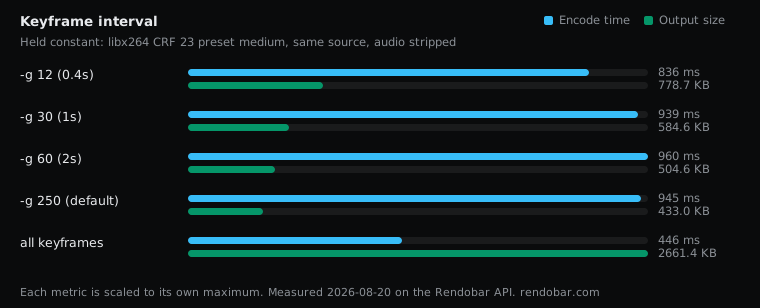
| Variant | Encode | Size | Cost |
|---|---|---|---|
| -g 12 (0.4s) | 836 ms | 778.7 KB | $0.0024 |
| -g 30 (1s) | 939 ms | 584.6 KB | $0.0024 |
| -g 60 (2s) | 960 ms | 504.6 KB | $0.0024 |
| -g 250 (default) | 945 ms | 433.0 KB | $0.0024 |
| all keyframes | 446 ms fastest | 2661.4 KB | $0.0039 |
The labels assume 30 fps. This clip runs at 24 fps and is 120 frames long, so -g 30 and -g 60 put a keyframe every 1.25 and 2.5 seconds, and -g 250 never reaches a second interval (one keyframe for the clip, apart from any scene-cut keyframes). That row is a baseline no real video has, so compare the intervals to each other. Going from -g 60 to -g 30 added 16% to the file, -g 30 to -g 12 added 33%, and making every frame a keyframe wrote 3.4x the bytes of -g 12. More keyframes did not make the encode slower (the all-keyframes run was the quickest), so this is a bandwidth decision. For streaming I would use 2 seconds. For a download, keep the default interval. Detail in the keyframe interval sweep.
-tune is the most expensive single word
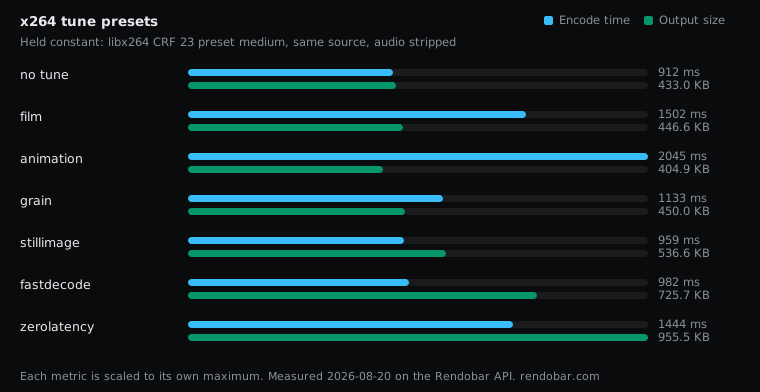
| Variant | Encode | Size | Cost |
|---|---|---|---|
| no tune | 912 ms fastest | 433.0 KB | $0.0025 |
| film | 1502 ms | 446.6 KB | $0.0030 |
| animation | 2045 ms | 404.9 KB | $0.0036 |
| grain | 1133 ms | 450.0 KB | $0.0026 |
| stillimage | 959 ms | 536.6 KB | $0.0023 |
| fastdecode | 982 ms | 725.7 KB | $0.0024 |
| zerolatency | 1444 ms | 955.5 KB | $0.0029 |
-tune zerolatency disables lookahead and B-frames and swaps frame threading for sliced threads, so the encoder never holds a frame back. Each of those features exists to improve compression. -tune fastdecode cost 68% for a different reason. It turns off CABAC entropy coding and the deblocking filter to make decoding cheaper.
Neither flag is misnamed. The trap is that “tune for low latency” reads like a scheduling hint and behaves like a bitrate multiplier. If your pipeline already buffers seconds of HLS segments, zerolatency buys you nothing. Detail in FFmpeg tune presets compared.
CRF is the cheapest decision available
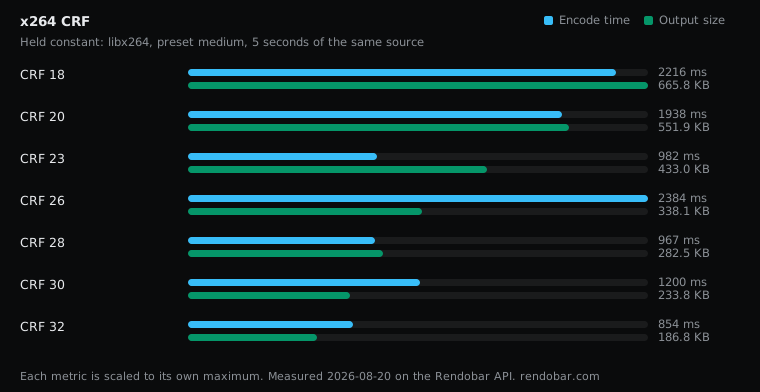
| Variant | Encode | Size | Cost |
|---|---|---|---|
| CRF 18 | 2216 ms | 665.8 KB | $0.0038 |
| CRF 20 | 1938 ms | 551.9 KB | $0.0036 |
| CRF 23 | 982 ms | 433.0 KB | $0.0025 |
| CRF 26 | 2384 ms | 338.1 KB | $0.0038 |
| CRF 28 | 967 ms | 282.5 KB | $0.0025 |
| CRF 30 | 1200 ms | 233.8 KB | $0.0026 |
| CRF 32 | 854 ms fastest | 186.8 KB | $0.0023 |
Each 3 CRF points removed about 20% of the remaining bytes, and moving from the default 23 to 26 removed 22%. Encode time showed no pattern across CRF values, so raising it is a pure size saving. What it costs in quality depends on the content, and this sweep measured bytes only. Detail in FFmpeg CRF explained and measured.
The settings people get wrong
Preset ordering is not what you think
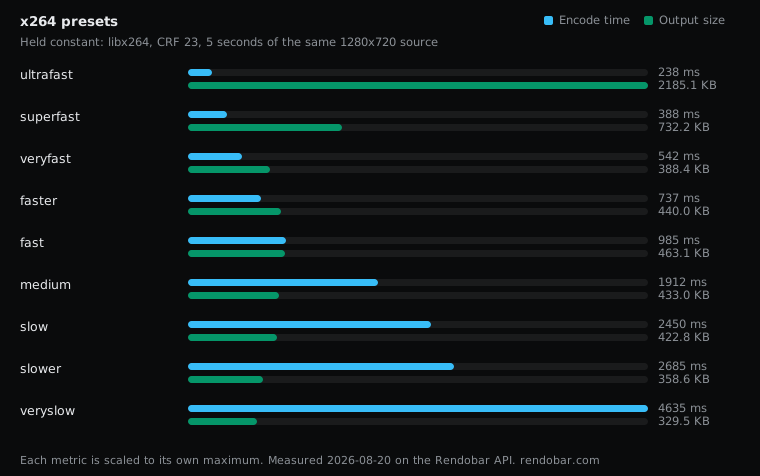
| Variant | Encode | Size | Cost |
|---|---|---|---|
| ultrafast | 238 ms fastest | 2185.1 KB | $0.0029 |
| superfast | 388 ms | 732.2 KB | $0.0024 |
| veryfast | 542 ms | 388.4 KB | $0.0021 |
| faster | 737 ms | 440.0 KB | $0.0022 |
| fast | 985 ms | 463.1 KB | $0.0025 |
| medium | 1912 ms | 433.0 KB | $0.0039 |
| slow | 2450 ms | 422.8 KB | $0.0040 |
| slower | 2685 ms | 358.6 KB | $0.0041 |
| veryslow | 4635 ms | 329.5 KB | $0.0062 |
The ends behave as advertised. The middle does not: veryfast wrote a smaller file than faster, fast, medium and slow.
Nothing is broken. CRF targets constant quality, so a slower preset can spend the bytes it saves on detail a faster one discarded. At fixed CRF, size is a side effect, not a dial. The same inversion shows up in SVT-AV1 presets compared, where preset 12 wrote a smaller file than preset 10.
Pick a preset by measuring your own content, and do not assume slower means smaller. The x264 preset sweep has the full curve.
The pixel format that breaks Safari
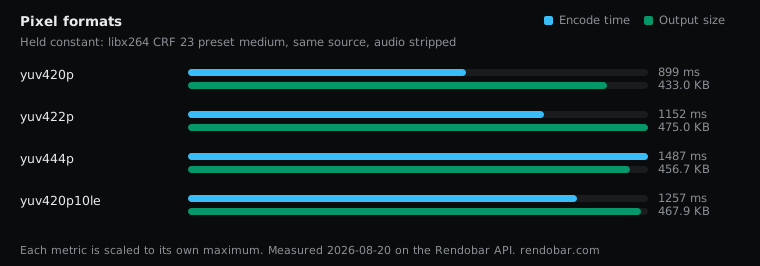
| Variant | Encode | Size | Cost |
|---|---|---|---|
| yuv420p | 899 ms fastest | 433.0 KB | $0.0024 |
| yuv422p | 1152 ms | 475.0 KB | $0.0026 |
| yuv444p | 1487 ms | 456.7 KB | $0.0031 |
| yuv420p10le | 1257 ms | 467.9 KB | $0.0029 |
yuv420p wrote the smallest file, and it is the format most hardware decoders expect. If a video plays in Chrome and not in Safari or QuickTime, check this first. A filter somewhere in the chain probably output a higher-chroma or RGB format and nothing converted it back. Ending a delivery chain with format=yuv420p does nothing when the format is already right. Detail in FFmpeg yuv420p vs yuv444p.
One oddity from that sweep: yuv422p wrote more bytes than yuv444p, which is not what the subsampling arithmetic predicts. Do not estimate output size from chroma volume.
The scaler flag is free, so use a good one
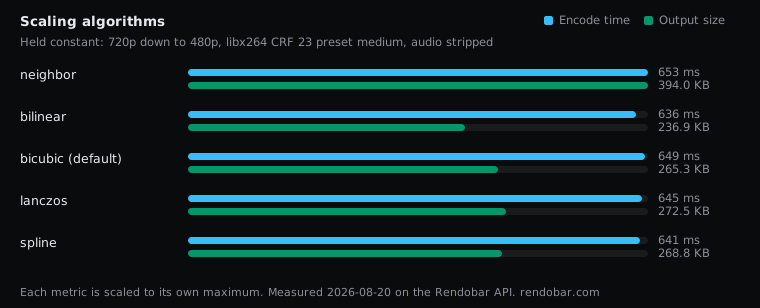
| Variant | Encode | Size | Cost |
|---|---|---|---|
| neighbor | 653 ms | 394.0 KB | $0.0022 |
| bilinear | 636 ms fastest | 236.9 KB | $0.0035 |
| bicubic (default) | 649 ms | 265.3 KB | $0.0022 |
| lanczos | 645 ms | 272.5 KB | $0.0024 |
| spline | 641 ms | 268.8 KB | $0.0020 |
All five algorithms took the same time within 17 ms while output size varied 66%. Scaling is a per-pixel filter pass and encoding is a search, so the encoder dominates the clock.
Nearest-neighbor wrote 49% more bytes than bicubic, because its stair-stepped edges are high-frequency detail the encoder then pays to describe. That generalises: any filter that adds artificial sharpness costs encoder bytes.
Smaller is not better here. Bilinear wrote the smallest file because it is the blurriest. Bicubic, spline and lanczos landed within 3% of each other, and that is the cluster to choose from. Detail in FFmpeg lanczos vs bicubic scaling.
Rate control: quality, bitrate, or both
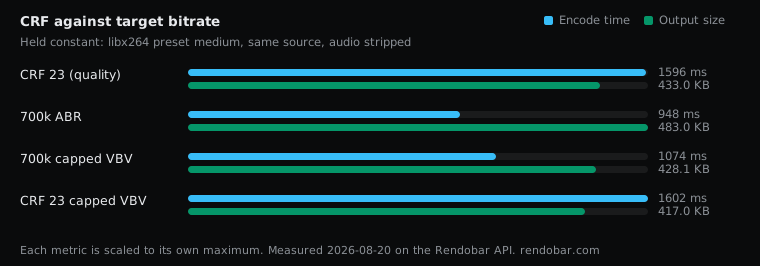
| Variant | Encode | Size | Cost |
|---|---|---|---|
| CRF 23 (quality) | 1596 ms | 433.0 KB | $0.0031 |
| 700k ABR | 948 ms fastest | 483.0 KB | $0.0023 |
| 700k capped VBV | 1074 ms | 428.1 KB | $0.0025 |
| CRF 23 capped VBV | 1602 ms | 417.0 KB | $0.0030 |
Single-pass ABR at 700k wrote 494,611 bytes where 700 kbit/s for five seconds predicts 437,500, overshooting its own target by 13%. It aims without knowing what is coming, so it corrects as it goes.
CRF with a VBV cap is the mode I would use for streaming. Quality drives the encode, and the cap bounds the peaks a player has to buffer:
-crf 23 -maxrate 900k -bufsize 1400kSet both flags. x264 ignores -maxrate without -bufsize and logs a warning saying so, which makes it one of the most commonly half-configured things in FFmpeg. Detail in FFmpeg CRF vs bitrate.
Threads, and why your benchmarks disagree
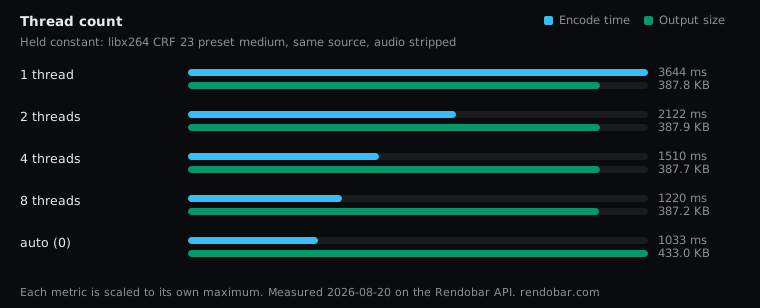
| Variant | Encode | Size | Cost |
|---|---|---|---|
| 1 thread | 3644 ms | 387.8 KB | $0.0053 |
| 2 threads | 2122 ms | 387.9 KB | $0.0036 |
| 4 threads | 1510 ms | 387.7 KB | $0.0029 |
| 8 threads | 1220 ms | 387.2 KB | $0.0026 |
| auto (0) | 1033 ms fastest | 433.0 KB | $0.0024 |
Each pinned thread count ran five times. Eight threads was 2.99x faster than one, not 8x, because encoding has serial parts. Four threads reached 2.41x, which is most of the benefit.
The larger finding is about measurement. With -threads pinned, repeated runs landed within 1.4% to 8.9%. On auto, the identical command ranged from 918 to 1,699 ms, because x264 sizes itself to whatever the machine has free. That spread invalidated a timing claim I had already published, and FFmpeg benchmark variance documents the retraction. If your timings wander between runs, pin the threads before concluding anything.
What to set
For web delivery, this avoids every costly setting above:
ffmpeg -i input.mp4 \ -c:v libx264 -crf 23 -preset medium -g 60 \ -vf "scale=1280:-2:flags=lanczos,format=yuv420p" \ -c:a aac -b:a 128k \ -movflags +faststart \ output.mp4CRF 23 is the quality anchor. -g 60 is a 2-second GOP at 30 fps. lanczos costs no measurable time. format=yuv420p prevents the Safari failure, and +faststart lets a browser start playing before the download finishes. Before any of it runs, validating the upload with ffprobe stops you paying for an encode that was always going to fail.
For archival, drop -g 60, use a slower preset, and look at AV1 at a matched size. To hit a size and a quality target at once, see how to compress video to a target size.
For live, -tune zerolatency is correct, and the extra bytes are the price of the latency you are buying.
Method and limits
Every row is one job run through Rendobar’s FFmpeg API against the same 5-second 1280x720 H.264 source, audio stripped, with the command recorded. Each variant was one call, which is what made a sweep of this size practical to repeat. The runner uses BtbN’s floating FFmpeg master static build, and exact x264 and FFmpeg versions were not recorded for this sweep. Timings are single samples except the threads sweep, so no timing difference under 2x on this page is a finding.
One clip is one content type. A static screencast or high-motion sports footage will move several of these numbers. The ordering and the mechanisms should travel. Keyframes are expensive, zerolatency disables compression features by design, and filters that add artificial detail cost bytes downstream. I would start any pipeline review by grepping for -tune.
Frequently asked questions
What are the best FFmpeg settings for web video?
libx264 at CRF 23, preset medium, a 2-second keyframe interval, format=yuv420p and -movflags +faststart. It plays everywhere, starts playing before the download finishes, and avoids the costly settings measured on this page.
Does a slower FFmpeg preset always produce a smaller file?
No. At a fixed CRF the encoder targets quality, so file size is a side effect. veryfast wrote a smaller file than faster, fast, medium and slow on this source.
Why does FFmpeg ignore -maxrate?
x264 ignores -maxrate unless -bufsize is also set, and it logs a warning saying so. Set both, for example -maxrate 900k -bufsize 1400k.