
FFmpeg keyframe interval, what a short GOP costs
Compare FFmpeg keyframe intervals on one clip: what a shorter GOP adds to the file, what it buys, and the flags that give HLS segments aligned keyframes.
 Abdelrahman Essawy 4 MIN READ
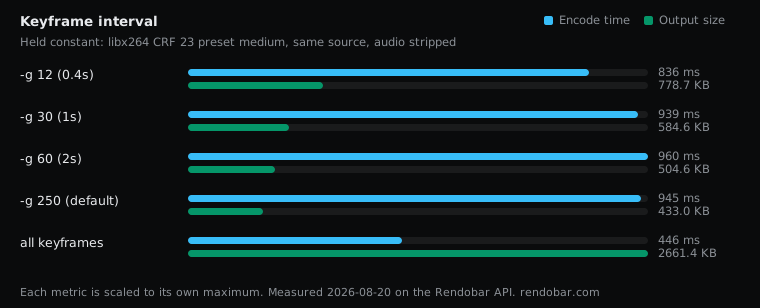
A shorter keyframe interval costs you bytes and, on this clip, no measurable encode time. Going from a keyframe every 60 frames to one every 30 added 16% to the file, and making every frame a keyframe wrote more than three times the bytes of the shortest interval tested. If you are packaging HLS or DASH, you need two flags besides -g to get aligned segments, and the command is below.
Each row is one encode of the same 5-second, 24 fps clip with only -g changed. The clip, the FFmpeg build and the noise rules are on the shared benchmark setup page.
| Variant | Encode | Size | Cost |
|---|---|---|---|
| -g 12 (0.4s) | 836 ms | 778.7 KB | $0.0024 |
| -g 30 (1s) | 939 ms | 584.6 KB | $0.0024 |
| -g 60 (2s) | 960 ms | 504.6 KB | $0.0024 |
| -g 250 (default) | 945 ms | 433.0 KB | $0.0024 |
| all keyframes | 446 ms fastest | 2661.4 KB | $0.0039 |
Two things about those labels before reading the numbers. They assume 30 fps, and this clip runs at 24 fps, so -g 12, -g 30 and -g 60 allow a keyframe every 0.5, 1.25 and 2.5 seconds. And the clip is only 120 frames long, so -g 250 never reaches a second interval. Apart from any keyframe x264’s scene-cut detection adds, that row is one keyframe for the whole clip, a baseline a real video does not have. Comparing the intervals to each other is the fair reading.
Each halving of the interval costs more bytes
| Change | Bytes added |
|---|---|
-g 60 to -g 30 (2.5 s to 1.25 s) | +16% |
-g 30 to -g 12 (1.25 s to 0.5 s) | +33% |
-g 12 to -g 1 (every frame a keyframe) | 3.4x |
A keyframe is a complete picture. Every other frame stores only what changed since an earlier one, so each extra keyframe pays full price for a picture the encoder could have described cheaply. Shorten the interval and you pay that price more often.
The magnitudes depend on the content. This clip is slow, smooth animation, where predicted frames are cheap and a keyframe is expensive by comparison, so the penalty is at the high end. High-motion footage has less to gain from prediction and loses less when you shorten the GOP. The direction holds either way.
An intra-only encode is the far end of this curve. It is the reason editing formats such as ProRes are enormous: every frame is a keyframe by design.
Encode time did not move measurably
Every interval from -g 12 to -g 250 encoded in 836 to 960 ms. Those are single samples, and the same command on identical work has ranged 898 to 1,912 ms, so the spread says nothing about the setting.
The all-keyframes run finished in 446 ms, about half the others. That is also one sample and only just past 2x, but it has a plain mechanism behind it. With no predicted frames there is no motion search, which is most of what x264’s medium preset spends its time on.
The cost column follows the noise, not the setting. The all-keyframes job billed the most despite the quickest encode, and its upload step took no longer than the others. Its cost still sits inside the range identical work has billed, so I would not read anything into it.
Aligned keyframes for HLS and DASH
A packager can only cut a segment at a keyframe, so the GOP has to divide the segment length. -g sets a maximum interval, not an exact one. x264 also places a keyframe wherever it detects a scene change, which puts keyframes mid-segment and leaves segments that start late or run long.
# A keyframe exactly every 2 seconds at 30 fps. Use 48 at 24 fps, 120 at 60 fps.ffmpeg -i in.mp4 -c:v libx264 -preset medium -crf 23 \ -g 60 -keyint_min 60 -sc_threshold 0 \ -c:a aac -b:a 128k out.mp4-keyint_min 60 stops x264 from closing a GOP early, and -sc_threshold 0 turns scene-cut detection off. Pick the interval so it divides your segment length: a 2-second GOP fits 2, 4 and 6-second segments. Turning scene cuts off has its own cost on footage with hard cuts, because the frame after a cut is then coded as a predicted frame. This sweep did not measure that.
A short interval also bounds seeking, since a player can only start decoding at a keyframe. At x264’s default of 250 frames, a 24 fps video can have more than ten seconds between keyframes, so a seek can land far from where the viewer clicked.
Running the sweep was five API calls with one flag changed between them, and the whole thing billed about 1.4 cents, which makes it cheap to repeat on a sample of your own library before you commit a ladder to a GOP length.
For HLS, I would use a fixed 2-second GOP with scene cuts off and accept the extra bytes. For a file people download, I would leave the default and keep them.
Frequently asked questions
How do I see where the keyframes are in a video?
Run ffprobe -v error -select_streams v:0 -skip_frame nokey -show_entries frame=pts_time -of csv=p=0 in.mp4. It decodes only keyframes and prints one timestamp per keyframe, so you can check the spacing your encode actually produced.