
Save FFmpeg output to S3, pipe a fragmented MP4
Send FFmpeg output to an S3 bucket by piping a fragmented MP4 into aws s3 cp. A regular MP4 can't stream, and MPEG-TS cost 7.5% more bytes.
 Abdelrahman Essawy 7 MIN READ
To stream FFmpeg output into S3, write a fragmented MP4 to stdout with -movflags frag_keyframe+empty_moov -f mp4 pipe:1 and pipe it into aws s3 cp -. A regular MP4 can’t be piped at all, because FFmpeg goes back to the start of the file to write its index. Fragmenting cost nothing in size on a measured encode, while switching to MPEG-TS, the usual fallback, made the file 7.5% bigger.
Why FFmpeg can’t stream a regular MP4
The command people try first points the output at a pipe and hands it to the AWS CLI:
ffmpeg -i input.mp4 -c:v libx264 -crf 23 -c:a aac -f mp4 pipe:1 \ | aws s3 cp - s3://my-bucket/exports/out.mp4FFmpeg stops before it writes a single frame. The failure happens inside FFmpeg whatever reads the pipe, so here it is from FFmpeg 8.0 run locally with a stream copy and the pipe sent to /dev/null:
ffmpeg -i sample.mp4 -c copy -f mp4 pipe:1 > /dev/null[mp4 @ 000001ee2e2e8100] muxer does not support non seekable output[out#0/mp4 @ 000001ee2e247cc0] Could not write header (incorrect codec parameters ?): Invalid argumentThe second line blames codec parameters. The first line is the real cause, and older builds word it differently for the same reason.
An MP4 keeps its index, the moov box, separately from the media. FFmpeg does not know how many frames it will write until it has written them, so it streams the media first and then goes back to write the index. That second step is a seek. A file on disk can seek. A pipe can’t, and neither can an upload already on its way to S3.
+faststart doesn’t rescue it. It moves the index to the front of a finished file in a second pass, and FFmpeg’s own documentation says it “will not work in various situations such as fragmented output”. A pipe never produces a finished file to make a second pass over.
A fragmented MP4 does work. empty_moov writes an index with no samples in it at the very start, and frag_keyframe starts a new fragment at every keyframe, so each piece of media arrives with its own small index and nothing ever needs to be revisited. Add both flags and set the format explicitly, because pipe:1 has no extension for FFmpeg to guess from. With them, the same stream copy went through the pipe.
What the pipe-safe flags cost
The worry with fragmenting is overhead, an index per fragment instead of one for the whole file. So I encoded the same 5 seconds six ways on Rendobar’s FFmpeg API on 2026-09-13, holding libx264 veryfast at CRF 23, a 2-second keyframe interval and 128k AAC fixed, and changed only the container. The test clip is described in how we benchmark.
| Container | Bytes | Against the default MP4 | Streams through a pipe |
|---|---|---|---|
| MP4, moov at end (default) | 599,026 | 0 | No |
MP4, +faststart | 599,026 | 0 | No |
MP4, frag_keyframe+empty_moov | 598,786 | 240 smaller | Yes |
MP4, +default_base_moof added | 598,698 | 328 smaller | Yes |
| Matroska | 597,724 | 1,302 smaller | Yes |
| MPEG-TS | 643,900 | 44,874 larger | Yes |
Every streamable MP4 variant landed within a few hundred bytes of the default, so fragmenting is free at this length. +faststart produced the same byte count as the default, which makes sense: it moves the index, it doesn’t change it. On a long file the picture can shift, because an hour of video with a 2-second keyframe interval carries far more fragment headers than 5 seconds does. What this measured is that the short case is not larger, not that a long file stays the same size.
MPEG-TS is the one that costs. It wraps everything in small fixed-size packets, each with its own header. It is the container people switch to when a pipe fails, because it was built for broadcast streams. For a file headed into a bucket, fragmented MP4 or Matroska streams just as well without the overhead.
Size is not the only trade. A fragmented MP4 is handled less uniformly than a regular one, and some editors and older players read its duration or seek in it poorly. If a tool downstream chokes, remux it once without re-encoding:
ffmpeg -i out.mp4 -c copy -movflags +faststart fixed.mp4Route 1: write to disk, then upload
The route with no surprises. FFmpeg writes a real file, so every flag works, +faststart included, and the upload is a separate step you can retry on its own.
import { spawn } from "node:child_process";import { createReadStream } from "node:fs";import { S3Client } from "@aws-sdk/client-s3";import { Upload } from "@aws-sdk/lib-storage";
await new Promise((resolve, reject) => {  const ff = spawn("ffmpeg", [    "-i", "input.mp4",    "-c:v", "libx264", "-crf", "23", "-c:a", "aac",    "-movflags", "+faststart",    "/tmp/out.mp4",  ]);  ff.on("error", reject);  ff.on("close", (code) => (code === 0 ? resolve(undefined) : reject(new Error(`ffmpeg exited ${code}`))));});
// Upload sends one PUT for a small body and switches to multipart for a large one.await new Upload({  client: new S3Client({}),  params: {    Bucket: "my-bucket",    Key: "exports/out.mp4",    Body: createReadStream("/tmp/out.mp4"),    ContentType: "video/mp4",  },}).done();
The cost is disk. A single PUT tops out at 5 GB, which the multipart path in Upload handles, with parts between 5 MiB and 5 GiB and at most 10,000 of them. The file still has to exist somewhere first, and on serverless that is the constraint that bites. Processing video from S3 lists the Lambda limits a write-then-upload function runs into.
Route 2: pipe a fragmented MP4 to S3
No disk, one line, and the flags from the table above:
ffmpeg -i input.mp4 -c:v libx264 -crf 23 -c:a aac \ -movflags frag_keyframe+empty_moov -f mp4 pipe:1 \ | aws s3 cp - s3://my-bucket/exports/out.mp4 --content-type video/mp4aws s3 cp - reads the stream and uploads it in parts as it arrives. It doesn’t know how long the stream is, so above 50 GB it needs --expected-size in bytes, or the upload can run out of its 10,000 parts partway through.
A pipe can’t be replayed, so if the upload fails at minute 40 the retry is the whole encode, not just the upload. And there is no +faststart on this route, because nothing ever writes a finished file to move the index around in.
Both routes share one property that is easy to miss. They run wherever FFmpeg runs, so that machine needs credentials that can write to the bucket.
Route 3: let the job deliver the file
The third route moves the write out of your code. You connect the bucket once, add destinations to the job, and the output is delivered after the job completes. FFmpeg writes a real file inside the job, so +faststart works again. The connected storage changelog entry lists every provider it works with.
The Route 1 encode, reading from a connected bucket and delivering back into it. media is the connection's ID.
import { createClient } from "@rendobar/sdk";
const rb = createClient({ apiKey: process.env.RENDOBAR_API_KEY });
const job = await rb.jobs.create({  type: "ffmpeg",  inputs: { source: "storage://media/raw/clip.mp4" },  params: {    command: "ffmpeg -i source -c:v libx264 -crf 23 -c:a aac -movflags +faststart out.mp4",  },  // A folder keeps the connection's file name pattern, so this lands at exports/clip.mp4.  destinations: ["storage://media/exports"],});
console.log(job.id);
Install with npm i @rendobar/sdk. jobs.run() submits and waits, so it returns the finished job in one call.
curl -X POST https://api.rendobar.com/jobs \ -H "Authorization: Bearer $RENDOBAR_API_KEY" \ -H "Content-Type: application/json" \ -d '{ "type": "ffmpeg", "inputs": { "source": "storage://media/raw/clip.mp4" }, "params": { "command": "ffmpeg -i source -c:v libx264 -crf 23 -c:a aac -movflags +faststart out.mp4" }, "destinations": ["storage://media/exports"] }'Returns immediately with a job id. Poll GET /jobs/{id} or register a webhook rather than blocking on the request.
A destination is storage://<id> with an optional path. A bare ID uses the connection’s output path, which defaults to rendobar/{date}/{source_name}.{ext}. A folder keeps that pattern’s file name inside the folder. A path containing a token such as {job_id}, or ending in a file name, is used exactly as written. When a file with that name already exists, the connection either keeps both by adding a short suffix or replaces it, whichever you picked.
The file also stays downloadable from the job whether or not the delivery succeeds, so a bucket that rejects a write does not cost you the encode.
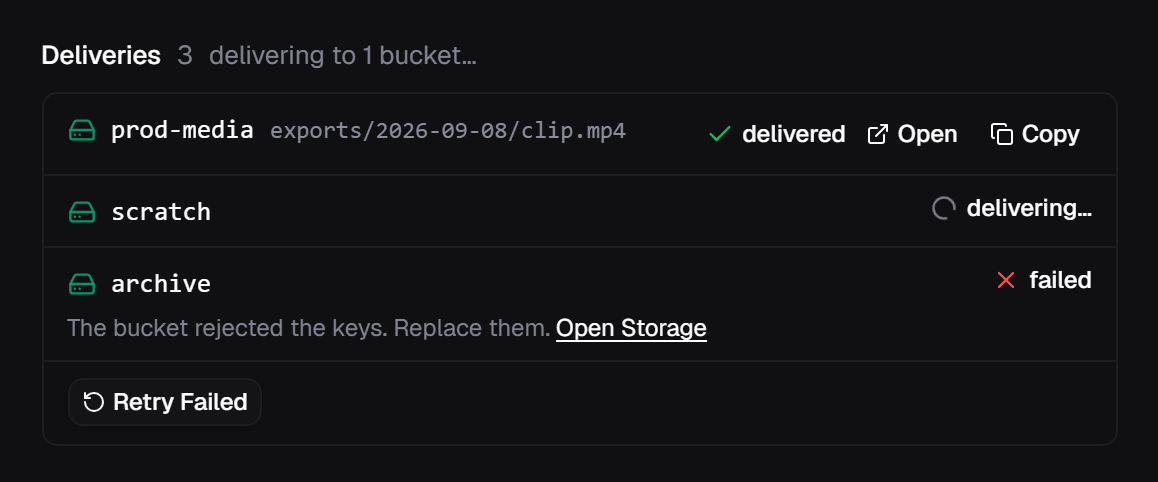
Knowing the file arrived is a webhook, not a poll. Each bucket fires its own job.delivery_succeeded or job.delivery_failed, and job.deliveries_settled fires once when every destination has finished, which is the one to wait on when a pipeline has a next step. Abridged, a success looks like this:
{ "event": "job.delivery_succeeded", "data": { "jobId": "job_8f3c2a91d4b04e17", "storageId": "media", "status": "delivered", "path": "exports/clip.mp4" }}A failed delivery retries on its own first. If it still fails, it reports a reason such as destination_denied instead of the raw bucket error, and rb.jobs.retryDeliveries(job.id) tries it again from the finished output. Route 3 delivers the job’s output file. It does not stream an arbitrary pipe into S3 for you.
Which route to pick
| Write, then upload | Pipe to S3 | Deliver from the job | |
|---|---|---|---|
| Local disk | As large as the output | None | None |
+faststart | Works | Not possible | Works |
| When the upload fails | Upload the file again | Run the encode again | Retries from the output |
| Bucket credentials | Wherever FFmpeg runs | Wherever FFmpeg runs | In the connection, not in your code |
| Knowing it landed | Your own code | Your own code | One webhook per bucket |
If you already run FFmpeg on a machine with room to spare, keep route 1. It is the simplest thing that works, and nothing here beats it. I would only pipe when disk is the thing you don’t have and the files are small enough that re-running a failed encode is cheap. Route 3 is for when you would rather not hold bucket credentials next to FFmpeg at all, or when more than one bucket needs the same output.
Frequently asked questions
Can FFmpeg write directly to an S3 URL?
Not to an s3:// path. FFmpeg has no s3 protocol. Write a fragmented MP4 to stdout and pipe it into aws s3 cp, or write a file first and upload it.
What does FFmpeg's 'muxer does not support non seekable output' error mean?
The MP4 muxer needs to jump back to the start of the file to write the moov index, and a pipe or an upload in flight cannot jump back. Add -movflags frag_keyframe+empty_moov and set -f mp4 so FFmpeg writes a fragmented MP4 that never seeks.