
FFmpeg lanczos vs bicubic scaling, size not speed
Compare FFmpeg scaling flags on one 720p to 480p downscale. The flag moved output size by 66 percent and encode time by nothing measurable.
 Abdelrahman Essawy 3 MIN READ
The scaling flag changes the file, not the encode time. On the same 720p to 480p downscale, five algorithms produced files up to 66% apart, while their encode times landed within 17 ms of each other. Use lanczos or the bicubic default, and write the flag into the command either way.
ffmpeg -i in.mp4 -vf "scale=854:-2:flags=lanczos" -c:v libx264 -preset medium -crf 23 out.mp4Each variant changes only flags=. The source clip and the noise rules for every sweep here are on how these benchmarks are run.
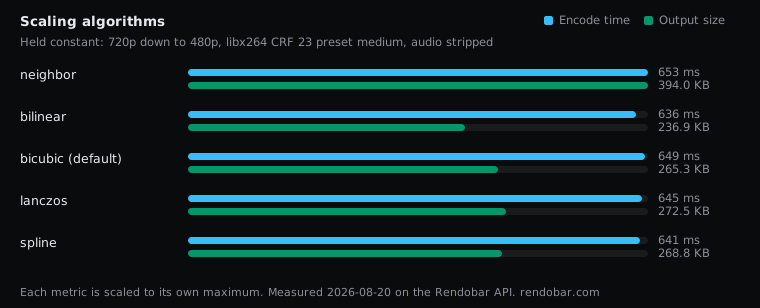
| Variant | Encode | Size | Cost |
|---|---|---|---|
| neighbor | 653 ms | 394.0 KB | $0.0022 |
| bilinear | 636 ms fastest | 236.9 KB | $0.0035 |
| bicubic (default) | 649 ms | 265.3 KB | $0.0022 |
| lanczos | 645 ms | 272.5 KB | $0.0024 |
| spline | 641 ms | 268.8 KB | $0.0020 |
The time column cannot rank them
Every algorithm encoded in 636 to 653 ms. Those are single samples, and the same command on identical work has ranged from 898 to 1,912 ms, so the 17 ms spread tells you nothing about which kernel is faster. The fair statement is that this sweep found no measurable difference.
That fits where the work is. Scaling is one pass over the pixels. Encoding is a search, and it dominates the clock so completely that a simple kernel and a wide one look the same from outside.
The cost column has one outlier. Bilinear billed noticeably more than the others, and its upload step took 1.8 seconds against roughly half a second for the rest. That is transfer time on one run, not the scaler.
Nearest-neighbor is the expensive one
Nearest-neighbor wrote 49% more bytes than bicubic at the same output resolution.
It copies one source pixel per output pixel, which leaves hard, stair-stepped edges. Hard edges are high-frequency content, and high-frequency content is what a DCT-based codec spends the most bits describing. A cheap scaler can hand the encoder a more expensive problem. Heavy sharpening inflates files for the same reason.
The smallest file is not the one to pick
Bilinear wrote the smallest file. It is the softest of the interpolating kernels here, and soft images compress well because there is less fine detail left to encode. Choosing a scaler by this column would pick the one that discards the most detail.
Bicubic, spline and lanczos landed within 3% of each other. I have not scored these outputs with a quality metric or published crops, so the case for lanczos rests on its documented behaviour (a wider kernel that holds edge detail on a downscale), not on a measurement here. What the sweep does show is that choosing it costs nothing in time and about 3% in bytes over the default.
What to set
For a downscale, lanczos is the conventional choice, and the MP4 to GIF recipe on this site uses it. bicubic is FFmpeg’s default and a reasonable one. Use neighbor only when you want hard pixels: pixel art, or enlarging a QR code or barcode where interpolation would blur the edges the reader depends on.
This sweep covers downscaling only. Upscaling is a different problem and was not measured.
Each algorithm was one API call against the same source, and the five of them billed about 1.2 cents together, so rerunning this on your own footage is a loop over five commands.
I would write flags=lanczos on every downscale. It costs nothing measurable, and a command that states its scaler is one you can read six months later without looking up a default.
Frequently asked questions
What does -2 mean in scale=854:-2?
It tells FFmpeg to compute the height from the aspect ratio and round it to a multiple of 2. libx264 with yuv420p needs even dimensions, and -1 can produce an odd height that fails the encode.