
FFmpeg threads benchmark
Compare FFmpeg thread counts from 1 to 8, five runs each. Eight threads gave a 3x speedup rather than 8x, and pinning threads made the benchmark reproducible.
 Abdelrahman Essawy 4 MIN READ
Adding threads to an encoder feels like it should be linear. Twice the threads, half the time. It is not, and the gap between expectation and reality is large.
Short version. Eight threads was 2.99x faster than one, not 8x. And the more useful finding: pinning -threads is what turns an FFmpeg benchmark from noisy into reproducible.
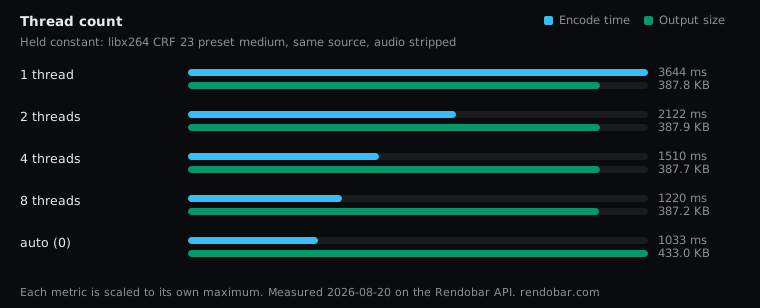
| Variant | Encode | Size | Cost |
|---|---|---|---|
| 1 thread | 3644 ms | 387.8 KB | $0.0053 |
| 2 threads | 2122 ms | 387.9 KB | $0.0036 |
| 4 threads | 1510 ms | 387.7 KB | $0.0029 |
| 8 threads | 1220 ms | 387.2 KB | $0.0026 |
| auto (0) | 1033 ms fastest | 433.0 KB | $0.0024 |
The scaling curve
Five runs per variant, median reported:
| Threads | Median | Speedup vs 1 |
|---|---|---|
| 1 | 3,644 ms | — |
| 2 | 2,122 ms | 1.72x |
| 4 | 1,510 ms | 2.41x |
| 8 | 1,220 ms | 2.99x |
Doubling from one to two threads bought 1.72x. Doubling again to four bought another 1.4x. Doubling again to eight bought only 1.24x more.
That is textbook Amdahl behaviour. Video encoding has genuinely serial parts: rate control decisions depend on previous frames, and the bitstream has to be assembled in order. Threads speed up the parallel portion and do nothing for the rest, so the curve flattens.
The practical reading: four threads gets you most of what eight does. If you are sizing a container or a worker, that is the knee in the curve.
The measurement finding matters more
Look at the range column, not just the median.
| Threads | Range | Spread |
|---|---|---|
| 1 | 3,590 to 3,657 ms | 1.9% |
| 2 | 2,108 to 2,181 ms | 3.5% |
| 4 | 1,490 to 1,511 ms | 1.4% |
| 8 | 1,183 to 1,288 ms | 8.9% |
| auto | 918 to 1,699 ms | 85% |
With -threads pinned, repeated runs of the same command land within a few percent of each other. With auto, the same work took anywhere from 918 to 1,699 ms.
We arrived at this from the other direction. An earlier sweep found one identical command varying 2.13x across ten runs, which was enough to retract a published claim. Every one of those runs used default threading.
x264’s default asks the machine how many cores are free and sizes itself accordingly. On shared infrastructure that answer moves between runs, so the encoder does a different amount of parallel work each time. It is not the measurement that is unreliable. It is the workload, and pinning the thread count pins the workload.
If you benchmark FFmpeg and your numbers wander, this is almost certainly why.
Auto was fastest, and produced a different file
Two things about the auto row are worth separating.
It was the fastest median at 1,033 ms, beating eight explicit threads. That is expected: the container has more than eight cores available and x264’s default uses roughly 1.5x the core count, so auto is simply using more threads than our explicit maximum.
It also produced 433.0 KB where every explicit thread count produced 387.8 KB, an 11.8% difference. Every variant’s size was byte-identical across its own five runs, so this is not noise, it is a real behavioural difference between pinned and default threading.
We do not have a confident explanation for it. The usual story is that more threads means more slices and slightly worse compression, which would predict auto being larger, and it is. But that story also predicts one thread being noticeably smaller than eight, and those came out within 0.15% of each other. Something other than slice count is moving here, and we are not going to invent a mechanism to cover it.
What it means practically is worth stating even without the explanation: pinning threads changes your output, not just your speed. If you pin threads in production and benchmark with auto, you are not measuring what you ship.
What to actually set
For a single encode on a dedicated box, leave it on auto and let x264 use the machine.
For anything running concurrently, pin it. If you run four encodes at once on an eight-core box and each one grabs twelve threads, they fight, and total throughput drops. Explicit -threads 2 on each is usually faster in aggregate than four jobs all trying to use everything.
For benchmarking, always pin it, or your numbers are unrepeatable.
Where this stops
One 5-second 1280x720 clip, libx264 CRF 23 preset medium, audio stripped, five runs per variant on shared infrastructure. The scaling shape is a property of the codec and should travel; the absolute times are specific to this machine and this clip.
Longer clips parallelise better, because frame-level threading has more frames to work with and the serial setup is amortised over more work. Treat 2.99x as a floor for the eight-thread speedup rather than a ceiling.
Threading is one of seven settings measured on this same source. The rest are in FFmpeg encoding settings compared.
Frequently asked questions
How many threads should FFmpeg use?
Four gets most of the benefit. We measured 2.41x speedup at four threads and only 2.99x at eight, so the returns fall off sharply past four.
Why is FFmpeg not 8x faster with 8 threads?
Video encoding has genuinely serial parts, including rate control decisions that depend on previous frames and bitstream assembly that must happen in order. Threads only speed up the parallel portion.
Why do my FFmpeg benchmarks give different times each run?
Almost certainly default threading. With -threads pinned our repeated runs landed within 1.4% to 8.9% of each other; on auto the same work ranged 918 to 1,699 ms, an 85% spread.
Should I pin threads in production?
Yes if jobs run concurrently. Four encodes each grabbing every core will fight for CPU, and explicit low thread counts per job usually give better total throughput.