
FFmpeg -tune values, zerolatency doubles the bytes
Compare all seven x264 -tune values on one clip at CRF 23. zerolatency needed 2.2x the bytes and fastdecode 1.7x. On a capped stream they cost quality.
 Abdelrahman Essawy 4 MIN READ
At the same CRF 23, -tune zerolatency made libx264 write 2.2x the bytes of no tune, and -tune fastdecode 1.7x. Only -tune animation made the file smaller. If you stream at a capped bitrate, those two flags cannot raise the bitrate, so they cost picture quality instead. The shared clip and setup are on how we benchmark.
ffmpeg -i sample.mp4 -c:v libx264 -crf 23 -preset medium -tune zerolatency -an -t 5 out.mp4Each variant swaps the -tune value. The baseline leaves the flag out.
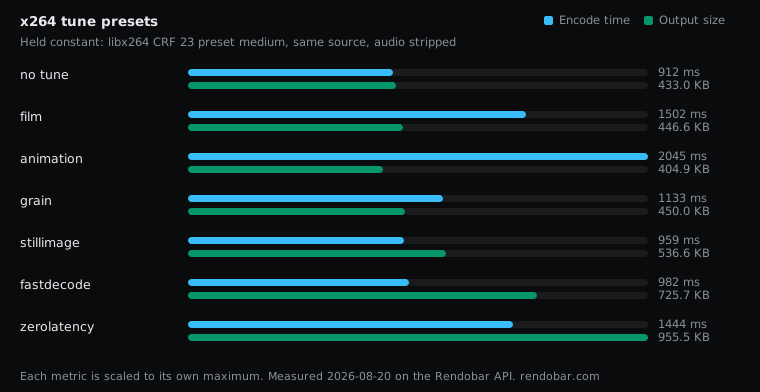
| Variant | Encode | Size | Cost |
|---|---|---|---|
| no tune | 912 ms fastest | 433.0 KB | $0.0025 |
| film | 1502 ms | 446.6 KB | $0.0030 |
| animation | 2045 ms | 404.9 KB | $0.0036 |
| grain | 1133 ms | 450.0 KB | $0.0026 |
| stillimage | 959 ms | 536.6 KB | $0.0023 |
| fastdecode | 982 ms | 725.7 KB | $0.0024 |
| zerolatency | 1444 ms | 955.5 KB | $0.0029 |
| Tune | Size vs no tune |
|---|---|
| animation | −6.5% |
| film | +3.1% |
| grain | +3.9% |
| stillimage | +24% |
| fastdecode | +68% |
| zerolatency | +121% |
The two performance tunes switch compression off
zerolatency exists so the encoder never holds a frame back. To get there it turns off B-frames, the rate-control lookahead and macroblock-tree, and swaps frame threading for sliced threads. Every one of those helps compression, so at constant quality the file grows. On this clip it grew to 2.2x.
fastdecode makes the decoder’s job cheaper by turning off CABAC, the deblocking filter and weighted prediction. Each is a compression tool, so the file grew by 68%.
Neither flag is misnamed. The trap is that “tune for low latency” reads like a scheduling hint, and it behaves like a different encoder configuration.
What zerolatency costs on a live stream
This sweep ran at constant quality (CRF 23), where the bytes are free to grow. Most live streams do not work that way. They run at a fixed or VBV-capped bitrate, and there the byte budget cannot grow, so zerolatency costs picture quality at the bitrate you already pay for. I did not measure a capped pair, so I cannot put a VMAF number on that loss. The direction follows from the same mechanism: the encoder has fewer tools to spend a fixed budget well.
-tune zerolatency is a common line in streaming tutorials, including the FFmpeg streaming guide as an option for low-latency cases. It earns its cost on genuine realtime video, such as calls or sub-second interactive streams. On HLS or DASH with multi-second segments, the player already buffers seconds of video, so the flag saves almost no latency and still costs you.
animation made the only smaller file
animation raises deblocking strength, lowers psychovisual tuning, and uses more reference frames and B-frames, which suits flat colour and hard edges. On this live-action clip it wrote a 6.5% smaller file. At a fixed CRF that is a size result, not proof that it compresses better, because the tune also changes what CRF 23 looks like. It needs a quality score before it counts as a win.
film and grain both made the file slightly larger. That is by design. grain tells the encoder to keep grain instead of smoothing it away, and keeping detail costs bits. You use it because you want the grain.
stillimage buys quality on static shots, not smaller files
stillimage is tuned for slideshow-type content, long static shots with occasional changes. It raises quality on the static portions, and on this moving clip the file came out 24% larger. If you want a smaller file from a static source, a longer keyframe interval and a higher CRF do far more, and FFmpeg keyframe interval compared shows the size of that lever.
The encode times in the table are single samples on default threading, and this infrastructure varies up to 2x run to run. Read the sizes, which are exact. Why FFmpeg benchmark times vary covers the difference.
-tune is content-dependent, so the content tunes will rank differently on real animation or grainy film. The two performance tunes will not: they turn off compression tools by design and cost bytes, or quality, on any content.
Running the sweep through the API meant each tune was one job with the same source and the rest of the command unchanged, so the size column compares exactly one flag at a time.
-tune is one of the settings in FFmpeg encoding settings compared, and it is the one I would audit first in an existing streaming config. If the stream is not interactive, I would delete -tune zerolatency and keep the bitrate.
Frequently asked questions
Should I use -tune zerolatency for HLS?
Usually not. HLS players buffer whole segments, so the stream already carries seconds of latency and zerolatency saves almost none of it. You pay in bytes at constant quality, or in picture quality at a capped bitrate.
Is -tune the same as -preset in FFmpeg?
No. -preset sets how much search effort x264 spends. -tune adjusts settings for a type of content or a constraint such as latency. They are separate flags and are often used together.