
JSON to video API, one timeline to MP4
Render an 18 second 1080p MP4 from one JSON timeline with a crossfade, titles and music, and see the FFmpeg filter graph the same edit needs.
 Abdelrahman Essawy 9 MIN READ
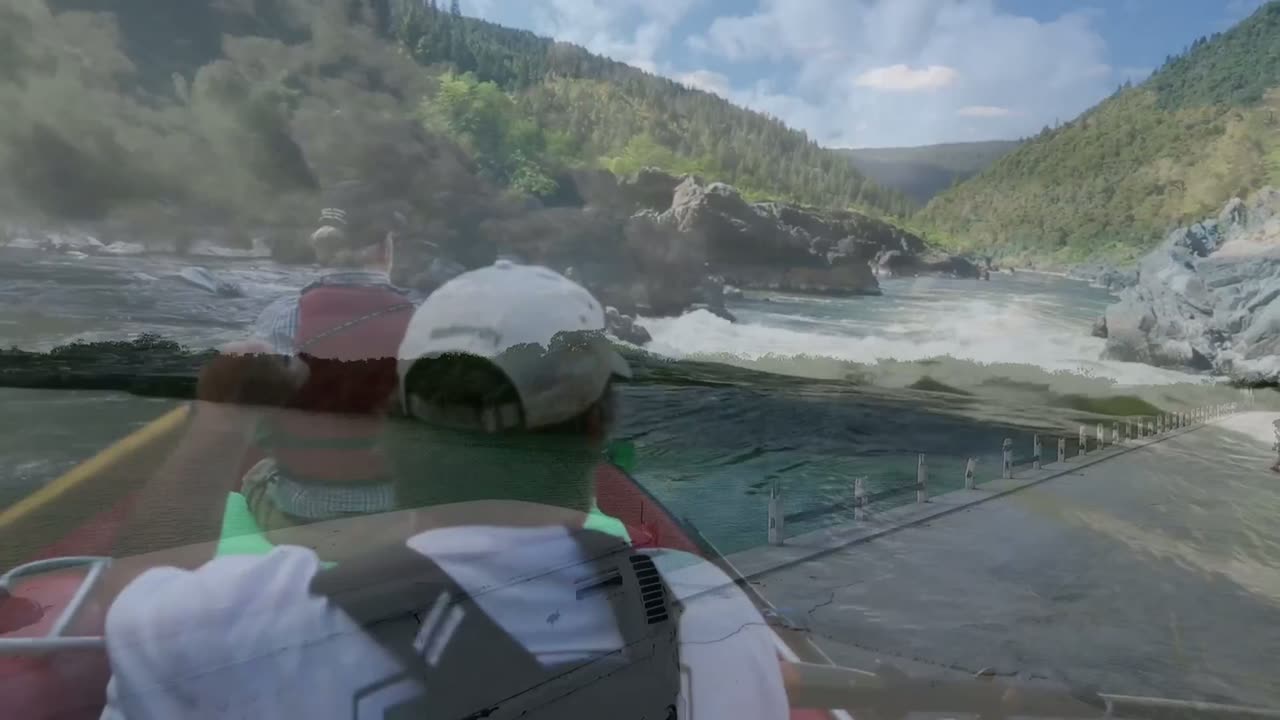
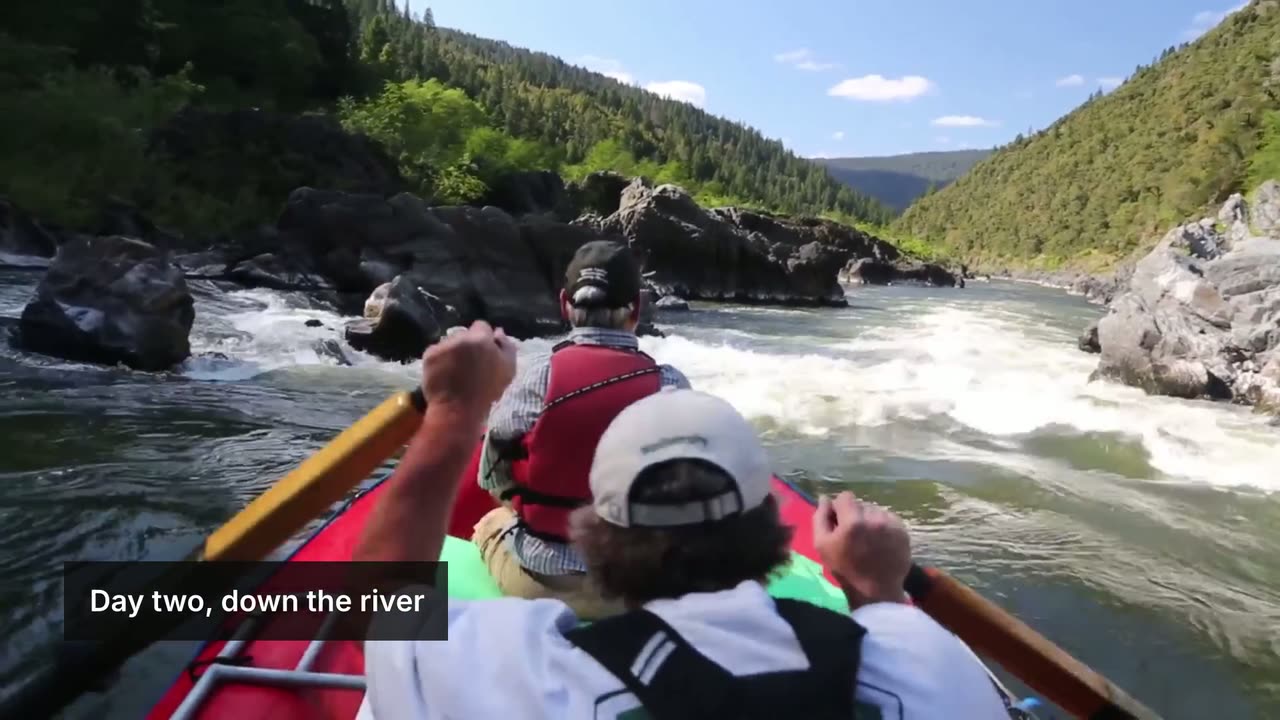
A JSON to video API takes a timeline, meaning tracks of clips, transitions between them and text over them, and returns a rendered file. The timeline below turns three stock clips, a title, a lower-third, an end card and a music bed into an 18.1 second 1080p MP4. It rendered in 14.6 seconds for $0.0141 on 2026-09-27, and this post shows the full JSON, frames from the output and the FFmpeg filter graph that produces the same edit by hand.
Corrected on 2026-10-18: compose now renders on a new engine and bills per second of the video it returns, $0.04 a minute on every plan, with a 15-second minimum per render. It used to bill render time. At today’s price this 18.1 second video costs $0.013. The render time and cost above are the original run.
The timeline that was rendered
This is the exact request body of job_0079c48d4c304499. Three clips sit on a picture track with a crossfade and a dip to black, and four more tracks carry the text and the music.
{ "schemaVersion": 1, "output": { "format": "mp4", "size": "1080p", "fps": 30 }, "timeline": { "tracks": [ { "name": "picture", "clips": [ { "asset": { "type": "video", "src": "https://cdn.rendobar.com/compose/showcase/media/road.mp4", "volume": 0 } }, { "type": "transition", "transition": "crossfade", "duration": 0.8 }, { "asset": { "type": "video", "src": "https://cdn.rendobar.com/compose/showcase/media/river.mp4", "volume": 0 } }, { "asset": { "type": "video", "src": "https://cdn.rendobar.com/compose/showcase/media/night.mp4", "volume": 0 }, "length": 4 }, { "type": "transition", "transition": "fade", "duration": 0.6 }, { "asset": { "type": "shape", "color": ["#064E3B", "#022C22"] }, "length": 3.5 } ] }, { "name": "title", "clips": [ { "start": 0.3, "length": 2.6, "asset": { "type": "text", "text": "TAKE THE LONG WAY", "style": { "font": "Bebas Neue", "size": 150, "color": "#FFFFFF", "align": "center", "shadow": { "opacity": 0.7, "offsetX": 3, "offsetY": 3 }, "animate": { "type": "slideUp", "duration": 0.7 } } }, "transform": { "position": { "x": "50%", "y": "45%" } } } ] }, { "name": "lower-third", "clips": [ { "start": 6.4, "length": 3.6, "asset": { "type": "shape", "color": "#0A0A0ACC" }, "transform": { "anchor": "topLeft", "position": { "x": "5%", "y": "78%" }, "size": { "width": "30%", "height": "11%" } } } ] }, { "name": "lower-third-text", "clips": [ { "start": 6.4, "length": 3.6, "asset": { "type": "text", "text": "Day two, down the river", "style": { "font": "Inter", "size": 44, "weight": 600, "color": "#FFFFFF", "align": "left", "animate": { "type": "slideLeft", "duration": 0.5 } } }, "transform": { "position": { "x": "7%", "y": "83.5%" } } } ] }, { "name": "end-card", "clips": [ { "start": 15, "asset": { "type": "text", "text": "Book your weekend", "style": { "font": "Bebas Neue", "size": 130, "color": "#FFFFFF", "align": "center", "animate": { "type": "fade", "duration": 0.6 } } }, "transform": { "position": { "x": "50%", "y": "50%" } } } ] }, { "name": "music", "clips": [ { "length": "end", "asset": { "type": "audio", "src": "https://api.rendobar.com/assets/asset_eb9db1fa80334c5f/content", "volume": 0.45, "fadeIn": 1, "fadeOut": 3 } } ] } ] }}The three clips are 6 second cuts of public domain and CC0 footage that Rendobar hosts for its effect reference, credited in the sources below. The music is a CC0 track I uploaded once as an asset, so its src is an asset URL that only resolves for my account. Point it at any audio URL of your own.
How a timeline is put together
Four ideas cover almost every timeline.
- Tracks stack. A later track draws over an earlier one, so the picture track is at the bottom and the text tracks sit on top of it.
- Clips hold one asset each: a video, image, audio file, text, shape or a nested composition. A clip with no
startfollows whatever is already on its track. A clip with nolengthruns as long as its content, and text and shapes have no length of their own, so they stay up until their container ends."length": "end"stretches a clip to the end of the video, which is what a music bed needs. - Transitions are items placed between two clips. The engine overlaps the neighbours by the transition’s duration, so nothing downstream needs recalculating.
- Keyframes animate any numeric field over time:
"scale": [{ "time": "0%", "value": 1 }, { "time": "100%", "value": 1.12 }]is a slow push-in, and a list of keyframes onvolumeducks music under speech. Theanimatepresets on the text clips above are shorthand for the common entrances.
Laid out on a time axis, the request above looks like this. I gave the text clips their start times. The engine placed everything on the picture and music tracks.
Nothing in the JSON says the river clip starts at 5.2 seconds or that the video ends at 18.1. Those fall out of the clip lengths and the transition durations. That is the whole difference between describing an edit and scripting one.
The same edit as an FFmpeg filter graph
FFmpeg can produce this video, and I checked by building it on FFmpeg 8.0 from the same three clips, the same music and the Bebas Neue and Inter font files. Its frames line up with the API render at the same timestamps, with the same cuts and the same text positions. This is the full -filter_complex script:
[0:v]scale=1920:1080,fps=30,format=yuv420p,settb=AVTB,setpts=PTS-STARTPTS[road];[1:v]scale=1920:1080,fps=30,format=yuv420p,settb=AVTB,setpts=PTS-STARTPTS[river];[2:v]trim=duration=4,scale=1920:1080,fps=30,format=yuv420p,settb=AVTB,setpts=PTS-STARTPTS[night];gradients=s=1920x1080:r=30:c0=0x064E3B:c1=0x022C22:x0=960:y0=0:x1=960:y1=1080:speed=0:d=3.5,format=yuv420p,settb=AVTB[card];[road][river]xfade=transition=fade:duration=0.8:offset=5.2[a];[a][night]concat=n=2:v=1:a=0[b];[b][card]xfade=transition=fadeblack:duration=0.6:offset=14.6[c];[c]drawtext=fontfile=BebasNeue-Regular.ttf:text='TAKE THE LONG WAY':fontsize=150:fontcolor=white:[email protected]:shadowx=3:shadowy=3:x=(w-tw)/2:y=486-th/2+60*(1-min(1\,(t-0.3)/0.7)):alpha='min(1,(t-0.3)/0.7)':enable='between(t,0.3,2.9)',drawbox=x=96:y=842:w=576:h=119:[email protected]:t=fill:enable='between(t,6.4,10)',drawtext=fontfile=Inter.ttf:text='Day two, down the river':fontsize=44:fontcolor=white:x=134+80*(1-min(1\,(t-6.4)/0.5)):y=902-th/2:alpha='min(1,(t-6.4)/0.5)':enable='between(t,6.4,10)',drawtext=fontfile=BebasNeue-Regular.ttf:text='Book your weekend':fontsize=130:fontcolor=white:x=(w-tw)/2:y=(h-th)/2:alpha='min(1,(t-15)/0.6)':enable='gte(t,15)'[v];[3:a]atrim=duration=18.1,afade=t=in:d=1,afade=t=out:st=15.1:d=3,volume=0.45[aud]It works, and it is where the cost of the DIY route shows.
- Every offset is arithmetic you own.
offset=5.2is the road clip’s 6 seconds minus the 0.8 second crossfade.offset=14.6is 5.2 plus 6 plus 4 minus 0.6. The music fade-out starts at 15.1 because the video ends at 18.1. Trim the road clip by a second and four numbers change. - Every input has to be normalised first.
xfadewants both inputs at the same frame size, frame rate, pixel format and timebase, which is why each branch repeats the samescale,fps,formatandsettbchain. - Animation is a per-frame expression. The title’s slide-up is
y=486-th/2+60*(1-min(1,(t-0.3)/0.7)), and 486 is 45 percent of 1080 worked out by hand. Change the output to 720p and every pixel coordinate is wrong. - Fonts are files on disk.
drawtextneeds a path to each font. It also cannot pick a weight from a variable font, so my local Inter rendered at its default 400 where the timeline asked for 600.
If you already maintain a graph like this and your edits never change shape, keep it. A pinned filter graph run through Rendobar’s FFmpeg API or your own workers is a fine way to stamp out one fixed layout. The moment the edit is data-driven, with clip counts, lengths or text that vary per video, the timeline stops being a convenience and starts saving the bug you would otherwise write in the offset maths.
Validate first, then draft, then render
Rendering is the only step that costs anything, so the workflow puts two cheap steps in front of it.
validate_compose runs the same checks a submit runs, plus the timeline checks a render would otherwise fail on, such as a transition that does not sit between two clips. It returns the timeline with every default filled in and renders nothing. This timeline passed with no warnings on the first check.
A draft render is the second step. Setting "output": { "quality": "draft", "resolution": { "width": 640, "height": 360 }, "fps": 30 } and leaving the timeline alone produced job_43b4e6ee57ec467f, which took 7.5 seconds and cost $0.0069 on 2026-09-27. It is good for checking timing and cuts. It is misleading for text, because text sizes are pixels at the output resolution, so a 150 px title fills far more of a 360-line frame than of a 1080-line one.
Corrected on 2026-10-18: a draft no longer costs less than the final render. Compose now bills by the length of the video at one rate whatever the frame size, so this draft and the final 1080p render both cost $0.013. The draft was cheaper when the price followed render time.
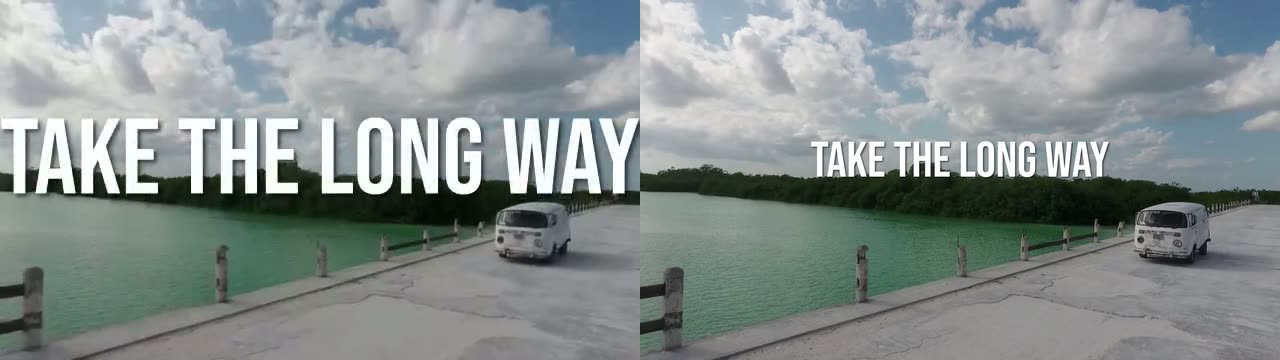
Judge layout and type on the final resolution. Use the draft for pacing only.
Render it with the API
Save the JSON above as timeline.json and submit it as the params of a compose job:
import { readFile } from "node:fs/promises";import { createClient } from "@rendobar/sdk";
const rb = createClient({ apiKey: process.env.RENDOBAR_API_KEY });
// The timeline from this post. Replace the music src with your own audio URL.const params = JSON.parse(await readFile("timeline.json", "utf8"));
const job = await rb.jobs.run({ type: "compose", inputs: {}, params });
console.log(job.output.file.url);
Install with npm i @rendobar/sdk. jobs.run() submits and waits, so it returns the finished job in one call.
curl -X POST https://api.rendobar.com/jobs \-H "Authorization: Bearer $RENDOBAR_API_KEY" \-H "Content-Type: application/json" \-d "{\"type\": \"compose\", \"inputs\": {}, \"params\": $(cat timeline.json)}"Returns immediately with a job id. Poll GET /jobs/{id} or register a webhook rather than blocking on the request.
The final render wrote a 10.2 MB H.264 file with AAC audio. Cost follows the length of the video, so a longer video costs proportionally more, whatever its frame size. The same timeline bills the same amount on every run, while the render time moves a little between runs. (Corrected on 2026-10-18: this paragraph said cost follows render time, which was how compose billed when the post was written.)
Template-editor APIs
Shotstack and Creatomate are the two JSON video APIs most people compare, and both are built around templates.
Shotstack renders a JSON timeline too, and adds a white-label editor SDK you can embed in your own product. Its pricing on 2026-09-27 was $0.20 per minute of rendered output on a $39 monthly subscription, or $0.30 per minute pay-as-you-go after a $75 one-time base. At the subscription rate this 18 second clip would come to $0.06, before the monthly fee. Rendobar’s compose bills the same clip $0.013 with no monthly fee. Rendobar vs Shotstack has the full comparison.
Corrected on 2026-10-20: Shotstack’s pricing page now lists pay as you go at $10 for 50 minutes, 20 cents a minute with no base fee, and Starter at $39 a month for 250 minutes, 15.6 cents a minute. Shotstack counts each render by the second, rounded down, so this clip comes to $0.06 on pay as you go and about $0.05 on Starter. The figures in the paragraph above were read on 2026-09-27. The plan-by-plan prices and a migration guide are in Shotstack alternative, the cheapest JSON video API.
Creatomate centres on a visual template editor, where a designer builds the video and the API fills in text, images and clips through modifications. It bills in credits of roughly 100 million rendered pixels each, with the Essential plan at $54 a month for 2,000 credits that reset monthly (checked 2026-09-27). By that measure this clip is about 11 credits, around $0.30 of an Essential plan, but Creatomate’s own calculator decides the real number. The details are in Rendobar vs Creatomate.
Corrected on 2026-10-20: Creatomate rounds credits up per render, so at 1080p and 30 fps this 18.1 second clip is 12 credits, about $0.32 of an Essential plan, not 11. Creatomate’s credits converted to minutes shows the per-minute cost on each plan.
If a designer or marketer owns the look and your code only swaps the words and pictures, Creatomate’s editor or Shotstack’s embeddable one is the better fit, and I would pick one of them. Neither takes an FFmpeg command, so anything the template cannot express needs a second service.
JSON2Video is the third name that comes up. It describes a video as scenes played one after another, a shape compose also accepts, and it adds text-to-speech voices inside the movie. Moving from JSON2Video’s scenes to compose maps one format onto the other, and JSON video API pricing at three monthly volumes puts all of these on one table.
Rendobar is the one I recommend when developers or agents write the edit. The compose timeline and the raw ffmpeg job run on the same API key and the same credits, so a timeline render and a one-off filter graph never need two vendors. A timeline bills per second of the video it returns, an ffmpeg job per second of compute, neither has a base fee on pay-as-you-go, and credits never expire. (Corrected on 2026-10-18: this said timelines billed per second of render time.) The hosted MCP server exposes validate_compose and submit_job, so an agent in Claude or ChatGPT can write a timeline, check it for free and render it, which is how this post’s jobs were run.
Fonts are where timelines most often go quietly wrong, and custom fonts in a video API fail silently covers the fallback stack that prevents it. If you are choosing a provider more broadly, the best FFmpeg API compares the command-first services.
I would write new video features as timelines from the start. Keep a hand-built filter graph for the one fixed layout it already serves, and move anything that varies per video into JSON, where changing a clip is one edit and not a recalculation.
Frequently asked questions
Can a JSON video timeline render a vertical 9:16 video?
Yes. In Rendobar's compose job, set output.size to tiktok, reels or shorts for 1080x1920, or square and instagram-feed for the other social shapes. Keep text inside the vertical safe area, roughly 8 to 92 percent across and 13.5 to 83 percent down, so platform buttons do not cover it.
What formats can a JSON timeline render besides MP4?
The compose job also writes WebM, GIF, MP3, JPG and PNG. WebM and PNG can carry a transparent background, which turns a timeline into an overlay you place on other footage later.
Can I use my own font in a JSON video timeline?
Yes. Any Google Fonts family renders by name, and your own font file goes in the job's fonts input under a name you choose. Write the font as a CSS stack that ends in a generic family, because a missing face is substituted without an error.
Sources
- FFmpeg filters documentation: xfade, concat, drawtext, drawbox, gradients
- Shotstack pricing
- Creatomate pricing
- Creatomate JSON documentation
- How Creatomate credits are calculated
- Volkswagen T2 (Coverr, CC0), Wikimedia Commons
- Rogue River rafting (Bureau of Land Management, public domain), Wikimedia Commons
- Ban Jelačić square, Zagreb (Quahadi, CC0), Wikimedia Commons
- Sweet Sun by Loyalty Freak Music (CC0), Wikimedia Commons