
AI Agent video tools in n8n that read FFmpeg errors
Build an n8n AI Agent that runs FFmpeg jobs as tools, checks its balance before it spends, and reads the real FFmpeg error when a job fails.
 Abdelrahman Essawy 5 MIN READ
Attach the Rendobar node to an n8n AI Agent’s tool port and the agent can run FFmpeg commands, compress video and read the results, with no HTTP request to build by hand. What decides whether the agent is useful is which operations you hand it: one that spends, one that reads the balance, and one that reads why a job failed. This post covers that wiring and shows the exact error record an agent receives from a real failed FFmpeg job.
The node itself installs from n8n’s nodes panel, on Cloud as well as self-hosted. Running FFmpeg on n8n Cloud covers the install, the templates and the three ways a workflow can wait.
The tools to attach
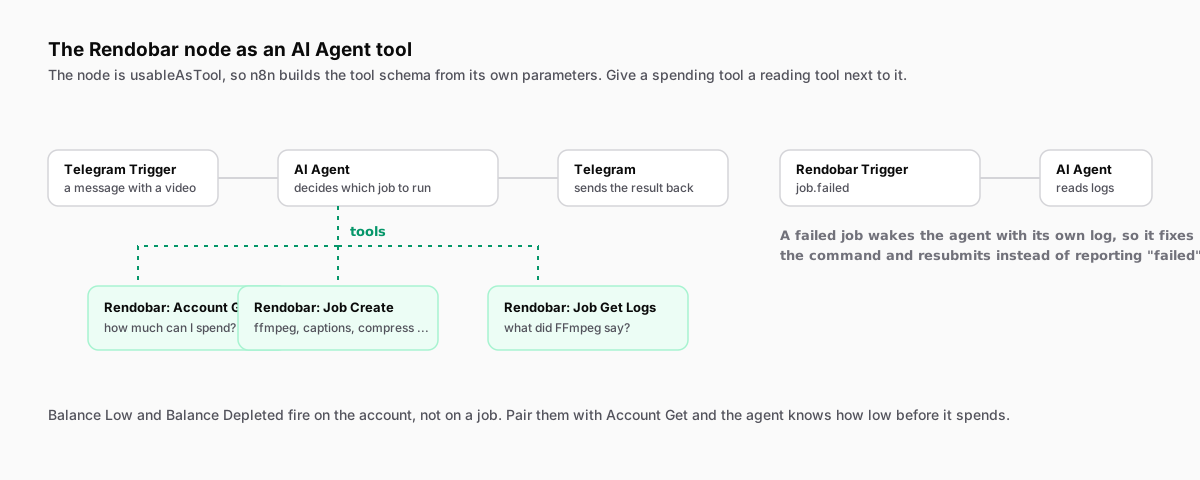
The node is marked usable as a tool, so n8n builds each tool’s schema from the node’s own parameters. Add a Rendobar node to the tool port once per operation you want the agent to have. These four cover a working agent:
| Tool (node operation) | What the agent uses it for |
|---|---|
| Job, Create | Submit a job. Let the model fill Job Type and Parameters. |
| Job, Get | Read a job’s status, result or error by ID. |
| Job, Get Logs | Read the runner’s step by step record of a job. |
| Account, Get | Read the balance and plan limits before submitting. |
A Rendobar API credential with a key from the dashboard goes on each node. Leave Output on Simplified, the default. It keeps the ID, status, cost and either the result or the error, which is what a model needs to decide its next step.
Read the balance before spending
If you give an agent a tool that spends, give it a tool that reads the account. Otherwise the only signal it gets is a failed job, and that arrives after the attempt.
Account Get returns balance.amount in dollars, the plan, and the limits a submission is checked against: maxInputFileSize in bytes, maxJobTimeout in seconds and concurrentJobs. An agent that reads those first can refuse a file that is too large or a job that will outrun the plan, and say so in plain words. One line in the system prompt does it: check the account before any job, and stop if the balance is below a figure you choose.
The trigger has the matching events, balance.low and balance.depleted. Neither says how low, so a workflow woken by one calls Account Get to find out.
What the agent sees when a job fails
Here is the error record from a real ffmpeg job I submitted with the misspelled filter -vf notafilter=1, read back with Job Get on 2026-09-27. This is what Job Get returns in error for that job, with the input banner and the output path cut from detail:
{ "code": "INVALID_OPTION", "message": "FFmpeg execution failed after 0s: Invalid argument. Check your FFmpeg flags and values.", "detail": "[AVFilterGraph @ 0x5c6c781cfb00] No option name near '1'\n[AVFilterGraph @ 0x5c6c781cfb00] Error parsing a filter description around:\n[AVFilterGraph @ 0x5c6c781cfb00] Error parsing filterchain 'notafilter=1' around:\nError opening output files: Invalid argument", "retryable": false, "failedPhase": "processing"}The message would fit a hundred different mistakes. The detail is the tail of FFmpeg’s stderr, and it names the filterchain that would not parse. FFmpeg does not say the filter is unknown. It says it could not read an option near 1, so the model still has to work out that the filter name is the problem. retryable: false tells it that resubmitting the same command will fail the same way.
Two details decide whether the agent ever sees that text:
- If the Create tool has Wait for Completion on and the job fails, the node stops with the short message as its error and puts the stderr in the error’s description. What reaches the model then depends on how n8n relays a tool error. A Job Get call returns the whole
errorobject as data, which is the reliable route. - Get Logs answers a different question, where the job stopped. Entries carry a
stepsuch asdownloadorexecute-ffmpeg, a level and a message. A job that failed indownloadneeds a different input URL, not a different command, and that is the distinction a model gets wrong when it only has the message.
I have not published a transcript of an agent repairing and resubmitting a command, so treat the loop as a design, not a measured result. What the record above shows is that the evidence the model needs is in the response. My view is that diagnosis is safe to automate and resubmission is not. Each tool call is submitted under its own idempotency key, so a corrected command is a new billed job. Let the agent explain the failure and propose the fix, and let a person or a spending cap decide whether it runs.
Long jobs go to a second workflow
A Wait node cannot sit inside a tool call, so the callback pattern that parks a normal workflow is not available to an agent. That leaves two shapes.
For a clip, Wait for Completion on the Create tool is fine. It polls until the job ends or Max Wait runs out, 300 seconds by default. For anything longer, leave it off. Create returns the job ID straight away, the agent tells the user the job is running, and a second workflow starting on the Rendobar Trigger picks it up when job.completed or job.failed fires.
Have the second workflow match the job ID against one the first workflow stored, because the trigger listens to the whole account.
When an agent is the wrong tool
If the operation never changes, a fixed workflow is cheaper and easier to test than an agent choosing parameters on every run. If the agent only resizes or crops images, n8n’s built-in Edit Image node does that in process, with no API call and no job to pay for. The Rendobar tools earn their place when the agent has to pick the operation itself or needs FFmpeg’s full filter set, and when a failure has to come back as something a model can read.
Frequently asked questions
Does the n8n agent see new Rendobar job types without a node update?
Yes. The node reads the job type list and each type's parameters from the API on your account when the agent looks, so a job type added after the node was published is available to the agent with no upgrade.
Why does the Rendobar tool return only a few fields to my agent?
The Output parameter defaults to Simplified, which returns ID, type, status, cost, timestamps and either the result or the error. A raw job carries around thirty-three fields, most of them irrelevant to a decision and all of them spending the agent's context. Switch to Raw or Selected Fields when the agent needs more.