
NVENC vs libx264, cheaper per job, bigger files
Compare NVENC on an NVIDIA L4 against libx264 on one clip. h264_nvenc cost 1.3x to 2.2x less per job and wrote 2.2x the bytes, and speed was inside the noise.
 Abdelrahman Essawy 4 MIN READ
The usual pitch for hardware encoding is speed. On a 5-second clip I could not measure a speed difference at all, and what moved was the bill. On an NVIDIA L4, h264_nvenc cost 1.3x to 2.2x less per job than libx264 medium and wrote 2.2x the bytes, so the trade is cheaper jobs for bigger files. The shared clip and setup are on how we benchmark.
These are the commands exactly as they ran:
ffmpeg -i sample.mp4 -c:v libx264 -preset medium -crf 23 -an -t 5 out.mp4ffmpeg -i sample.mp4 -c:v libx264 -preset veryfast -crf 23 -an -t 5 out.mp4ffmpeg -i sample.mp4 -c:v h264_nvenc -preset p4 -cq 23 -an -t 5 out.mp4ffmpeg -i sample.mp4 -c:v h264_nvenc -preset p7 -cq 23 -an -t 5 out.mp4ffmpeg -i sample.mp4 -c:v hevc_nvenc -preset p4 -cq 28 -an -t 5 out.mp4None of the NVENC commands set -b:v 0 or -rc. The usual advice pairs -cq with -b:v 0 so the quality target drives the encode on its own, and I have not rerun them that way. Read the NVENC rows as -cq plus FFmpeg’s defaults for everything else.
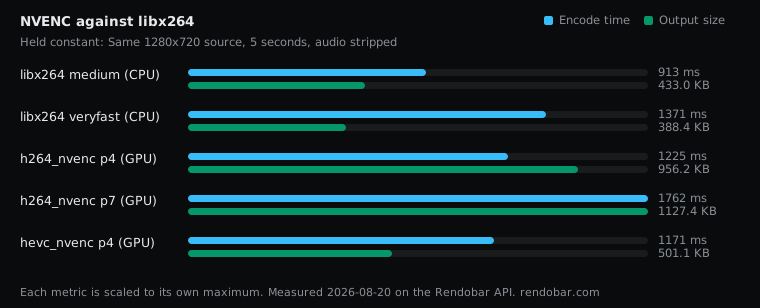
| Variant | Encode | Size | Cost |
|---|---|---|---|
| libx264 medium (CPU) | 913 ms fastest | 433.0 KB | $0.0030 |
| libx264 veryfast (CPU) | 1371 ms | 388.4 KB | $0.0031 |
| h264_nvenc p4 (GPU) | 1225 ms | 956.2 KB | $0.0018 |
| h264_nvenc p7 (GPU) | 1762 ms | 1127.4 KB | $0.0011 |
| hevc_nvenc p4 (GPU) | 1171 ms | 501.1 KB | $0.0008 |
The GPU jobs cost less, because of how they are priced
Like for like, H.264 against H.264, h264_nvenc p4 cost $0.0018. The identical libx264 medium command cost between $0.0023 and $0.0039 across ten runs, so the GPU job was 1.3x to 2.2x cheaper. hevc_nvenc was the cheapest job measured at $0.0008, 2.9x to 4.9x below the same CPU range, but it is a different codec at a different quality setting.
The reason is not that NVENC finished sooner. Its encode times (1,171 to 1,762 ms) are the same as or longer than libx264’s. The cost gap is a pricing fact: on Rendobar, GPU jobs are billed at a different per-second rate from CPU jobs, and on this clip that rate made the GPU job cheaper. Treat the multiple as Rendobar pricing, not as a property of the hardware. Another provider with a different GPU price could reverse it.
The GPU numbers are single samples, and they are noisy too. p7 took longer to encode than p4 and cost less, largely because the p4 job spent 2.6 seconds uploading its bigger file and billing covers the upload. Two identical h264_nvenc jobs on a different, much smaller input cost $0.0018 and $0.0034. So the range above is the most I would quote. A single multiple would claim more precision than one GPU run per variant supports.
The libx264 veryfast row is the cheap-CPU comparison. It wrote a smaller file than medium at the same CRF and did not cost less on this run, which is inside the CPU noise band.
On speed, I cannot tell you
An earlier version of this post opened with “The usual pitch for hardware encoding is that it is faster. On a short clip it was not”, citing 1,225 ms for NVENC against libx264’s 913 ms. That claim does not survive its own data and is retracted.
The same libx264 command, run ten times, took between 898 ms and 1,912 ms while writing a byte-identical file every time. NVENC’s 1,225 ms sits inside that band, so this sweep cannot separate the two on speed. FFmpeg benchmark variance shows the ten runs and where the spread comes from.
Hardware encoding is designed to win on throughput: many streams at once, or long inputs where the encode block runs flat out. A five-second clip is the wrong test for that, and this sweep does not attempt it.
The GPU file is bigger, and part of that is the setting
h264_nvenc p4 wrote 979,195 bytes where libx264 medium wrote 443,351, 2.2x the size.
That ratio mixes two things. -cq 23 on NVENC and -crf 23 on x264 are each encoder’s own scale, not the same quality, and without VMAF on both outputs I cannot say how much of the 2.2x is NVENC’s rate control and how much is -cq 23 asking for a higher quality than -crf 23 does. The missing -b:v 0 adds a third unknown. hevc_nvenc at -cq 28 came out 16% larger than libx264, and it is a different codec, so it does not settle the question either.
What the table does settle is the bill for bytes. At these settings you pay less per job and ship more than twice the file.
The slower NVENC preset wrote a bigger file
p7, NVENC’s slowest preset, wrote 1,154,485 bytes against p4’s 979,195 at the same -cq. -cq targets quality, not size, so a preset that finds more detail can spend more bytes on it. The same pattern shows up on the CPU in FFmpeg x264 presets. If you pick an NVENC preset by output size, measure it.
Which I would use
Running this through the FFmpeg API made the comparison possible at all: the CPU and GPU encodes were the same call with a different -c:v, and every job came back with its own billed cost.
If a file is encoded once and served many times, I would keep libx264. More than twice the bytes costs more in delivery than NVENC saves on the job. For a large library that is transcoded and rarely watched, the cheaper GPU job is the number that matters, and hevc_nvenc is the one I would test first. Either way, rerun it with -b:v 0 and score both outputs with VMAF before deciding, as the video codec comparison does for software encoders.
Frequently asked questions
Should I set -b:v 0 with NVENC -cq in FFmpeg?
The common advice is yes, so -cq drives the encode without a default bitrate target in the mix. The runs in this post did not set it, so their sizes reflect -cq with FFmpeg's defaults for everything else.
Is hevc_nvenc a better choice than h264_nvenc?
On this clip hevc_nvenc wrote about half the bytes of h264_nvenc and was the cheapest job measured. It needs HEVC playback support, and it was run at -cq 28, so it is not a like-for-like quality comparison either.