
Process video in S3 with FFmpeg, past Lambda's limit
Process video in S3 with FFmpeg by reading a presigned URL and piping the result back, then see what changes when an encode outlives Lambda's 900 seconds.
 Abdelrahman Essawy 6 MIN READ
FFmpeg can’t open an s3:// path, but it reads HTTPS, so the direct way to process a video in S3 is to presign the object, pass that link to -i, and pipe the result back with aws s3 cp -. Nothing touches local disk. The catch is where the command runs: on Lambda it has 900 seconds, and a long upload blows through that.
Read and write S3 with FFmpeg directly
A presigned URL is an ordinary HTTPS link with the credentials in its query string, so FFmpeg treats it like any other remote input. On the way out, a fragmented MP4 streams through a pipe into the AWS CLI, which uploads it in parts as it arrives:
# A GET link to one object, valid for an hourIN=$(aws s3 presign s3://my-bucket/raw/interview.mov --expires-in 3600)
ffmpeg -i "$IN" -c:v libx264 -preset veryfast -crf 23 -c:a aac \  -movflags frag_keyframe+empty_moov -f mp4 pipe:1 \  | aws s3 cp - s3://my-bucket/exports/interview.mp4 --content-type video/mp4
FFmpeg fetches the input with HTTP range requests, so a MOV whose index sits at the end of the file still opens without a full download first. The output flags are there because a regular MP4 can’t be written to a pipe at all. Saving FFmpeg output to S3 shows the error you get without them and what each way of writing into a bucket costs.
Three things limit this route. The machine running it needs credentials that can presign the input and write the output. The link dies with the credentials that signed it, so a link signed by an assumed role can stop working well before its own expiry, which presigned URLs that expire early measures. And the command runs for as long as the encode takes, on whatever machine you put it on.
The limits a Lambda function runs into
Put that command in a Lambda function triggered by an S3 event and it works for short clips. These are the quotas a video pipeline meets first, from AWS’s own quota page:
| Limit | Value | What it means for video |
|---|---|---|
| Function timeout | 900 seconds | The encode, the download and the upload all fit inside 15 minutes |
/tmp storage | 512 MB to 10,240 MB | A write-then-upload pipeline needs room for input and output at once |
| Memory | 128 MB to 10,240 MB | CPU is allocated in proportion, one vCPU at 1,769 MB |
| Synchronous payload | 6 MB | The video can’t travel in the request or the response |
| Network bandwidth | 625 Mbps per execution environment | Pulling a large object eats into the 900 seconds |
The timeout is the one that ends the conversation. AWS’s own answer to a question about processing a 40 GB video with Lambda was to use a different service. The AWS media blog’s well-known pattern streams the object through FFmpeg much like the command above, which avoids /tmp and does nothing for the clock.
A run past 900 seconds
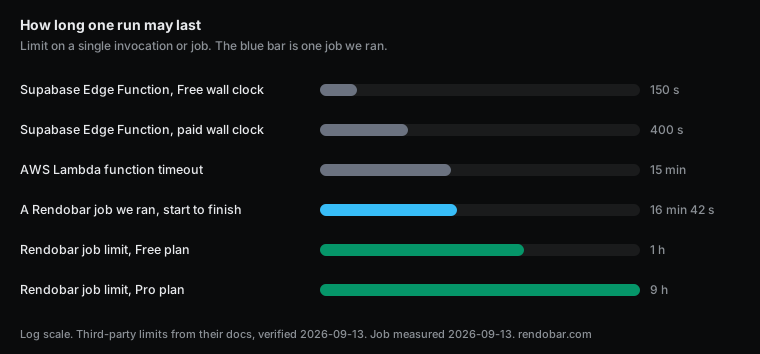
To see a job cross the line Lambda stops at, I submitted one FFmpeg job, built to last 1,000 seconds, to Rendobar’s FFmpeg API:
ffmpeg -re -stream_loop -1 -i https://cdn.rendobar.com/assets/examples/sample.mp4 \ -t 1000 -c:v libx264 -preset veryfast -crf 28 -c:a aac -b:a 96k out.mp4-stream_loop -1 repeats a short clip and -re holds FFmpeg to real time, so the run lasts 1,000 seconds however fast the machine is. That makes it a test of how long a job may run and nothing else. The encoder spent most of those seconds idle, waiting for the next frame to come due, so the run says nothing about encode speed. How long video transcoding takes has real encode times.
| Step | Time |
|---|---|
| Waiting to start | 0.8 s |
| Download input | 40 ms |
| FFmpeg | 1,000,274 ms |
| Upload the 57.3 MB output | 2,175 ms |
| Start to finish | 1,002 s |
It completed. The job ran 102 seconds past the point where a Lambda function would have been stopped, and the output landed. The ceiling that applies instead is the plan’s job limit, 1 hour on Free and 9 hours on Pro.
The run billed $1.02, and Lambda would have billed less for the same time if it could have finished. At the x86 list price per GB-second, a function at its 10,240 MB maximum costs about 17 cents for 1,000 seconds. The paced run also billed wall time while the encoder mostly waited, so a real encode producing the same output would finish sooner and cost less than this run did. For work that fits inside 900 seconds, Lambda is the cheaper host.
Reading the object from S3 in a job
That run read a public URL. Reading from your bucket is the same job with a different input. Connect the bucket once, then pass the object as storage://<connection>/<key> and name where the result goes:
The encode from the top of this post, reading from a connected bucket and delivering back into it. media is the connection's ID.
import { createClient } from "@rendobar/sdk";
const rb = createClient({ apiKey: process.env.RENDOBAR_API_KEY });
const job = await rb.jobs.create({  type: "ffmpeg",  inputs: { source: "storage://media/raw/interview.mov" },  params: {    command: "ffmpeg -i source -c:v libx264 -preset veryfast -crf 23 -c:a aac -movflags +faststart out.mp4",  },  destinations: ["storage://media/exports"],});
console.log(job.id);
Install with npm i @rendobar/sdk. jobs.run() submits and waits, so it returns the finished job in one call.
curl -X POST https://api.rendobar.com/jobs \ -H "Authorization: Bearer $RENDOBAR_API_KEY" \ -H "Content-Type: application/json" \ -d '{ "type": "ffmpeg", "inputs": { "source": "storage://media/raw/interview.mov" }, "params": { "command": "ffmpeg -i source -c:v libx264 -preset veryfast -crf 23 -c:a aac -movflags +faststart out.mp4" }, "destinations": ["storage://media/exports"] }'Returns immediately with a job id. Poll GET /jobs/{id} or register a webhook rather than blocking on the request.
The output flags change because the job writes a real file before delivering it, so +faststart works again and no pipe is involved. The reference is checked against your account when you submit, so a typo or a connection you don’t own fails immediately instead of after the job has waited its turn. When the job starts, it gets a signed link to that one object, sized to outlive the longest job any plan allows. No key leaves your side, and the link can’t be pointed at anything else in the bucket.
The destinations line delivers the encode to exports/ under the connection’s file name pattern, and the finished file stays downloadable from the job if a delivery fails. If the bucket holds footage you never want written to, connect it as read only. A read only connection is admitted as a job source and refused as a destination, so no job can deliver into it by mistake. The Amazon S3 storage guide covers connecting a bucket through a role that needs no access key.
When Lambda is still the right call
Plenty of video work fits comfortably inside 900 seconds. Probing a file, grabbing a thumbnail or trimming a short clip finishes in seconds, and if your pipeline already lives in AWS there is no reason to move those. Generating a thumbnail when a file lands in S3 is one of them.
The problem is the long tail. User uploads don’t come in a predictable size, and a pipeline that handles 99 files and times out on the hundredth fails the person who uploaded the longest video. I would keep the short work on Lambda, where it is cheapest, and send only the uploads that can run long to something whose limit is measured in hours.
Frequently asked questions
Can AWS Lambda process a video that takes longer than 15 minutes?
Not in a standard invocation. The function timeout tops out at 900 seconds. AWS documents a 90-minute limit only for Lambda Managed Instances invoked asynchronously or through an event source mapping. Container services such as ECS and AWS Batch have no 900-second limit, in exchange for running and scaling them yourself.
Can FFmpeg open an s3:// path?
No. FFmpeg has no s3 protocol, so an s3:// input fails before it reads anything. Turn the object into an HTTPS link with aws s3 presign, or with getSignedUrl in the AWS SDK, and pass that link to -i.
Does FFmpeg download the whole S3 object before it starts encoding?
No. It reads the presigned URL over HTTP and uses range requests to jump around the file, so a MOV or MP4 with its index at the end still opens without a full download first.