
Give a service S3 access without an access key
Send job outputs to your S3 bucket through an IAM role a service assumes, with no access key to leak and access revoked by deleting one stack.
 Abdelrahman Essawy 7 MIN READ
To let a service write into your S3 bucket without handing it an access key, create an IAM role in your account that trusts only that service’s identity and allows only the actions it needs. The service trades its own signed token for credentials that expire within 12 hours, no key of yours ever leaves the account, and deleting the role, or the stack that made it, revokes access. The rest of this post takes that role apart line by line, using the one Rendobar’s Amazon S3 connection creates.
What is wrong with handing over an access key
An access key belongs to an IAM user and stays valid until someone deactivates or rotates it. The IAM security best practices open with “require workloads to use temporary credentials with IAM roles to access AWS”, and treat access keys as the exception for “use cases that require long-term credentials”.
A vendor integration is the case that doesn’t need one. The practical problem is not that the vendor is careless. It is that a key has no natural end. Once pasted, it keeps working after the integration is abandoned, after the person who created it leaves, and after a breach on the other side that you may never hear about.
Three ways to grant a service access
| IAM user access key | Role with an external ID | Role trusting an identity token | |
|---|---|---|---|
| What the service holds | Your key ID and secret | Its own AWS credentials | A key that signs its own tokens |
| Credential lifetime | Until rotated | 15 minutes to 12 hours per session | 15 minutes to 12 hours per session |
| What stops another customer using it | The key is yours alone | The external ID in your trust policy | The subject condition in your trust policy |
| What you create | A user, a policy, a key | A role trusting the vendor’s account | An identity provider and a role |
| How you revoke | Deactivate the key | Delete the role | Delete the role |
The middle column is the long-standing pattern. The role trusts the vendor’s AWS account, and a value the vendor generates for each customer, the external ID, closes what AWS calls the confused deputy problem. Without it, another customer who learns your role’s ARN could ask the vendor to act on your bucket.
The right column is the newer one, and it is the one Rendobar uses. The role trusts a token issuer instead of an AWS account, so there is no account relationship to manage and no shared identifier to leak. A role is an AWS concept, so Cloudflare R2, Supabase Storage and other S3-compatible services connect with a scoped token, a sign-in or a key pair instead.
The trust policy, line by line
This is the shape of the trust policy the stack creates, with the issuer and subject replaced by placeholders:
{ "Version": "2012-10-17", "Statement": [ { "Effect": "Allow", "Principal": { "Federated": "arn:aws:iam::111122223333:oidc-provider/issuer.example.com/federation" }, "Action": "sts:AssumeRoleWithWebIdentity", "Condition": { "StringEquals": { "issuer.example.com/federation:aud": "rendobar-storage", "issuer.example.com/federation:sub": "YOUR_CONNECTION_SUBJECT" }, "Bool": { "sts:RoleAuthorizedByIdp": "true" } } } ]}- The principal is an OIDC identity provider registered in your account. AWS fetches the issuer’s public keys to check each token’s signature.
- The audience has to match the value the issuer puts in tokens meant for this purpose, so a token minted for something else can’t be replayed here.
- The subject is the line that matters most. Every customer’s role trusts the same issuer, so the subject is what ties this role to your one connection and nobody else’s.
sts:RoleAuthorizedByIdpadds a second lock. AWS describes it as verifying “that the identity provider (IdP) explicitly authorized the requested role through thehttps://aws.amazon.com/rolesclaim in the OIDC token”. The token has to name your role, not just carry the right subject.
The permission policy: one bucket for objects, no delete
Trust decides who may assume the role. The permission policy decides what that session can do. This is the policy the stack creates for a bucket you deliver to:
{ "Version": "2012-10-17", "Statement": [ { "Effect": "Allow", "Action": ["s3:GetObject"], "Resource": "arn:aws:s3:::my-bucket/*" }, { "Effect": "Allow", "Action": ["s3:ListBucket"], "Resource": "arn:aws:s3:::my-bucket" }, { "Effect": "Allow", "Action": ["s3:ListAllMyBuckets", "s3:GetBucketLocation"], "Resource": "*" }, { "Effect": "Allow", "Action": ["s3:PutObject", "s3:AbortMultipartUpload"], "Resource": "arn:aws:s3:::my-bucket/*" } ]}Reading, listing and writing objects stays inside one bucket. AbortMultipartUpload lets the service clean up its own half-finished large uploads. What’s missing is the point. There is no s3:DeleteObject, so no session issued from this role can remove a file. A read only connection drops the last statement entirely, and the service can then read and list but never write.
Anything allowed s3:PutObject can still write a new object over an existing key. Rendobar’s connections keep both files on a name clash by default, and a connection set to replace is doing what it says.
The third statement is the one to read twice. s3:ListAllMyBuckets on * returns the name and creation date of every bucket in your account, and s3:GetBucketLocation says which region a bucket lives in. Neither reads a byte inside any bucket, but the service does learn every bucket name you have, so the policy is not limited to one bucket in every respect. Rendobar uses the listing for one thing: offering your other buckets by name when you connect the next one. Delete that statement and the only thing that breaks is that list, which falls back to typing the name. If you build this pattern yourself, leave it out unless you need a bucket picker.
A session can be narrowed further than its role at the moment it is issued, and never widened. Each delivery asks for credentials limited to the one object it is about to write, so even a session that leaked mid-delivery could touch only that key.
One click instead of a runbook
Writing that role by hand is a runbook: register the identity provider, paste two policies, set the maximum session duration, copy the role ARN back. A CloudFormation quick-create link turns it into a review screen. In AWS’s words, it lets you “prepopulate a single Create stack page” with the template URL, stack name and parameters. Rendobar’s connect dialog builds that link for one bucket, and the console opens on a stack whose description says what it creates:
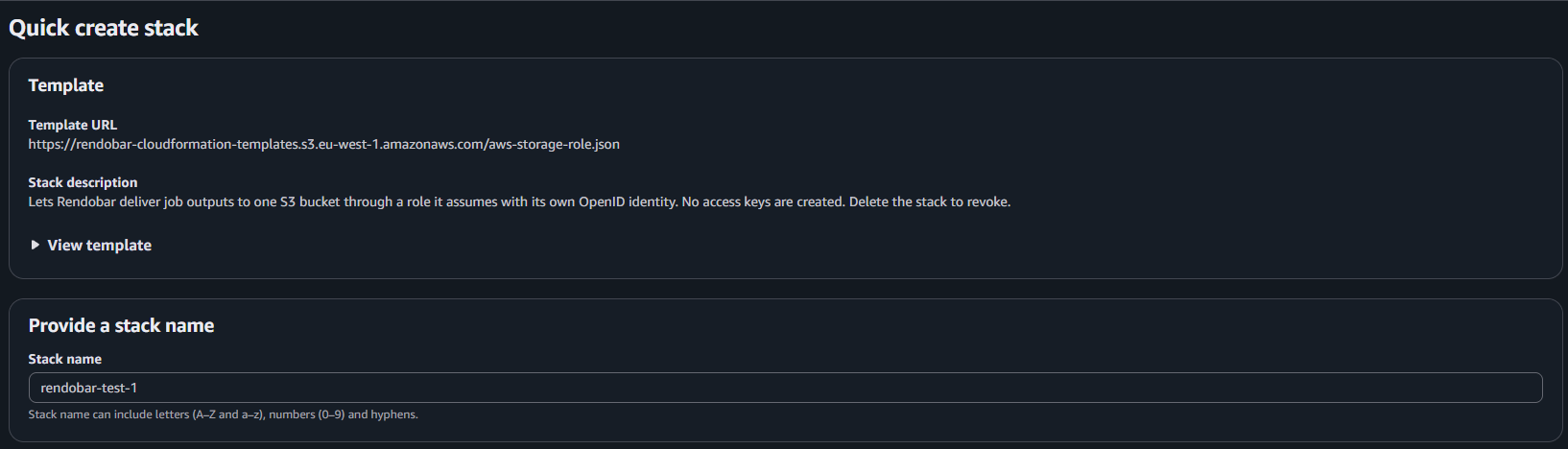
You can expand the template and read every line before anything exists. The dialog then waits for the stack to report back, and the Amazon S3 storage guide walks through each screen.
Measured: connect, deliver, read back, revoke
To check the whole cycle without a person clicking through the console, I wrote a script that created the same stack with the CLI from the same template and parameters the link carries, then used the connection and deleted it. It ran once, against our staging environment and a real AWS account in eu-west-1, with one small file.
| Step | Result |
|---|---|
| Prepare the connection | 2.1 s |
| Stack started to connection saved | 32 s |
| Access checks | write passed, read passed, list passed, delete skipped |
| Deliver a 343.9 KB job output | seen in the bucket 12 s after the job completed |
| Read that file back as a job input | job completed |
| Stack deleted to connection removed | 7 s |
The connection finished before CloudFormation had marked the stack complete. The stack reports to Rendobar from inside itself once the role exists, and the remaining bookkeeping on the AWS side doesn’t hold anything up. The delivery figure was observed by polling every 2 seconds, so read it as a ceiling on one small file, not a delivery speed. None of these timings benchmark CloudFormation. They show the sequence works end to end.
Deleting the role stops new sessions. A session already issued keeps working until it expires, which is why the lifetime matters, and AWS’s Revoke active sessions action attaches a deny policy that cuts off sessions issued before that moment.
Building this into your own service
If you run a service that writes into customers’ buckets, the pattern transfers directly. You need an OIDC issuer that serves its public keys, a subject per customer connection, and a template your customers can launch. At delivery time you exchange a token for a session, and you narrow that session to the one object you are writing:
import { STSClient, AssumeRoleWithWebIdentityCommand } from "@aws-sdk/client-sts";
// Sketch. These come from your own system: the customer's connection record,// the job being delivered, and your issuer's JWT signer.declare const connection: { roleArn: string; subject: string };declare const jobId: string;declare const bucket: string;declare const key: string;declare function signToken(claims: { sub: string; aud: string }): Promise<string>;
const sts = new STSClient({ region: "us-east-1" });
const { Credentials } = await sts.send(  new AssumeRoleWithWebIdentityCommand({    RoleArn: connection.roleArn,    RoleSessionName: `deliver-${jobId}`,    // Your issuer signs this with the customer's connection as the subject.    WebIdentityToken: await signToken({ sub: connection.subject, aud: "your-audience" }),    DurationSeconds: 900,    // A session policy can only narrow the role. This session can write one key.    Policy: JSON.stringify({      Version: "2012-10-17",      Statement: [{ Effect: "Allow", Action: "s3:PutObject", Resource: `arn:aws:s3:::${bucket}/${key}` }],    }),  }),);
Two details took real time to get right in Rendobar’s version. An identity provider outlives the stack that created it, which is deliberate so deleting one connection can’t break another, so a second connection in the same AWS account must not try to create it again. And a presigned URL signed with these credentials dies with the session, which presigned URLs that expire early measures.
If a vendor asks you for an access key today, ask whether they support a role before you create one. A role with a subject condition, no delete and a short session is the setup I would accept for my own bucket, and it is less work to revoke than a key is to rotate.
Frequently asked questions
What is the difference between an external ID and OIDC federation for cross-account access?
With an external ID the role trusts the vendor's AWS account, and a value the vendor generates for you stops another customer from pointing the vendor at your role. With OIDC federation the role trusts a token issuer and checks the token's audience and subject, so the vendor needs no AWS account relationship with you at all.
What permissions does a service need to write files to one S3 bucket?
s3:PutObject on the bucket's objects, plus s3:AbortMultipartUpload if it uploads large files in parts. It needs s3:GetObject and s3:ListBucket only if it also reads. None of that requires s3:DeleteObject, s3:ListAllMyBuckets or access to any other bucket.
Is it safe to open a CloudFormation quick-create link from a vendor?
The link only opens the console with a template and parameters filled in. You can read the template before anything happens, the console asks you to acknowledge that it creates IAM resources, and nothing is created until you choose Create stack.
Sources
- AWS: security best practices in IAM
- AWS: the confused deputy problem
- AWS: create a role for OpenID Connect federation
- AWS: IAM and STS condition keys, including sts:RoleAuthorizedByIdp
- AWS: methods to assume a role and session durations
- AWS: revoke IAM role temporary security credentials
- AWS: CloudFormation quick-create links