
S3 presigned URL expires early, the session caps it
Learn why an S3 presigned URL dies before its expiry when a role session signed it, and why the failure arrives as a 400 ExpiredToken, not a 403.
 Abdelrahman Essawy 5 MIN READ
An S3 presigned URL can’t outlive the credentials that signed it. Sign it with an assumed role and it stops working when the role session ends, 1 hour after the role was assumed by default, whatever expiry the URL asked for. The fix is to sign with a session at least as long as the link, and never ask for more time than that session has left.
So a link signed for a day, handed to a job or a customer, can die an hour later with its own expiry still far off. No role session can back a day-long link at all, because the ceiling is 12 hours.
The rule, in AWS’s words
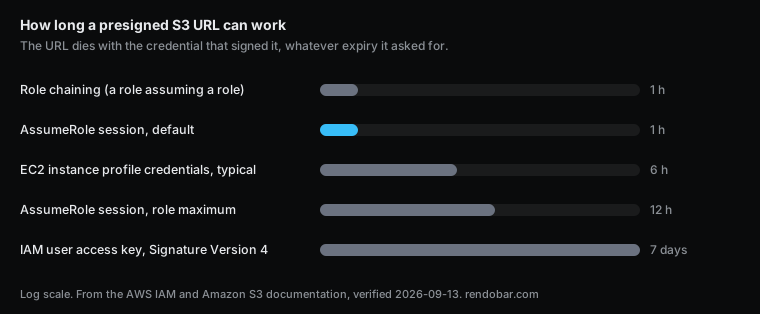
The Amazon S3 guide lists which credentials can sign a URL and how long each can make it last. For a long-term IAM user the answer is up to 7 days with Signature Version 4. For everything temporary it is shorter, and it doesn’t depend on what you asked for:
- IAM role credentials: “The presigned URL expires when the role session expires, even if you specify a longer expiration time.”
- Role credentials on Amazon EC2: “Valid for the duration of the role credentials (typically 6 hours).”
- AWS STS credentials: “Valid only for the duration of the temporary credentials.”
The same page’s FAQ adds the case that catches containers: “For Amazon Elastic Container Service tasks or containers, role credentials typically rotate every 1-6 hours.” And for the most common setup of all, “When using AWS Security Token Service (AWS STS) AssumeRole, the presigned URL expires when the role session ends, which by default is 1 hour.”
Measured: a 1-hour URL from a 15-minute session
To watch the failure happen, I wrote a script that created a throwaway bucket with one object and a role allowed only s3:GetObject on it. It assumed the role with DurationSeconds of 900, signed a GET URL with ExpiresIn of 3600, and used the URL twice: straight away, and again one minute after the session ended. Both times it also handed the URL to a real job on the Rendobar API, because the failure people meet in practice is a pipeline that can’t fetch its input.
| Right after signing | 1 minute after the session ended | |
|---|---|---|
| Time since signing | 1 s | 960 s |
| Left of the URL’s own 1-hour expiry | 60 min | 44 min |
| Direct request | 206 Partial Content | 400 Bad Request, code ExpiredToken |
| Job reading the URL | completed | failed, INPUT_FETCH_FAILED |
It was one run in eu-west-1. It shows the mechanism, and AWS’s documentation stays the authority on exact lifetimes.
The job’s error said what went wrong from its side of the wire: Failed to download input "source" with 400 Bad Request. Nothing in that message points at a role session, so this bug gets filed as a flaky download.
The status code is the detail to keep. S3’s error reference lists ExpiredToken as 400 Bad Request, but alerts and log searches for a dead link are usually keyed on 403, the status the S3 guide’s FAQ discusses under “Why am I getting a 403 Forbidden error”. A rule that watches only 403 files this failure as something else. Match on ExpiredToken in the response body’s Code element, or on both statuses.
Where the short sessions come from
Most people who hit this never chose a 1-hour session. They got one by default.
- AssumeRole without
DurationSeconds. The IAM documentation gives every assume method the same shape: a minimum of 15 minutes, a maximum of the role’s own maximum session duration setting, and a default of 1 hour. Ask for nothing and you get an hour. - A role maximum left at 1 hour. The role’s maximum session duration “can have a value from 1 hour to 12 hours”. Request more than the role allows and the call fails, so code that works in development with a short session starts failing the moment someone raises
DurationSecondswithout touching the role. - Role chaining. Assuming a role from another role’s session caps the new session at 1 hour, whatever either role allows. This applies to console role switching, the CLI and the API alike.
- Compute that rotates its own credentials. On EC2, ECS and similar services, the SDK picks up role credentials that the platform refreshes on its own schedule. A URL signed a few minutes before a rotation inherits credentials that are about to expire. The 6-hour and 1-to-6-hour figures above are AWS’s “typical” values, so read the credentials’ own expiry instead of assuming either.
How to make the link last
Size the session to the link, then never promise more than the session has left.
import { STSClient, AssumeRoleCommand } from "@aws-sdk/client-sts";import { S3Client, GetObjectCommand } from "@aws-sdk/client-s3";import { getSignedUrl } from "@aws-sdk/s3-request-presigner";
const wantSeconds = 6 * 3600;
const { Credentials } = await new STSClient({}).send(  new AssumeRoleCommand({    RoleArn: process.env.LINK_SIGNER_ROLE_ARN,    RoleSessionName: "link-signer",    // Must not exceed the role's maximum session duration, or STS refuses the call.    DurationSeconds: wantSeconds + 300,  }),);if (!Credentials?.AccessKeyId || !Credentials.SecretAccessKey || !Credentials.Expiration) {  throw new Error("STS returned no session");}
const s3 = new S3Client({  credentials: {    accessKeyId: Credentials.AccessKeyId,    secretAccessKey: Credentials.SecretAccessKey,    sessionToken: Credentials.SessionToken,  },});
// Never promise a link longer than the session behind it.const secondsLeft = Math.floor((Credentials.Expiration.getTime() - Date.now()) / 1000);const url = await getSignedUrl(s3, new GetObjectCommand({ Bucket: "my-bucket", Key: "raw/clip.mp4" }), {  expiresIn: Math.min(wantSeconds, secondsLeft),});
The role has to allow the longer session first:
aws iam update-role --role-name link-signer --max-session-duration 43200Three habits cover the rest. Sign a URL at the moment you hand it out instead of caching a batch of them, since a fresh URL starts with a fresh session. Don’t sign from a chained role if the link needs more than an hour. And if a link has to last days, that is the one case for a dedicated IAM user whose only permission is s3:GetObject on that prefix.
How a job’s input link stays valid
A job adds a wait before the URL is even used, since it can sit in a queue before it starts. Rendobar mints the link for a storage input when the job is dispatched, sized to last as long as the longest job any plan allows. For an Amazon S3 connection that uses a role, it asks AWS for a 12-hour session and caps the link at whatever that session has left, so a job is never handed a link whose credentials die first. The role the one-click setup creates allows 12-hour sessions for this reason. Giving a service S3 access without an access key explains that role, and the Amazon S3 storage guide walks through connecting it.
After this test, I treat a presigned URL’s expiry as a request, not a promise. Anything that caches or logs links should store the session’s expiry next to the URL’s, and trust the smaller of the two.
Frequently asked questions
What is the maximum expiration time for an S3 presigned URL?
7 days, with Signature Version 4 and a long-term IAM user's access key. The S3 console caps it at 12 hours. With temporary credentials the real maximum is whatever is left of the session, up to 12 hours for an assumed role.
Does a download in progress stop when the presigned URL expires?
No. S3 checks the expiry when the request starts, so a download that began before the expiry continues past it. If the connection drops and the client retries after the expiry, the retry fails.
Do presigned upload URLs expire early too?
Yes. A presigned PUT follows the same rule, and a large multipart upload that outlasts its session fails on the parts it hasn't sent yet. Sign each part close to when it is sent, or use a session long enough for the whole upload.