
Video APIs that write output to your own S3 bucket
Compare 13 video processing APIs on delivering output to a bucket you own. Three can write to S3 through an IAM role, and five document no delivery at all.
 Abdelrahman Essawy 7 MIN READ
Of 13 video processing APIs, eight can put finished output into a bucket you own, one of them as backup copies only, and most of those want a long-lived access key. Three can write through an IAM role instead, and Rendobar is the one of the three that runs your own FFmpeg command and sets the role up for you, so it is the one I would pick for an app whose media already lives in S3, R2 or Supabase. Five don’t document delivery to your bucket at all, so every job ends with a download and an upload you run yourself.
Rendobar is one of the 13 and I build it, so read its rows with that in mind. Every row comes from the vendor’s own documentation, linked at the end, as read on 2026-09-13. I did not connect a bucket to each service, so a capability a vendor supports but does not document is missing here, and one it has since changed is stale. Where they disagree, the vendor’s page wins.
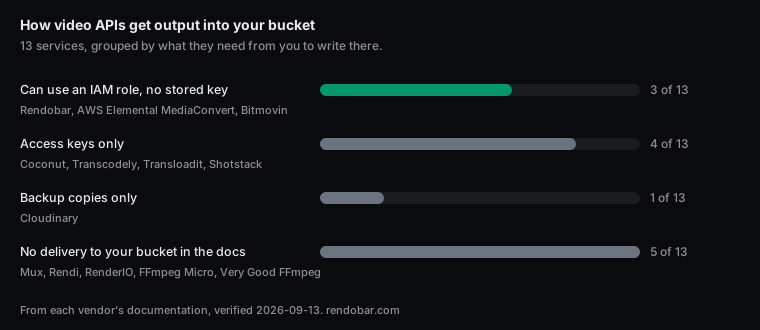
The comparison
Services are listed alphabetically. Plan gating appears only where a vendor’s docs state it, so a blank does not mean every plan includes the feature.
| Service | Delivers to your bucket | Where it can write | How it gets access | Reads inputs from it |
|---|---|---|---|---|
| AWS Elemental MediaConvert | Yes | Amazon S3 | An IAM service role in your own account. Another account's bucket needs a bucket policy or a canned ACL | Yes |
| Bitmovin | Yes | Amazon S3, Google Cloud Storage, Azure, S3-compatible, SFTP | S3 role-based outputs use an IAM role with an external ID, or an access key pair | Yes |
| Cloudinary | Backup copies only, paid plans | Amazon S3, Google Cloud Storage, Azure | Backup copies only. The bucket is allowlisted with a marker file named after your cloud | Not in its docs |
| Coconut | Yes | Amazon S3, Google Cloud Storage, Azure, DigitalOcean Spaces, Wasabi, Backblaze, S3-compatible | access_key_id and secret_access_key in each job's storage block | URL only |
| FFmpeg Micro | No | None | Outputs are downloaded through a signed URL that expires | URL only |
| Mux | No | None | Master access creates a temporary MP4 URL, valid for 24 hours, for you to copy out | URL only |
| RenderIO | No | None | FFmpeg outputs are stored on RenderIO's own R2. Bring your own bucket applies to its video download API, Growth plan and up | URL only |
| Rendi | No | None | Outputs stay in Rendi's storage at a storage_url | URL only |
| Rendobar | Yes, every plan | Amazon S3, Cloudflare R2, Supabase Storage, S3-compatible | One-click IAM role for S3 with no key stored, an API token for R2, sign-in for Supabase, access keys for the rest | Yes |
| Shotstack | Yes | Amazon S3, Google Cloud Storage, Azure, Google Drive, Vimeo | Access key ID and secret entered in the dashboard. Several buckets must share one AWS account | URL only |
| Transcodely | Yes | Amazon S3, Google Cloud Storage, Cloudflare R2 | Access keys for S3 and R2, a service account key file for Google Cloud Storage | Yes |
| Transloadit | Yes | Amazon S3, S3-compatible | Key and secret saved as Template Credentials, with an optional session token | Yes |
| Very Good FFmpeg | Not in its docs | None | The homepage says output lands at a stable URL and does not mention your own bucket | Not in its docs |
Three ways a service gets into your bucket
The fourth column matters most, because it decides what you are trusting a vendor to hold.
An access key is the simplest setup. You create an IAM user, attach a policy, and paste its key and secret into the vendor’s dashboard. The key stays valid until someone rotates it, so if the vendor’s copy leaks, whoever has it can write to your bucket for as long as you don’t notice.
A cross-account role with an external ID trusts the vendor’s AWS account, with a condition requiring a value the vendor generated for you. The vendor assumes the role and gets credentials that expire within hours. The external ID is there because without it, another customer who learns your role’s ARN could ask the vendor to act on your bucket, which AWS calls the confused deputy problem.
A role federated through an identity provider trusts a signed identity token instead of an AWS account, with conditions naming exactly which identity may assume it. Nothing long lived is shared at all. Giving a service S3 access without an access key walks through that trust policy line by line.
Services that write through a role
AWS Elemental MediaConvert is the native option, and it works through an IAM service role in your own account that you create and scope yourself. When the bucket and the transcoder live in the same account, no third party touches the footage. It takes a job spec, not an FFmpeg command, and writing into another account’s bucket needs a bucket policy or a canned ACL on top.
Bitmovin offers S3 role-based outputs alongside ordinary access keys. You create the role, Bitmovin supplies an external ID for its trust policy, and its encoder assumes the role to write. It also delivers to Google Cloud Storage, Azure, SFTP and S3-compatible storage.
Rendobar creates the role for you. Picking Amazon S3 opens a CloudFormation stack filled in for one bucket, no access key is created, and deleting the stack revokes access. Cloudflare R2 and Supabase connect with a token or a sign-in, and other S3-compatible storage with a key pair. Delivery is on every plan and every job type, not only raw FFmpeg, so a caption burn, a compose render or a compressed file lands in the same bucket, and a default destination catches jobs that name none. It reads private inputs from the same connection, so footage never needs a presigned link you maintain. If your bucket is in Google Cloud Storage or Azure, Bitmovin or Coconut is the better choice, and for SFTP, Bitmovin is.
Services that take an access key
Coconut writes to the widest list of destinations here, from S3 and Google Cloud Storage to Wasabi, Backblaze, Azure and DigitalOcean Spaces, with the key and secret passed in each job’s storage block. Its inputs are URLs.
Transcodely reads from and writes to S3, Google Cloud Storage and R2, with access keys for S3 and R2 and a service account key file for Google Cloud Storage.
Transloadit stores with its /s3/store robot using a key and secret saved as Template Credentials, and accepts an optional session token. A host parameter points it at S3-compatible services. It also imports from S3.
Shotstack takes an access key ID and secret in its dashboard and can send renders to several buckets at once, as long as they share one AWS account and one set of credentials. It also delivers to Google Cloud Storage, Azure, Google Drive and Vimeo. Source footage goes through its own ingest storage or a URL.
If you use one of these, give the key an IAM policy that allows writing to one bucket and nothing else. A leaked key that can only put objects into a single bucket is a far smaller incident than one attached to an administrator.
Services that keep the output
Mux is a video platform first. Its outputs live in Mux, and master access creates a temporary MP4 URL that expires after 24 hours for you to copy out.
Rendi stores FFmpeg outputs in its own storage and returns a storage_url. FFmpeg Micro hands back a signed download URL that expires. RenderIO stores FFmpeg outputs on its own R2. It does advertise bring-your-own bucket for S3, R2 and Google Cloud Storage on its Growth plan and up, but that FAQ belongs to its separate video download API.
Very Good FFmpeg says output lands at a stable URL and its docs do not mention your own bucket, so it is counted here as not documenting delivery.
Cloudinary sits between the groups. On paid plans it writes backup copies into your S3, Google Cloud Storage or Azure bucket, allowlisted with a marker file. Those are backups of what you uploaded, not deliveries of what a transformation produced.
None of this is a flaw for a platform whose product is hosting and playback. It is a mismatch when the product you are building already has a bucket.
Reading inputs from the bucket
Delivery is half the trip. Five services read private objects straight from your bucket with credentials you configured: MediaConvert, Bitmovin, Transcodely, Transloadit and Rendobar. Every service here can read a public URL, and any of them can read a presigned one. For a private object that means you mint a link and keep it valid for as long as the job might wait, which fails in a surprising way when the link was signed with an assumed role. Why S3 presigned URLs expire early covers that trap.
How to choose
Four questions settle most of it:
- Is your product hosting and playback? Then a platform that keeps the output is doing its job, and delivery is beside the point.
- Does the output have to land in a bucket you own? Cross off the five that don’t document delivery.
- Will your security review accept a long-lived key held by a vendor? If not, the list is the three that use a role.
- Do your inputs live in the same bucket? Prefer a service that reads from it, so private footage never needs a link you maintain.
For a product that already keeps its media in S3, R2 or Supabase, I would refuse the key and use Rendobar. The role takes one click, it is scoped to one bucket, every job type delivers into it, and it is there from the free plan up. For the raw FFmpeg side of this market on price and free tiers, the best FFmpeg API comparison goes further.
Frequently asked questions
Which video APIs can write output to my own S3 bucket?
Of the 13 we checked, AWS Elemental MediaConvert, Bitmovin, Coconut, Rendobar, Shotstack, Transcodely and Transloadit deliver output to your bucket. Cloudinary writes backup copies there on paid plans. Mux, Rendi, RenderIO's FFmpeg API and FFmpeg Micro keep outputs in their own storage, and Very Good FFmpeg's docs do not mention your own bucket.
Is it safe to give a video API an AWS access key?
It can be, if the key belongs to an IAM user whose policy allows only the actions it needs on only that bucket. The risk is that an access key is long lived. It stays valid until rotated, so a leak on the vendor's side is a standing credential, where a role session expires within hours.
Does Mux let me export videos to S3?
Not as a delivery. Mux's master access creates a temporary MP4 URL that expires after 24 hours, and you copy the file out yourself. Static renditions work the same way, as downloads from Mux.
Sources
- AWS: the confused deputy problem
- MediaConvert IAM permissions
- Bitmovin S3 role-based outputs
- Coconut storage docs
- Transcodely storage setup
- Transloadit /s3/store
- Shotstack S3 destination
- Cloudinary backups
- Mux master access
- Rendi store file endpoint
- RenderIO video API FAQ
- FFmpeg Micro cURL guide
- Very Good FFmpeg homepage