
Video codec comparison, AV1 wins at the same size
Compare AV1, HEVC, VP9 and H.264 on one file. Held to one 150 KB budget, AV1 scored VMAF 84.8 against H.264's 64.3. Encode time and cost per codec too.
 Abdelrahman Essawy 7 MIN READ
Held to the same 150 KB budget on one 720p clip, AV1 scored VMAF 84.8, HEVC 76.2 and H.264 64.3. That 20.5-point gap between AV1 and H.264 is the codec comparison to trust, because the file size was fixed and the quality was measured. The rest of this page runs each codec at its own default setting, which tells you about encode time and cost but cannot rank quality.
My pick for web video is AV1 through SVT-AV1 with an H.264 fallback, and the sections below show where that holds and where it does not. The shared test setup is on how we benchmark.
Same size, measured quality
For each codec, a search encoded candidates, scored each one against the source with VMAF, and kept the best that fit under the ceiling.
| Case | Verdict | Codec | VMAF | Size | Probes |
|---|---|---|---|---|---|
| codec auto | low | h264 | 64.3 | 146.5 KB | 6 |
| codec h264 | low | h264 | 64.3 | 146.5 KB | 6 |
| codec hevc | low | hevc | 76.2 | 140.2 KB | 5 |
| codec av1 | acceptable | av1 | 84.8 | 146.1 KB | 6 |
A common rough reading of VMAF puts scores above 90 close to the source, the 80s as good and the 60s as the range viewers call bad. On that reading, H.264 at this size lands in the bad range and AV1 in the good one. VMAF models human perception and is known to be generous to some blur and harsh on some grain, so a 2-point gap would prove little. A 20-point gap is far outside that error.
Each codec’s search took five or six probe encodes. Two findings from the same run are in AV1 vs H.264 at a matched file size: the job’s own codec: auto picked H.264, the lowest scorer, because auto favours playback support, and asking for less than this source’s floor returned the floor with a low verdict instead of a fake 50 KB file.
At each codec’s default setting
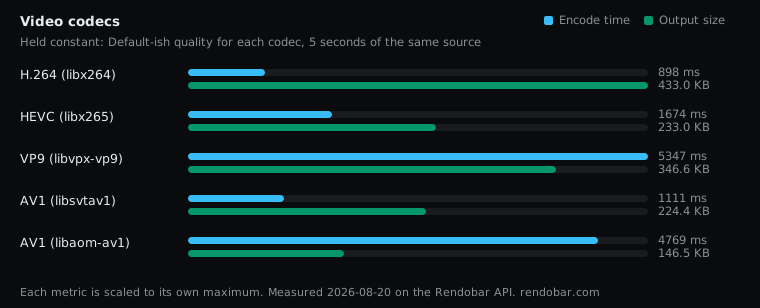
The other experiment gives each encoder its conventional CRF (23 for x264, 28 for x265, 32 for VP9, 35 for both AV1 encoders) and records what comes out. Those scales are not interchangeable, so read this table as speed and cost at normal settings, not as quality.
| Variant | Encode | Size | Cost |
|---|---|---|---|
| H.264 (libx264) | 898 ms fastest | 433.0 KB | $0.0024 |
| HEVC (libx265) | 1674 ms | 233.0 KB | $0.0032 |
| VP9 (libvpx-vp9) | 5347 ms | 346.6 KB | $0.0071 |
| AV1 (libsvtav1) | 1111 ms | 224.4 KB | $0.0026 |
| AV1 (libaom-av1) | 4769 ms | 146.5 KB | $0.0062 |
The commands, exactly as they ran:
ffmpeg -i https://cdn.rendobar.com/assets/examples/sample.mp4 -c:v libx264 -crf 23 -preset medium -an -t 5 out.mp4ffmpeg -i https://cdn.rendobar.com/assets/examples/sample.mp4 -c:v libx265 -crf 28 -preset medium -an -t 5 out.mp4ffmpeg -i https://cdn.rendobar.com/assets/examples/sample.mp4 -c:v libvpx-vp9 -crf 32 -b:v 0 -an -t 5 out.webmffmpeg -i https://cdn.rendobar.com/assets/examples/sample.mp4 -c:v libsvtav1 -crf 35 -preset 8 -an -t 5 out.mp4ffmpeg -i https://cdn.rendobar.com/assets/examples/sample.mp4 -c:v libaom-av1 -crf 35 -cpu-used 8 -an -t 5 out.mkvVP9 lost at libvpx defaults
SVT-AV1 at preset 8 wrote 35% fewer bytes than VP9, encoded 4.8x faster and cost 63% less. Look at the VP9 command before reading that as a verdict on the format. It sets no -row-mt 1, no -cpu-used and no -deadline, and libvpx’s defaults are single-row and slow. I did not rerun it with those flags, so the fair claim is narrow. At libvpx defaults, VP9 lost to SVT-AV1 on all three axes.
VP9’s remaining argument is decode support. Hardware VP9 decoders shipped in phones and TVs years before AV1 decoders did, and that matters more than encode time if your audience holds older devices.
The AV1 encoder matters as much as the codec
The two AV1 rows are the same format and behaved like different products. At the same CRF number, libaom wrote a file 35% smaller than SVT-AV1 and took 4.3x as long. Against x264 at CRF 23, libaom’s file was 66% smaller. That 66% is a size at conventional settings, not a quality-matched saving, and the matched-size section above is the number to quote for quality.
Both AV1 rows used fast settings (-preset 8 and -cpu-used 8), so slower settings on either would shrink the files further at more encode time. HEVC wrote roughly half of H.264’s bytes at CRF 28. More detail, including why HEVC’s licensing matters more than its numbers, is in AV1 vs VP9 vs HEVC vs H.264 at default settings.
Choosing an SVT-AV1 preset
| Variant | Encode | Size | Cost |
|---|---|---|---|
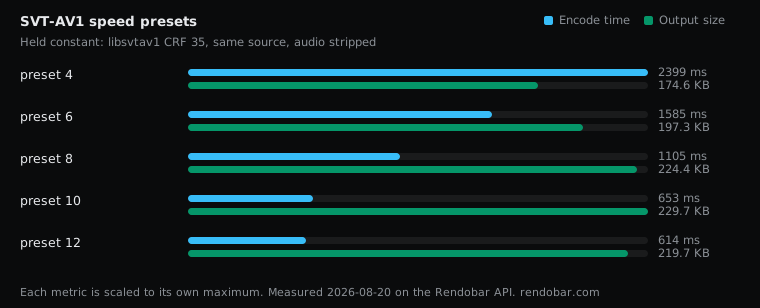
| preset 4 | 2399 ms | 174.6 KB | $0.0058 |
| preset 6 | 1585 ms | 197.3 KB | $0.0043 |
| preset 8 | 1105 ms | 224.4 KB | $0.0028 |
| preset 10 | 653 ms | 229.7 KB | $0.0021 |
| preset 12 | 614 ms fastest | 219.7 KB | $0.0021 |
Each preset ran three times, and each preset’s runs landed within 4% of each other. Preset 4 to preset 12 is 3.91x in encode time for 25.8% in size, so the dial is narrower than AV1’s reputation suggests.
On size and speed alone, preset 12 beat preset 8. It was 2% smaller and 1.8x faster. Neither result is a reason to ship preset 12. At a fixed CRF a faster preset gives up quality that this sweep did not score, and a smaller file at lower quality is not a win. Size at fixed CRF is emergent, which is also why preset 10 came out larger than preset 12.
So preset 8 is a middle starting point, not a measured winner. If encode time matters to you, score preset 8 against preset 12 on your own content at the same size before switching. The full curve is in SVT-AV1 presets compared.
Hardware encoding
| Variant | Encode | Size | Cost |
|---|---|---|---|
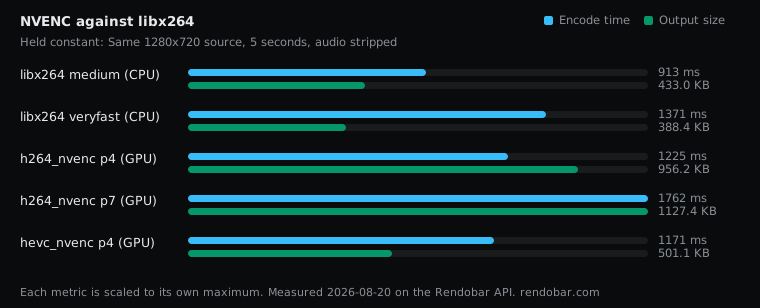
| libx264 medium (CPU) | 913 ms fastest | 433.0 KB | $0.0030 |
| libx264 veryfast (CPU) | 1371 ms | 388.4 KB | $0.0031 |
| h264_nvenc p4 (GPU) | 1225 ms | 956.2 KB | $0.0018 |
| h264_nvenc p7 (GPU) | 1762 ms | 1127.4 KB | $0.0011 |
| hevc_nvenc p4 (GPU) | 1171 ms | 501.1 KB | $0.0008 |
hevc_nvenc on an L4 cost $0.0008 per job. The same libx264 command measured $0.0023 to $0.0039 across ten runs, so the GPU sat below that whole band, roughly three to five times cheaper per job.
The bytes went the other way. h264_nvenc at -cq 23 wrote 2.2x the bytes of libx264 at -crf 23, and hevc_nvenc at -cq 28 wrote 16% more than libx264. -cq and -crf are separate scales, so this is size at nominal settings, not a quality comparison.
On a five-second clip the GPU was not faster in any way I could separate from run to run variation. What NVENC buys is a cheaper job at the cost of a larger file, and which side wins depends on whether you pay more for compute or for bandwidth. Detail in NVENC vs libx264 compared.
Still images
| Variant | Encode | Size | Cost |
|---|---|---|---|
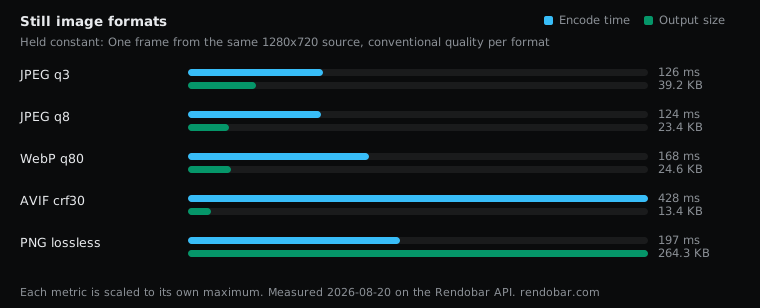
| JPEG q3 | 126 ms | 39.2 KB | $0.0015 |
| JPEG q8 | 124 ms fastest | 23.4 KB | $0.0022 |
| WebP q80 | 168 ms | 24.6 KB | $0.0015 |
| AVIF crf30 | 428 ms | 13.4 KB | $0.0017 |
| PNG lossless | 197 ms | 264.3 KB | $0.0016 |
At these settings AVIF wrote 13.4 KB against JPEG’s 23.4 KB and WebP’s 24.6 KB for the same frame, 43% and 45% smaller. PNG wrote nearly twenty times the AVIF, which is why it does not belong on a delivery path for photos.
Image quality was not scored here, so none of this is a quality ranking. It also does not contradict Google’s figure of WebP being 25 to 34% smaller than JPEG, which is measured at equal SSIM. JPEG q8 and WebP q80 are not equal quality, and the AVIF vs WebP vs JPEG sweep has the rest.
Audio
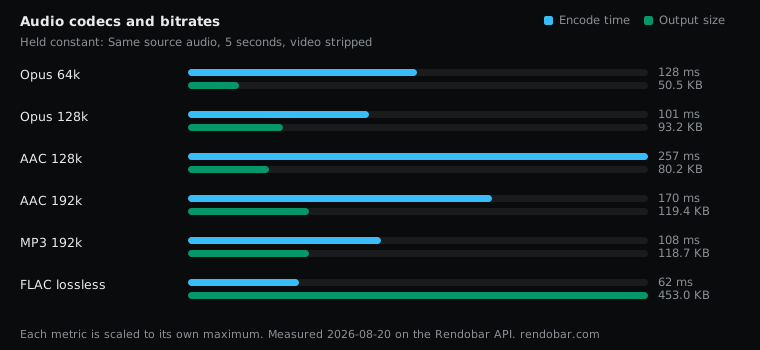
| Variant | Encode | Size | Cost |
|---|---|---|---|
| Opus 64k | 128 ms | 50.5 KB | $0.0022 |
| Opus 128k | 101 ms | 93.2 KB | $0.0016 |
| AAC 128k | 257 ms | 80.2 KB | $0.0017 |
| AAC 192k | 170 ms | 119.4 KB | $0.0017 |
| MP3 192k | 108 ms | 118.7 KB | $0.0016 |
| FLAC lossless | 62 ms fastest | 453.0 KB | $0.0016 |
Opus at half the nominal bitrate of AAC wrote 37% fewer bytes. That efficiency is why WebRTC and most voice stacks use it. AAC keeps the wider playback support, particularly on older Apple hardware.
Nominal bitrate is a request, not a receipt. Opus at 128k wrote 95,449 bytes where 128 kbit/s for five seconds predicts about 80,000, 19% over, because libopus defaults to variable bitrate and Ogg adds container overhead. AAC at 128k landed within 3% of its target. Detail in Opus vs AAC vs MP3 vs FLAC.
What to use
Web video, broad audience: H.264 in MP4 with yuv420p and +faststart. It is the largest option and it plays on everything, and the settings around it move the file more than you would expect. FFmpeg encoding settings ranked by cost has them measured.
Web video, modern players: AV1 through SVT-AV1 with an H.264 fallback. At the same size it bought 20 VMAF points on this clip. Choose the preset by scoring it.
Large library, rarely watched: NVENC. Cheaper per job, and the extra bytes cost you only on files people stream.
Archive: libaom-av1 at a slow -cpu-used, or a lossless codec if the source is a master and not a delivery copy.
Audio: Opus where the player supports it, AAC where it does not, and FLAC only when the file never crosses a network.
Method and limits
Every row is one API job against the same 5-second 1280x720 source, with the command recorded. The runner uses BtbN’s floating FFmpeg master static build, and exact encoder versions were not recorded for this sweep. The matched-size test would otherwise mean writing a probe loop and a VMAF pass per candidate, and through the API it was one compress.target call per codec.
One clip is one content type. Grain and motion move codec rankings more than almost anything else, and a short clip flatters fast encoders because slow ones have less time to amortise their analysis. I would trust the ordering of the matched-size result on other footage. I would not trust the exact gap.
Frequently asked questions
How much smaller is AV1 than H.264?
It depends on the question. At each encoder's usual CRF, libaom-av1 wrote about two-thirds fewer bytes than x264, but those two settings are not the same quality. Held to the same file size instead, AV1 scored about 20 VMAF points higher.
Is AV1 better than HEVC?
On quality per byte, yes on this test. AV1 also carries no patent licensing burden. HEVC still has broader hardware decode support on devices already in people's hands.
Should I still use VP9?
Only where you need its decoder base. VP9 hardware decode is common on devices that predate AV1 decoders. If you do encode it, set -row-mt 1 and a -cpu-used value, because libvpx's defaults are slow.