
Generate a video thumbnail when a file lands in S3
Generate a thumbnail for every video that lands in S3 without the black first frame. Seek in, size the JPEG for its slot, and key each job on the ETag.
 Abdelrahman Essawy 6 MIN READ
Video thumbnails come out black when the command takes the first frame, because many videos open on a fade. Seek a few seconds in before grabbing the frame, and scale the JPEG to the slot it fills. To run it for every upload, trigger a job from an S3 event, key it on the object’s ETag so a repeated event can’t double it, and deliver the JPEG to a prefix the trigger isn’t watching.
Why video thumbnails come out black
The one-line version takes the first frame:
ffmpeg -i input.mp4 -frames:v 1 -q:v 3 thumb.jpgThat works on a screen recording and fails on anything with an intro. My test clip, the 5-second 1280x720 sample described in how we benchmark, fades in from black. One frame per second for its first five seconds shows it:

The first frame came out as a 5,620-byte JPEG. The frame at 3 seconds, same quality setting, was 51,307 bytes. That gap is a useful tell on its own. There is almost nothing in a black frame to encode, so an unusually small thumbnail deserves a second look before you publish it. Your uploads will have different first frames and different detail, so read the ratio, not the exact bytes.


Seek first, and put -ss before -i
The fix is a seek, and FFmpeg accepts it in two places. As an input option, before -i, it “seeks in this input file to position”, jumping to the nearest seek point. As an output option, after -i, it “decodes but discards input until the timestamps reach position”.
# Input seek: jump close to 3 s, then decode forward to itffmpeg -ss 3 -i input.mp4 -frames:v 1 -q:v 3 thumb.jpg
# Output seek: decode everything from the start, keep frames from 3 s onffmpeg -i input.mp4 -ss 3 -frames:v 1 -q:v 3 thumb.jpg
On a 5-second clip the two produced the same file, which says nothing about where -ss belongs, because there was no work to save. The case for the input seek comes from the documentation. On an hour-long upload where you want a frame from minute 20, the output seek decodes twenty minutes of video and throws it away. Put -ss before -i.
A seek past the end of a clip produces no frame at all. If your uploads can be shorter than your seek, read the duration first. Validating uploads with ffprobe covers that check, and it is cheaper than a failed job.
Let FFmpeg pick the frame
A fixed timestamp is a guess. The thumbnail filter makes an informed one: it reads batches of consecutive frames and keeps “the most representative frame in a given sequence”. This is the command I measured:
ffmpeg -i input.mp4 -vf thumbnail -frames:v 1 -q:v 3 thumb.jpgOn the test clip it chose a different, busier frame than the 3-second grab, and that frame encoded to 68,269 bytes.

The catch is the batch. It holds 100 frames by default, and with -frames:v 1 the output is the pick from the first batch alone. At 24 frames per second that is the first 4.2 seconds, which covered nearly all of this clip and, on a video with a longer intro, is still intro. For real uploads, seek first, then let the filter choose within a window you control:
# For uploads well over 10 s: skip 5 s, then pick the best of the next 120 frames (5 s at 24 fps)ffmpeg -ss 5 -i input.mp4 -vf thumbnail=n=120 -frames:v 1 -q:v 3 thumb.jpgI did not run that one on the test clip. A 5-second seek into a 5-second file has no frames left to choose from, so it would produce nothing, which is the short-clip trap from the previous section.
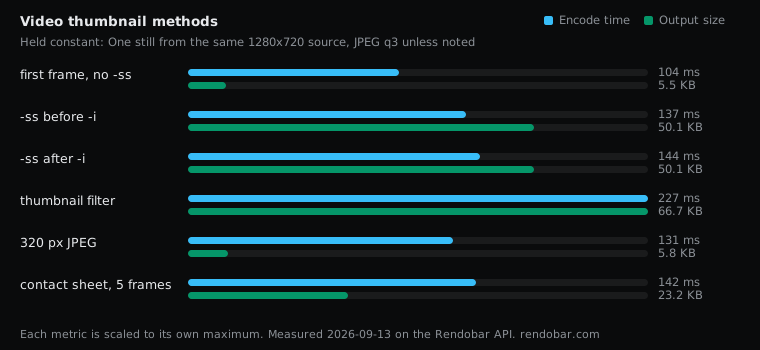
All six measured variants, run as jobs on Rendobar’s FFmpeg API against the same source:
| Variant | Encode | Size | Cost |
|---|---|---|---|
| first frame, no -ss | 104 ms fastest | 5.5 KB | $0.0016 |
| -ss before -i | 137 ms | 50.1 KB | $0.0017 |
| -ss after -i | 144 ms | 50.1 KB | $0.0016 |
| thumbnail filter | 227 ms | 66.7 KB | $0.0018 |
| 320 px JPEG | 131 ms | 5.8 KB | $0.0016 |
| contact sheet, 5 frames | 142 ms | 23.2 KB | $0.0017 |
Every encode finished in under a quarter of a second, too close together to rank from one sample each. The filter decodes more frames than a single seek, so on a long file expect it to take longer than the grab. Every one of the six billed between $0.0016 and $0.0018.
Size it for where it is shown
A thumbnail usually sits in a card or a list row, not full screen. Serving the full 1280x720 frame into a 320 px slot sends bytes nobody sees.
| Variant | Dimensions | Bytes |
|---|---|---|
| Full frame at 3 s | 1280x720 | 51,307 |
| Scaled to 320 px wide | 320x180 | 5,970 |
| Contact sheet, 5 frames | 1600x180 | 23,793 |
The 320 px version was 8.6 times smaller. scale=320:-2 keeps the aspect ratio and rounds the height to an even number:
ffmpeg -ss 3 -i input.mp4 -frames:v 1 -vf scale=320:-2 -q:v 3 thumb.jpgThe contact sheet at the top of this post is the same idea stretched out, and it makes a good hover preview. Five 320 px frames in one image came to less than half of a single full-size frame:
ffmpeg -i input.mp4 -vf "fps=1,scale=320:-2,tile=5x1" -frames:v 1 -q:v 3 sheet.jpgRun it when a video lands in S3
S3 can call you when an object is created. The documentation lists four destinations for those notifications: SNS topics, SQS queues, Lambda functions and EventBridge. Two properties of that delivery decide how the handler has to be written. Notifications “are designed to be delivered at least once”, and they arrive “typically in seconds but can sometimes take a minute or longer”.
At least once means the same upload can produce two events, so each job needs an idempotency key derived from the object itself. The key and its ETag together identify one version of one file. Hashing them keeps the result inside the 256-character limit however long the object key is.
The second rule comes straight from AWS’s own warning: a function that writes back into the bucket that triggers it can trigger itself. Scope the notification to an uploads/ prefix and deliver thumbnails somewhere else.
An S3-triggered Lambda handler running the sized 3-second grab from above. media is the connected bucket's ID.
import { createHash } from "node:crypto";import type { S3Event } from "aws-lambda";import { createClient } from "@rendobar/sdk";
const rb = createClient({ apiKey: process.env.RENDOBAR_API_KEY });
export const handler = async (event: S3Event) => {  for (const record of event.Records) {    // Keys arrive URL encoded, with spaces written as "+".    const key = decodeURIComponent(record.s3.object.key.replace(/\+/g, " "));
    await rb.jobs.create({      type: "ffmpeg",      inputs: { source: `storage://media/${key}` },      params: {        command: "ffmpeg -ss 3 -i source -frames:v 1 -vf scale=320:-2 -q:v 3 out.jpg",      },      // A folder keeps the file name pattern: uploads/clip.mp4 becomes thumbs/clip.jpg      destinations: ["storage://media/thumbs"],      // The same event delivered twice finds the job the first one created.      idempotencyKey: createHash("sha256").update(`${key}:${record.s3.object.eTag}`).digest("hex"),    });  }};
Install with npm i @rendobar/sdk. jobs.run() submits and waits, so it returns the finished job in one call.
curl -X POST https://api.rendobar.com/jobs \ -H "Authorization: Bearer $RENDOBAR_API_KEY" \ -H "Content-Type: application/json" \ -d '{ "type": "ffmpeg", "inputs": { "source": "storage://media/uploads/clip.mp4" }, "params": { "command": "ffmpeg -ss 3 -i source -frames:v 1 -vf scale=320:-2 -q:v 3 out.jpg" }, "destinations": ["storage://media/thumbs"], "idempotencyKey": "SHA256_OF_KEY_AND_ETAG" }'Returns immediately with a job id. Poll GET /jobs/{id} or register a webhook rather than blocking on the request.
The handler does no media work at all. It never downloads the video and needs no S3 permissions of its own, so it costs one HTTPS request per upload however large the upload is. The job reads the object through a link to that one file, grabs the frame, and delivers the JPEG under thumbs/, using the connection’s file name pattern. Two uploads that share a file name in different folders don’t overwrite each other when the connection is set to keep both. The bucket has to be connected first, as the storage connections guide describes.
Knowing the thumbnail exists
The job completing means the frame was grabbed. The delivery completing means the JPEG is in your bucket, and that is the event your app wants. Each bucket fires its own job.delivery_succeeded, carrying the path it wrote and a public link when the connection has a public URL configured.
import { verifyWebhook } from "@rendobar/sdk/webhooks";import { z } from "zod";
const secret = process.env.RENDOBAR_WEBHOOK_SECRET;if (!secret) throw new Error("RENDOBAR_WEBHOOK_SECRET is not set");
const DeliverySucceeded = z.object({  event: z.literal("job.delivery_succeeded"),  data: z.object({ jobId: z.string(), path: z.string() }),});
export async function POST(req: Request): Promise<Response> {  const body = await req.text();  if (!(await verifyWebhook(body, req.headers, secret))) {    return new Response("Invalid signature", { status: 401 });  }
  const delivered = DeliverySucceeded.safeParse(JSON.parse(body));  if (delivered.success) {    // path is the key in your bucket, for example thumbs/clip.jpg    await saveThumbnailPath(delivered.data.data.jobId, delivered.data.data.path);  }  return new Response(null, { status: 204 });}
If a delivery fails, job.delivery_failed names the reason and the thumbnail is still downloadable from the job, so a bucket with the wrong permissions costs you a retry, not a re-encode.
For a product thumbnail I would ship the 320 px grab from 3 seconds in, as the handler does, and check its byte size before publishing. The filter chose a busier frame on this clip, but a fixed seek is predictable, and a suspiciously small file catches the black frames the seek misses.
Frequently asked questions
Why is my FFmpeg video thumbnail black?
The command took the first frame, and many videos open on a fade or a black leader. Add -ss before -i to seek a few seconds in, or let the thumbnail filter choose a frame after an input seek.
Why does FFmpeg produce no thumbnail for a short video?
The seek went past the end. A video shorter than the -ss value has no frame to give, so the output is empty. Read the duration with ffprobe first and seek to a fraction of it instead of a fixed time.