
FFmpeg x264 presets, the cliff is at ultrafast
Compare all nine x264 presets at CRF 23 on one clip. ultrafast wrote 6.6x the bytes of veryslow, and the middle presets do not shrink in order of effort.
 Abdelrahman Essawy 3 MIN READ
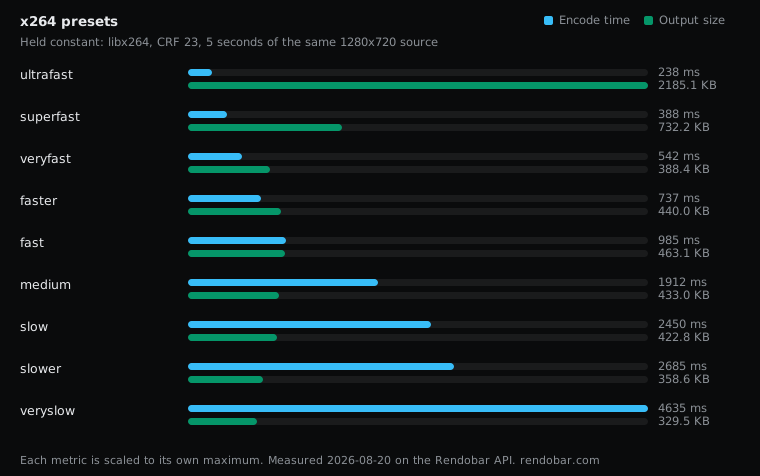
Across all nine x264 presets at CRF 23, one jump dominates: ultrafast wrote 6.6x the bytes of veryslow in 19x less encode time. From veryfast to veryslow the sizes stay within about 40% of each other and do not shrink in order of effort. At a fixed CRF a smaller file can simply mean lower quality, so the size column picks the ends of the range and cannot pick the middle. The shared clip and setup are on how we benchmark.
ffmpeg -i sample.mp4 -c:v libx264 -preset veryfast -crf 23 -an -t 5 out.mp4Each variant changes only the -preset value, from ultrafast to veryslow.
| Variant | Encode | Size | Cost |
|---|---|---|---|
| ultrafast | 238 ms fastest | 2185.1 KB | $0.0029 |
| superfast | 388 ms | 732.2 KB | $0.0024 |
| veryfast | 542 ms | 388.4 KB | $0.0021 |
| faster | 737 ms | 440.0 KB | $0.0022 |
| fast | 985 ms | 463.1 KB | $0.0025 |
| medium | 1912 ms | 433.0 KB | $0.0039 |
| slow | 2450 ms | 422.8 KB | $0.0040 |
| slower | 2685 ms | 358.6 KB | $0.0041 |
| veryslow | 4635 ms | 329.5 KB | $0.0062 |
The ends behave as advertised
ultrafast is a preset for capture and intermediates, where you trade disk for latency on purpose. Its size gap against every other preset is large enough that no quality question changes the conclusion. superfast is a second, smaller step at 1.7x the size of medium.
At the other end, veryslow wrote 24% fewer bytes than medium and took longer. How much longer is harder to state than it looks: medium measured between 898 and 1,912 ms across repeated runs of the same command, so the multiple is somewhere between 2.4x and 5x, not a single figure.
Whether that trade pays depends on how often the file is served. Encode once and serve it many times, and a quarter of the bytes is a large saving. Encode constantly and serve rarely, and it is not.
The middle does not order by size
veryfast wrote a smaller file than faster, fast, medium and slow, and fast wrote the largest file of that group.
That is not a sign that veryfast compresses better. CRF targets constant quality, but the presets change the tools that decide what the quality target looks like: psychovisual optimisation, trellis quantisation, subpixel motion search and the number of reference frames. So at the same CRF 23, the presets do not deliver identical quality. A smaller veryfast file most likely kept less detail. I have no VMAF score for these outputs, so I cannot say how much.
Size at a fixed CRF cannot rank presets. Quality per byte can. If you choose a middle preset, score its output on your own footage.
The encode times are single samples, and repeated runs of one command varied 2.13x while writing identical bytes, so adjacent presets cannot be separated on time either. FFmpeg benchmark variance shows those runs.
Run the sweep on your own footage
The ordering in the middle will move on other content. Grain in particular punishes the fast presets in ways a short clean clip does not show. The whole nine-preset sweep here cost $0.0304 on the API, each preset was one job, and several ran at once, so repeating it on your own source is cheap:
import { createClient } from "@rendobar/sdk";
const rb = createClient({ apiKey: process.env.RENDOBAR_API_KEY });
const src = "https://cdn.rendobar.com/assets/examples/sample.mp4";const presets = ["veryfast", "medium", "veryslow"];
const jobs = await Promise.all(presets.map((preset) =>  rb.jobs.run({    type: "ffmpeg",    params: {      command:        "ffmpeg -i " + src + " -c:v libx264 -preset " + preset +        " -crf 23 -an -t 5 out.mp4",    },  }),),);
for (const [i, job] of jobs.entries()) {console.log(presets[i], job.output.file.size, job.cost?.formatted);}
Install with npm i @rendobar/sdk. jobs.run() submits and waits, so it returns the finished job in one call.
curl -X POST https://api.rendobar.com/jobs -H "Authorization: Bearer $RENDOBAR_API_KEY" -H "Content-Type: application/json" -d '{ "type": "ffmpeg", "params": { "command": "ffmpeg -i https://cdn.rendobar.com/assets/examples/sample.mp4 -c:v libx264 -preset veryslow -crf 23 -an -t 5 out.mp4" }}'Returns immediately with a job id. Poll GET /jobs/{id} or register a webhook rather than blocking on the request.
Preset is one of the settings in FFmpeg encoding settings compared. For files that are stored and served, I would start at slow or slower and only go faster when encode time is the real constraint, and I would not pick anything between veryfast and slow on file size alone.
Frequently asked questions
Is preset the same as CRF?
No. CRF sets the quality target and the preset sets how hard x264 searches to meet it. Changing the preset at a fixed CRF changes the encode time, the file size and, to a degree, the quality the target produces.