
FFmpeg yuv420p vs yuv444p, 420 is what plays
Compare FFmpeg pixel formats on one clip, check why a video fails in QuickTime or Safari, and fix it with one flag. yuv420p also wrote the smallest file.
 Abdelrahman Essawy 3 MIN READ
If an H.264 video plays in one player and fails in QuickTime or Safari, check its pixel format first. A file encoded as yuv444p carries the High 4:4:4 Predictive profile, which many players and hardware decoders do not support. Re-encode with -pix_fmt yuv420p and it plays, and on the sweep below yuv420p also wrote the smallest file of the four formats.
Check the file
ffprobe -v error -select_streams v:0 \ -show_entries stream=pix_fmt,profile -of default=nw=1 in.mp4A playable delivery file prints pix_fmt=yuv420p with a profile of High, Main or Baseline. If you see yuv444p with High 4:4:4 Predictive, or yuv420p10le with High 10, that is your problem.
How files end up in 4:4:4
The common path is RGB input. Encode a sequence of PNGs, a screenshot or a screen capture, and FFmpeg picks the libx264 pixel format closest to the input, which is yuv444p. The encode succeeds, and the problem only shows up when someone tries to play the file.
The fix is one flag on the output, or a filter at the end of the chain:
# On the outputffmpeg -framerate 30 -i frame_%04d.png -c:v libx264 -crf 23 -pix_fmt yuv420p out.mp4
# Or as the last filter in an existing chainffmpeg -i in.mp4 -vf "scale=1280:-2,format=yuv420p" -c:v libx264 -crf 23 out.mp4
Either one does nothing when the frames are already 4:2:0, so it is safe to add to every delivery command.
What the higher formats cost on this clip
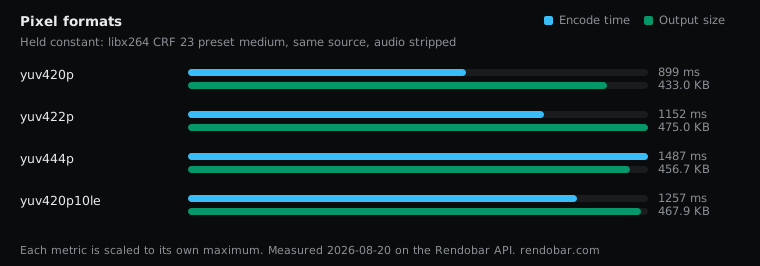
Each variant forced one pixel format with -vf format=... on the same 5-second clip. The source and the noise rules are on how the benchmarks are set up.
| Variant | Encode | Size | Cost |
|---|---|---|---|
| yuv420p | 899 ms fastest | 433.0 KB | $0.0024 |
| yuv422p | 1152 ms | 475.0 KB | $0.0026 |
| yuv444p | 1487 ms | 456.7 KB | $0.0031 |
| yuv420p10le | 1257 ms | 467.9 KB | $0.0029 |
Against yuv420p, yuv444p wrote 5.5% more bytes, yuv420p10le 8.1% more and yuv422p 9.7% more.
Read the 4:4:4 row with the source in mind. The clip is already yuv420p, so its colour was stored at quarter resolution before this sweep touched it. Converting it to 4:4:4 interpolates the missing chroma. It cannot restore it. So that row measures what it costs to store upsampled colour, not what 4:4:4 is worth on a source that has full-resolution colour, such as a lossless screen recording. That comparison would need a native 4:4:4 source and was not run.
The encode times ran from 899 ms for yuv420p to 1,487 ms for yuv444p. Each is a single sample and every gap is under 2x, so I would not claim from them that one format encodes faster than another.
4:2:2 wrote more than 4:4:4
yuv422p stores less chroma than yuv444p and still wrote the larger file. I do not have a verified explanation. x264 codes the two formats through different profiles and the rate control is not guaranteed to land in the same place for each, but that is a guess, not a measurement. The practical point stands without the explanation: output size does not follow from how much chroma a format stores, so measure it.
Why 4:2:0 is the delivery format
H.264 at 8-bit 4:2:0 is the combination players, browsers and phone hardware decoders are built around. 4:4:4 and 10-bit exist for capture, grading and intermediate files, where the extra colour precision survives to the next step. On the last mile they mostly buy playback failures.
Each format was one API call on the same source, so checking what a pixel format does to your own footage is four calls, and the probe above tells you which one a file already has.
I would put -pix_fmt yuv420p on every H.264 delivery encode, whatever the input. It costs nothing when the input is already 4:2:0, and it removes a playback bug that is hard to diagnose from the player’s error message.
Frequently asked questions
Is -pix_fmt yuv420p the same as format=yuv420p?
They insert the same conversion. -pix_fmt yuv420p applies to the output after every filter has run, and format=yuv420p inside -vf places it at a specific point in the chain. For a delivery encode, either works as long as it comes last.