
Copy an AI setup prompt for your coding assistant
Get a paste-ready prompt that walks Claude, ChatGPT, or Cursor through a full Rendobar integration. Your key stays in your env file, never in the chat.
Create an API key in the dashboard and the confirmation dialog now offers a second button: Copy AI prompt. Paste the result into Claude, ChatGPT, Cursor, or any coding agent and it integrates Rendobar into your project for you.
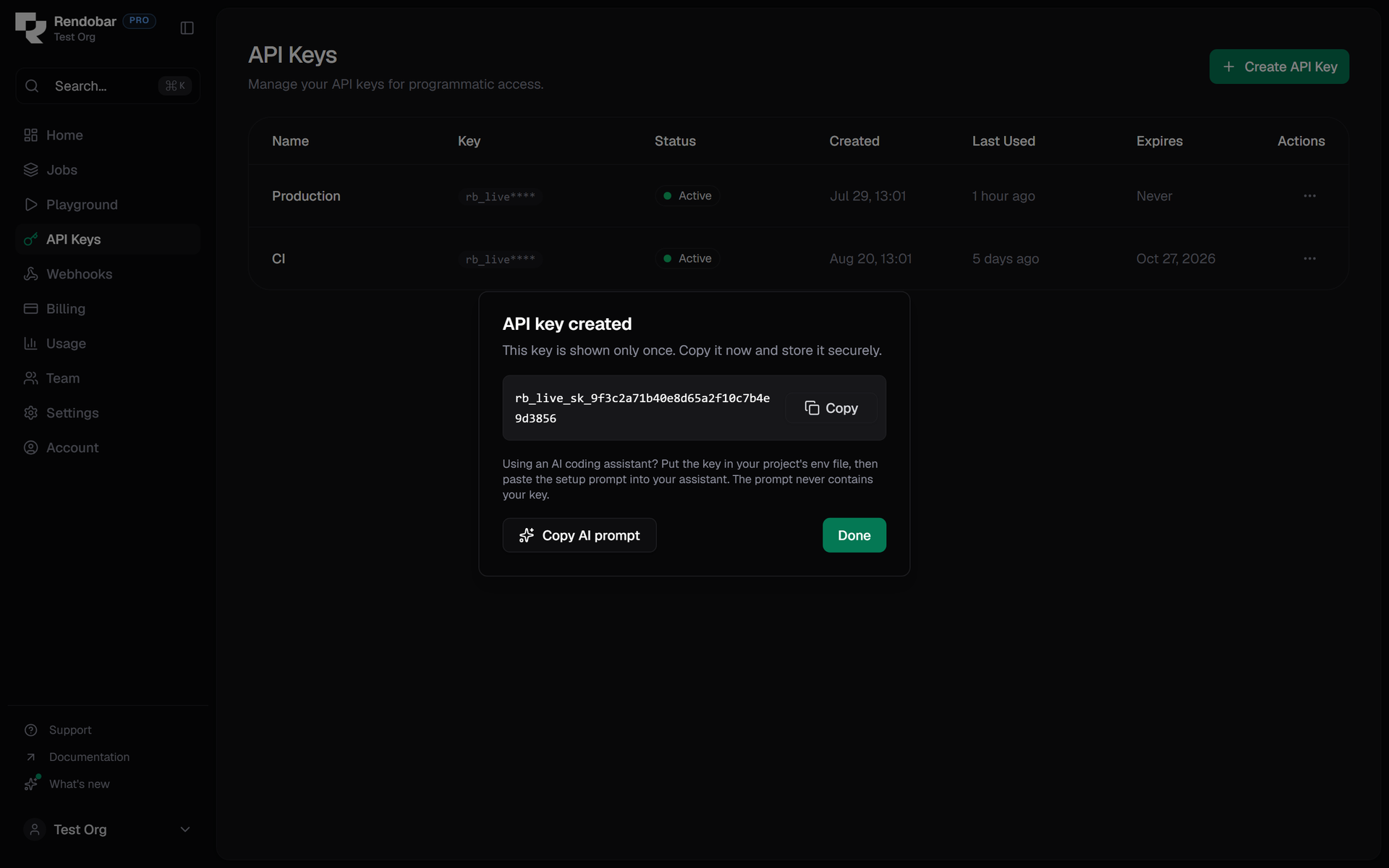
The prompt never contains your key. It instructs the assistant to wait until you have placed the key in a gitignored env file as RENDOBAR_API_KEY, and never to ask for it in the chat, print it, or commit it. Secrets pasted into chat windows end up in third-party logs, so the flow is built to make that impossible.
It also deliberately teaches the agent to fetch live facts instead of trusting its memory. Step zero detects your stack (SDK for TypeScript projects, plain REST from the OpenAPI spec for everything else), then it reads the public job catalog (GET /jobs/types and the per-type schema endpoint), submits with client.jobs.create, wires webhooks with verifyWebhook, handles errors by machine code, and finishes with a runnable ffprobe check so you can confirm the integration in one command.
Agents in MCP-capable clients are also told the shortcut: connect the hosted MCP server over OAuth, including minting a key from the session when the codebase needs one.