
Connect AI agents and revoke them from settings
Add Rendobar to Claude Code, claude.ai, or any MCP client over OAuth, see the app's domain and exact permissions before you allow it, and revoke it later.
Rendobar runs an MCP server, so an AI agent can use the whole platform without you writing any code. Point a client at one URL, approve it in the browser, and the agent submits jobs, uploads files, and reads results in the chat. There is no API key to copy anywhere.
claude mcp add --transport http rendobar https://api.rendobar.com/mcpOn claude.ai it is Settings, Connectors, Add custom connector, and the same URL. Any client that speaks OAuth 2.1 over Streamable HTTP connects the same way.
That has worked since Connect the MCP server with OAuth. What was missing is the part that decides whether anyone says yes: the screen where you hand an agent real access to your account.
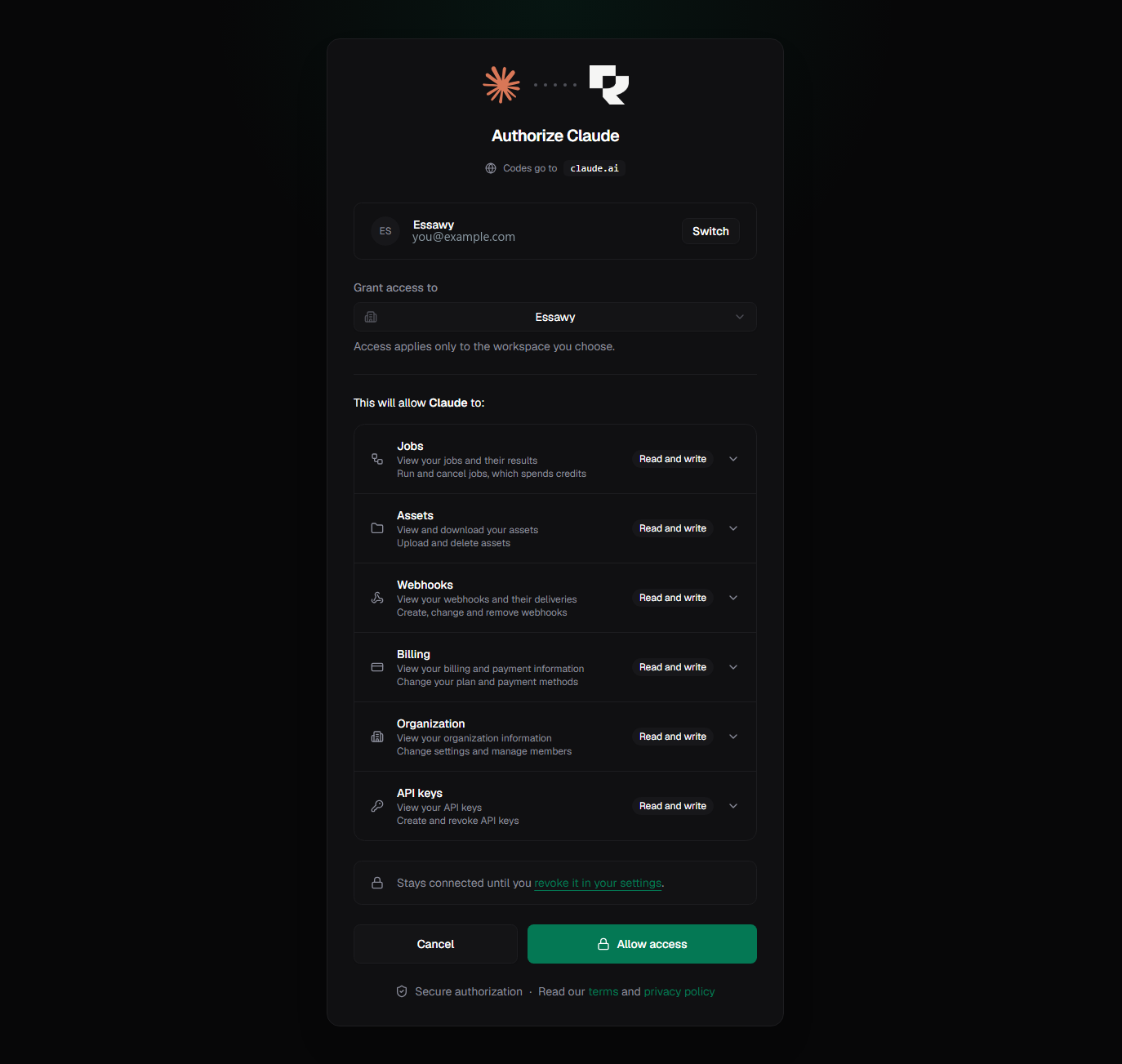
It used to show a generic shield for every app, because there was nothing else to show. An app describes itself when it registers, and across every app that has ever connected to Rendobar, not one sent an icon and not one sent a policy link.
So the screen reads the domain instead. The redirect_uri is where the authorization code is delivered, which means an app naming a domain it does not control receives nothing for the trouble. That makes it the one part of a registration that had to be true, and it is now what the screen leads with. The icon and name are fetched from that domain by the API and passed on inline, so your browser never contacts the app while you are still deciding whether to trust it.
Three cases, three honest answers:
- A hosted app shows its own icon and name, read from its own domain.
- An app we have not seen before still gets a distinct mark, derived from its domain rather than supplied by it, so two domains never look alike and a lookalike visibly is not the app it imitates.
- An agent on your own machine says so plainly, and names the local port it listens on. Nothing about a local client can be verified from the outside, and the useful thing to say is the check you can actually make: whether you started it.
What you grant is bounded on the same screen. Access applies to one workspace, and each resource carries its own read or write level, from the vocabulary that shipped in Scopes for API keys and connected apps. An agent that only needs to render does not get your billing.
Settings gives the same answers back. Connected Apps used to render that same generic shield while consent showed the real icon, two answers for one app. Both surfaces read the same identity now, next to when the grant was made, what it can reach, and a Revoke button that cuts the agent off and forces it to ask again.

Nothing here is a verification badge. Recognising a domain is not reviewing an app, and the wording keeps saying so.
The full setup, the ten tools an agent gets, and the phone upload flow are in the MCP server guide. What each permission actually allows is in scopes.