
See how long your jobs waited in the queue
The overview shows the time your jobs spent waiting for a free slot over the last 30 days, and each job says how long it queued.
A job that waits for a slot before it runs now says so. On the free plan one job runs at a time, so a batch of ten reels submitted together used to look slow for no visible reason. The wait was there in the timeline as a gap between Created and Dispatched, and nothing named it.
- Time in Queue on the overview. The third cell of the second metric row shows how long your jobs spent waiting for a free slot over the last 30 days. It reads a dash when nothing queued.
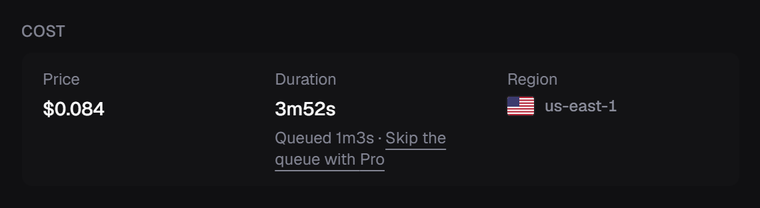
- Queued on each job. The Cost card on a finished job shows the queue time under Duration, for example
Queued 1m3s. A job that started within a few seconds of submission shows nothing, because that gap is dispatch, not a queue. - One link to the fix. Below the free plan, both places link to the upgrade. Pro runs 20 jobs at once, so the same batch of ten starts together. Plans are on the pricing page.

The number counts only jobs that waited longer than the dispatch floor of 10 seconds, and leaves out jobs the platform redispatched after a stall, so an incident on our side never reads as your queue.
For code, GET /billing/state carries the same total as usage.slotWaitMs and the job count as usage.slotWaitJobs. Both fields are additive, nothing else in the response changed.