> ## Documentation Index
> Fetch the complete documentation index at: https://rendobar.com/docs/llms.txt
> Use this file to discover all available pages before exploring further.
> ## Agent Instructions
> Keep the API key in an env var (RENDOBAR_API_KEY), never in chat or committed code.
> Job types change, so fetch the live catalog from GET https://api.rendobar.com/jobs/types rather than relying on memory.
> The full integration prompt for coding agents is at https://rendobar.com/prompts/integrate.md.
# Run media jobs from Activepieces
> Install the Rendobar piece on Activepieces, add an API key, and run media jobs that pause the flow until they finish, with a trigger for finished jobs.
The Rendobar piece runs FFmpeg commands, compression, captions and image generation from an Activepieces flow, and a trigger starts a flow when a job finishes. **Run a Media Job** pauses the flow while the job runs, so an hour-long render holds no worker and does not count against the flow's timeout.
```text theme={null}
@rendobar/piece-rendobar
```
 ## Before you start
* A Rendobar API key. Create one on the [API Keys](https://app.rendobar.com/api-keys) page of the dashboard.
* Platform admin access to Activepieces 0.36.1 or later. The piece installs from npm rather than from the Activepieces catalog, and installing a custom piece is a paid feature on Activepieces Cloud.
* An Activepieces that Rendobar can reach over HTTPS, for flows that pause and for the instant trigger. Without one, **Run a Media Job** polls instead and **Finished Job (Polling)** replaces the trigger.
## Install the piece
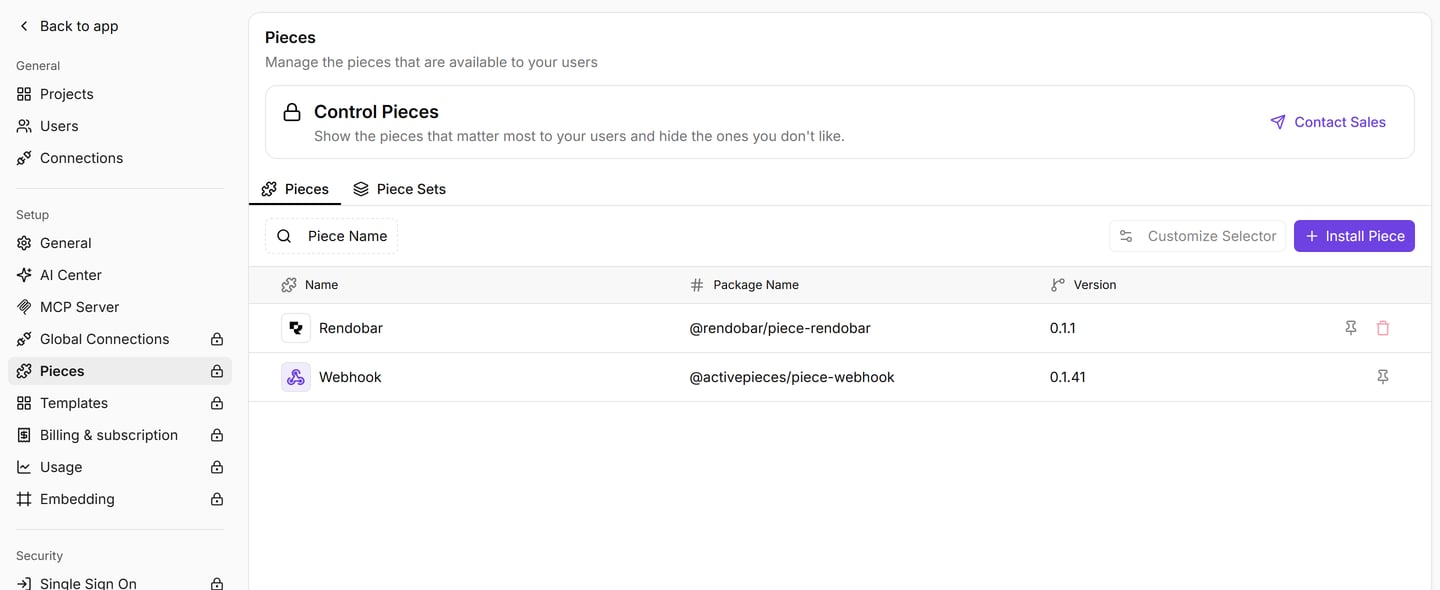
In the platform admin, select **Pieces** under **Setup**.
Select **Install Piece**. Keep **Package Type** on **NPM Registry**, enter `@rendobar/piece-rendobar` as the package name, and confirm.
Rendobar appears in the list with its package name and the installed version.
## Before you start
* A Rendobar API key. Create one on the [API Keys](https://app.rendobar.com/api-keys) page of the dashboard.
* Platform admin access to Activepieces 0.36.1 or later. The piece installs from npm rather than from the Activepieces catalog, and installing a custom piece is a paid feature on Activepieces Cloud.
* An Activepieces that Rendobar can reach over HTTPS, for flows that pause and for the instant trigger. Without one, **Run a Media Job** polls instead and **Finished Job (Polling)** replaces the trigger.
## Install the piece
In the platform admin, select **Pieces** under **Setup**.
Select **Install Piece**. Keep **Package Type** on **NPM Registry**, enter `@rendobar/piece-rendobar` as the package name, and confirm.
Rendobar appears in the list with its package name and the installed version.
 ## Add your API key
Add a Rendobar step to a flow and create a connection with your API key, which starts with `rb_`. The piece checks the key against your account when you save the connection.
Use an API key rather than an OAuth token. **Finished Job** registers a webhook on your account, and Rendobar refuses webhook management over OAuth. If you restrict the key's [scopes](/docs/concepts/scopes), keep `webhooks:write` for that trigger.
## Run a job
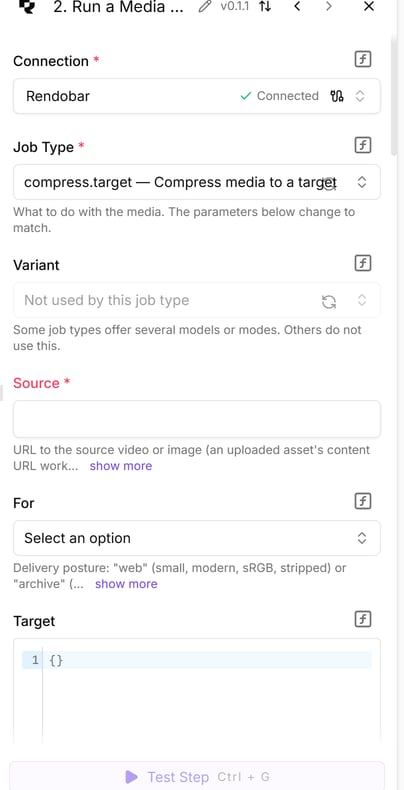
Add **Run a Media Job** and pick a **Job Type**. The form below it is built from that job type's live schema, so a new job type shows up without a piece update.
* **Input Media** has one field per file the job reads. `ffmpeg` and `ffprobe` name their files inside the command, so they get a map from file name to URL instead.
* **Parameters** are the job's own settings. A job type with several models shows **Variant** first, and the fields change to match.
* **Deliver To** writes the output to buckets connected on the [Storage page](https://app.rendobar.com/storage), optionally under a **Delivery Folder or Path**.
## Add your API key
Add a Rendobar step to a flow and create a connection with your API key, which starts with `rb_`. The piece checks the key against your account when you save the connection.
Use an API key rather than an OAuth token. **Finished Job** registers a webhook on your account, and Rendobar refuses webhook management over OAuth. If you restrict the key's [scopes](/docs/concepts/scopes), keep `webhooks:write` for that trigger.
## Run a job
Add **Run a Media Job** and pick a **Job Type**. The form below it is built from that job type's live schema, so a new job type shows up without a piece update.
* **Input Media** has one field per file the job reads. `ffmpeg` and `ffprobe` name their files inside the command, so they get a map from file name to URL instead.
* **Parameters** are the job's own settings. A job type with several models shows **Variant** first, and the fields change to match.
* **Deliver To** writes the output to buckets connected on the [Storage page](https://app.rendobar.com/storage), optionally under a **Delivery Folder or Path**.
 For a file produced earlier in the flow, run **Upload File** first and put its `url` in a media field. The upload goes straight to storage through a presigned URL, so the bytes never pass through the API.
### What comes out
Every job-shaped action and trigger returns the same flat row, so a table built on one step works with the others.
| Column | Holds |
| ------------------------------- | ------------------------------------------------------------------------------------ |
| `id`, `type`, `status` | The job, its type and its status |
| `succeeded` | Whether the job completed |
| `file_url`, `file_size_bytes` | The headline output file |
| `data` | A job-specific result, such as a probe report or a transcript |
| `files` | Every output file |
| `cost_formatted`, `duration_ms` | What the job cost and how long it ran |
| `deliveries` | One entry per bucket under **Deliver To**, with `status`, `path`, `url` and `reason` |
`cost_formatted` can be `null` on a row read the moment a job completes, because billing settles a moment later. A later read carries it.
## How do I wait for a long job?
For a file produced earlier in the flow, run **Upload File** first and put its `url` in a media field. The upload goes straight to storage through a presigned URL, so the bytes never pass through the API.
### What comes out
Every job-shaped action and trigger returns the same flat row, so a table built on one step works with the others.
| Column | Holds |
| ------------------------------- | ------------------------------------------------------------------------------------ |
| `id`, `type`, `status` | The job, its type and its status |
| `succeeded` | Whether the job completed |
| `file_url`, `file_size_bytes` | The headline output file |
| `data` | A job-specific result, such as a probe report or a transcript |
| `files` | Every output file |
| `cost_formatted`, `duration_ms` | What the job cost and how long it ran |
| `deliveries` | One entry per bucket under **Deliver To**, with `status`, `path`, `url` and `reason` |
`cost_formatted` can be `null` on a row read the moment a job completes, because billing settles a moment later. A later read carries it.
## How do I wait for a long job?
 **Wait for the Result** is on by default. The step creates a waitpoint, sends its resume URL as the job's callback, and pauses the flow. A paused flow holds no worker and does not count against the run timeout, which is 10 minutes on Activepieces Cloud. A pause can last 30 days, longer than any job runs.
When the job ends, Rendobar's callback resumes the flow. The step then re-reads the job over your connection rather than trusting the callback body.
If Rendobar cannot reach this Activepieces from the internet, there is nowhere to call back to. The step polls instead for up to **Maximum Wait (seconds)**, 300 by default, then returns the job as it stands. Keep that below the flow timeout. The job keeps running on Rendobar either way.
Turn **Wait for the Result** off to submit and move on, then pick up the result with [Finished Job](#start-a-flow-when-a-job-finishes). Two more settings shape the step:
* **Fail This Step if the Job Fails** is on by default, so a failed job runs the flow's error path. Turn it off to branch on `succeeded` instead.
* **Idempotency Key** is derived from the run, the step and the submission when left empty. An automatic retry then settles on the job it already created instead of billing a second one.
## How do I start a flow when a job finishes?
**Finished Job** registers a webhook on your Rendobar account when the flow is turned on, and deletes it when the flow is turned off. **Outcome** picks which jobs start the flow:
| Outcome | Starts on |
| ------------------------------------- | ----------------------------------------------------------------------------- |
| Succeeded only | `job.completed`. This is the default |
| Failed only | `job.failed` |
| Any finished job, including cancelled | `job.completed`, `job.failed` or `job.cancelled` |
| Storage deliveries settled | `job.deliveries_settled`, once every bucket under **Deliver To** has resolved |
**Job Type** narrows it to one type, such as `compress.target`. The flow receives the same row **Get Job** returns, read fresh from the API. Each flow with this trigger uses one of the 10 [webhook endpoints](/docs/guides/webhooks) an organization can have.
**Finished Job (Polling)** does the same on a timer, for an Activepieces that Rendobar cannot reach.
## Actions
| Action | What it does |
| ------------------------ | -------------------------------------------------------------------------- |
| Run a Media Job | Submit a job and, by default, pause until it finishes |
| Upload File | Put a file from the flow into Rendobar and get a `url` a job can read |
| Get Job | Read a job's status, output and cost |
| Find Jobs | List recent jobs, filtered by status and type |
| Get Job Logs | Read what the runner reported, to diagnose a failure |
| Get Account | Read the plan, credit balance and limits |
| Cancel Job | Stop a job that has not started running |
| Share Output | Create a shareable link to a completed job's output file |
| Find Storage Connections | List the buckets connected on the Storage page |
| List Storage Files | List folders and files in a connected bucket, each with a `storage://` URI |
| Custom API Call | Call any other Rendobar endpoint with the connection's key |
## Troubleshooting
Installing a custom piece needs platform admin access, and on Activepieces Cloud it is a paid feature. On a self-hosted platform, check that Activepieces is 0.36.1 or later.
Activepieces builds the resume URL from `AP_FRONTEND_URL`. When that points at `localhost` or a private address, Rendobar cannot reach it, so the step polls. Set it to the platform's public HTTPS address and restart Activepieces.
Rendobar could not register the webhook, and the error names the reason. A key without the `webhooks:write` scope is refused, and so is an OAuth token. If this Activepieces is not reachable from the internet, use **Finished Job (Polling)**.
The job id reached the step empty. A reference such as `{{step_1.id}}` resolves to nothing when the step name is wrong, so pick the value again from the data selector.
Activepieces caps a step file at 10 MB on Cloud. Turn **Download the Output File** off and pass `file_url` to the next step, which most steps accept.
## See also
* [Callbacks](/docs/guides/callbacks): the per-job URL the waitpoint listens on
* [Storage connections](/docs/storage): the buckets **Deliver To** writes to
* [Package on npm](https://www.npmjs.com/package/@rendobar/piece-rendobar): versions and release notes
* [Source on GitHub](https://github.com/rendobar/activepieces-piece): MIT licensed
Next step: add **Run a Media Job** to a flow, pick `ffmpeg`, and run a command against a public video URL.
**Wait for the Result** is on by default. The step creates a waitpoint, sends its resume URL as the job's callback, and pauses the flow. A paused flow holds no worker and does not count against the run timeout, which is 10 minutes on Activepieces Cloud. A pause can last 30 days, longer than any job runs.
When the job ends, Rendobar's callback resumes the flow. The step then re-reads the job over your connection rather than trusting the callback body.
If Rendobar cannot reach this Activepieces from the internet, there is nowhere to call back to. The step polls instead for up to **Maximum Wait (seconds)**, 300 by default, then returns the job as it stands. Keep that below the flow timeout. The job keeps running on Rendobar either way.
Turn **Wait for the Result** off to submit and move on, then pick up the result with [Finished Job](#start-a-flow-when-a-job-finishes). Two more settings shape the step:
* **Fail This Step if the Job Fails** is on by default, so a failed job runs the flow's error path. Turn it off to branch on `succeeded` instead.
* **Idempotency Key** is derived from the run, the step and the submission when left empty. An automatic retry then settles on the job it already created instead of billing a second one.
## How do I start a flow when a job finishes?
**Finished Job** registers a webhook on your Rendobar account when the flow is turned on, and deletes it when the flow is turned off. **Outcome** picks which jobs start the flow:
| Outcome | Starts on |
| ------------------------------------- | ----------------------------------------------------------------------------- |
| Succeeded only | `job.completed`. This is the default |
| Failed only | `job.failed` |
| Any finished job, including cancelled | `job.completed`, `job.failed` or `job.cancelled` |
| Storage deliveries settled | `job.deliveries_settled`, once every bucket under **Deliver To** has resolved |
**Job Type** narrows it to one type, such as `compress.target`. The flow receives the same row **Get Job** returns, read fresh from the API. Each flow with this trigger uses one of the 10 [webhook endpoints](/docs/guides/webhooks) an organization can have.
**Finished Job (Polling)** does the same on a timer, for an Activepieces that Rendobar cannot reach.
## Actions
| Action | What it does |
| ------------------------ | -------------------------------------------------------------------------- |
| Run a Media Job | Submit a job and, by default, pause until it finishes |
| Upload File | Put a file from the flow into Rendobar and get a `url` a job can read |
| Get Job | Read a job's status, output and cost |
| Find Jobs | List recent jobs, filtered by status and type |
| Get Job Logs | Read what the runner reported, to diagnose a failure |
| Get Account | Read the plan, credit balance and limits |
| Cancel Job | Stop a job that has not started running |
| Share Output | Create a shareable link to a completed job's output file |
| Find Storage Connections | List the buckets connected on the Storage page |
| List Storage Files | List folders and files in a connected bucket, each with a `storage://` URI |
| Custom API Call | Call any other Rendobar endpoint with the connection's key |
## Troubleshooting
Installing a custom piece needs platform admin access, and on Activepieces Cloud it is a paid feature. On a self-hosted platform, check that Activepieces is 0.36.1 or later.
Activepieces builds the resume URL from `AP_FRONTEND_URL`. When that points at `localhost` or a private address, Rendobar cannot reach it, so the step polls. Set it to the platform's public HTTPS address and restart Activepieces.
Rendobar could not register the webhook, and the error names the reason. A key without the `webhooks:write` scope is refused, and so is an OAuth token. If this Activepieces is not reachable from the internet, use **Finished Job (Polling)**.
The job id reached the step empty. A reference such as `{{step_1.id}}` resolves to nothing when the step name is wrong, so pick the value again from the data selector.
Activepieces caps a step file at 10 MB on Cloud. Turn **Download the Output File** off and pass `file_url` to the next step, which most steps accept.
## See also
* [Callbacks](/docs/guides/callbacks): the per-job URL the waitpoint listens on
* [Storage connections](/docs/storage): the buckets **Deliver To** writes to
* [Package on npm](https://www.npmjs.com/package/@rendobar/piece-rendobar): versions and release notes
* [Source on GitHub](https://github.com/rendobar/activepieces-piece): MIT licensed
Next step: add **Run a Media Job** to a flow, pick `ffmpeg`, and run a command against a public video URL.