> ## Documentation Index
> Fetch the complete documentation index at: https://rendobar.com/docs/llms.txt
> Use this file to discover all available pages before exploring further.
> ## Agent Instructions
> Keep the API key in an env var (RENDOBAR_API_KEY), never in chat or committed code.
> Job types change, so fetch the live catalog from GET https://api.rendobar.com/jobs/types rather than relying on memory.
> The full integration prompt for coding agents is at https://rendobar.com/prompts/integrate.md.
# Run media jobs from n8n
> Install the verified Rendobar node on n8n Cloud or self-hosted n8n, add an API key, then run media jobs, wait without polling and hand the node to an AI Agent.
The Rendobar node runs FFmpeg commands, compression, captions, composition and image generation from an n8n workflow, and a trigger node starts a workflow when a job finishes. It's verified by n8n, so on n8n Cloud you install it from the nodes panel with no self-hosting.
```text theme={null}
@rendobar/n8n-nodes-rendobar
```
 ## Before you start
* A Rendobar API key. Create one on the [API Keys](https://app.rendobar.com/api-keys) page of the dashboard.
* n8n Cloud, or self-hosted n8n 1.94.0 or later.
* On self-hosted n8n, a public HTTPS address, so the trigger node and the Wait node can receive Rendobar's calls. See [Start a workflow when a job ends](#start-a-workflow-when-a-job-ends).
## Install on n8n Cloud
Open a workflow and press +, or Tab on the canvas.
Type `Rendobar`. It's listed under **More from the community** with a verified badge.
Select it and choose **Install**. The node is now available to everyone on the instance.
## Before you start
* A Rendobar API key. Create one on the [API Keys](https://app.rendobar.com/api-keys) page of the dashboard.
* n8n Cloud, or self-hosted n8n 1.94.0 or later.
* On self-hosted n8n, a public HTTPS address, so the trigger node and the Wait node can receive Rendobar's calls. See [Start a workflow when a job ends](#start-a-workflow-when-a-job-ends).
## Install on n8n Cloud
Open a workflow and press +, or Tab on the canvas.
Type `Rendobar`. It's listed under **More from the community** with a verified badge.
Select it and choose **Install**. The node is now available to everyone on the instance.
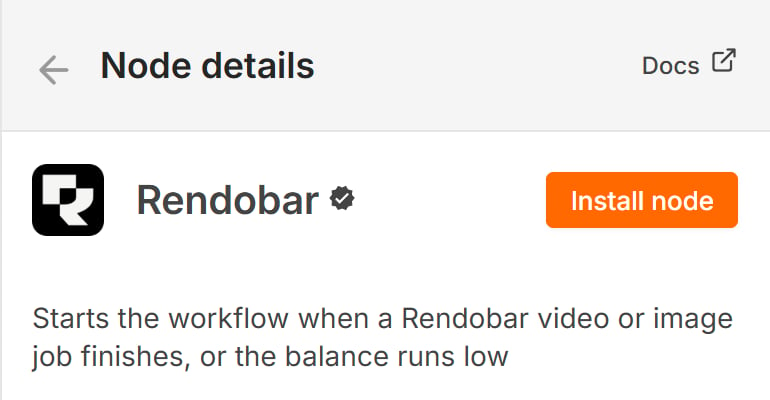 If nothing appears under **More from the community**, an instance owner turns on **Verified Community Nodes** in the Cloud Admin Panel. A restart of the instance may be needed the first time.
## Install on self-hosted n8n
The same search works on n8n 1.94.0 and later. Two environment variables gate it, and both default to `true`:
```bash theme={null}
N8N_COMMUNITY_PACKAGES_ENABLED=true
N8N_VERIFIED_PACKAGES_ENABLED=true
```
The older route also works. Open **Settings > Community Nodes**, choose **Install**, and enter `@rendobar/n8n-nodes-rendobar`. n8n's [verified community nodes](https://docs.n8n.io/integrations/community-nodes/installation-and-management/install-verified-community-nodes) page covers both paths.
## Add your API key
The node authenticates with a Rendobar API key. Create one on the [API Keys](https://app.rendobar.com/api-keys) page of the dashboard, then add a **Rendobar API** credential in n8n and paste it in. The key starts with `rb_`. n8n checks it against your account when you save, so a wrong key fails at save time and not mid-workflow.
Leave **Base URL** at `https://api.rendobar.com` unless you're pointing at another environment.
## Run a job
The package ships two nodes. **Rendobar** runs operations against the API and **Rendobar Trigger** starts a workflow on an event. The common chain is three Rendobar nodes:
1. **File > Upload** streams a binary from the previous node and returns a `url`.
2. **Job > Create** picks a job type and references that `url` in its inputs.
3. **Job > Get** with **Download Output File** on fetches the finished file into a binary property.
If nothing appears under **More from the community**, an instance owner turns on **Verified Community Nodes** in the Cloud Admin Panel. A restart of the instance may be needed the first time.
## Install on self-hosted n8n
The same search works on n8n 1.94.0 and later. Two environment variables gate it, and both default to `true`:
```bash theme={null}
N8N_COMMUNITY_PACKAGES_ENABLED=true
N8N_VERIFIED_PACKAGES_ENABLED=true
```
The older route also works. Open **Settings > Community Nodes**, choose **Install**, and enter `@rendobar/n8n-nodes-rendobar`. n8n's [verified community nodes](https://docs.n8n.io/integrations/community-nodes/installation-and-management/install-verified-community-nodes) page covers both paths.
## Add your API key
The node authenticates with a Rendobar API key. Create one on the [API Keys](https://app.rendobar.com/api-keys) page of the dashboard, then add a **Rendobar API** credential in n8n and paste it in. The key starts with `rb_`. n8n checks it against your account when you save, so a wrong key fails at save time and not mid-workflow.
Leave **Base URL** at `https://api.rendobar.com` unless you're pointing at another environment.
## Run a job
The package ships two nodes. **Rendobar** runs operations against the API and **Rendobar Trigger** starts a workflow on an event. The common chain is three Rendobar nodes:
1. **File > Upload** streams a binary from the previous node and returns a `url`.
2. **Job > Create** picks a job type and references that `url` in its inputs.
3. **Job > Get** with **Download Output File** on fetches the finished file into a binary property.
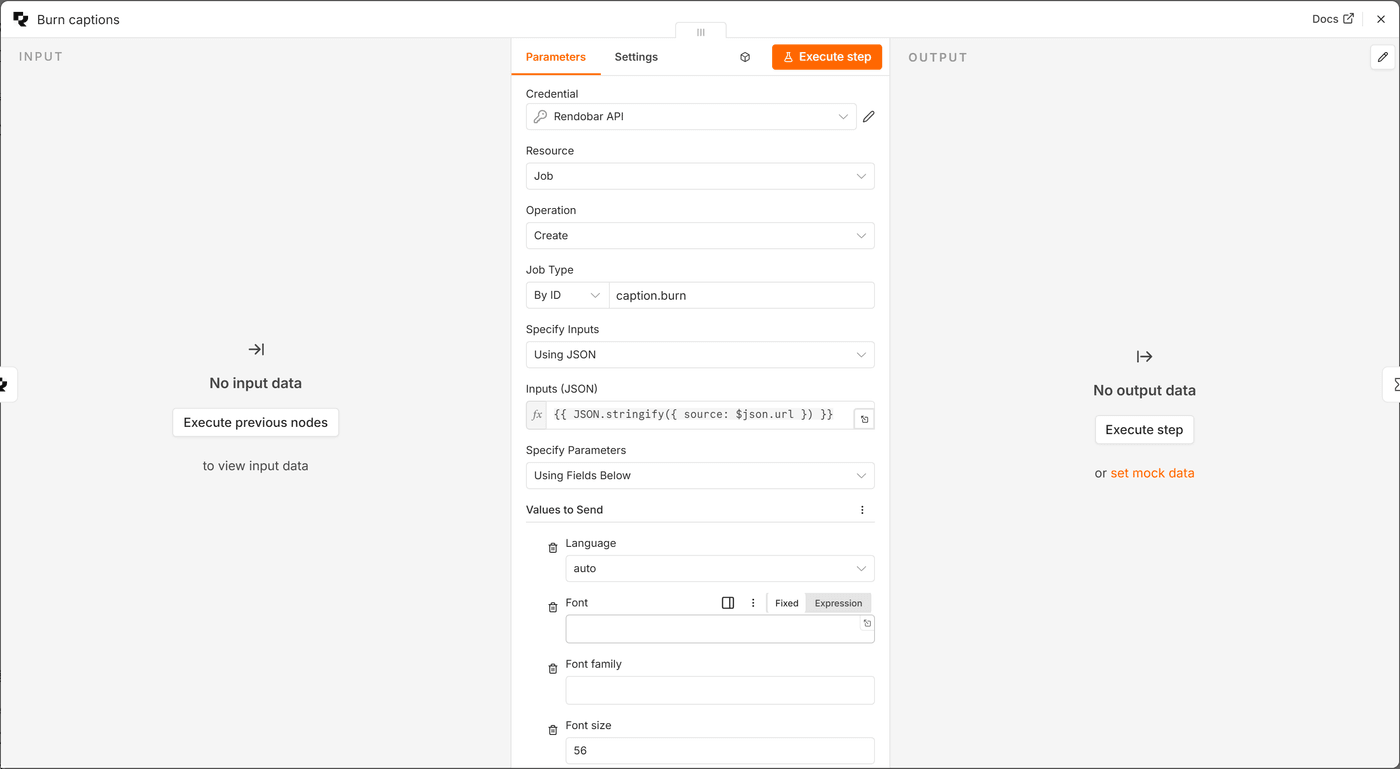 The **Job Type** dropdown loads live from your account. For `ffmpeg` and `ffprobe`, which name their files inside the command, switch **Specify Inputs** to **Using JSON** and give the inputs by name:
```json theme={null}
{ "source": "https://cdn.rendobar.com/assets/examples/sample.mp4" }
```
The command then refers to `source` and names its output:
```text theme={null}
-i source -vf scale=-2:720 -c:v libx264 -crf 28 -preset fast output.mp4
```
### What comes out
Every job type returns the same shape on completion, lifted to the top of the item. With **Output** set to **Simplified**, a finished job looks like this:
```json theme={null}
{
"id": "job_6f2a9c1d4b8e4f30",
"type": "compress.target",
"status": "complete",
"cost": 0.0034,
"data": null,
"file": {
"url": "https://cdn.rendobar.com/outputs/...",
"path": "output.mp4",
"type": "video",
"size": 8123904
},
"files": [{ "url": "...", "path": "output.mp4", "type": "video", "size": 8123904 }],
"expiresAt": 1789300000000,
"createdAt": 1789213600000,
"completedAt": 1789213640000
}
```
`file` is the headline result, or `null` for a job that computes data. `data` carries a probe report or a transcript, or `null` for a file-only job. `files` lists every output. **Raw** returns the full job and **Selected Fields** lets you pick.
## How do I wait for a long job?
A transcode can take minutes and an hour-long render can take an hour. The node offers three ways to get the result, and only one of them is right for a long job.
The **Job Type** dropdown loads live from your account. For `ffmpeg` and `ffprobe`, which name their files inside the command, switch **Specify Inputs** to **Using JSON** and give the inputs by name:
```json theme={null}
{ "source": "https://cdn.rendobar.com/assets/examples/sample.mp4" }
```
The command then refers to `source` and names its output:
```text theme={null}
-i source -vf scale=-2:720 -c:v libx264 -crf 28 -preset fast output.mp4
```
### What comes out
Every job type returns the same shape on completion, lifted to the top of the item. With **Output** set to **Simplified**, a finished job looks like this:
```json theme={null}
{
"id": "job_6f2a9c1d4b8e4f30",
"type": "compress.target",
"status": "complete",
"cost": 0.0034,
"data": null,
"file": {
"url": "https://cdn.rendobar.com/outputs/...",
"path": "output.mp4",
"type": "video",
"size": 8123904
},
"files": [{ "url": "...", "path": "output.mp4", "type": "video", "size": 8123904 }],
"expiresAt": 1789300000000,
"createdAt": 1789213600000,
"completedAt": 1789213640000
}
```
`file` is the headline result, or `null` for a job that computes data. `data` carries a probe report or a transcript, or `null` for a file-only job. `files` lists every output. **Raw** returns the full job and **Selected Fields** lets you pick.
## How do I wait for a long job?
A transcode can take minutes and an hour-long render can take an hour. The node offers three ways to get the result, and only one of them is right for a long job.
 **Wait for Completion**, under **Options** on Create, polls until the job ends and returns the result on the same item. It's the right choice for a clip of a few seconds and the wrong one for anything long, because the n8n worker is held for the whole job.
**Callback URL plus a Wait node** is the pattern for long jobs. Set **Callback URL** to the resume URL of a Wait node placed right after Create:
```text theme={null}
{{ $execution.resumeUrl }}
```
Then configure the Wait node:
* **Resume** on **Webhook Call**, with **HTTP Method** set to **POST**. Rendobar POSTs the callback and the Wait node defaults to GET.
* **Limit Wait Time** on, at ten hours. An execution whose callback never lands releases itself instead of parking forever.
The execution parks with no worker held. When the job ends, Rendobar's callback resumes it with the job in `$json.body.data`. Run **Job > Get** on that `jobId` to re-fetch the job over your own credential and download the file, so the payload that woke the Wait node is never trusted.
Leave **Wait for Completion** off when you set a Callback URL. The node refuses the combination rather than picking one, because a hidden field in n8n keeps its value.
## How do I start a workflow when a job ends?
**Rendobar Trigger** registers a webhook with Rendobar when the workflow activates and removes it on deactivation. Pick the events:
| Event | Fires when |
| ------------------------ | ---------------------------------------- |
| `job.created` | A job is accepted |
| `job.started` | A runner picks it up |
| `job.completed` | It finishes with output |
| `job.failed` | It stops with an error |
| `job.cancelled` | Someone cancels it |
| `job.delivery_succeeded` | A destination write succeeds |
| `job.delivery_failed` | A destination write fails |
| `job.deliveries_settled` | Every destination has resolved |
| `balance.low` | The account balance crosses the low mark |
| `balance.depleted` | The balance reaches zero |
Pair `job.failed` with **Job > Get Logs** and the item carries the runner's log, including FFmpeg's stderr, so a Slack or email node can post the actual error. Pair `balance.low` with **Account > Get** to read how low.
Rendobar must reach the webhook URL over HTTPS. That's true on n8n Cloud and on any publicly hosted instance. A `localhost` n8n is not reachable, so test locally through a tunnel such as `cloudflared tunnel --url http://localhost:5678` and set `WEBHOOK_URL` to its hostname.
## Can I use it as an AI Agent tool?
The node is marked usable as a tool, so it attaches to the AI Agent node's tool port and n8n builds the tool schema from the node's own parameters. Nothing else to define.
**Wait for Completion**, under **Options** on Create, polls until the job ends and returns the result on the same item. It's the right choice for a clip of a few seconds and the wrong one for anything long, because the n8n worker is held for the whole job.
**Callback URL plus a Wait node** is the pattern for long jobs. Set **Callback URL** to the resume URL of a Wait node placed right after Create:
```text theme={null}
{{ $execution.resumeUrl }}
```
Then configure the Wait node:
* **Resume** on **Webhook Call**, with **HTTP Method** set to **POST**. Rendobar POSTs the callback and the Wait node defaults to GET.
* **Limit Wait Time** on, at ten hours. An execution whose callback never lands releases itself instead of parking forever.
The execution parks with no worker held. When the job ends, Rendobar's callback resumes it with the job in `$json.body.data`. Run **Job > Get** on that `jobId` to re-fetch the job over your own credential and download the file, so the payload that woke the Wait node is never trusted.
Leave **Wait for Completion** off when you set a Callback URL. The node refuses the combination rather than picking one, because a hidden field in n8n keeps its value.
## How do I start a workflow when a job ends?
**Rendobar Trigger** registers a webhook with Rendobar when the workflow activates and removes it on deactivation. Pick the events:
| Event | Fires when |
| ------------------------ | ---------------------------------------- |
| `job.created` | A job is accepted |
| `job.started` | A runner picks it up |
| `job.completed` | It finishes with output |
| `job.failed` | It stops with an error |
| `job.cancelled` | Someone cancels it |
| `job.delivery_succeeded` | A destination write succeeds |
| `job.delivery_failed` | A destination write fails |
| `job.deliveries_settled` | Every destination has resolved |
| `balance.low` | The account balance crosses the low mark |
| `balance.depleted` | The balance reaches zero |
Pair `job.failed` with **Job > Get Logs** and the item carries the runner's log, including FFmpeg's stderr, so a Slack or email node can post the actual error. Pair `balance.low` with **Account > Get** to read how low.
Rendobar must reach the webhook URL over HTTPS. That's true on n8n Cloud and on any publicly hosted instance. A `localhost` n8n is not reachable, so test locally through a tunnel such as `cloudflared tunnel --url http://localhost:5678` and set `WEBHOOK_URL` to its hostname.
## Can I use it as an AI Agent tool?
The node is marked usable as a tool, so it attaches to the AI Agent node's tool port and n8n builds the tool schema from the node's own parameters. Nothing else to define.
 Three tools cover most agents:
* **Account > Get** before anything that spends. `balance.amount` tells the agent how much it has and `plan.limits` what a submission is measured against.
* **Job > Create** for the work itself. The agent picks the job type and fills the parameters.
* **Job > Get Logs** after a `job.failed` event, so the agent reads the real FFmpeg error, fixes the command and resubmits.
Give an agent **Callback URL** and a Wait node rather than **Wait for Completion**, for the same reason as above. On self-hosted n8n, community tools need `N8N_COMMUNITY_PACKAGES_ALLOW_TOOL_USAGE=true`.
## Operations
| Resource | Operation | What it does |
| ------------------ | --------------- | --------------------------------------------------------------------------------------------------- |
| Job | Create | Submit a job. Sends an idempotency key per item, so a retried step never double-creates. |
| Job | Get | Fetch a job by ID, optionally downloading the headline file. |
| Job | Get Many | List jobs with filters on status, type, client and date. |
| Job | Get Logs | Read what the runner reported for a job. |
| Job | Download Output | Fetch a completed job's file into a binary property. |
| Job | Cancel | Stop a running job. |
| File | Upload | Stream a binary to Rendobar and get a `url` to use as a job input. Uploads expire after 24 hours. |
| Account | Get | Read the balance and plan limits. |
| Storage Connection | Get Many | List the buckets connected on the Storage page. |
| Storage File | Get Many | List the folders and files in a connected bucket, each with a `storage://` URI a job input accepts. |
### Storage
Create Job's **Destinations** option writes the output to buckets connected on the [Storage page](https://app.rendobar.com/storage): one row per bucket, each with an optional folder or path. The job's `deliveries` reports every write. **Storage Connection** lists the connections, and **Storage File** lists the folders and files in one, each with a `storage://` URI that a job input accepts. See [Storage connections](/docs/storage).
Destinations, the Storage resources and the three delivery events need version 0.6.0 or later. An install from the nodes panel gets the version n8n has verified, which can trail the latest npm release.
## Templates
Ready-made workflows that import and run on n8n Cloud are listed on the [Automation overview](/docs/automation#templates).
## Troubleshooting
On n8n Cloud, an instance owner enables **Verified Community Nodes** in the Cloud Admin Panel. On self-hosted n8n, check `N8N_VERIFIED_PACKAGES_ENABLED` and that the version is 1.94.0 or later. The manual route under **Settings > Community Nodes** works either way.
Its **HTTP Method** must be **POST**. Check that **Callback URL** on Create is exactly `{{ $execution.resumeUrl }}` and that **Wait for Completion** is off. On a self-hosted instance, the resume URL must be reachable from the internet, so set `WEBHOOK_URL` to your public hostname.
The account balance is below the job's estimated cost. Put **Account > Get** in front of the submission and branch on `balance.amount`, or top up in the dashboard.
A file exists once the job is `complete` and produced one. A data-only job such as `ffprobe` never produces a file and puts its result under `data`. A job past its retention window has had its files removed. Run **Job > Get** to see which applies.
Rendobar could not reach the webhook URL. A `localhost` URL is the usual cause. Use a tunnel and set `WEBHOOK_URL`, then deactivate and reactivate the workflow so the node re-registers.
## See also
* [Job lifecycle](/docs/concepts/job): the six statuses a job moves through
* [Webhooks](/docs/guides/webhooks): the events the trigger node subscribes to
* [Rendobar on n8n.io](https://n8n.io/integrations/rendobar/): the verified listing
* [Source on GitHub](https://github.com/rendobar/n8n-nodes-rendobar): MIT licensed, published from CI with npm provenance
Next step: import a [template](/docs/automation#templates) and run it.
Three tools cover most agents:
* **Account > Get** before anything that spends. `balance.amount` tells the agent how much it has and `plan.limits` what a submission is measured against.
* **Job > Create** for the work itself. The agent picks the job type and fills the parameters.
* **Job > Get Logs** after a `job.failed` event, so the agent reads the real FFmpeg error, fixes the command and resubmits.
Give an agent **Callback URL** and a Wait node rather than **Wait for Completion**, for the same reason as above. On self-hosted n8n, community tools need `N8N_COMMUNITY_PACKAGES_ALLOW_TOOL_USAGE=true`.
## Operations
| Resource | Operation | What it does |
| ------------------ | --------------- | --------------------------------------------------------------------------------------------------- |
| Job | Create | Submit a job. Sends an idempotency key per item, so a retried step never double-creates. |
| Job | Get | Fetch a job by ID, optionally downloading the headline file. |
| Job | Get Many | List jobs with filters on status, type, client and date. |
| Job | Get Logs | Read what the runner reported for a job. |
| Job | Download Output | Fetch a completed job's file into a binary property. |
| Job | Cancel | Stop a running job. |
| File | Upload | Stream a binary to Rendobar and get a `url` to use as a job input. Uploads expire after 24 hours. |
| Account | Get | Read the balance and plan limits. |
| Storage Connection | Get Many | List the buckets connected on the Storage page. |
| Storage File | Get Many | List the folders and files in a connected bucket, each with a `storage://` URI a job input accepts. |
### Storage
Create Job's **Destinations** option writes the output to buckets connected on the [Storage page](https://app.rendobar.com/storage): one row per bucket, each with an optional folder or path. The job's `deliveries` reports every write. **Storage Connection** lists the connections, and **Storage File** lists the folders and files in one, each with a `storage://` URI that a job input accepts. See [Storage connections](/docs/storage).
Destinations, the Storage resources and the three delivery events need version 0.6.0 or later. An install from the nodes panel gets the version n8n has verified, which can trail the latest npm release.
## Templates
Ready-made workflows that import and run on n8n Cloud are listed on the [Automation overview](/docs/automation#templates).
## Troubleshooting
On n8n Cloud, an instance owner enables **Verified Community Nodes** in the Cloud Admin Panel. On self-hosted n8n, check `N8N_VERIFIED_PACKAGES_ENABLED` and that the version is 1.94.0 or later. The manual route under **Settings > Community Nodes** works either way.
Its **HTTP Method** must be **POST**. Check that **Callback URL** on Create is exactly `{{ $execution.resumeUrl }}` and that **Wait for Completion** is off. On a self-hosted instance, the resume URL must be reachable from the internet, so set `WEBHOOK_URL` to your public hostname.
The account balance is below the job's estimated cost. Put **Account > Get** in front of the submission and branch on `balance.amount`, or top up in the dashboard.
A file exists once the job is `complete` and produced one. A data-only job such as `ffprobe` never produces a file and puts its result under `data`. A job past its retention window has had its files removed. Run **Job > Get** to see which applies.
Rendobar could not reach the webhook URL. A `localhost` URL is the usual cause. Use a tunnel and set `WEBHOOK_URL`, then deactivate and reactivate the workflow so the node re-registers.
## See also
* [Job lifecycle](/docs/concepts/job): the six statuses a job moves through
* [Webhooks](/docs/guides/webhooks): the events the trigger node subscribes to
* [Rendobar on n8n.io](https://n8n.io/integrations/rendobar/): the verified listing
* [Source on GitHub](https://github.com/rendobar/n8n-nodes-rendobar): MIT licensed, published from CI with npm provenance
Next step: import a [template](/docs/automation#templates) and run it.