


Add audio to a video with FFmpeg

Name both files, then pick the streams: -map 0:v -map 1:a keeps the video of the first file and the audio of the second. Add -c copy to skip re-encoding and -shortest to stop when the shorter of the two ends. Without -map, FFmpeg keeps the old soundtrack and ignores your new file.

Fast Stream copy

The new audio is AAC or MP3. Both streams are copied, so nothing changes in quality.

ffmpeg -i in.mp4 -i audio.m4a -map 0:v -map 1:a -c copy -shortest out.mp4

30.0 s: the video from in.mp4 and the first 30 s of audio.m4a. The old soundtrack is gone. Nothing re-encoded.

Length
30.0 s, the video's length
Audio kept
audio.m4a only
Run time
94 ms
Output
7.7 MB
Any format Re-encode

The new audio is WAV, FLAC, Opus or anything else. The video is copied and the audio becomes AAC.

ffmpeg -i in.mp4 -i audio.wav -map 0:v -map 1:a -c:v copy -c:a aac out.mp4

Video copied, WAV encoded to AAC. 30.0 s long, with sound for the first 20 s, the length of the WAV.

Length
30.0 s video, 20 s of sound
Same WAV copied
11.1 MB file instead
Run time
423 ms
Output
7.6 MB

Proof

The audio track of each output

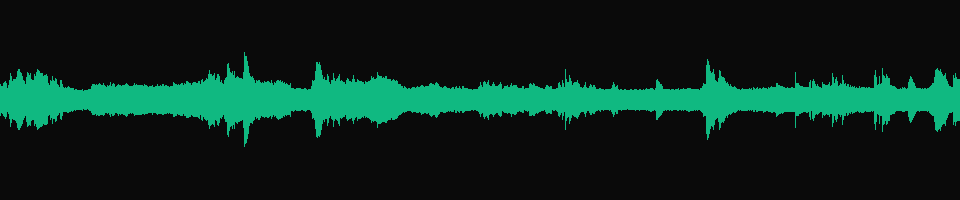
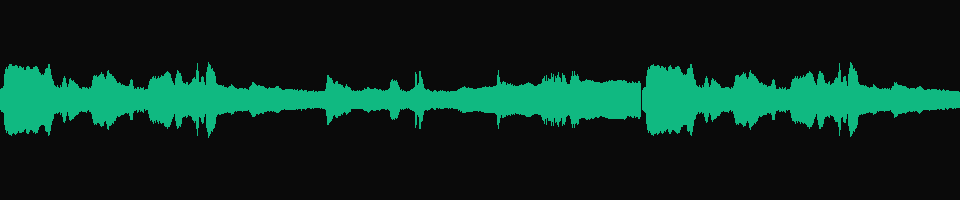
One waveform per file, each 30 s wide at the same scale, so a moved or repeated sound lines up with the one above it.
in.mp4, before
Waveform of the soundtrack in.mp4 came with
30 s The clip's own soundtrack. Every command below removes it or keeps it next to the new one.
-map 0:v -map 1:a -c copy -shortest New audio, cut to the video
Waveform of the replaced audio: the first 30 seconds of audio.m4a
30.0 s audio.m4a from its start. It is 40 s long and -shortest stopped it at 30 s with the video.
adelay=2s Starts at 0:02
Waveform of the delayed audio: two seconds of silence, then audio.m4a
2.000 s Two seconds of silence, then the same audio as above shifted right. silencedetect puts the end of the silence at 2.000 s.
-stream_loop -1 -i audio.mp3 Repeats to fill the video
Waveform of the looped MP3: 20 seconds of audio, then the same audio again from the start
0:20 The 20 s MP3 plays once, starts over at 0:20 and is cut at 0:30 by -shortest.

Footage: Sintel, © Blender Foundation, CC BY 3.0.

Run it

Run it on Rendobar

Send the same command from your code. The job fetches each input from its URL and returns the output file's URL when it finishes.

job.ts
import { createClient } from "@rendobar/sdk";
const rb = createClient({ apiKey: process.env.RENDOBAR_API_KEY });
const job = await rb.jobs.run({
type: "ffmpeg",
inputs: {
"in.mp4": "https://cdn.rendobar.com/examples/add-audio-to-video/in.mp4",
"audio.m4a": "https://cdn.rendobar.com/examples/add-audio-to-video/audio.m4a",
},
params: {
command: "ffmpeg -i in.mp4 -i audio.m4a -map 0:v -map 1:a -c copy -shortest out.mp4",
},
});
console.log(job.output.file.url);

Install with npm i @rendobar/sdk. jobs.run() submits and waits, so it returns the finished job in one call.

terminal
curl https://api.rendobar.com/jobs \
-H "Authorization: Bearer $RENDOBAR_API_KEY" \
-H "Content-Type: application/json" \
-d '{
"type": "ffmpeg",
"inputs": {
"in.mp4": "https://cdn.rendobar.com/examples/add-audio-to-video/in.mp4",
"audio.m4a": "https://cdn.rendobar.com/examples/add-audio-to-video/audio.m4a"
},
"params": {
"command": "ffmpeg -i in.mp4 -i audio.m4a -map 0:v -map 1:a -c copy -shortest out.mp4"
}
}'

Returns immediately with a job id. Poll GET /jobs/{id} or register a webhook rather than blocking on the request.

Every variant

Pick the command for your case

Each one ran on the same input. The line under it is what came out. Run times are the best of three runs with FFmpeg 8.0 on one desktop machine, so read them as relative.

  1. Keep the original audio and add a second track

    Stream copy
    ffmpeg -i in.mp4 -i audio.m4a -map 0 -map 1:a -c copy -shortest -disposition:a:1 0 out.mp4

    One video track and two audio tracks. The original stays the default and the new one is the alternate a player can switch to.

    87 ms run 8.2 MB 30.00 s long

  2. Add audio to a video that has none

    Stream copy
    ffmpeg -i silent.mp4 -i audio.m4a -c copy -shortest out.mp4

    The same bytes as the replace command. With one video and one audio stream in the inputs, FFmpeg needs no -map.

    81 ms run 7.7 MB 30.00 s long

  3. Add an MP3 to an MP4 without re-encoding

    Stream copy
    ffmpeg -i in.mp4 -i audio.mp3 -map 0:v -map 1:a -c copy out.mp4

    MP3 copied into the MP4 as it is. 30 s of video with 20.0 s of sound.

    83 ms run 7.7 MB 30.00 s long

  4. Start the audio 2 seconds in, without re-encoding

    Stream copy
    ffmpeg -i in.mp4 -itsoffset 2 -i audio.m4a -map 0:v -map 1:a -c copy -shortest out.mp4

    The audio track's first packet sits at 1.978 s. That first 21 ms packet is AAC encoder delay, so the sound itself starts at 2 s.

    86 ms run 7.7 MB 30.00 s long

  5. Start the audio 2 seconds in, with real silence

    Re-encode
    ffmpeg -i in.mp4 -i audio.m4a -filter_complex "[1:a]adelay=2s:all=1[a]" -map 0:v -map "[a]" -c:v copy -c:a aac -shortest out.mp4

    The audio track starts at 0:00 with 2.000 s of silence, then audio.m4a. Video copied, audio re-encoded.

    455 ms run 7.7 MB 30.00 s long

  6. Loop a short audio file to the video's length

    Stream copy
    ffmpeg -i in.mp4 -stream_loop -1 -i audio.mp3 -map 0:v -map 1:a -c copy -shortest out.mp4

    The 20 s MP3 plays one and a half times and stops with the video at 30.0 s. -stream_loop -1 goes before the -i it repeats.

    83 ms run 8.0 MB 30.00 s long

Gotchas

Where it goes wrong

Why does my output still have the old audio?

Because you left out -map. Without it FFmpeg picks one audio stream for the output by itself, and with two stereo tracks of the same kind it took the one from the first input:

ffmpeg -i in.mp4 -i audio.m4a -c copy out.mp4

30.0 s, one audio track, and its packets hash the same as in.mp4's audio. audio.m4a is not in the file.

Name the streams you want: -map 0:v -map 1:a. As soon as one -map is given, FFmpeg writes only the mapped streams.

Why is the output longer than the video?

The new audio is longer and nothing told FFmpeg to stop. The output runs until the last stream ends:

ffmpeg -i in.mp4 -i audio.m4a -map 0:v -map 1:a -c copy out.mp4

40.0 s file. The video track still holds 720 frames, 30.0 s, so the picture stops at 0:30 while the sound plays 10 s more.

Add -shortest. With stream copy on FFmpeg 8.0 it cut this one to 30.000 s, with the audio ending at 29.994 s.

I added a second audio track. Which one plays?

Check the default flag. With -map 0 -map 1:a -c copy and nothing else, FFmpeg marked both audio tracks as default, so the choice is left to the player.

Add -disposition:a:1 0 to clear the flag on the second audio track, as in the task above. ffprobe then reports default=1 on the original and default=0 on the new one. To make the new track the one that plays, swap the values: -disposition:a:0 0 -disposition:a:1 default.

Related: Mix audio tracks, Extract audio, Remove audio, Convert audio formats.

Your command. Our infrastructure.

Bring your own commands. Run them on scalable CPU and GPU infrastructure, and pay only for compute time.