
Add subtitles to a video with FFmpeg

For a track viewers can turn off, mux the SRT in with -c copy -c:s mov_text. Nothing is re-encoded and the file grew by 1,219 bytes. To make the text part of the picture, burn it with -vf subtitles=subs.srt and style it with force_style. Every command below ran on the same 40-second clip.

Soft Stream copy

Viewers can switch the subtitles on and off. No re-encode.

ffmpeg -i in.mp4 -i subs.srt -map 0 -map 1 -c copy -c:s mov_text -metadata:s:s:0 language=eng out.mp4

Video and audio copied, a third stream of mov_text tagged eng and on by default. The file grew by 1,219 bytes.

Subtitle stream
mov_text, eng, default
Added size
1,219 bytes
Run time
82 ms
Output
7.8 MB
Burned in Re-encode

The text has to show everywhere, including players and sites with no subtitle support.

ffmpeg -i in.mp4 -vf subtitles=subs.srt -c:a copy out.mp4

All ten lines drawn into the picture in white with a black outline. The video is re-encoded, the audio copied.

Default style
White, black outline
Video
Re-encoded
Run time
3.0 s
Output
5.3 MB

Proof

The same line, burned four ways

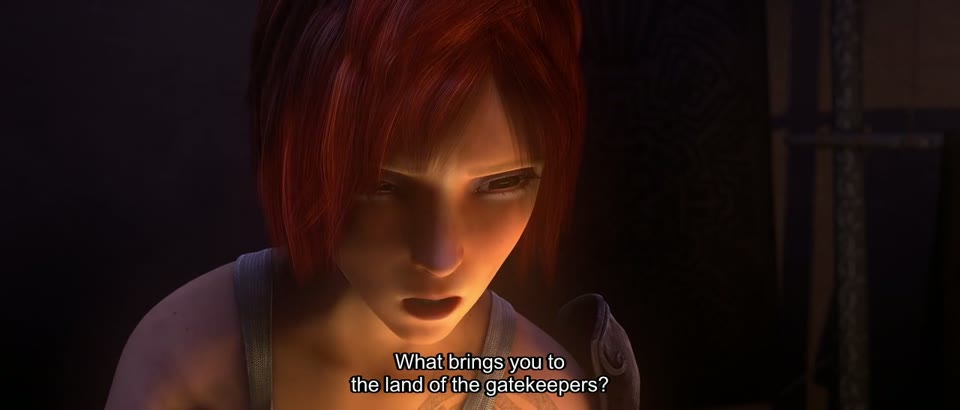
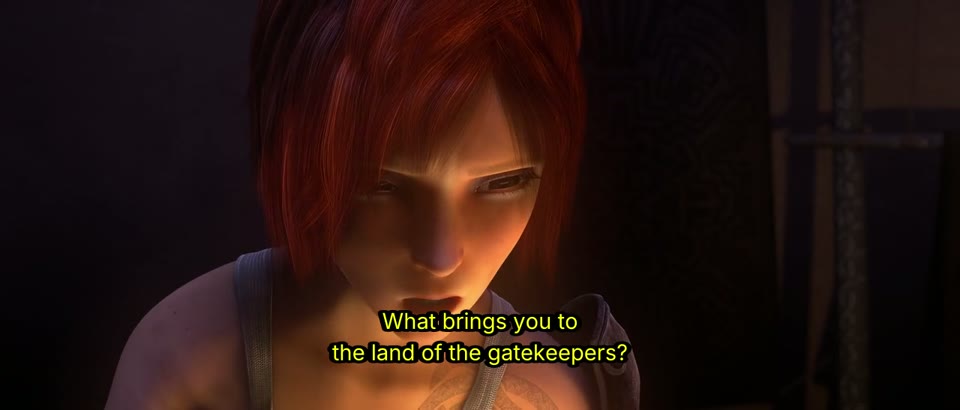
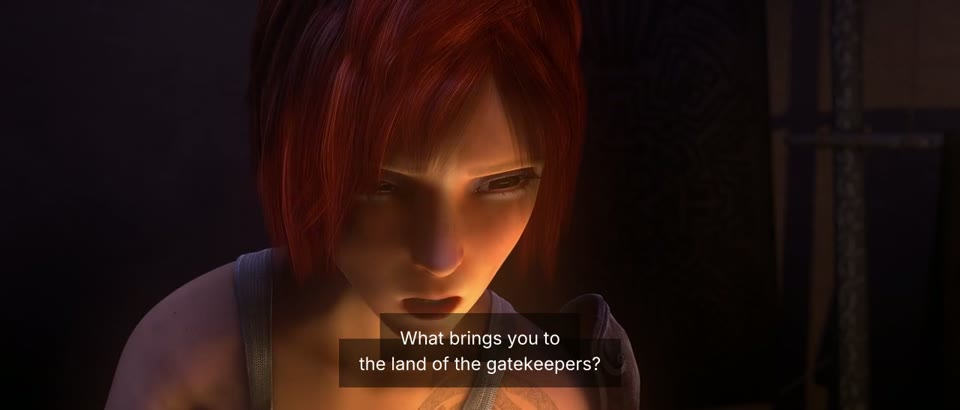
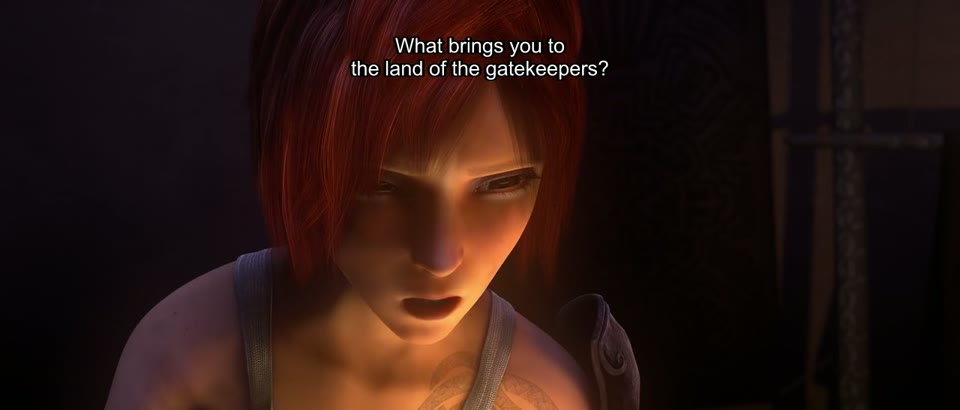
Each picture is 0:13 of the output, during the cue "What brings you to / the land of the gatekeepers?"
subtitles=subs.srt The default style
Two lines of white subtitle text with a thin black outline at the bottom of a dark frame
No options. White with a black outline, centered near the bottom. On our test machine libass picked Arial.
force_style FontName=Inter, FontSize=22, yellow Font, size, colour, outline, margin
Two lines of yellow subtitle text in Inter with a thicker outline, set higher in the frame
PrimaryColour=&H00FFFF& is yellow: ASS colours are written blue, green, red. MarginV=30 lifts the text off the bottom.
BorderStyle=3, OutlineColour=&H80000000& Text on a box
Two lines of white subtitle text on a semi-transparent black box
BorderStyle=3 turns the outline into a box, Outline=8 sets its padding and the 80 in the colour makes it half transparent.
force_style Alignment=6 Top center
Two lines of white subtitle text at the top center of the frame
Alignment=6 put the text at the top center. Alignment=8, the top-center value in the ASS spec, put it at the middle left.

Footage: Sintel, © Blender Foundation, CC BY 3.0.

Run it

Run it on Rendobar

Send the same command from your code. The job fetches each input from its URL and returns the output file's URL when it finishes.

job.ts
import { createClient } from "@rendobar/sdk";
const rb = createClient({ apiKey: process.env.RENDOBAR_API_KEY });
const job = await rb.jobs.run({
type: "ffmpeg",
inputs: {
"in.mp4": "https://cdn.rendobar.com/examples/add-subtitles/in.mp4",
"subs.srt": "https://cdn.rendobar.com/examples/add-subtitles/subs.srt",
},
params: {
command: "ffmpeg -i in.mp4 -vf subtitles=subs.srt -c:a copy out.mp4",
},
});
console.log(job.output.file.url);

Install with npm i @rendobar/sdk. jobs.run() submits and waits, so it returns the finished job in one call.

terminal
curl https://api.rendobar.com/jobs \
-H "Authorization: Bearer $RENDOBAR_API_KEY" \
-H "Content-Type: application/json" \
-d '{
"type": "ffmpeg",
"inputs": {
"in.mp4": "https://cdn.rendobar.com/examples/add-subtitles/in.mp4",
"subs.srt": "https://cdn.rendobar.com/examples/add-subtitles/subs.srt"
},
"params": {
"command": "ffmpeg -i in.mp4 -vf subtitles=subs.srt -c:a copy out.mp4"
}
}'

Returns immediately with a job id. Poll GET /jobs/{id} or register a webhook rather than blocking on the request.

Every variant

Pick the command for your case

Each one ran on the same input. The line under it is what came out. Run times are the best of three runs with FFmpeg 8.0 on one desktop machine, so read them as relative.

  1. Change the font, size and colour of burned subtitles

    Re-encode
    ffmpeg -i in.mp4 -vf "subtitles=subs.srt:fontsdir=.:force_style='FontName=Inter,FontSize=22,PrimaryColour=&H00FFFF&,Outline=2,MarginV=30'" -c:a copy out.mp4

    Yellow Inter with a 2 px outline, 30 units up from the bottom. fontsdir=. makes libass load Inter.ttf from the folder.

    3.2 s run 5.4 MB 40.00 s long

  2. Put a background box behind subtitles

    Re-encode
    ffmpeg -i in.mp4 -vf "subtitles=subs.srt:fontsdir=.:force_style='FontName=Inter,FontSize=18,BorderStyle=3,Outline=8,OutlineColour=&H80000000&,MarginV=24'" -c:a copy out.mp4

    Each cue sits on a half-transparent black box sized to the text.

    3.2 s run 5.3 MB 40.00 s long

  3. Move subtitles to the top

    Re-encode
    ffmpeg -i in.mp4 -vf "subtitles=subs.srt:force_style='Alignment=6,MarginV=24'" -c:a copy out.mp4

    Every cue at the top center, 24 units below the edge.

    3.0 s run 5.3 MB 40.00 s long

  4. Add subtitles to MKV, on by default

    Stream copy
    ffmpeg -i in.mp4 -i subs.srt -map 0 -map 1 -c copy -metadata:s:s:0 language=eng -disposition:s:0 default out.mkv

    The SRT goes in as SubRip, unchanged, tagged eng with the default flag set. Without -disposition the flag was 0.

    94 ms run 7.8 MB 40.02 s long

  5. Delay the subtitles by 1.5 seconds

    Stream copy
    ffmpeg -i in.mp4 -itsoffset 1.5 -i subs.srt -map 0 -map 1 -c copy -c:s mov_text out.mp4

    The first line now appears at 1.500 s instead of 0.000 s. -itsoffset shifts only the input it is written before.

    83 ms run 7.8 MB 40.00 s long

  6. Burn the subtitle track already inside a video

    Re-encode
    ffmpeg -i in.mkv -vf subtitles=in.mkv -c:a copy out.mp4

    The SubRip track inside in.mkv drawn into the picture, same look as burning subs.srt.

    3.3 s run 5.3 MB 40.04 s long

Gotchas

Where it goes wrong

Why are my burned subtitles so big, or so small?

FontSize is not in pixels. libass lays SRT subtitles out on a 288-line canvas and scales that canvas to the video height, so the same number grows with the resolution. We burned the cue "A dragon." with FontSize=24 onto blank frames of four sizes and measured the text:

  • 640x272: 18 px tall
  • 1280x546: 38 px tall
  • 1920x818: 57 px tall
  • 1080x1920 (vertical): 132 px tall

To work in pixels, set PlayResY to the video height. The canvas then matches the frame:

ffmpeg -i in.mp4 -vf "subtitles=subs.srt:force_style='FontSize=24,PlayResY=546'" -c:a copy out.mp4

On a blank 1280x546 frame, "A dragon." came out 20 px tall, against 38 px without PlayResY. The command above ran on in.mp4 in full.

Why does -c copy fail when I add an SRT to an MP4?

MP4 has no slot for SubRip. With -c copy FFmpeg tries to copy the SRT as it is and stops before writing anything:

ffmpeg -i in.mp4 -i subs.srt -map 0 -map 1 -c copy out.mp4

Could not find tag for codec subrip in stream #2, codec not currently supported in container

Add -c:s mov_text after -c copy. Video and audio are still copied, only the subtitles are converted. MKV takes SubRip as it is, so the same command with out.mkv works without it.

Check the default flag too. The MP4 mov_text track came out with default=1. The MKV SubRip track came out with default=0, which many players read as off. -disposition:s:0 default sets it.

Why does the subtitles filter fail with a Windows path?

The colon after the drive letter ends the filename. FFmpeg reads the rest as the next option, original_size:

ffmpeg -i in.mp4 -vf "subtitles=D:/rendobar/_recipe-media/cdn/add-subtitles/subs.srt" -c:a copy out.mp4

Unable to parse option value "/rendobar/_recipe-media/cdn/add-subtitles/subs.srt" as image size

Escape the colon and quote the path inside the filter:

ffmpeg -i in.mp4 -vf "subtitles='D\:/rendobar/_recipe-media/cdn/add-subtitles/subs.srt'" -c:a copy out.mp4

Runs and burns the subtitles. A relative path with no drive letter, like subs.srt, needs neither.

An https URL has the same colon problem. Burning subtitles into a video with FFmpeg covers the escaping for paths and URLs, the place most raw burn attempts in our job history broke.

Related: Add text to a video, Add a watermark, Remove audio, Convert to MP4, Extract subtitles.

Your command. Our infrastructure.

Bring your own commands. Run them on scalable CPU and GPU infrastructure, and pay only for compute time.