
Add text to a video with FFmpeg

Use the drawtext filter with a font file, the text, a size, a colour and a position: x=(w-tw)/2 centers it. Add box=1 for a background. Inside the text, write a colon as \:, and put anything with apostrophes in a file and pass it with textfile.

Centered Re-encode

A title or label in the middle of the frame.

ffmpeg -i in.mp4 -vf "drawtext=fontfile=Inter.ttf:text='Sintel':fontsize=64:fontcolor=white:x=(w-tw)/2:y=(h-th)/2" -c:a copy out.mp4

White 64 px text centered on every frame. tw and th are the width and height of the rendered text.

Position
x=(w-tw)/2, y=(h-th)/2
Audio
Copied, not re-encoded
Run time
2.1 s
Output
5.6 MB
Caption Re-encode

Text over moving footage that has to stay readable on any background.

ffmpeg -i in.mp4 -vf "drawtext=fontfile=Inter.ttf:text='The dragon wakes up':fontsize=36:fontcolor=white:box=1:boxcolor=black@0.5:boxborderw=16:x=(w-tw)/2:y=h-th-48" -c:a copy out.mp4

The line sits 48 px above the bottom on a half-transparent black box with 16 px of padding. It stays readable on the bright shots and the dark ones.

Box
black@0.5, 16 px padding
Position
Centered, 48 px from the bottom
Run time
1.9 s
Output
5.5 MB

Proof

What each command drew

Frames from the outputs, at the times given in each label.
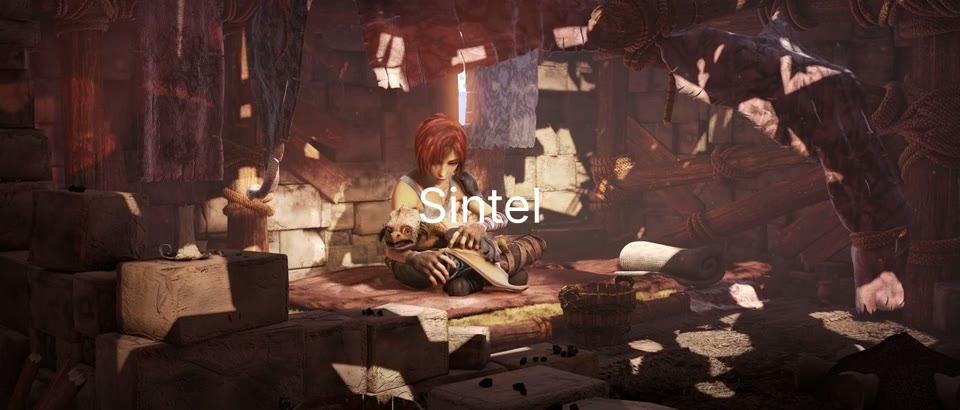
x=(w-tw)/2:y=(h-th)/2, at 0:12 Centered, no background
The word Sintel in white, centered over a wide shot of a cluttered hut
Plain white text with no box or outline. Over the bright middle of this shot it loses contrast.
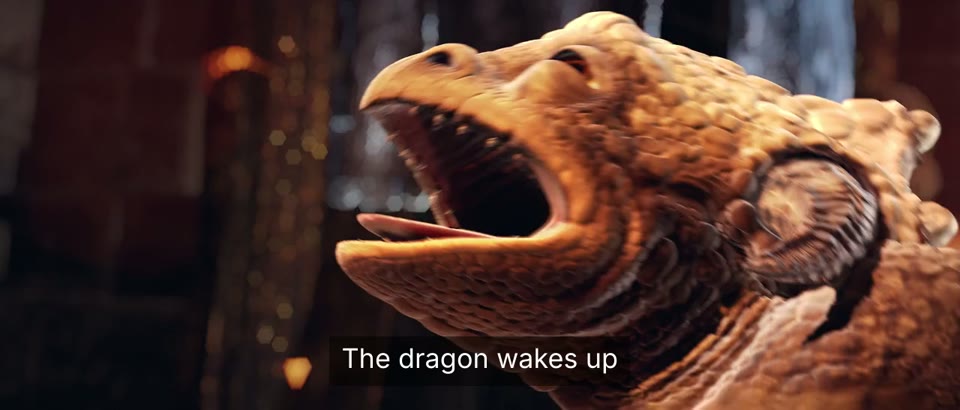
box=1:boxcolor=black@0.5, at 0:09 Readable on any shot
The caption The dragon wakes up on a dark box under a close-up of the roaring dragon
The box sizes itself to the text. boxborderw is its padding.
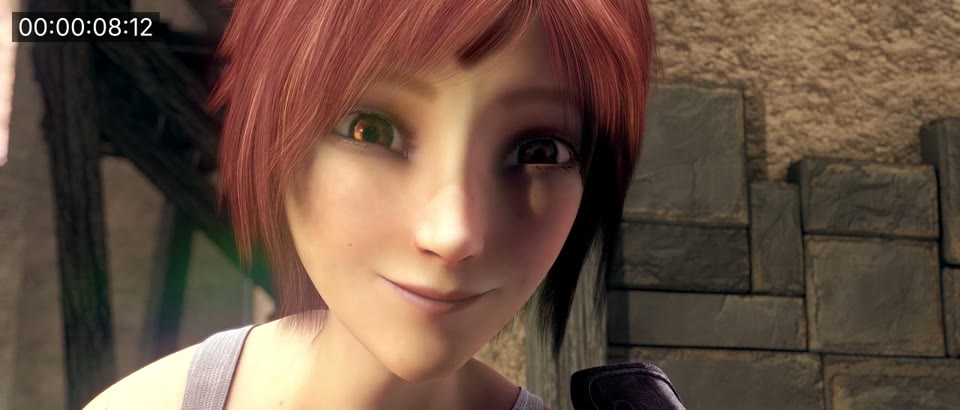
timecode='00\:00\:00\:00':rate=24, at 0:08.5 Hours, minutes, seconds, frames
Close-up of the girl smiling with the timecode 00:00:08:12 in the top-left corner
08:12 At 8.5 s the counter reads 00:00:08:12, frame 12 of 24 in that second.
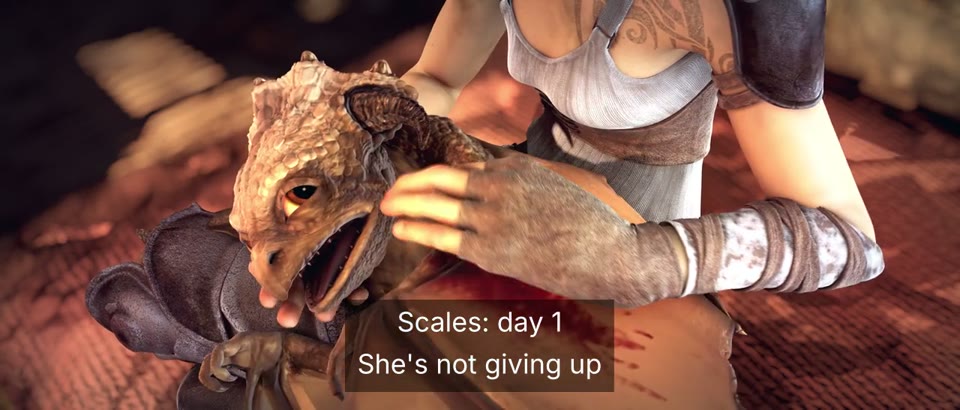
textfile=text.txt:text_align=C, at 0:17 Colon, apostrophe and line break, no escaping
Two centered lines, Scales: day 1 and She's not giving up, on a dark box over the girl holding the dragon
The file holds the text as typed. text_align=C centers each line inside the block.

Footage: Sintel, © Blender Foundation, CC BY 3.0.

Run it

Run it on Rendobar

Send the same command from your code. The job fetches each input from its URL and returns the output file's URL when it finishes.

job.ts
import { createClient } from "@rendobar/sdk";
const rb = createClient({ apiKey: process.env.RENDOBAR_API_KEY });
const job = await rb.jobs.run({
type: "ffmpeg",
inputs: {
"in.mp4": "https://cdn.rendobar.com/examples/add-text-to-video/in.mp4",
"Inter.ttf": "https://cdn.rendobar.com/examples/add-text-to-video/Inter.ttf",
},
params: {
command: "ffmpeg -i in.mp4 -vf \"drawtext=fontfile=Inter.ttf:text='The dragon wakes up':fontsize=36:fontcolor=white:box=1:boxcolor=black@0.5:boxborderw=16:x=(w-tw)/2:y=h-th-48\" -c:a copy out.mp4",
},
});
console.log(job.output.file.url);

Install with npm i @rendobar/sdk. jobs.run() submits and waits, so it returns the finished job in one call.

terminal
curl https://api.rendobar.com/jobs \
-H "Authorization: Bearer $RENDOBAR_API_KEY" \
-H "Content-Type: application/json" \
-d '{
"type": "ffmpeg",
"inputs": {
"in.mp4": "https://cdn.rendobar.com/examples/add-text-to-video/in.mp4",
"Inter.ttf": "https://cdn.rendobar.com/examples/add-text-to-video/Inter.ttf"
},
"params": {
"command": "ffmpeg -i in.mp4 -vf \"drawtext=fontfile=Inter.ttf:text='\''The dragon wakes up'\'':fontsize=36:fontcolor=white:box=1:boxcolor=black@0.5:boxborderw=16:x=(w-tw)/2:y=h-th-48\" -c:a copy out.mp4"
}
}'

Returns immediately with a job id. Poll GET /jobs/{id} or register a webhook rather than blocking on the request.

Every variant

Pick the command for your case

Each one ran on the same input. The line under it is what came out. Run times are the best of three runs with FFmpeg 8.0 on one desktop machine, so read them as relative.

  1. Burn in a timecode

    Re-encode
    ffmpeg -i in.mp4 -vf "drawtext=fontfile=Inter.ttf:timecode='00\:00\:00\:00':rate=24:fontsize=32:fontcolor=white:box=1:boxcolor=black@0.6:boxborderw=8:x=24:y=24" -c:a copy out.mp4

    00:00:00:00 on the first frame, 00:00:19:23 on the last. Without rate FFmpeg stops with "Valid timecode frame rate must be specified".

    1.9 s run 5.6 MB 20.00 s long

  2. Show the running time

    Re-encode
    ffmpeg -i in.mp4 -vf "drawtext=fontfile=Inter.ttf:text='%{pts\:hms}':fontsize=32:fontcolor=white:box=1:boxcolor=black@0.6:boxborderw=8:x=24:y=24" -c:a copy out.mp4

    Hours, minutes, seconds and milliseconds of each frame: 00:00:08.500 at 8.5 s.

    2.0 s run 5.6 MB 20.00 s long

  3. Show the frame number

    Re-encode
    ffmpeg -i in.mp4 -vf "drawtext=fontfile=Inter.ttf:text='Frame %{frame_num}':fontsize=32:fontcolor=white:box=1:boxcolor=black@0.6:boxborderw=8:x=w-tw-24:y=24" -c:a copy out.mp4

    Counts from Frame 0. At 8.5 s it reads Frame 204. %{n} gave the same numbers.

    1.8 s run 5.6 MB 20.00 s long

  4. Show text only between two times

    Re-encode
    ffmpeg -i in.mp4 -vf "drawtext=fontfile=Inter.ttf:text='Scales':fontsize=64:fontcolor=white:x=(w-tw)/2:y=(h-th)/2:enable='between(t,2,6)'" -c:a copy out.mp4

    No text at 1.9 s, text from 2.0 s through 6.0 s, gone at 6.1 s.

    1.8 s run 5.6 MB 20.00 s long

  5. Add several lines of text

    Re-encode
    ffmpeg -i in.mp4 -vf "drawtext=fontfile=Inter.ttf:textfile=text.txt:text_align=C:line_spacing=12:fontsize=36:fontcolor=white:box=1:boxcolor=black@0.5:boxborderw=16:x=(w-tw)/2:y=h-th-40" -c:a copy out.mp4

    Both lines of text.txt, centered on one box, 12 px apart. The colon and the apostrophe came out as typed.

    1.8 s run 5.6 MB 20.00 s long

  6. Size the text to the video

    Re-encode
    ffmpeg -i in.mp4 -vf "drawtext=fontfile=Inter.ttf:text='Sintel':fontsize=h/8:fontcolor=white:x=(w-tw)/2:y=(h-th)/2" -c:a copy out.mp4

    fontsize takes an expression. "Sintel" measured 169x52 px on this 546-line video and 335x103 px on a 1080-line frame.

    1.7 s run 5.6 MB 20.00 s long

  7. Scroll text across the screen

    Re-encode
    ffmpeg -i in.mp4 -vf "drawtext=fontfile=Inter.ttf:text='Sintel, Blender Foundation, 2010':fontsize=36:fontcolor=white:box=1:boxcolor=black@0.5:boxborderw=12:x=w-mod(t*200\,w+tw):y=h-th-40" -c:a copy out.mp4

    The line enters from the right and moves left 200 px a second, then comes round again. The comma inside mod() is written \, so the filter does not split there.

    1.8 s run 6.0 MB 20.00 s long

Gotchas

Where it goes wrong

How do I escape colons and apostrophes in drawtext?

A colon ends an option in a filter, even inside quotes. This fails before any frame is read:

ffmpeg -i in.mp4 -vf "drawtext=fontfile=Inter.ttf:text='Scales: day 1':fontsize=40:fontcolor=white" -c:a copy out.mp4

No option name near ' day 1:fontsize=40:fontcolor=white'

Write it as \: and the text draws: text='Scales\: day 1'. The same goes for the colons in %{pts\:hms} and in a timecode.

Apostrophes are worse because they are also the filter's quote mark. With text=She\'s here the apostrophe opened a quote and swallowed the rest of the filter: the frame showed Shes here:fontsize=36:fontcolor=white:box=1:... in small black type in the top-left corner. Other escapes we tried dropped the apostrophe and drew "Shes here".

Put the text in a file instead. textfile=text.txt drew Scales: day 1 and She's not giving up exactly as typed, on two lines, with no escaping at all.

Why does the timestamp start at zero when I cut with -ss?

-ss before -i resets the timestamps, so %{pts\:hms} counts from the cut, not from the start of the source:

ffmpeg -ss 5 -i in.mp4 -vf "drawtext=fontfile=Inter.ttf:text='%{pts\:hms}':fontsize=40:fontcolor=white" -c:a copy out.mp4

The first frame reads 00:00:00.000, although it is 5 s into in.mp4.

Add the offset to the expansion, %{pts\:hms\:5}, or keep the source timestamps with -copyts before -i. Both made the first frame read 00:00:05.000.

Why does fontfile fail with a Windows path?

The colon after the drive letter ends the option, so FFmpeg reads the rest of the path as the next one:

ffmpeg -i in.mp4 -vf "drawtext=fontfile=C:/Windows/Fonts/arial.ttf:text=Hi:fontsize=40" -c:a copy out.mp4

No option name near '/Windows/Fonts/arial.ttf:text=Hi:fontsize=40'

Escape the colon and quote the path: fontfile='C\:/Windows/Fonts/arial.ttf'. That ran. A font file next to the video, as in every command on this page, needs neither. Rendobar fetches Inter.ttf with the video, so the same command runs there.

Related: Add subtitles, Add a watermark, Trim a video, Extract a thumbnail.

Your command. Our infrastructure.

Bring your own commands. Run them on scalable CPU and GPU infrastructure, and pay only for compute time.