
Batch convert all files in a folder with FFmpeg

FFmpeg converts one file per command, so wrap it in a bash for loop. for f in *.mp4; do ffmpeg -i "$f" "out/${f%.mp4}.mp3"; done converts every MP4 in the folder to MP3 and keeps each name: ${f%.mp4} strips the extension, the quotes keep a name with spaces in one piece, and out/ keeps the new files away from the old ones. Every loop below ran on the same folder of six clips.

Quick Re-encode

One line for a folder you convert once. Writes every output into out/.

mkdir -p out; for f in *.mp4; do ffmpeg -i "$f" "out/${f%.mp4}.mp3"; done

4 MP3s in out/, each named after its MP4: alley.mp3, girl.mp3, rooftops.mp3, shaman.mp3. 6.02 s each at 128 kb/s, the MP3 default. dragon.mov and more/scales.mp4 were not touched.

Files
4 of 4 MP4s, names kept
Each
6.02 s at 128 kb/s
Run time
523 ms
Output
388 KB
Careful Re-encode

For a folder you come back to. Skips finished files and never leaves a broken one under the final name.

mkdir -p out; for f in *.mp4; do o="out/${f%.mp4}.mp3"; [ -e "$o" ] || { ffmpeg -nostdin -y -i "$f" -f mp3 "$o.part" && mv "$o.part" "$o"; }; done

The same 4 MP3s, byte for byte. Run it again and it converts nothing, because every output exists. A file it was stopped in the middle of stays a .part and is converted again on the next run.

Second run
0 files converted
Stopped run
leaves a .part file only
Run time
565 ms
Output
388 KB

Proof

The folder before and after

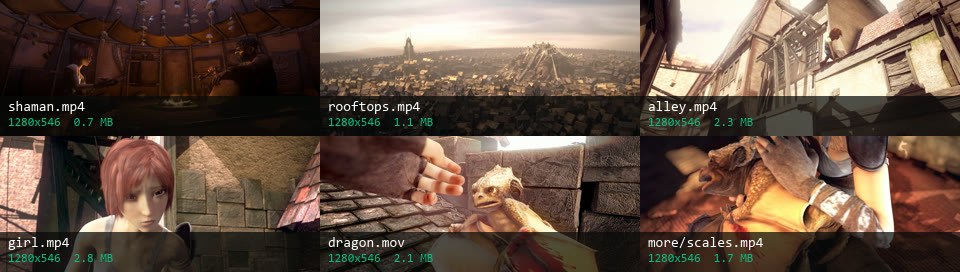
Each tile is the frame at 0:03 of one file, with its name and size. The loops run in the top folder.
the input folder
Six frames from the input clips, labelled shaman.mp4, rooftops.mp4, alley.mp4, girl.mp4, dragon.mov and more/scales.mp4
6 files Four MP4s at the top, one MOV and one MP4 in more/. *.mp4 matches the first four only.
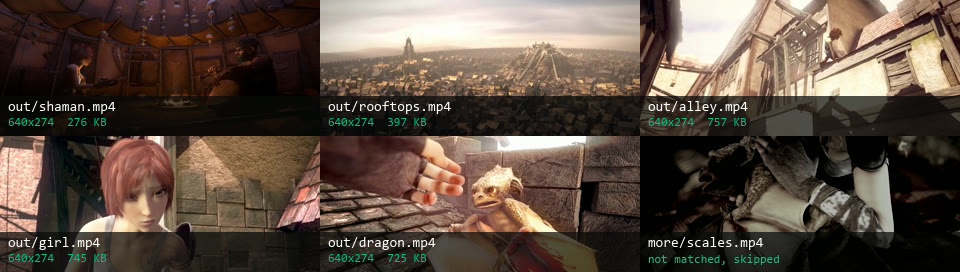
for f in *.mp4 *.mov, scale=640:-2 5 files converted, names kept
Five converted clips in out/ at 640x274 with their sizes, and the subfolder clip dimmed as skipped
2.9 MB Every MP4 and the MOV re-encoded to 640x274 H.264. more/scales.mp4 is skipped because a pattern does not look inside subfolders.
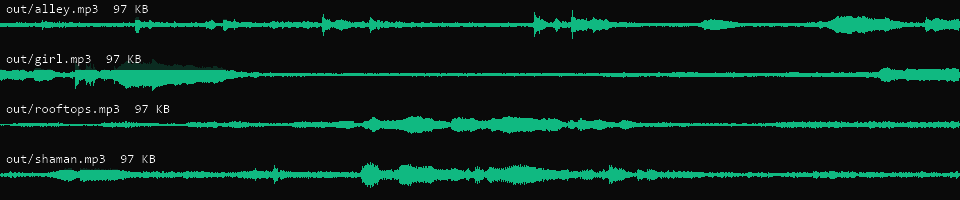
for f in *.mp4, to MP3 4 MP3s, one per MP4
Four waveforms, one per MP3 in out/, labelled alley, girl, rooftops and shaman, 97 KB each
97 KB each The soundtrack of each clip, 6.02 s at 128 kb/s. ffmpeg wrote the audio only, with no -vn in the command.

Footage: Sintel, © Blender Foundation, CC BY 3.0.

Run it

Run it on Rendobar

Send the same command from your code. The job fetches each input from its URL and returns the output file's URL when it finishes.

job.ts
import { createClient } from "@rendobar/sdk";
const rb = createClient({ apiKey: process.env.RENDOBAR_API_KEY });
const job = await rb.jobs.run({
type: "ffmpeg",
inputs: {
"rooftops.mp4": "https://cdn.rendobar.com/examples/batch-convert-videos/rooftops.mp4",
},
params: {
command: "ffmpeg -i rooftops.mp4 rooftops.mp3",
},
});
console.log(job.output.file.url);

Install with npm i @rendobar/sdk. jobs.run() submits and waits, so it returns the finished job in one call.

terminal
curl https://api.rendobar.com/jobs \
-H "Authorization: Bearer $RENDOBAR_API_KEY" \
-H "Content-Type: application/json" \
-d '{
"type": "ffmpeg",
"inputs": {
"rooftops.mp4": "https://cdn.rendobar.com/examples/batch-convert-videos/rooftops.mp4"
},
"params": {
"command": "ffmpeg -i rooftops.mp4 rooftops.mp3"
}
}'

Returns immediately with a job id. Poll GET /jobs/{id} or register a webhook rather than blocking on the request.

Every variant

Pick the command for your case

Each one ran on the same input. The line under it is what came out. Run times are the best of three runs with FFmpeg 8.0 on one desktop machine, so read them as relative.

  1. Convert several formats in one loop

    Re-encode
    mkdir -p out; for f in *.mp4 *.mov; do ffmpeg -i "$f" "out/${f%.*}.mp3"; done

    5 MP3s, dragon.mp3 included. ${f%.*} strips any extension, so one line names the output for every format.

    629 ms run 486 KB 30.08 s long

  2. Re-encode every video to H.264 at 640 wide

    Re-encode
    mkdir -p out; for f in *.mp4 *.mov; do ffmpeg -i "$f" -vf scale=640:-2 -c:v libx264 -crf 23 -c:a aac "out/${f%.*}.mp4"; done

    5 MP4s at 640x274, 2.9 MB together against 9.0 MB of input. The MOV comes out as dragon.mp4.

    1.7 s run 2.9 MB 30.08 s long

  3. Change the container without re-encoding

    Stream copy
    mkdir -p out; for f in *.mp4; do ffmpeg -i "$f" -c copy "out/${f%.mp4}.mkv"; done

    4 MKVs with the same H.264 and AAC streams, copied. Each MKV is 1.4 to 1.6 KB smaller than its MP4.

    312 ms run 6.8 MB 24.08 s long

  4. Convert files in subfolders too

    Re-encode
    find . -name '*.mp4' -not -path './out/*' -exec sh -c 'mkdir -p "out/${1%/*}" && ffmpeg -nostdin -i "$1" "out/${1%.mp4}.mp3"' _ {} \;

    5 MP3s, more/scales.mp4 included, written to out/more/scales.mp3. The folder tree is copied into out/, so two files with the same name in different folders never collide.

    786 ms run 486 KB 30.08 s long

  5. Convert several files at once

    Re-encode
    mkdir -p out; printf '%s\0' *.mp4 *.mov | xargs -0 -n 1 -P 4 sh -c 'ffmpeg -nostdin -i "$1" -vf scale=640:-2 -c:v libx264 -crf 23 -c:a aac "out/${1%.*}.mp4"' _

    The same 5 files as the H.264 loop above, byte for byte, with up to 4 ffmpeg processes running at a time. Compare the two run times.

    1.3 s run 2.9 MB 30.08 s long

Gotchas

Where it goes wrong

Why does my loop skip files or say No such file?

A while read loop gets its file names from stdin, and ffmpeg reads stdin too: it listens for key presses while it encodes. It eats the start of the next name, and the loop asks for a file that does not exist.

mkdir -p out; find . -name '*.mp4' -not -path './out/*' | while read f; do ffmpeg -i "$f" -vf scale=640:-2 "out/$(basename "${f%.mp4}").mp4"; done

3 of the 5 files converted, in each of three runs. The other names reached ffmpeg with their leading . gone.

Add -nostdin and ffmpeg leaves stdin alone:

mkdir -p out; find . -name '*.mp4' -not -path './out/*' | while read f; do ffmpeg -nostdin -i "$f" -vf scale=640:-2 "out/$(basename "${f%.mp4}").mp4"; done

5 of 5, every run.

A short job can finish before ffmpeg checks for keys, so a quick test hides the bug. Extracting MP3s from the same clips got all 5 without the flag. The re-encode, which runs longer, did not.

Why does ffmpeg try to open a file called *.mkv?

When a pattern matches nothing, bash passes the pattern on as it is. This folder has no MKV files:

mkdir -p out; for f in *.mp4 *.mkv; do ffmpeg -i "$f" "out/${f%.*}.mp3"; done

The 4 MP4s converted, then ffmpeg was asked to open a file named *.mkv and failed.

Turn on nullglob and a pattern that matches nothing drops out of the list:

shopt -s nullglob; mkdir -p out; for f in *.mp4 *.mkv; do ffmpeg -i "$f" "out/${f%.*}.mp3"; done

4 MP3s, no error.

What happens if I stop the loop halfway?

The file ffmpeg was writing stays behind, and it is not a working file. We killed ffmpeg 2 s into girl.mp4:

mkdir -p out; timeout -s KILL 2 ffmpeg -nostdin -readrate 1 -i girl.mp4 out/girl.mp3

out/girl.mp3 was left at 0 bytes, and ffprobe could not read it.

A loop that skips every output that exists would skip that file on every later run. The careful loop writes to out/girl.mp3.part and renames it only after ffmpeg succeeds, so a stopped run leaves the .part file and the next run converts girl.mp4 again.

Keep the -y. Without it, ffmpeg 8.0 found the old .part file, printed already exists. Exiting. and still exited with status 0, so mv renamed the leftover file to out/girl.mp3.

Can I convert the files in parallel?

On your machine, xargs -P 4 runs four ffmpeg processes at a time and wrote the same five files, byte for byte, as the loop. The loop converts one file after another, so its run time is every file's time added up. Compare the run times of the H.264 loop and the parallel command above.

On Rendobar a batch is not a loop. Each file is its own job: you send one job per file, all at once, and they run side by side up to your plan's limit on concurrent jobs. The Run it on Rendobar block shows one of those jobs, the command for rooftops.mp4. Send it once per file with that file's name.

Related: Extract audio, Convert to MP4, Resize a video, Convert audio formats.

Your command. Our infrastructure.

Bring your own commands. Run them on scalable CPU and GPU infrastructure, and pay only for compute time.