

Check a video file for corruption with FFmpeg

Decode the whole file to nowhere: ffmpeg -v warning -i in.mp4 -f null -. No output means every frame decoded. Use -v warning, not the usual -v error, which missed 4 of the 20 damaged files we tested. Every command below ran on one clean clip and four copies we broke on purpose.

Fast Read only

Reads every packet without decoding. Finds files that stop early or will not open, not damaged pictures.

ffmpeg -v warning -i truncated.mp4 -c copy -f null -

Printed 5 lines ending in stream 1, offset 0x4935c8: partial file: the file stops partway through. The clean in.mp4 printed nothing.

Damaged keyframes found
1 of 20
Run time
90 ms
Thorough Read only

Decodes every frame, so it also finds damaged pictures. Takes as long as a decode of the whole file.

ffmpeg -v warning -i damaged.mp4 -f null -

Printed one line, corrupt decoded frame, for the 4 KiB of zeros at 0:08. The same command with -v error printed nothing.

Damaged keyframes found
20 of 20
Clean file
No output
Run time
325 ms

Proof

What the damage looks like

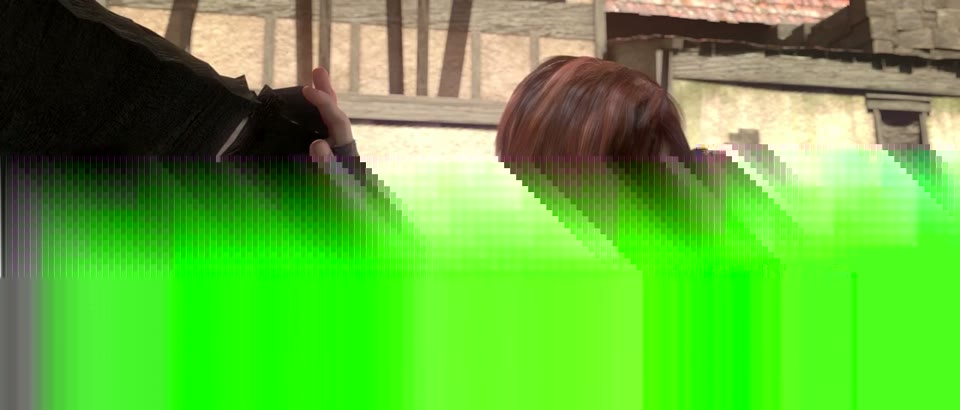
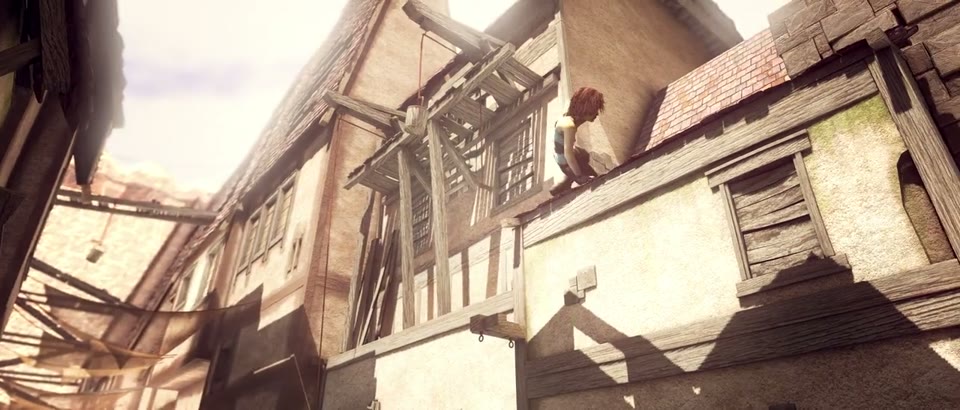
Frame 192 (0:08) of the clean file and of damaged.mp4, and the last whole frame left in truncated.mp4.
in.mp4, 0:08 Both checks print nothing
Frame at 0:08 of the clean clip: the girl pulls aside a dark cloth in a sunlit alley
0 lines The keyframe at 0:08 as encoded. The fast and the thorough check both printed nothing for this file and exited 0.
damaged.mp4, 0:08 -v error printed nothing
The same frame from damaged.mp4: the lower two thirds are a smeared green block
48 frames 4 KiB of zeros inside this keyframe. FFmpeg filled in what it could not decode, and the smear lasts until the next keyframe at 0:10. Only -v warning reported it.
truncated.mp4, last frame The header still says 30 s
The last whole frame in truncated.mp4: rooftops and a broken wooden balcony at 0:20
0:20.04 Frame 482 of a promised 720. ffprobe reports 30.000000 for this file, because the header was written before the cut.

Footage: Sintel, © Blender Foundation, CC BY 3.0. Damage added by us.

Run it

Run it on Rendobar

Send the same command from your code. The job reads the input from its URL and returns the report as JSON.

job.ts
import { createClient } from "@rendobar/sdk";
const rb = createClient({ apiKey: process.env.RENDOBAR_API_KEY });
const job = await rb.jobs.run({
type: "ffprobe",
params: {
command: "ffprobe -v error -count_packets -show_entries stream=codec_type,nb_frames,nb_read_packets -of json https://cdn.rendobar.com/examples/check-video-corruption/truncated.mp4",
},
});
console.log(job.output.data);

Install with npm i @rendobar/sdk. jobs.run() submits and waits, so it returns the finished job in one call.

terminal
curl https://api.rendobar.com/jobs \
-H "Authorization: Bearer $RENDOBAR_API_KEY" \
-H "Content-Type: application/json" \
-d '{
"type": "ffprobe",
"params": {
"command": "ffprobe -v error -count_packets -show_entries stream=codec_type,nb_frames,nb_read_packets -of json https://cdn.rendobar.com/examples/check-video-corruption/truncated.mp4"
}
}'

Returns immediately with a job id. Poll GET /jobs/{id} or register a webhook rather than blocking on the request.

Every variant

Pick the command for your case

Each one ran on the same input. The line under it is what came out. Run times are the best of three runs with FFmpeg 8.0 on one desktop machine, so read them as relative.

  1. Get a pass or fail exit code for a script

    Read only
    ffmpeg -v warning -xerror -i damaged.mp4 -f null -; echo $?

    Prints 183 and stops at the first damaged frame. The clean in.mp4 prints 0. Without -xerror, damaged.mp4 also printed 0.

    153 ms run

  2. Read the duration from the header only

    Read only
    ffprobe -v error -show_entries format=duration -of csv=p=0 truncated.mp4

    Prints 30.000000 and exits 0, though half the file is gone. A header check only proves the file opens.

    79 ms run

  3. Compare the frames a file promises with the frames it holds

    Read only
    ffprobe -v error -count_packets -show_entries stream=codec_type,nb_frames,nb_read_packets -of json truncated.mp4

    The video promises 720 frames (nb_frames) and holds 483 (nb_read_packets). The audio promises 1408 and holds 939. Fewer packets than promised means the file was cut short.

    79 ms run

  4. Check only the last second

    Read only
    ffmpeg -v warning -sseof -1 -i truncated.mp4 -f null -

    Prints Output file is empty, nothing was encoded: the last second of the 30 s file is missing. With -v error it printed nothing.

    88 ms run

  5. Check every file in a folder

    Read only
    for f in *.mp4; do ffmpeg -v warning -xerror -i "$f" -f null - 2>/dev/null || echo "$f"; done

    Printed damaged.mp4, frag-cut.mp4, no-moov.mp4 and truncated.mp4, the four broken files. The clean in.mp4 passed.

    917 ms run

  6. Save the playable part of a cut-off file

    Stream copy
    ffmpeg -v error -fflags +discardcorrupt -i truncated.mp4 -c copy fixed.mp4

    fixed.mp4 holds the first 20.08 s, 482 frames, and decodes with no warnings. +discardcorrupt drops the half-written frame at the cut.

    77 ms run 4.7 MB 20.08 s long

Gotchas

Where it goes wrong

Why does -v error find nothing in a damaged file?

FFmpeg reports some damage as a warning, not an error. We wrote 4 KiB of zeros into the middle of a different keyframe of in.mp4 20 times. A decode at -v error flagged 16 of the 20 files. A decode at -v warning flagged all 20, and each one had between 5 and 48 damaged frames.

ffmpeg -v error -i damaged.mp4 -f null -

No output and exit code 0, yet 2 s of this file are smeared green (the second picture above). At -v warning it prints corrupt decoded frame.

On the clean in.mp4, -v warning printed nothing, so the lower log level added no noise.

Why does FFmpeg exit with 0 on a broken file?

A decoding error does not fail the run. FFmpeg conceals the damage, carries on and exits 0. Every check on damaged.mp4 and truncated.mp4 exited 0 unless it had -xerror, so a script that only tests the exit code passes both.

ffmpeg -v warning -xerror -i truncated.mp4 -f null -; echo $?

183. -xerror turns the first error into a failed run. A file FFmpeg cannot open at all, like no-moov.mp4, exits 183 without it.

Can FFmpeg fix "moov atom not found"?

No. The moov atom is the MP4's index: where each frame sits and how long it lasts. FFmpeg writes it at the end of the file unless you ask for +faststart, so a file cut off before the end loses it, and nothing can read what is left:

ffprobe -v error -show_entries format=duration -of csv=p=0 no-moov.mp4

moov atom not found, then Invalid data found when processing input, exit code 1. ffmpeg -i no-moov.mp4 -c copy fails the same way, so none of it can be saved.

Where the index sits decides what survives. We cut three copies of the same clip at the same byte, halfway through:

  • Index at the end (no-moov.mp4, the MP4 default): unreadable.
  • Index at the front (truncated.mp4, written with -movflags +faststart): 20.08 s saved by the salvage command above.
  • Fragmented (frag-cut.mp4, written with -movflags +frag_keyframe+empty_moov): 20.2 s saved with -c copy.

+faststart moves the index to the front only after the file is finished. For a recording that might be cut off, write fragmented MP4.

Is -map 0:1 from the top Stack Overflow answer enough?

No. -map 0:1 checks the second stream only, which is the audio in most MP4 files, so the video goes unchecked:

ffmpeg -v warning -i damaged.mp4 -map 0:1 -f null -

No output, though 48 video frames are damaged. Leave -map out and FFmpeg decodes the video and the audio.

Related: FFprobe video info, Web-playable MP4, Convert to MP4, Split a video.

Your command. Our infrastructure.

Bring your own commands. Run them on scalable CPU and GPU infrastructure, and pay only for compute time.