
Convert audio formats with FFmpeg

Name the encoder and a quality: -c:a libmp3lame -q:a 2 turns WAV, FLAC or M4A into a variable-bitrate MP3, and the tags come across on their own. Add -c:v copy when the source has cover art, or FFmpeg re-encodes the picture. Every command below ran on the same 60-second track.

MP3 Re-encode

The usual choice. -q:a 2 sets a quality and lets the bitrate follow the sound.

ffmpeg -i in.wav -c:a libmp3lame -q:a 2 out.mp3

Variable-bitrate MP3 at 172.8 kb/s average, a ninth of the WAV. All seven tags came across.

Bitrate
172.8 kb/s average
Run time
518 ms
Output
1.3 MB
Keep tags Re-encode

For a music library. Keeps every tag and the cover picture as they were.

ffmpeg -i in.flac -c:a libmp3lame -q:a 2 -c:v copy -id3v2_version 3 out.mp3

All seven tags written as ID3v2.3, and the cover is the original JPEG, byte for byte.

Cover
JPEG, 42 KB, unchanged
Run time
502 ms
Output
1.3 MB

Proof

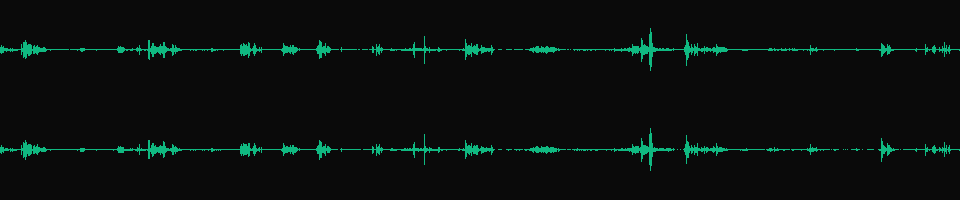
The same 60 seconds in three files

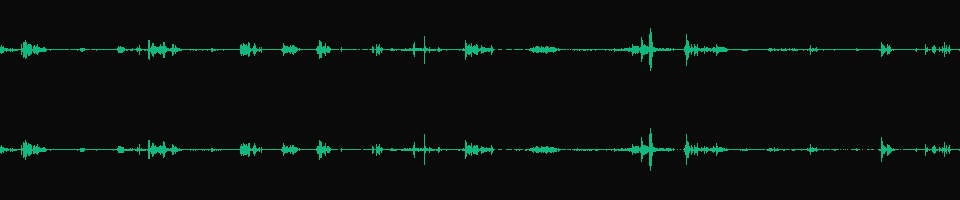
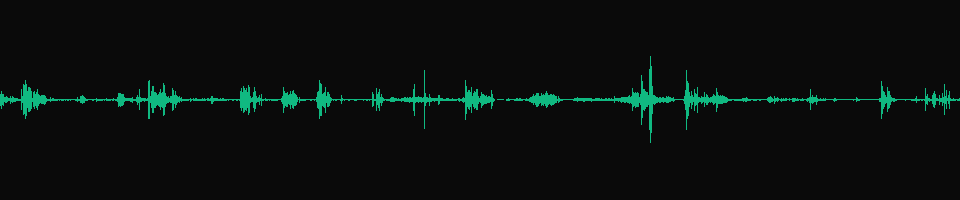
Waveforms drawn from the files, one lane per channel. The MP3 traces the WAV. Mono folds both channels into one.
in.wav, 16-bit PCM
Stereo waveform of in.wav, 60 seconds
11.5 MB The input. 1,536 kb/s, the same every second.
-c:a libmp3lame -q:a 2 Same shape, 172.8 kb/s
Stereo waveform of the MP3 made with -q:a 2, matching the WAV
1.3 MB Both channels, every peak where the WAV has it.
-ac 1 -c:a libmp3lame -q:a 2 One channel, 96.9 kb/s
Single-lane waveform of the mono MP3
727 KB Mono at the same quality setting takes 56% of the stereo MP3's bytes.

Footage: Sintel, © Blender Foundation, CC BY 3.0. Soundtrack excerpt, tags and cover crop added by us.

Run it

Run it on Rendobar

Send the same command from your code. The job fetches each input from its URL and returns the output file's URL when it finishes.

job.ts
import { createClient } from "@rendobar/sdk";
const rb = createClient({ apiKey: process.env.RENDOBAR_API_KEY });
const job = await rb.jobs.run({
type: "ffmpeg",
inputs: {
"in.wav": "https://cdn.rendobar.com/examples/convert-audio-format/in.wav",
},
params: {
command: "ffmpeg -i in.wav -c:a libmp3lame -q:a 2 out.mp3",
},
});
console.log(job.output.file.url);

Install with npm i @rendobar/sdk. jobs.run() submits and waits, so it returns the finished job in one call.

terminal
curl https://api.rendobar.com/jobs \
-H "Authorization: Bearer $RENDOBAR_API_KEY" \
-H "Content-Type: application/json" \
-d '{
"type": "ffmpeg",
"inputs": {
"in.wav": "https://cdn.rendobar.com/examples/convert-audio-format/in.wav"
},
"params": {
"command": "ffmpeg -i in.wav -c:a libmp3lame -q:a 2 out.mp3"
}
}'

Returns immediately with a job id. Poll GET /jobs/{id} or register a webhook rather than blocking on the request.

Every variant

Pick the command for your case

Each one ran on the same input. The line under it is what came out. Run times are the best of three runs with FFmpeg 8.0 on one desktop machine, so read them as relative.

  1. Convert WAV to MP3 at a fixed bitrate

    Re-encode
    ffmpeg -i in.wav -c:a libmp3lame -b:a 192k out.mp3

    Constant 192 kb/s. Use it when a player or spec asks for a fixed rate.

    582 ms run 1.4 MB 60.00 s long

  2. Convert M4A to MP3

    Re-encode
    ffmpeg -i in.m4a -c:a libmp3lame -q:a 2 out.mp3

    173.4 kb/s, a little larger than the 165 kb/s AAC it came from. Lossy to lossy adds no quality.

    498 ms run 1.3 MB 60.01 s long

  3. Convert WAV to FLAC

    Re-encode
    ffmpeg -i in.wav -c:a flac out.flac

    Lossless at 30% of the WAV's size, tags kept.

    142 ms run 3.5 MB 60.00 s long

  4. Convert FLAC to WAV

    Re-encode
    ffmpeg -i in.flac -c:a pcm_s16le out.wav

    Byte-identical to the WAV the FLAC was made from.

    79 ms run 11.5 MB 60.00 s long

  5. Change the sample rate to 44.1 kHz

    Re-encode
    ffmpeg -i in.wav -ar 44100 -c:a libmp3lame -q:a 2 out.mp3

    MP3 at 44,100 Hz. Without -ar it stays at the input's 48,000 Hz.

    493 ms run 1.3 MB 60.00 s long

  6. Convert stereo to mono

    Re-encode
    ffmpeg -i in.wav -ac 1 -c:a libmp3lame -q:a 2 out.mp3

    One channel at 96.9 kb/s. -ac 1 mixes left and right together.

    286 ms run 727 KB 60.00 s long

  7. Convert WAV to AAC (M4A)

    Re-encode
    ffmpeg -i in.wav -c:a aac -b:a 192k out.m4a

    AAC at 198.7 kb/s in an M4A, tags kept.

    1.2 s run 1.5 MB 60.00 s long

  8. Convert WAV to Opus

    Re-encode
    ffmpeg -i in.wav -c:a libopus -b:a 96k out.opus

    85.7 kb/s average. The smallest file on this page that keeps both channels.

    420 ms run 643 KB 60.01 s long

Gotchas

Where it goes wrong

-q:a or -b:a for MP3?

-q:a sets a quality, lower is better, and lets the bitrate move with the sound. -b:a fixes the bitrate. Here is what each gave on the 60 s WAV:

  • -q:a 0: 236.6 kb/s, 1.8 MB
  • -q:a 2: 172.8 kb/s, 1.3 MB
  • -q:a 4: 135.4 kb/s, 1.0 MB
  • -q:a 6: 91.2 kb/s, 684 KB
  • -b:a 128k: 128 kb/s, 961 KB
  • -b:a 192k: 192 kb/s, 1.4 MB
  • -b:a 320k: 320 kb/s, 2.4 MB

Use -q:a unless something requires a fixed rate. The -q:a bitrates are for this track. Another track lands elsewhere at the same setting.

How do I keep the tags and the cover art?

Tags come across without any flag. All seven survived WAV, FLAC and M4A to MP3 with no -map_metadata 0. The cover picture is the catch:

ffmpeg -i in.flac -c:a libmp3lame -q:a 2 out.mp3

FFmpeg re-encoded the 42 KB JPEG cover as a 326 KB PNG. The MP3 grew from 1.3 MB to 1.6 MB.

Add -c:v copy to keep the picture as it is. FFmpeg writes ID3v2.4 tags by default. Add -id3v2_version 3 to write ID3v2.3 instead.

Why is my MP3 48 kHz and not 44.1 kHz?

FFmpeg keeps the input's sample rate. Audio taken from video is usually 48 kHz, so the MP3 is too. Set it with -ar:

ffmpeg -i in.wav -ar 44100 -c:a libmp3lame -q:a 2 out.mp3

44,100 Hz, 1,288,863 bytes against 1,296,344 at 48 kHz. Resampling changed the size by under 1%.

Related: Extract audio, Normalize audio, Mix audio tracks.

Your command. Our infrastructure.

Bring your own commands. Run them on scalable CPU and GPU infrastructure, and pay only for compute time.