
Turn an image and audio into a video with FFmpeg

Loop the image with -loop 1, add the audio as a second input and stop at the end of the audio with -shortest. Add -pix_fmt yuv420p so players can decode it. If you re-encode the audio, send both streams through one -filter_complex, or the picture runs on past the sound.

Fast Re-encode

Keeps the audio as it is. The MP3 goes into the MP4 untouched.

ffmpeg -loop 1 -i cover.jpg -i audio.mp3 -c:v libx264 -tune stillimage -pix_fmt yuv420p -c:a copy -shortest out.mp4

60.00 s, 1500 frames at 25 fps. Picture and sound end together. The MP3 audio is copied as it was.

Length
60.00 s, same as the audio
Audio
MP3, copied
Run time
3.7 s
Output
2.2 MB
AAC Re-encode

Re-encodes the sound to AAC, the audio most players expect in an MP4, and still ends on time.

ffmpeg -loop 1 -i cover.jpg -i audio.mp3 -filter_complex "[0:v]format=yuv420p[v];[1:a]anull[a]" -map "[v]" -map "[a]" -c:v libx264 -tune stillimage -c:a aac -b:a 192k -shortest out.mp4

60.00 s of picture and 60.00 s of AAC sound. Routing both streams through one filter graph makes -shortest stop on time.

Length
60.00 s, same as the audio
Audio
AAC 192k
Run time
3.6 s
Output
2.8 MB

Proof

What the videos look like

A frame from 30 or 40 seconds into each output.
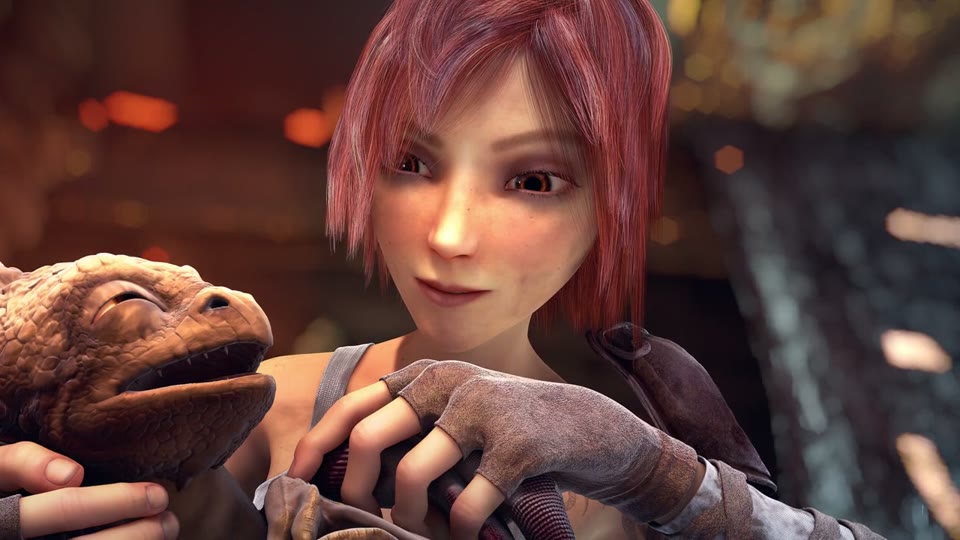
-loop 1, -tune stillimage The image, unchanged, for 60 s
A frame of the image-and-audio video: Sintel holding the baby dragon, 1280x720
1280x720 The cover at its own size. Every one of the 1500 frames is this picture.
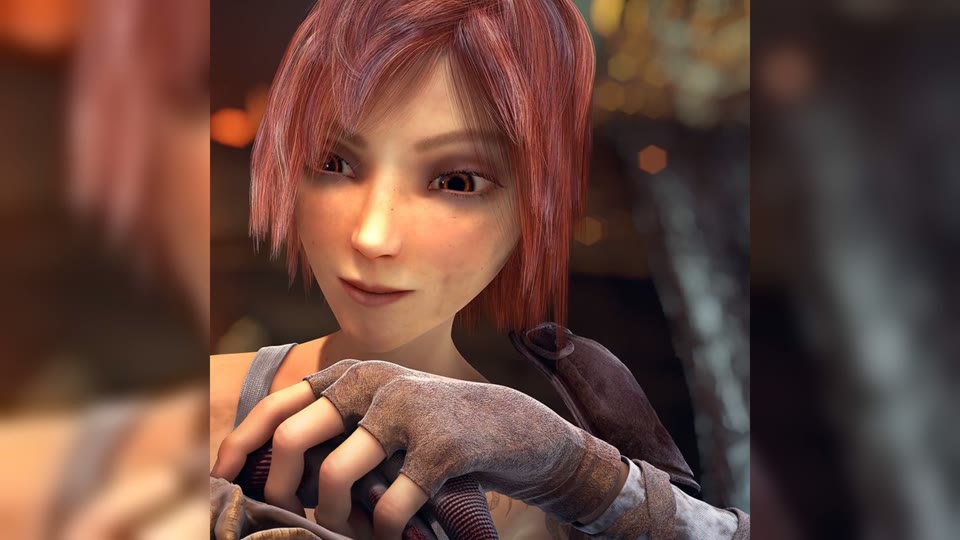
Square art in a 1920x1080 frame Fills 16:9 without stretching
The square image centred in a 1920x1080 frame over a blurred, enlarged copy of itself
1920x1080 The 999x999 PNG scaled to 1080 high and centred, over a blurred copy that fills the sides.
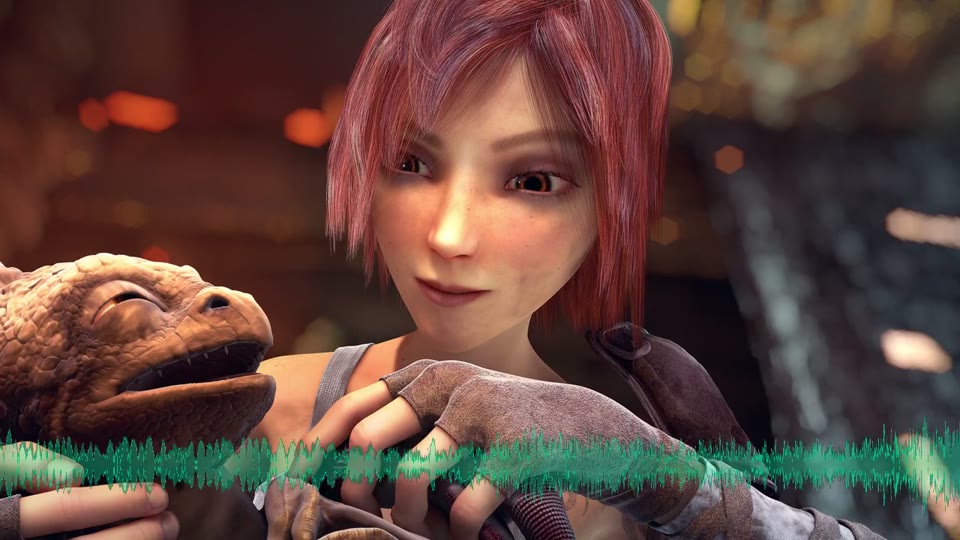
showwaves overlay The picture moves with the voice
The cover with a green waveform of the dialogue drawn across the bottom
18.7 MB A waveform of the audio redrawn every frame. The moving part costs bytes: 18.7 MB against 2.8 MB for the still.

Footage: Sintel, © Blender Foundation, CC BY 3.0. Stills and audio taken from the film by us.

Run it

Run it on Rendobar

Send the same command from your code. The job fetches each input from its URL and returns the output file's URL when it finishes.

job.ts
import { createClient } from "@rendobar/sdk";
const rb = createClient({ apiKey: process.env.RENDOBAR_API_KEY });
const job = await rb.jobs.run({
type: "ffmpeg",
inputs: {
"cover.jpg": "https://cdn.rendobar.com/examples/image-to-video/cover.jpg",
"audio.mp3": "https://cdn.rendobar.com/examples/image-to-video/audio.mp3",
},
params: {
command: "ffmpeg -loop 1 -i cover.jpg -i audio.mp3 -filter_complex \"[0:v]format=yuv420p[v];[1:a]anull[a]\" -map \"[v]\" -map \"[a]\" -c:v libx264 -tune stillimage -c:a aac -b:a 192k -shortest out.mp4",
},
});
console.log(job.output.file.url);

Install with npm i @rendobar/sdk. jobs.run() submits and waits, so it returns the finished job in one call.

terminal
curl https://api.rendobar.com/jobs \
-H "Authorization: Bearer $RENDOBAR_API_KEY" \
-H "Content-Type: application/json" \
-d '{
"type": "ffmpeg",
"inputs": {
"cover.jpg": "https://cdn.rendobar.com/examples/image-to-video/cover.jpg",
"audio.mp3": "https://cdn.rendobar.com/examples/image-to-video/audio.mp3"
},
"params": {
"command": "ffmpeg -loop 1 -i cover.jpg -i audio.mp3 -filter_complex \"[0:v]format=yuv420p[v];[1:a]anull[a]\" -map \"[v]\" -map \"[a]\" -c:v libx264 -tune stillimage -c:a aac -b:a 192k -shortest out.mp4"
}
}'

Returns immediately with a job id. Poll GET /jobs/{id} or register a webhook rather than blocking on the request.

Every variant

Pick the command for your case

Each one ran on the same input. The line under it is what came out. Run times are the best of three runs with FFmpeg 8.0 on one desktop machine, so read them as relative.

  1. Make a video from one image for 10 seconds

    Re-encode
    ffmpeg -loop 1 -i cover.jpg -t 10 -c:v libx264 -tune stillimage -pix_fmt yuv420p out.mp4

    10.00 s, 250 frames at 25 fps, no sound. With no audio to end on, -t sets the length.

    691 ms run 215 KB 10.00 s long

  2. Make the file smaller with 1 frame per second

    Re-encode
    ffmpeg -loop 1 -framerate 1 -i cover.jpg -i audio.mp3 -filter_complex "[0:v]format=yuv420p[v];[1:a]anull[a]" -map "[v]" -map "[a]" -c:v libx264 -tune stillimage -c:a aac -b:a 192k -shortest out.mp4

    60.00 s with 60 frames instead of 1500. 1.97 MB against 2.77 MB at 25 fps, with the same sound.

    1.3 s run 2.0 MB 60.00 s long

  3. Fit a square image into a 1920x1080 video

    Re-encode
    ffmpeg -loop 1 -i art.png -i audio.mp3 -filter_complex "[0:v]scale=1920:1080:force_original_aspect_ratio=increase,crop=1920:1080,boxblur=20[bg];[0:v]scale=-2:1080[fg];[bg][fg]overlay=(W-w)/2:(H-h)/2,format=yuv420p[v];[1:a]anull[a]" -map "[v]" -map "[a]" -c:v libx264 -tune stillimage -c:a aac -b:a 192k -shortest out.mp4

    1920x1080, 60.00 s. The square sits in the middle at 1080x1080 over a blurred copy of itself. The scaling also fixes the odd 999 size.

    16.7 s run 3.8 MB 60.00 s long

  4. Add a moving waveform of the audio

    Re-encode
    ffmpeg -loop 1 -i cover.jpg -i audio.mp3 -filter_complex "[1:a]asplit[a][w];[w]showwaves=s=1280x200:mode=cline:scale=sqrt:colors=0x10b981[wave];[0:v][wave]overlay=0:H-h,format=yuv420p[v]" -map "[v]" -map "[a]" -c:v libx264 -c:a aac -b:a 192k -shortest out.mp4

    60.00 s with a 200 px waveform across the bottom. asplit sends the audio both to the waveform and to the output.

    5.5 s run 18.7 MB 60.00 s long

  5. Use an image with odd width or height

    Re-encode
    ffmpeg -loop 1 -i art.png -i audio.mp3 -vf "scale=trunc(iw/2)*2:trunc(ih/2)*2,format=yuv420p" -c:v libx264 -tune stillimage -c:a copy -shortest out.mp4

    998x998, 60.00 s. The scale rounds each side down to an even number, which 4:2:0 video needs.

    4.8 s run 2.7 MB 60.00 s long

Gotchas

Where it goes wrong

Why is my video longer than the audio with -shortest?

The command most answers give re-encodes the audio and ends a little late:

ffmpeg -loop 1 -i cover.jpg -i audio.mp3 -c:v libx264 -tune stillimage -pix_fmt yuv420p -c:a aac -b:a 192k -shortest out.mp4

60.00 s of audio and 61.96 to 62.44 s of picture over four runs. The overshoot changed from run to run. With -framerate 1 on the image it wrote 134 s of picture.

-shortest stops when the audio ends, but by then the video encoder already holds frames it has not written, and they still go into the file. The fix older answers give no longer runs:

ffmpeg -loop 1 -i cover.jpg -i audio.mp3 -c:v libx264 -tune stillimage -pix_fmt yuv420p -c:a aac -b:a 192k -shortest -fflags +shortest -max_interleave_delta 100M out.mp4

Fails on FFmpeg 8.0 with Unable to parse option value "shortest" and writes nothing.

  • Copy the audio with -c:a copy, as in the Fast answer. It ended at 60.00 s.
  • Send both streams through one -filter_complex, as in the AAC answer. anull passes the audio through unchanged. It ended at 60.00 s, byte for byte the same file as cutting with -t 60.

How do I fix "width not divisible by 2"?

-pix_fmt yuv420p stores colour at half the width and half the height, so both sides must be even. The 999x999 PNG fails at once:

ffmpeg -loop 1 -i art.png -i audio.mp3 -c:v libx264 -tune stillimage -pix_fmt yuv420p -c:a copy -shortest out.mp4

width not divisible by 2 (999x999), then Conversion failed!. No file.

Round each side to an even number with scale=trunc(iw/2)*2:trunc(ih/2)*2, as in the odd-size task. It gave 998x998. Scaling to a fixed size such as 1920x1080 fixes it too.

Why add -pix_fmt yuv420p?

Without it, libx264 keeps as much colour as the image has. From an RGB PNG that is full 4:4:4:

ffmpeg -loop 1 -i art.png -i audio.mp3 -c:v libx264 -c:a copy -shortest out.mp4

It runs, even at 999x999, and writes yuv444p in profile High 4:4:4 Predictive.

That profile is outside what most browsers and phones decode, so the file can play as sound only or not at all. With yuv420p the same image came out in profile High. From cover.jpg, a 4:2:0 JPEG, the output reads yuvj420p: the same 4:2:0 layout, flagged as full range.

Does -tune stillimage make the file smaller?

Not here. It tunes the encoder for detail in a picture that does not move. With the AAC answer's command, -tune stillimage gave 2.77 MB and the same command without it gave 2.63 MB, with the same 192k sound.

To make the file smaller, lower the frame rate. -framerate 1 on the image input cut the file to 1.97 MB, since the encoder has 60 frames to write instead of 1500.

What each x264 -tune value costs finds the same on moving footage, where stillimage added 24% to the file at CRF 23.

Related: Images to video, Add audio to a video, Resize a video, Encode H.264 and H.265.

Your command. Our infrastructure.

Bring your own commands. Run them on scalable CPU and GPU infrastructure, and pay only for compute time.