


Make a video from images with FFmpeg

Name your images img001.png, img002.png and so on, set how long each one shows with -framerate, and add -pix_fmt yuv420p so the video plays everywhere. For a different duration per image, list them in a concat file. Every command below ran on the same six stills, and the timelines show where each slide really starts.

Sequence Re-encode

Every image shows for the same time. Set it with -framerate: 1 is one second each, 1/2 is two.

ffmpeg -framerate 1 -i img%03d.png -c:v libx264 -r 30 -pix_fmt yuv420p out.mp4

6.000 s at 30 fps, 180 frames. The picture changes at exactly 1, 2, 3, 4 and 5 s.

Slides change at
1, 2, 3, 4, 5 s
Frames
180 at 30 fps
Run time
459 ms
Output
1.0 MB
Per image Re-encode

Each image needs its own duration. The concat list sets them, with one trick for the last image.

ffmpeg -f concat -i list.txt -vf fps=30 -c:v libx264 -pix_fmt yuv420p out.mp4

10.000 s. Slides change at exactly 3, 4, 6, 7 and 8 s, and the last one holds its full 2 s.

Slides change at
3, 4, 6, 7, 8 s
Last slide
8 to 10 s
Run time
688 ms
Output
1.1 MB

Proof

Where each slide starts

One frame from the middle of every second of the output, labelled with the second it comes from.
img001.png to img006.png
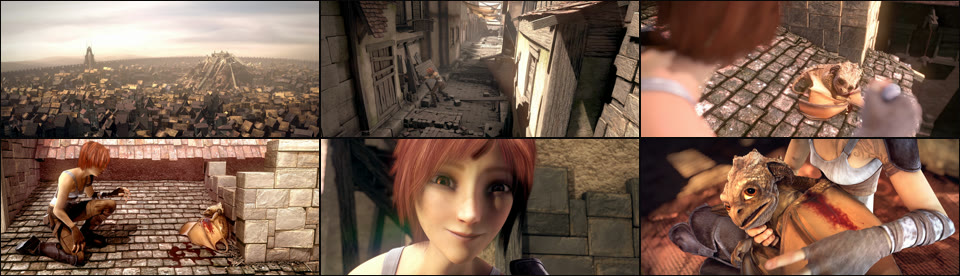
The six input stills from Sintel: a city, an alley, a dragon on a roof, the girl kneeling, the girl smiling, the girl holding the dragon
6 stills The input: six 1280x546 PNGs taken from the film.
concat list, last image listed twice Every slide gets its time
Timeline of the concat output: the city for 3 s, the alley 1 s, the dragon 2 s, then one second each of the girl kneeling and smiling, and 2 s of the girl holding the dragon
10.000 s 3, 1, 2, 1, 1 and 2 s, as asked.
concat list, written the obvious way Last slide cut to 1 s
Timeline of the plain concat output: the same slides, but the video ends at 9 s and the last slide shows for one second
9.000 s duration 2 on the last entry was ignored. The video stops a second early.

Footage: Sintel, © Blender Foundation, CC BY 3.0. Stills taken from the film by us.

Run it

Run it on Rendobar

Send the same command from your code. The job fetches each input from its URL and returns the output file's URL when it finishes.

job.ts
import { createClient } from "@rendobar/sdk";
const rb = createClient({ apiKey: process.env.RENDOBAR_API_KEY });
const job = await rb.jobs.run({
type: "ffmpeg",
inputs: {
"img001.png": "https://cdn.rendobar.com/examples/images-to-video/img001.png",
"img002.png": "https://cdn.rendobar.com/examples/images-to-video/img002.png",
"img003.png": "https://cdn.rendobar.com/examples/images-to-video/img003.png",
"img004.png": "https://cdn.rendobar.com/examples/images-to-video/img004.png",
"img005.png": "https://cdn.rendobar.com/examples/images-to-video/img005.png",
"img006.png": "https://cdn.rendobar.com/examples/images-to-video/img006.png",
},
params: {
command: "ffmpeg -framerate 1 -i img%03d.png -c:v libx264 -r 30 -pix_fmt yuv420p out.mp4",
},
});
console.log(job.output.file.url);

Install with npm i @rendobar/sdk. jobs.run() submits and waits, so it returns the finished job in one call.

terminal
curl https://api.rendobar.com/jobs \
-H "Authorization: Bearer $RENDOBAR_API_KEY" \
-H "Content-Type: application/json" \
-d '{
"type": "ffmpeg",
"inputs": {
"img001.png": "https://cdn.rendobar.com/examples/images-to-video/img001.png",
"img002.png": "https://cdn.rendobar.com/examples/images-to-video/img002.png",
"img003.png": "https://cdn.rendobar.com/examples/images-to-video/img003.png",
"img004.png": "https://cdn.rendobar.com/examples/images-to-video/img004.png",
"img005.png": "https://cdn.rendobar.com/examples/images-to-video/img005.png",
"img006.png": "https://cdn.rendobar.com/examples/images-to-video/img006.png"
},
"params": {
"command": "ffmpeg -framerate 1 -i img%03d.png -c:v libx264 -r 30 -pix_fmt yuv420p out.mp4"
}
}'

Returns immediately with a job id. Poll GET /jobs/{id} or register a webhook rather than blocking on the request.

Every variant

Pick the command for your case

Each one ran on the same input. The line under it is what came out. Run times are the best of three runs with FFmpeg 8.0 on one desktop machine, so read them as relative.

  1. Show each image for 2 seconds

    Re-encode
    ffmpeg -framerate 1/2 -i img%03d.png -c:v libx264 -r 30 -pix_fmt yuv420p out.mp4

    12.000 s, a new slide at 2, 4, 6, 8 and 10 s. -framerate is images per second, so 1/2 is one image every two seconds.

    626 ms run 1.1 MB 12.00 s long

  2. Add music and stop when the images end

    Re-encode
    ffmpeg -framerate 1/2 -i img%03d.png -i music.m4a -c:v libx264 -r 30 -pix_fmt yuv420p -c:a copy -shortest out.mp4

    Video and audio both 12.000 s. The music is 15 s, and -shortest cut it where the last slide ends.

    622 ms run 1.4 MB 12.00 s long

  3. Start from a later image

    Re-encode
    ffmpeg -framerate 1 -start_number 3 -i img%03d.png -c:v libx264 -r 30 -pix_fmt yuv420p out.mp4

    4.000 s, img003.png to img006.png. Without -start_number FFmpeg looks for a first file numbered 0 to 4.

    342 ms run 684 KB 4.00 s long

  4. Use images with an odd width or height

    Re-encode
    ffmpeg -framerate 1 -i odd%03d.png -c:v libx264 -r 30 -vf "pad=ceil(iw/2)*2:ceil(ih/2)*2" -pix_fmt yuv420p out.mp4

    1279x545 stills in, 1280x546 video out. pad adds one black row and one black column.

    283 ms run 475 KB 3.00 s long

Gotchas

Where it goes wrong

Why won't my video play in a browser?

You left out -pix_fmt yuv420p. With PNG input, libx264 keeps the full colour detail of the images:

ffmpeg -framerate 1 -i img%03d.png -c:v libx264 out.mp4

yuv444p, profile High 4:4:4 Predictive, 6 frames at 1 fps. Chrome rates that profile as not power efficient, which means software decoding. See web-playable MP4.

Add -pix_fmt yuv420p and the same stills give the High profile every player supports. Add -r 30 too, so the file has a normal frame rate instead of one frame per second.

Why is the last image too short with the concat demuxer?

FFmpeg ignores the duration of the last entry. It holds the final picture for as long as the gap before it. This list asks for 3, 1, 2, 1, 1 and 2 s:

ffmpeg -f concat -i list-plain.txt -vf fps=30 -c:v libx264 -pix_fmt yuv420p out.mp4

9.000 s, not 10. The last still showed for 1 s, the same as the one before it. Changing the fifth still to 3 s made the last one 3 s too.

So list the last image twice. Give the first line half its time and leave the second without a duration, and the hold adds the other half. list.txt ends like this:

file 'img006.png'
duration 1
file 'img006.png'

10.000 s, the last still from 8 to 10 s.

Use -vf fps=30, not -r 30, with the concat demuxer. With -r 30 every slide changed one frame early, at 2.967 s instead of 3.

Why does -pattern_type glob fail?

Glob patterns need a function Windows does not have, so Windows builds of FFmpeg leave it out:

ffmpeg -framerate 1 -pattern_type glob -i "*.png" -c:v libx264 -r 30 -pix_fmt yuv420p out.mp4

"Pattern type 'glob' was selected but globbing is not supported by this libavformat build". Nothing was written.

Number your files and use img%03d.png, which works on every build. On Linux and macOS glob works, but it sorts by name, so img10.png comes before img2.png unless the numbers are zero-padded.

How do I fix "width not divisible by 2"?

H.264 with yuv420p needs even dimensions. The 1279x545 stills failed before a single frame was written:

ffmpeg -framerate 1 -i odd%03d.png -c:v libx264 -r 30 -pix_fmt yuv420p out.mp4

"width not divisible by 2 (1279x545)" and "Conversion failed!".

Pad up to the next even size with pad=ceil(iw/2)*2:ceil(ih/2)*2, as in the task above. It keeps every pixel and adds at most one line of black, on the right and at the bottom.

Related: Image and audio to video, Extract frames, Add audio to a video, MP4 to GIF.

Your command. Our infrastructure.

Bring your own commands. Run them on scalable CPU and GPU infrastructure, and pay only for compute time.