
Mix two audio tracks with FFmpeg

Lower the music with volume, then mix it with the dialogue using amix=inputs=2:duration=first:normalize=0. duration=first ends the mix with the first input, and normalize=0 stops amix from cutting every input's level. To dip the music only while someone talks, run it through sidechaincompress keyed by the dialogue before the mix.

Simple Re-encode

Music at one steady level under the whole video.

ffmpeg -i in.mp4 -i music.m4a -filter_complex "[1:a]volume=0.3[m];[0:a][m]amix=inputs=2:duration=first:normalize=0[a]" -map 0:v -map "[a]" -c:v copy -c:a aac out.mp4

30.0 s, the video's length. The dialogue keeps its level and the music sits under it at 0.3, about 10.5 dB down.

Loudness
-31.8 LUFS, dialogue alone -31.7
Length
30.0 s, ends with the video
Run time
570 ms
Output
3.8 MB
Ducked Re-encode

Music that stays up between lines and drops under speech, without editing levels by hand.

ffmpeg -i in.mp4 -i music.m4a -filter_complex "[0:a]asplit=2[voice][key];[1:a][key]sidechaincompress=threshold=0.005:ratio=10:attack=20:release=300[ducked];[voice][ducked]amix=inputs=2:duration=first:normalize=0[a]" -map 0:v -map "[a]" -c:v copy -c:a aac out.mp4

The music stays within 2 dB of its own level between lines and drops while the dialogue track is loud. 30.0 s, video copied.

Music under speech
15.0 dB lower on average
Music between lines
2.0 dB lower
Run time
541 ms
Output
3.8 MB

Proof

The tracks going in and the mixes coming out

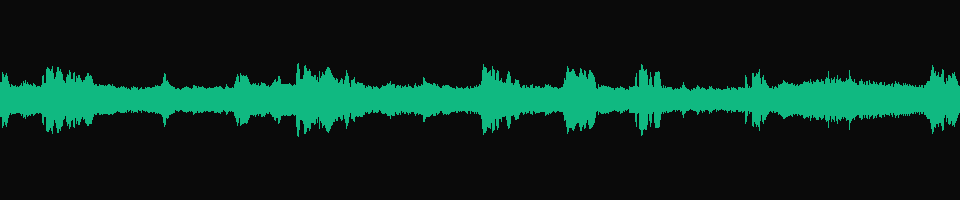
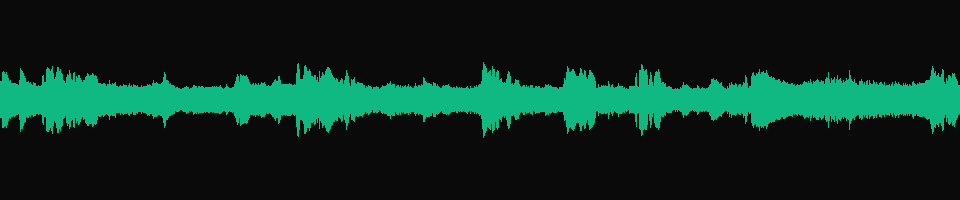
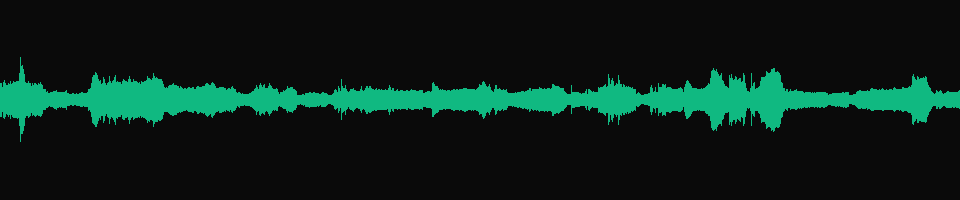
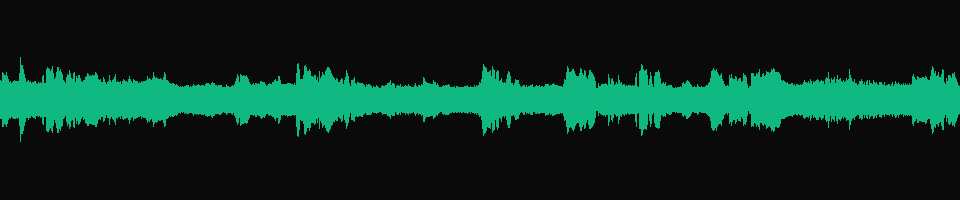
One waveform per track, 30 s wide, all drawn at the same scale. Peaks in the dialogue line up with dips in the ducked music.
in.mp4 audio
Waveform of the dialogue track: bursts of speech separated by quiet fire and score
-31.7 LUFS The scene's own audio. The bursts are the lines of dialogue.
volume=0.3, amix normalize=0 Dialogue on top, music under it
Waveform of the simple mix: the dialogue shape with a thin layer of music filling the gaps
-31.8 LUFS Nearly the shape of the dialogue alone. The music fills the gaps without lifting the overall loudness.
sidechaincompress output, before the mix Dips under each line
Waveform of the music after sidechain compression, with dips where the dialogue is loud
-15.0 dB The first 30 s of music.m4a after the compressor. In half-seconds where the dialogue track was above -35 dB, the music lost 15.0 dB on average.
sidechaincompress, then amix Music fills the gaps
Waveform of the ducked mix: dialogue bursts with music rising between them
-31.1 LUFS The ducked command's audio. The music is not turned down between lines, so this mix measures -31.1 LUFS against -31.8 for the simple one.

Footage: Sintel, © Blender Foundation, CC BY 3.0. The music track is part of the film's own soundtrack.

Run it

Run it on Rendobar

Send the same command from your code. The job fetches each input from its URL and returns the output file's URL when it finishes.

job.ts
import { createClient } from "@rendobar/sdk";
const rb = createClient({ apiKey: process.env.RENDOBAR_API_KEY });
const job = await rb.jobs.run({
type: "ffmpeg",
inputs: {
"in.mp4": "https://cdn.rendobar.com/examples/mix-audio/in.mp4",
"music.m4a": "https://cdn.rendobar.com/examples/mix-audio/music.m4a",
},
params: {
command: "ffmpeg -i in.mp4 -i music.m4a -filter_complex \"[1:a]volume=0.3[m];[0:a][m]amix=inputs=2:duration=first:normalize=0[a]\" -map 0:v -map \"[a]\" -c:v copy -c:a aac out.mp4",
},
});
console.log(job.output.file.url);

Install with npm i @rendobar/sdk. jobs.run() submits and waits, so it returns the finished job in one call.

terminal
curl https://api.rendobar.com/jobs \
-H "Authorization: Bearer $RENDOBAR_API_KEY" \
-H "Content-Type: application/json" \
-d '{
"type": "ffmpeg",
"inputs": {
"in.mp4": "https://cdn.rendobar.com/examples/mix-audio/in.mp4",
"music.m4a": "https://cdn.rendobar.com/examples/mix-audio/music.m4a"
},
"params": {
"command": "ffmpeg -i in.mp4 -i music.m4a -filter_complex \"[1:a]volume=0.3[m];[0:a][m]amix=inputs=2:duration=first:normalize=0[a]\" -map 0:v -map \"[a]\" -c:v copy -c:a aac out.mp4"
}
}'

Returns immediately with a job id. Poll GET /jobs/{id} or register a webhook rather than blocking on the request.

Every variant

Pick the command for your case

Each one ran on the same input. The line under it is what came out. Run times are the best of three runs with FFmpeg 8.0 on one desktop machine, so read them as relative.

  1. Mix two audio files into one

    Re-encode
    ffmpeg -i voice.m4a -i music.m4a -filter_complex "[1:a]volume=0.3[m];[0:a][m]amix=inputs=2:duration=first:normalize=0" out.m4a

    One 30.0 s AAC file. A filter graph with one unlabelled output goes to the output file without -map.

    561 ms run 500 KB 30.02 s long

  2. Mix and keep the longer track to its end

    Re-encode
    ffmpeg -i voice.m4a -i music.m4a -filter_complex "amix=inputs=2:duration=longest:normalize=0" out.m4a

    45.0 s, the length of the music. After 0:30 only the music plays.

    785 ms run 744 KB 45.01 s long

  3. Fade the music out at the end

    Re-encode
    ffmpeg -i in.mp4 -i music.m4a -filter_complex "[1:a]volume=0.3,afade=t=out:st=27:d=3[m];[0:a][m]amix=inputs=2:duration=first:normalize=0[a]" -map 0:v -map "[a]" -c:v copy -c:a aac out.mp4

    The music fades over the last 3 s, from 0:27 to 0:30. Its last half second measures -76.6 dB.

    584 ms run 3.8 MB 30.02 s long

  4. Start the music 5 seconds in

    Re-encode
    ffmpeg -i in.mp4 -i music.m4a -filter_complex "[1:a]volume=0.3,adelay=5s:all=1[m];[0:a][m]amix=inputs=2:duration=first:normalize=0[a]" -map 0:v -map "[a]" -c:v copy -c:a aac out.mp4

    Dialogue only for the first 5 s, then the music comes in. silencedetect puts the end of the music's silence at exactly 5 s.

    557 ms run 3.8 MB 30.02 s long

Gotchas

Where it goes wrong

Why is my amix output quieter than the inputs?

amix divides every input by the number of inputs unless you pass normalize=0. Mixing the dialogue with plain silence shows it with nothing else in the way:

ffmpeg -i voice.m4a -f lavfi -i anullsrc=r=48000:cl=stereo -filter_complex "amix=inputs=2:duration=first" out.m4a

-37.8 LUFS against -31.7 for the dialogue alone. Two inputs, so each came out at half level: 6.1 dB down.

Pass normalize=0 and set each level yourself with volume. Without any volume, both tracks at full level summed to -28.2 LUFS with a peak of -6.4 dB, louder than either input. Leave headroom when your sources are hotter than these.

Why does the mixed video run past the end of the picture?

amix runs until its longest input ends. With 45 s of music under a 30 s video:

ffmpeg -i in.mp4 -i music.m4a -filter_complex "[0:a][1:a]amix=inputs=2[a]" -map 0:v -map "[a]" -c:v copy -c:a aac out.mp4

45.0 s file. The picture ends at 0:30 and the music plays on for 15 s.

Put the video's audio first and add duration=first. Every command at the top of the page does.

My ducking command made a 4-channel file. Why?

A widely copied ducking answer ends with amerge, which does not mix. It stacks the channels of its inputs, so two stereo inputs become one 4-channel track:

ffmpeg -i music.m4a -i voice.m4a -filter_complex "[1:a]asplit=2[sc][mix];[0:a][sc]sidechaincompress=threshold=0.003:ratio=20[bg]; [bg][mix]amerge[final]" -map "[final]" out.m4a

One audio stream with 4 channels, 29.78 s long, where you wanted a stereo mix.

Use amix to put the ducked music and the dialogue in the same two channels, as in the Ducked command above.

Related: Add audio to a video, Normalize audio, Fade in and out, Extract audio.

Your command. Our infrastructure.

Bring your own commands. Run them on scalable CPU and GPU infrastructure, and pay only for compute time.