
Convert MP4 to HLS with FFmpeg

Run ffmpeg -i in.mp4 -c copy -hls_time 6 -hls_playlist_type vod out.m3u8 to turn an MP4 into an HLS playlist and .ts segments without re-encoding. A copy can only cut on the keyframes the MP4 already has, so on our clip the segments came out 1.1 s to 11.6 s long. Re-encode with a keyframe every 2 seconds for segments of exactly 6 s, the shape an adaptive bitrate ladder needs.

Fast Stream copy

Copies the streams, so it finishes at once. Segment lengths follow the keyframes already in the MP4.

ffmpeg -i in.mp4 -c copy -hls_time 6 -hls_playlist_type vod out.m3u8

out.m3u8 and 10 MPEG-TS segments, out0.ts to out9.ts, holding all 1440 frames. The segments run 1.1 s to 11.6 s, because a copy can only cut where the MP4 already has a keyframe.

Segments
10, from 1.1 s to 11.6 s
Frames
1440 of 1440
Run time
96 ms
Output
9.7 MB
Exact Re-encode

Every segment the length you set, aligned across qualities. Re-encodes, so it takes longer.

ffmpeg -i in.mp4 -c:v libx264 -crf 23 -g 48 -sc_threshold 0 -c:a aac -b:a 128k -hls_time 6 -hls_playlist_type vod out.m3u8

10 segments of exactly 6.000 s each and a playlist with #EXT-X-TARGETDURATION:6. -g 48 puts a keyframe every 2 s at 24 fps, and -sc_threshold 0 stops x264 adding extra ones on scene cuts.

Segments
10, each 6.000 s
Keyframes
every 2 s (48 frames)
Run time
4.4 s
Output
10.6 MB

Proof

What the playlists hold

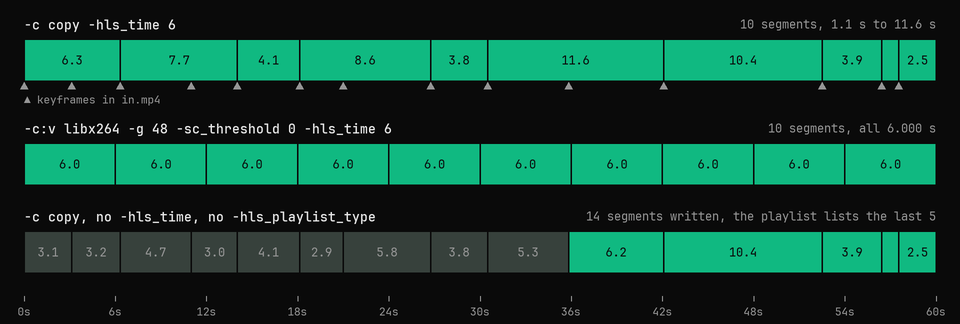
Each command cut the same 60 s MP4. The bars are segments, sized by the durations the playlist gives them.
-c copy vs -g 48 -sc_threshold 0 vs no options Only the re-encode gives even segments
Segment lengths of three HLS conversions of one 60 second MP4: stream copy gives 10 uneven segments, a re-encode with -g 48 gives ten 6 second segments, and no options gives 14 segments of which the playlist lists only the last 5
6.000 s The copy cuts on the MP4's own keyframes (the ticks), so its segments run 1.1 s to 11.6 s. With no options FFmpeg writes 2 s targets and a playlist that lists only the last 5 of 14 segments.
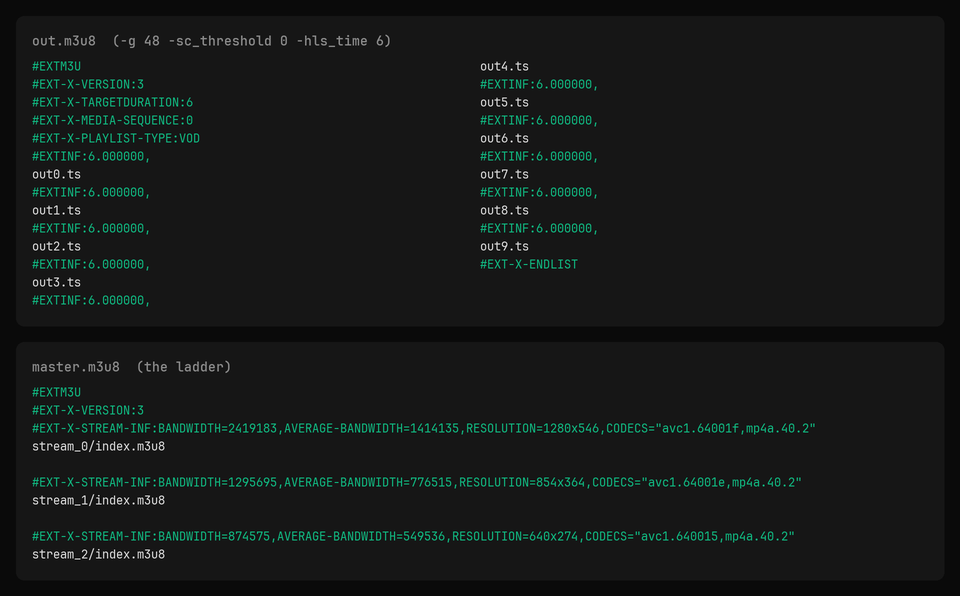
out.m3u8 and master.m3u8 Plain text, every segment listed
The text of out.m3u8 from the re-encode, ten 6.000 second segments, and of master.m3u8 from the ladder, three variants with bandwidth and resolution
26 lines #EXT-X-PLAYLIST-TYPE:VOD and #EXT-X-ENDLIST tell players the list is complete. The master lists each rendition with the bandwidth FFmpeg measured from its segments.
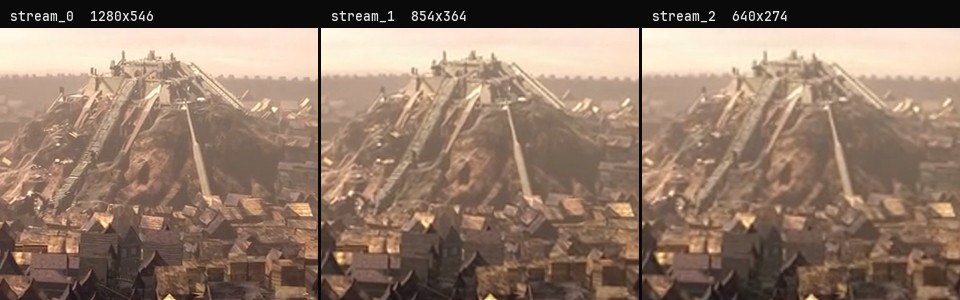
The ladder at 0:33, each rung scaled to 1280 wide Same frame, three qualities
The same crop of Sintel's hilltop citadel at 0:33 from the three ladder renditions, 1280x546, 854x364 and 640x274, each scaled to 1280 wide
1280 / 854 / 640 Each rung is decoded from its own playlist at the same moment. The 640x274 rung loses the fine detail on the citadel's stairs.

Footage: Sintel, © Blender Foundation, CC BY 3.0. Cut to 60 s and packaged as HLS by us.

Run it

Run it on Rendobar

Send the same command from your code. The job fetches each input from its URL and returns the output file's URL when it finishes.

job.ts
import { createClient } from "@rendobar/sdk";
const rb = createClient({ apiKey: process.env.RENDOBAR_API_KEY });
const job = await rb.jobs.run({
type: "ffmpeg",
inputs: {
"in.mp4": "https://cdn.rendobar.com/examples/mp4-to-hls/in.mp4",
},
params: {
command: "ffmpeg -i in.mp4 -c:v libx264 -crf 23 -g 48 -sc_threshold 0 -c:a aac -b:a 128k -hls_time 6 -hls_playlist_type vod out.m3u8",
},
});
console.log(job.output.file.url);

Install with npm i @rendobar/sdk. jobs.run() submits and waits, so it returns the finished job in one call.

terminal
curl https://api.rendobar.com/jobs \
-H "Authorization: Bearer $RENDOBAR_API_KEY" \
-H "Content-Type: application/json" \
-d '{
"type": "ffmpeg",
"inputs": {
"in.mp4": "https://cdn.rendobar.com/examples/mp4-to-hls/in.mp4"
},
"params": {
"command": "ffmpeg -i in.mp4 -c:v libx264 -crf 23 -g 48 -sc_threshold 0 -c:a aac -b:a 128k -hls_time 6 -hls_playlist_type vod out.m3u8"
}
}'

Returns immediately with a job id. Poll GET /jobs/{id} or register a webhook rather than blocking on the request.

Every variant

Pick the command for your case

Each one ran on the same input. The line under it is what came out. Run times are the best of three runs with FFmpeg 8.0 on one desktop machine, so read them as relative.

  1. Build an adaptive bitrate ladder with a master playlist

    Re-encode
    ffmpeg -i in.mp4 -filter_complex "[0:v]split=3[v0][v1][v2];[v1]scale=854:-2[v1s];[v2]scale=640:-2[v2s]" -map "[v0]" -map "[v1s]" -map "[v2s]" -map 0:a -map 0:a -map 0:a -c:v libx264 -crf 23 -g 48 -sc_threshold 0 -c:a aac -b:a 128k -hls_time 6 -hls_playlist_type vod -master_pl_name master.m3u8 -var_stream_map "v:0,a:0 v:1,a:1 v:2,a:2" -hls_segment_filename "stream_%v/seg_%03d.ts" "stream_%v/index.m3u8"

    master.m3u8 plus stream_0/ to stream_2/ at 1280x546, 854x364 and 640x274, each with ten 6.000 s segments that start on the same frames. FFmpeg created the three folders itself.

    7.3 s run 20.6 MB 60.00 s long

  2. Share one audio track across the ladder

    Re-encode
    ffmpeg -i in.mp4 -filter_complex "[0:v]split=3[v0][v1][v2];[v1]scale=854:-2[v1s];[v2]scale=640:-2[v2s]" -map "[v0]" -map "[v1s]" -map "[v2s]" -map 0:a -c:v libx264 -crf 23 -g 48 -sc_threshold 0 -c:a aac -b:a 128k -hls_time 6 -hls_playlist_type vod -master_pl_name master.m3u8 -var_stream_map "v:0,agroup:aud v:1,agroup:aud v:2,agroup:aud a:0,agroup:aud" -hls_segment_filename "stream_%v/seg_%03d.ts" "stream_%v/index.m3u8"

    The audio is encoded once into stream_3/, and the master points every video rung at it with #EXT-X-MEDIA:TYPE=AUDIO. 18.4 MB in all, 2.1 MB less than the ladder with three copies of the audio.

    6.7 s run 18.4 MB 60.00 s long

  3. Name the segment files

    Stream copy
    ffmpeg -i in.mp4 -c copy -hls_time 6 -hls_playlist_type vod -hls_segment_filename "seg_%03d.ts" out.m3u8

    seg_000.ts to seg_009.ts, the same 10 segments as the fast command. %03d pads the number to three digits so the files sort in order.

    86 ms run 9.7 MB 60.00 s long

  4. Write fMP4 (.m4s) segments instead of .ts

    Stream copy
    ffmpeg -i in.mp4 -c copy -hls_time 6 -hls_playlist_type vod -hls_segment_type fmp4 out.m3u8

    init.mp4 and out0.m4s to out9.m4s, with #EXT-X-MAP in the playlist. 9.27 MB against 9.70 MB for the .ts set, 4.4% less, because fragmented MP4 carries less packet overhead than MPEG-TS.

    86 ms run 9.3 MB 60.00 s long

  5. Encrypt the segments with AES-128

    Stream copy
    ffmpeg -i in.mp4 -c copy -hls_time 6 -hls_playlist_type vod -hls_key_info_file enc.keyinfo out.m3u8

    The playlist gains #EXT-X-KEY:METHOD=AES-128,URI="enc.key". A segment on its own fails with "Invalid data found", and the playlist with the key decodes all 1440 frames.

    92 ms run 9.7 MB 60.00 s long

  6. Write one .ts file instead of many segments

    Stream copy
    ffmpeg -i in.mp4 -c copy -hls_time 6 -hls_playlist_type vod -hls_flags single_file out.m3u8

    One out.ts and a playlist that addresses the 10 segments inside it by #EXT-X-BYTERANGE, so there is one media file to upload instead of ten.

    83 ms run 9.7 MB 60.00 s long

Gotchas

Where it goes wrong

Why does my playlist only list the last 5 segments?

Because FFmpeg's HLS muxer keeps 5 entries in the playlist unless you tell it otherwise, a default meant for live streams. With no options at all on our 60 s clip:

ffmpeg -i in.mp4 -c copy -f hls out.m3u8

14 segment files written, out0.ts to out13.ts, but the playlist starts at #EXT-X-MEDIA-SEQUENCE:9 and plays 24.2 s of the 60.

Add -hls_playlist_type vod. It lists every segment and marks the playlist complete. -hls_list_size 0 lists every segment too, and gave segments with the same MD5, but leaves out the #EXT-X-PLAYLIST-TYPE:VOD line.

Why are my segments not the length I set with -hls_time?

A segment can only start on a keyframe. With -c copy FFmpeg uses the keyframes already in the MP4, so on our clip -hls_time 6 gave segments from 1.1 s to 11.6 s and a #EXT-X-TARGETDURATION of 12.

Re-encode with a fixed keyframe interval that divides the segment length. -g 48 alone is not enough, because x264 still adds a keyframe at each scene cut and restarts its count there:

ffmpeg -i in.mp4 -c:v libx264 -crf 23 -g 48 -c:a aac -b:a 128k -hls_time 6 -hls_playlist_type vod out.m3u8

Segments from 4.25 s to 7.33 s. Adding -sc_threshold 0 made all ten exactly 6.000 s.

Do I need -b:v on each rung for the master playlist?

Not on FFmpeg 8.0. The ladder above uses -crf 23 on every rung and the master still carries BANDWIDTH and AVERAGE-BANDWIDTH, measured from the segments: 2,419,183 for the top rung, 1,295,695 and 874,575 below it. Older answers say the muxer fails with "Bandwidth info not available" without a bitrate. That no longer happens.

Setting a bitrate does not cap a rung either. We ran the same ladder with -b:v:0 2500k -b:v:1 1200k -b:v:2 700k:

ffmpeg -i in.mp4 -filter_complex "[0:v]split=3[v0][v1][v2];[v1]scale=854:-2[v1s];[v2]scale=640:-2[v2s]" -map "[v0]" -map "[v1s]" -map "[v2s]" -map 0:a -map 0:a -map 0:a -c:v libx264 -g 48 -sc_threshold 0 -b:v:0 2500k -b:v:1 1200k -b:v:2 700k -c:a aac -b:a 128k -hls_time 6 -hls_playlist_type vod -master_pl_name master.m3u8 -var_stream_map "v:0,a:0 v:1,a:1 v:2,a:2" -hls_segment_filename "stream_%v/seg_%03d.ts" "stream_%v/index.m3u8"

41.5 MB, twice the 20.6 MB of the CRF ladder, and the top rung peaked at 5,390,336 bits per second in the master. -b:v is an average target, not a ceiling.

Related: Convert HLS to MP4, Encode H.264 and H.265, Resize a video, Web-playable MP4.

Your command. Our infrastructure.

Bring your own commands. Run them on scalable CPU and GPU infrastructure, and pay only for compute time.