
Overlay video on video with FFmpeg

For picture in picture, scale the second video with scale and place it on the first with overlay=W-w-24:H-h-24 for the bottom-right corner. Add eof_action=pass so a shorter inset disappears when it ends instead of freezing on its last frame, and pick the sound with -map. The picture is re-encoded, the main audio can be copied.

Corner Re-encode

The inset plays from the start in the bottom-right corner.

ffmpeg -i main.mp4 -i inset.mp4 -filter_complex "[1:v]scale=320:-2[pip];[0:v][pip]overlay=W-w-24:H-h-24:eof_action=pass[v]" -map "[v]" -map 0:a -c:v libx264 -crf 20 -c:a copy out.mp4

20.0 s at 1280x720. The 640x360 inset shrinks to 320x180, 24 px from the right and bottom edges, plays from 0:00 to 0:10 and then leaves the main video clear.

Inset
320x180 at 936,516
After 0:10
Gone, no frozen frame
Run time
2.1 s
Output
6.2 MB
Timed Re-encode

The inset starts later and gets a border.

ffmpeg -i main.mp4 -i inset.mp4 -filter_complex "[1:v]scale=320:-2,pad=iw+8:ih+8:4:4:white,setpts=PTS-STARTPTS+5/TB[pip];[0:v][pip]overlay=W-w-24:H-h-24:eof_action=pass[v]" -map "[v]" -map 0:a -c:v libx264 -crf 20 -c:a copy out.mp4

The corner is empty until 0:05.000, then the inset plays from its first frame inside 4 px of white. Its last frame shows at 0:14.958 and it is gone at 0:15.000.

Inset appears
0:05.000, on its first frame
Border
4 px white, 328x188
Run time
2.2 s
Output
6.2 MB

Proof

Frames from the outputs

main.mp4 is 20 s long and inset.mp4 10 s, so every command has to decide what happens when the inset runs out.
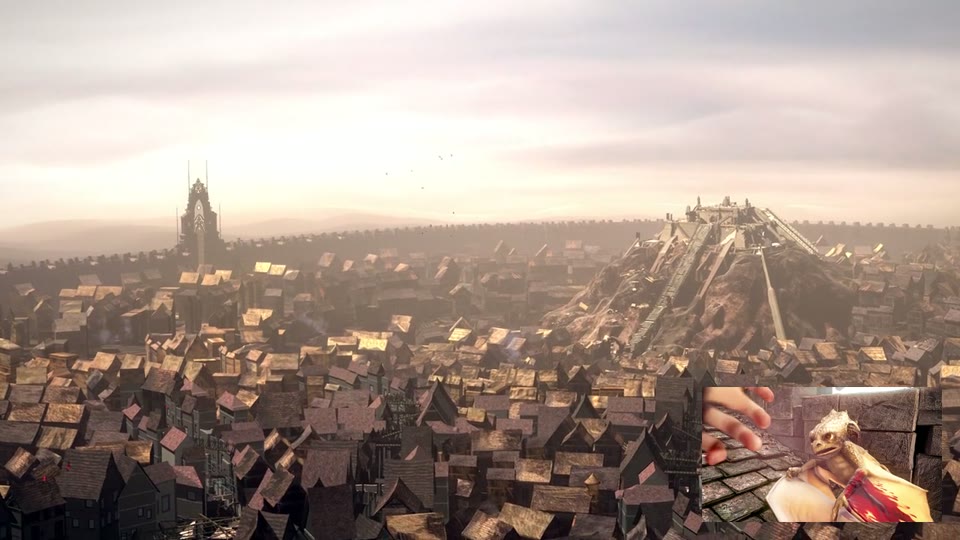
scale=320:-2, overlay=W-w-24:H-h-24 Inset in the corner
The city of rooftops from above, with the baby dragon playing in a small inset in the bottom-right corner
0:03 The first command at 0:03. The inset is a quarter of the main video's width.
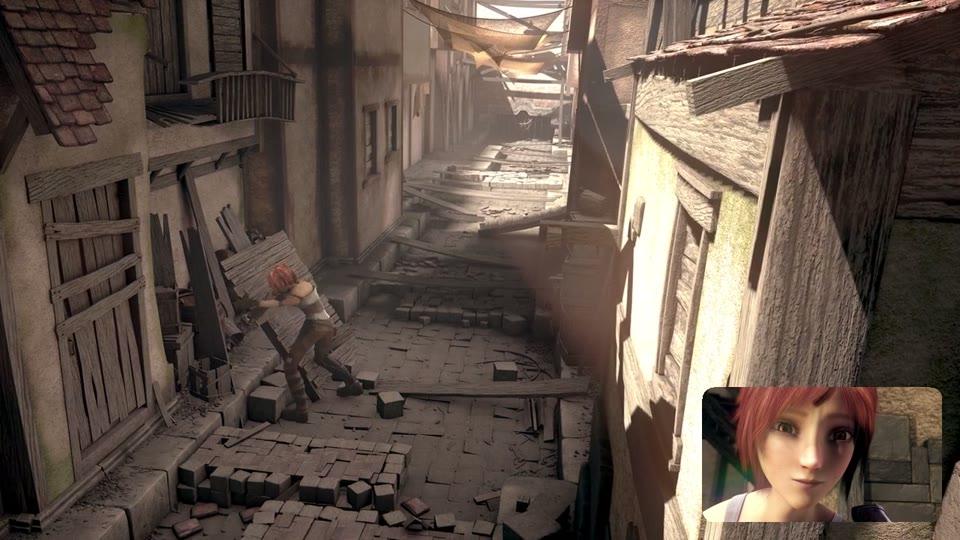
format=yuva420p, geq alpha Rounded corners
An alley scene with a rounded-corner inset of the girl smiling in the bottom-right corner
16 px The rounded-corner task at 0:09. The corners of the inset are transparent, so the alley shows through them.
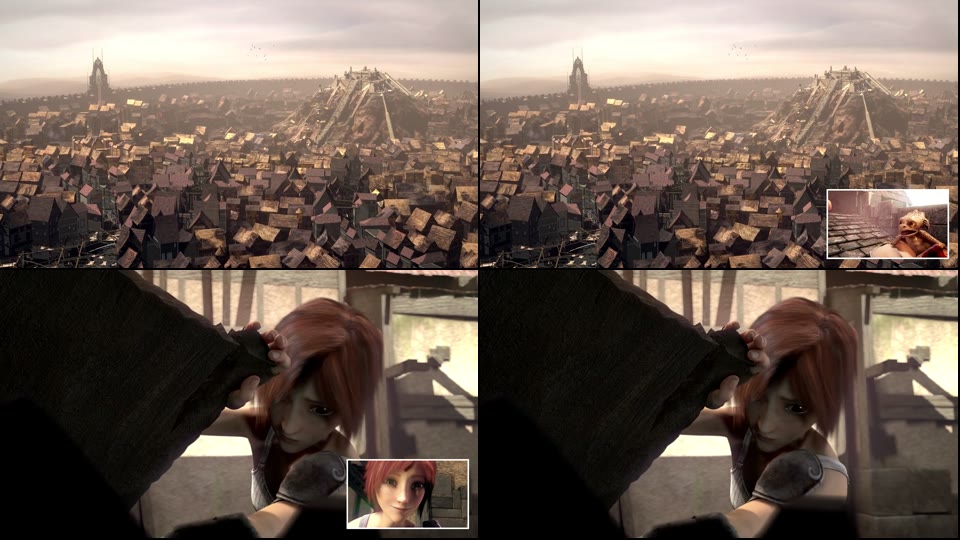
setpts=PTS-STARTPTS+5/TB Starts at 0:05 on its first frame
Four frames: the city with no inset, the city with a bordered dragon inset, the girl with a bordered inset of her smiling, the girl with no inset
0:05 to 0:15 The second command at 0:04.958, 0:05.000, 0:14.958 and 0:15.000. The inset arrives on its own first frame and leaves when it ends.
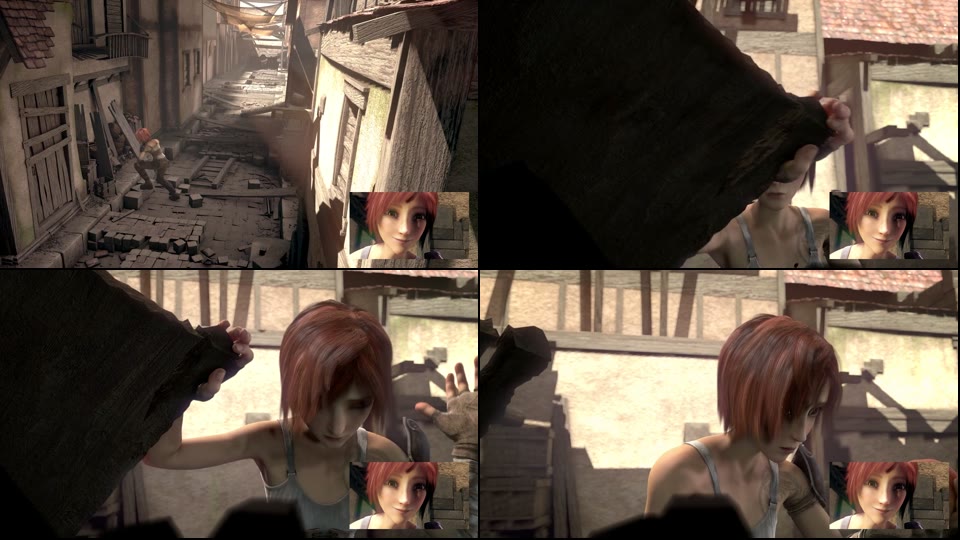
overlay with no eof_action Frozen for the last 10 s
Four frames from 0:11 to 0:19: the main video moves from the alley to the girl while the inset shows the same smiling frame in every one
0:10 to 0:20 Without eof_action=pass the inset holds its last frame after it ends. Frames at 0:11, 0:13, 0:16 and 0:19.

Footage: Sintel, © Blender Foundation, CC BY 3.0. Cropped to 16:9 by us.

Run it

Run it on Rendobar

Send the same command from your code. The job fetches each input from its URL and returns the output file's URL when it finishes.

job.ts
import { createClient } from "@rendobar/sdk";
const rb = createClient({ apiKey: process.env.RENDOBAR_API_KEY });
const job = await rb.jobs.run({
type: "ffmpeg",
inputs: {
"main.mp4": "https://cdn.rendobar.com/examples/picture-in-picture/main.mp4",
"inset.mp4": "https://cdn.rendobar.com/examples/picture-in-picture/inset.mp4",
},
params: {
command: "ffmpeg -i main.mp4 -i inset.mp4 -filter_complex \"[1:v]scale=320:-2[pip];[0:v][pip]overlay=W-w-24:H-h-24:eof_action=pass[v]\" -map \"[v]\" -map 0:a -c:v libx264 -crf 20 -c:a copy out.mp4",
},
});
console.log(job.output.file.url);

Install with npm i @rendobar/sdk. jobs.run() submits and waits, so it returns the finished job in one call.

terminal
curl https://api.rendobar.com/jobs \
-H "Authorization: Bearer $RENDOBAR_API_KEY" \
-H "Content-Type: application/json" \
-d '{
"type": "ffmpeg",
"inputs": {
"main.mp4": "https://cdn.rendobar.com/examples/picture-in-picture/main.mp4",
"inset.mp4": "https://cdn.rendobar.com/examples/picture-in-picture/inset.mp4"
},
"params": {
"command": "ffmpeg -i main.mp4 -i inset.mp4 -filter_complex \"[1:v]scale=320:-2[pip];[0:v][pip]overlay=W-w-24:H-h-24:eof_action=pass[v]\" -map \"[v]\" -map 0:a -c:v libx264 -crf 20 -c:a copy out.mp4"
}
}'

Returns immediately with a job id. Poll GET /jobs/{id} or register a webhook rather than blocking on the request.

Every variant

Pick the command for your case

Each one ran on the same input. The line under it is what came out. Run times are the best of three runs with FFmpeg 8.0 on one desktop machine, so read them as relative.

  1. Put the inset in the top-left corner

    Re-encode
    ffmpeg -i main.mp4 -i inset.mp4 -filter_complex "[1:v]scale=320:-2[pip];[0:v][pip]overlay=24:24:eof_action=pass[v]" -map "[v]" -map 0:a -c:v libx264 -crf 20 -c:a copy out.mp4

    24 px from the top and left. W-w-24:24 put it top right, 24:H-h-24 bottom left and (W-w)/2:(H-h)/2 in the centre, each checked on a frame.

    2.1 s run 6.5 MB 20.00 s long

  2. Size the inset relative to the main video

    Re-encode
    ffmpeg -i main.mp4 -i inset.mp4 -filter_complex "[0:v]split[m][r];[1:v][r]scale=rw/4:-2[pip];[m][pip]overlay=W-w-24:H-h-24:eof_action=pass[v]" -map "[v]" -map 0:a -c:v libx264 -crf 20 -c:a copy out.mp4

    scale reads the main video's width from its second input as rw, so rw/4 gave 320x180 on the 1280x720 main. The file is byte for byte the first command's.

    2.1 s run 6.2 MB 20.00 s long

  3. Round the inset's corners

    Re-encode
    ffmpeg -i main.mp4 -i inset.mp4 -filter_complex "[1:v]scale=320:-2,format=yuva420p,geq=lum='p(X,Y)':a='if(gt(abs(W/2-X),W/2-16)*gt(abs(H/2-Y),H/2-16),if(lte(hypot(16-(W/2-abs(W/2-X)),16-(H/2-abs(H/2-Y))),16),255,0),255)'[pip];[0:v][pip]overlay=W-w-24:H-h-24:eof_action=pass[v]" -map "[v]" -map 0:a -c:v libx264 -crf 20 -c:a copy out.mp4

    Corners with a 16 px radius. format=yuva420p adds an alpha channel, geq sets it to 0 outside the rounded corners, and overlay lets the main video show there. Change all five 16s to change the radius.

    2.3 s run 6.2 MB 20.00 s long

  4. Show the inset only between 0:02 and 0:08

    Re-encode
    ffmpeg -i main.mp4 -i inset.mp4 -filter_complex "[1:v]scale=320:-2[pip];[0:v][pip]overlay=W-w-24:H-h-24:enable='between(t,2,8)'[v]" -map "[v]" -map 0:a -c:v libx264 -crf 20 -c:a copy out.mp4

    The corner shows the inset from frame 48 (0:02.000) to frame 192 (0:08.000), both ends included. It shows the inset's own 0:02 to 0:08, because enable switches it on and off without moving it in time.

    2.0 s run 6.2 MB 20.00 s long

  5. Use the inset's sound instead

    Re-encode
    ffmpeg -i main.mp4 -i inset.mp4 -filter_complex "[1:v]scale=320:-2[pip];[0:v][pip]overlay=W-w-24:H-h-24:eof_action=pass[v]" -map "[v]" -map 1:a -c:v libx264 -crf 20 -c:a copy out.mp4

    The 10.0 s audio track of inset.mp4 in a 20.0 s file. The last 10 s have no sound.

    2.0 s run 6.1 MB 20.00 s long

  6. Keep both soundtracks

    Re-encode
    ffmpeg -i main.mp4 -i inset.mp4 -filter_complex "[1:v]scale=320:-2,pad=iw+8:ih+8:4:4:white,setpts=PTS-STARTPTS+5/TB[pip];[0:v][pip]overlay=W-w-24:H-h-24:eof_action=pass[v];[1:a]adelay=5s:all=1[ia];[0:a][ia]amix=inputs=2:duration=first:normalize=0[a]" -map "[v]" -map "[a]" -c:v libx264 -crf 20 -c:a aac out.mp4

    One track with both. adelay=5s starts the inset's sound at 0:05 with its picture, and normalize=0 keeps the main audio at its own level. Subtracting main.mp4 left -61 to -64 dBFS before 0:05 and the inset's -43 to -46 dBFS from 0:05 to 0:15.

    2.1 s run 6.2 MB 20.01 s long

  7. Loop a short inset for the whole video

    Re-encode
    ffmpeg -i main.mp4 -stream_loop -1 -i inset.mp4 -filter_complex "[1:v]scale=320:-2[pip];[0:v][pip]overlay=W-w-24:H-h-24:shortest=1[v]" -map "[v]" -map 0:a -c:v libx264 -crf 20 -c:a copy out.mp4

    The 10 s inset plays twice and restarts on its first frame at 0:10. shortest=1 ends the picture with main.mp4 at 20.0 s, since the looped input never ends.

    2.2 s run 6.5 MB 20.00 s long

  8. Make the inset semi-transparent

    Re-encode
    ffmpeg -i main.mp4 -i inset.mp4 -filter_complex "[1:v]scale=320:-2,format=yuva420p,colorchannelmixer=aa=0.6[pip];[0:v][pip]overlay=W-w-24:H-h-24:eof_action=pass[v]" -map "[v]" -map 0:a -c:v libx264 -crf 20 -c:a copy out.mp4

    The inset at 60% opacity, with the main video showing through it. colorchannelmixer=aa=0.6 scales the alpha channel that format=yuva420p adds.

    2.3 s run 6.5 MB 20.00 s long

Gotchas

Where it goes wrong

Why does the inset freeze on its last frame?

When the inset ends before the main video, overlay repeats its last frame until the main video ends. That is the default, eof_action=repeat:

ffmpeg -i main.mp4 -i inset.mp4 -filter_complex "[1:v]scale=320:-2[pip];[0:v][pip]overlay=W-w-24:H-h-24[v]" -map "[v]" -map 0:a -c:v libx264 -crf 20 -c:a copy out.mp4

From 0:10 to 0:20 the corner shows the inset's last frame, 0:09.958, in every frame checked. The main video keeps playing behind it.

Add eof_action=pass to drop the inset when it ends, as the commands at the top do. To end the whole video with the inset instead, use shortest=1 in overlay and -shortest for the copied audio. That gave a 10.0 s file.

How do I start the inset at a later time?

Shift its timestamps with setpts=PTS-STARTPTS+5/TB, as in the second command at the top. enable looks like the same thing and is not: it shows the inset from 0:05, but the inset has been playing since 0:00.

ffmpeg -i main.mp4 -i inset.mp4 -filter_complex "[1:v]scale=320:-2[pip];[0:v][pip]overlay=W-w-24:H-h-24:enable='gte(t,5)'[v]" -map "[v]" -map 0:a -c:v libx264 -crf 20 -c:a copy out.mp4

At 0:05.000 the corner shows the inset's frame from 0:05, so its first 5 s never appear. From 0:10 it freezes on its last frame.

-itsoffset 5 before -i inset.mp4 delays the picture the same way setpts does. It does not carry through amix: mixed with the main audio after -itsoffset 5, the inset's sound still started at 0:00. Delay the sound with adelay, as in the both-soundtracks task.

Which audio ends up in the output?

The one you map. -map 0:a keeps the main video's sound and -map 1:a the inset's. A mapped track keeps its own length, so the inset's 10.0 s of audio ended at 0:10 in a 20.0 s file.

With no -map at all, FFmpeg chose for you. Both inputs have stereo tracks, and it took the first input's: main.mp4's sound at -31.6 LUFS, re-encoded to AAC, where the inset's measures -40.5 LUFS. Map the track yourself so the choice does not depend on the order of the inputs.

Related: Add a watermark, Blurred background, Stack videos, Mix audio tracks.

Your command. Our infrastructure.

Bring your own commands. Run them on scalable CPU and GPU infrastructure, and pay only for compute time.