

Remove audio from a video with FFmpeg

Add -an to drop the audio and -c:v copy to keep the video as it is. To remove only some tracks, select everything with -map 0 and subtract what you do not want, like -map -0:a:1. Every command below ran on the same files, and the stream lists come from ffprobe.

All audio Stream copy

Drops every audio track and copies the video untouched.

ffmpeg -i in.mp4 -an -c:v copy out.mp4

Video only. The video stream is identical to the input's (same md5).

Video
Unchanged, same md5
Run time
85 ms
Output
7.1 MB
Keep the rest Stream copy

Drops the audio and keeps every other stream, subtitles included.

ffmpeg -i in.mkv -map 0 -map -0:a -c copy out.mkv

Both audio tracks gone. The video and the subtitle track are still there, copied.

Left
Video and subtitles
Run time
105 ms
Output
7.1 MB

Proof

The audio that is left

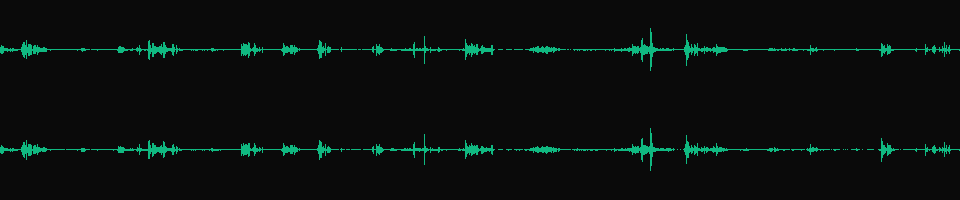
Waveforms of the first audio track in each file, one lane per channel.
in.mkv, audio track 1
Stereo waveform of the first audio track of in.mkv
2 channels The input's default track: stereo AAC, dialogue and music.
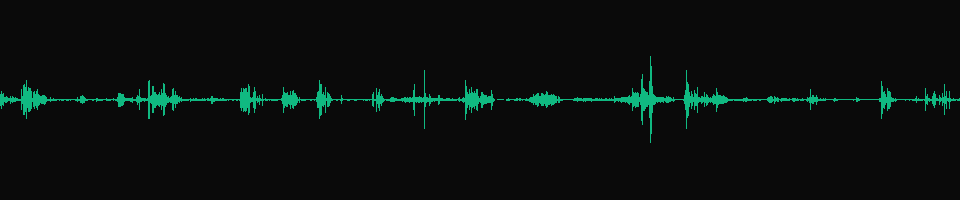
-map 0 -map -0:a:0 First track removed, second kept
Mono waveform of the only audio track left after removing the first one
1 channel One lane: the mono AC-3 track is now the first and only audio track.
anullsrc, -shortest Audio track kept, sound gone
Two flat lines: a stereo track of pure silence
-91 dB Loudest sample -91.0 dB, digital silence. A waveform of silence draws nothing, so the flat lines are ours.

Footage: Sintel, © Blender Foundation, CC BY 3.0. Second audio track (mono AC-3) made by us.

Run it

Run it on Rendobar

Send the same command from your code. The job fetches each input from its URL and returns the output file's URL when it finishes.

job.ts
import { createClient } from "@rendobar/sdk";
const rb = createClient({ apiKey: process.env.RENDOBAR_API_KEY });
const job = await rb.jobs.run({
type: "ffmpeg",
inputs: {
"in.mp4": "https://cdn.rendobar.com/examples/remove-audio/in.mp4",
},
params: {
command: "ffmpeg -i in.mp4 -an -c:v copy out.mp4",
},
});
console.log(job.output.file.url);

Install with npm i @rendobar/sdk. jobs.run() submits and waits, so it returns the finished job in one call.

terminal
curl https://api.rendobar.com/jobs \
-H "Authorization: Bearer $RENDOBAR_API_KEY" \
-H "Content-Type: application/json" \
-d '{
"type": "ffmpeg",
"inputs": {
"in.mp4": "https://cdn.rendobar.com/examples/remove-audio/in.mp4"
},
"params": {
"command": "ffmpeg -i in.mp4 -an -c:v copy out.mp4"
}
}'

Returns immediately with a job id. Poll GET /jobs/{id} or register a webhook rather than blocking on the request.

Every variant

Pick the command for your case

Each one ran on the same input. The line under it is what came out. Run times are the best of three runs with FFmpeg 8.0 on one desktop machine, so read them as relative.

  1. Keep the video stream only

    Stream copy
    ffmpeg -i in.mkv -map 0:v -c copy out.mkv

    Video only. The subtitles go too, which -an would have kept.

    89 ms run 7.1 MB 60.02 s long

  2. Remove one audio track

    Stream copy
    ffmpeg -i in.mkv -map 0 -map -0:a:0 -c copy -disposition:a:0 default out.mkv

    The stereo AAC track is gone. The AC-3 track, now 0:a:0, is marked default, and the subtitles stay.

    92 ms run 7.9 MB 60.02 s long

  3. Keep one audio track and drop the others

    Stream copy
    ffmpeg -i in.mkv -map 0:v -map 0:a:1 -c copy out.mkv

    Video plus the second audio track, the mono AC-3. Nothing else.

    91 ms run 7.9 MB 60.02 s long

  4. Remove subtitles

    Stream copy
    ffmpeg -i in.mkv -map 0 -map -0:s -c copy out.mkv

    Video and both audio tracks, no subtitle track.

    94 ms run 9.2 MB 60.03 s long

  5. Change the default audio track

    Stream copy
    ffmpeg -i in.mkv -map 0 -c copy -disposition:a:0 0 -disposition:a:1 default out.mkv

    All streams kept. The AC-3 track is default now and the AAC track is not.

    97 ms run 9.2 MB 60.03 s long

  6. Replace the audio with silence

    Re-encode
    ffmpeg -i in.mp4 -f lavfi -i anullsrc=r=48000:cl=stereo -map 0:v -map 1:a -c:v copy -c:a aac -shortest out.mp4

    A stereo AAC track of silence, 60.0 s like the video. For players or tools that expect an audio track.

    195 ms run 7.2 MB 60.00 s long

  7. List the tracks before you pick

    Read only
    ffprobe -v error -show_entries stream=index,codec_type,codec_name,channels:stream_tags=title:stream_disposition=default -of compact in.mkv

    Four lines: h264 video at index 0, AAC stereo at 1 (default), AC-3 mono at 2, SubRip at 3.

    70 ms run

Gotchas

Where it goes wrong

-an or -map 0 -map -0:a?

Both remove the audio. They differ in what else survives. On in.mkv:

  • -an -c copy: video and subtitles, the same bytes as -map 0 -map -0:a.
  • -map 0 -map -0:a -c copy: video and subtitles.
  • -map 0:v -c copy: video only.

Without -map, FFmpeg keeps one stream per type, so -an works when a file has one stream of each. With -map 0, every stream is kept, and the minus signs say which to drop. Use -map 0 when a file carries several subtitle or data tracks.

Why does no audio play by default after I removed a track?

Default is a flag on each track. Remove the track that had it and no track has it.

ffmpeg -i in.mkv -map 0 -map -0:a:0 -c copy out.mkv

The AC-3 track is left with default=0. No audio track in the file is marked default.

Set the flag in the same command. Track numbers count the output, so the AC-3 track is now a:0:

ffmpeg -i in.mkv -map 0 -map -0:a:0 -c copy -disposition:a:0 default out.mkv

default=1 on the AC-3 track.

Does removing audio re-encode the video?

Only if you leave out -c:v copy. FFmpeg then decodes and encodes every frame with its default encoder.

ffmpeg -i in.mp4 -an out.mp4

Re-encoded with libx264: 7,288,731 bytes, and the video stream's md5 no longer matches the input. With -c:v copy the md5 matches.

Related: Extract audio, Add audio to a video, Mute a section, Strip metadata.

Your command. Our infrastructure.

Bring your own commands. Run them on scalable CPU and GPU infrastructure, and pay only for compute time.