Run -vf mpdecimate -fps_mode vfr and copy the audio. Every kept frame keeps its timestamp, so the sound stays in sync: on a 60 fps clip made from 24 fps footage it kept 241 of 720 frames. Retime with setpts only when you want a shorter video, and cut or drop the audio with it.
Keep timingRe-encode
Drops every repeat and keeps the sound in sync. The file keeps its length.
Kept 241 of 720 frames, exactly the 241 distinct pictures. Each kept frame keeps its timestamp, so the copied audio stays in sync and the file still runs 12.0 s.
Frames
720 in, 241 out
Audio
Copied, 12.0 s, in sync
Run time
1.1 s
Output
3.3 MB
ShorterRe-encode
A shorter file at one steady frame rate, freezes cut out. Video only.
241 frames at a constant 24 fps, 10.04 s. The repeats and the 2 s freeze are gone. The audio is left out because it no longer lines up with the picture.
Frames
241 at 24 fps
Length
12.0 s in, 10.04 s out
Run time
1.1 s
Output
3.0 MB
Proof
Eight frames in a row, before and after
Every frame of the test clip carries the number of the picture it came from, so a repeat shows as a repeated number.
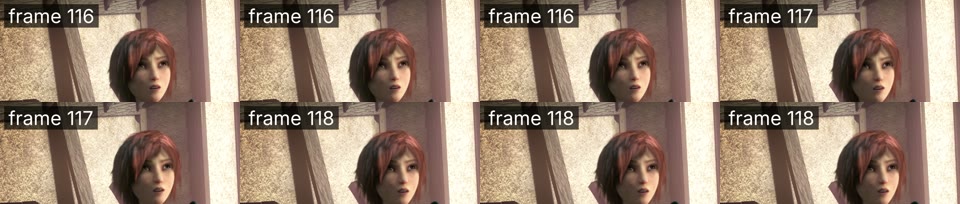
in.mp4, frames 290 to 297Each picture 2 or 3 times
720 frames24 fps footage stored at 60 fps: picture 116 three times, 117 twice, 118 three times.
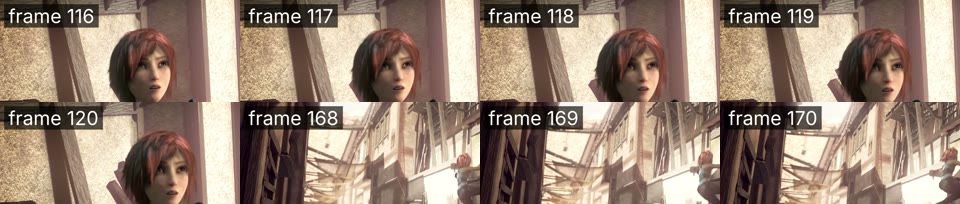
mpdecimate -fps_mode vfr, frames 116 to 123Each picture once
241 framesFrame 120 is followed by 168. The 2 s freeze is one stored frame now, shown from 5.0 s to 7.0 s, so the sound still matches.
setpts=N/FRAME_RATE/TB, at 2.0 sVideo runs 2.5 times fast
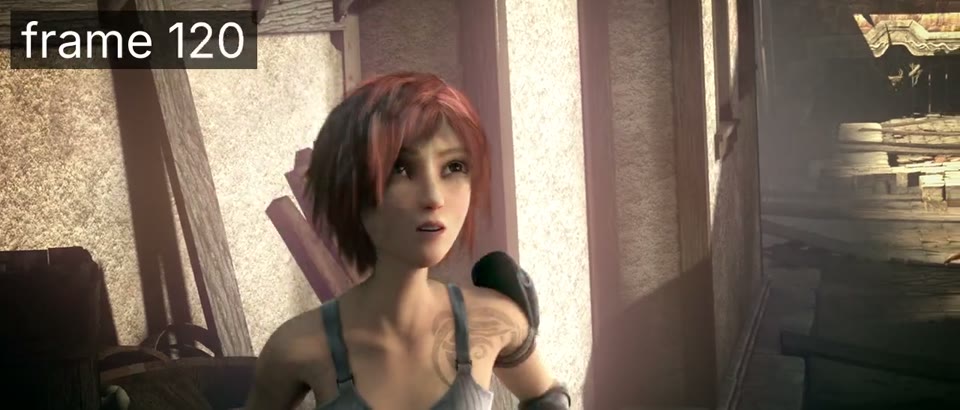
frame 120At 2.0 s this output shows frame 120, the picture from 5.0 s of the input. The copied audio is still at 2.0 s.
Returns immediately with a job id. Poll GET /jobs/{id} or register a webhook rather than blocking on the request.
Every variant
Pick the command for your case
Each one ran on the same input. The line under it is what came out. Run times are the best of three runs with FFmpeg 8.0 on one desktop machine, so read them as relative.
See which frames are duplicates
Read only
ffmpeg-iin.mp4-vfmpdecimate-logleveldebug-fnull-
One line per frame with its pts_time and the word keep or drop. The test clip logged 241 keep lines and 479 drop lines.
290 ms run
Find frozen sections
Read only
ffmpeg-iin.mp4-vffreezedetect=d=1-an-fnull-
Logged freeze_start: 5, freeze_duration: 2 and freeze_end: 7. The 60 fps repeats last 50 ms at most, so they never reach the 1 s minimum set by d=1.
The freeze from 5 s to 7 s is cut from picture and sound together: 10.0 s of video and 10.01 s of audio, still in step. Take the times from freezedetect.
288 frames at a constant 24 fps, 12.0 s, audio in sync. fps fills each gap with the last kept frame, so the 2 s freeze comes back as 48 repeats. Use it when an editor needs a fixed frame rate.
Prints 720. It decodes every frame to count them. Run it on the output to see what is left: 241 after the first answer.
797 ms run
Gotchas
Where it goes wrong
Why is the audio out of sync after mpdecimate?
Because setpts=N/FRAME_RATE/TB packs the kept frames back to back at the input's frame rate, and nothing touches the audio. On the test clip the video ended after 4.02 s while the audio ran 12.0 s. This is the command most answers give, run with the audio copied:
241 frames at 60 fps: 4.02 s of video against 12.0 s of audio. At 2.0 s the picture already shows what the input showed at 5.0 s.
FRAME_RATE is the input rate, 60 here, while the real pictures came 24 a second. Keep the timestamps instead (the first answer: -fps_mode vfr and no setpts) and the sound stays in step. To get a shorter file, retime at the real rate with setpts=N/24/TB and cut the audio at the same places, as in the freeze cut above.
Do I need -vsync vfr with mpdecimate?
Not on FFmpeg 8.0. Without it, MP4, MKV, MOV, AVI and MPEG-TS outputs all kept 241 frames. -vsync itself now prints "-vsync is deprecated. Use -fps_mode".
What puts the duplicates back is a fixed output rate:
ffmpeg-iin.mp4-vfmpdecimate-r60-c:acopyout.mp4
720 frames again at a constant 60 fps. -fps_mode cfr did the same.
The commands on this page still write -fps_mode vfr, so the output keeps the gaps whatever the defaults do.
Does mpdecimate drop frames that are not duplicates?
Yes, in slow shots. It compares 8x8 pixel blocks against thresholds, not exact equality, so two real frames that barely differ count as a repeat. On 10 s of Sintel at its own 24 fps, which has no repeats, the defaults dropped 6 of 240 frames, all in two slow close-ups:
6 drop lines out of 240 frames. With -fps_mode vfr each dropped frame shows as the one before it, held twice as long.
Lowering hi keeps more real frames, and it also leaves more repeats behind, because re-encoded repeats are not bit-identical. Measured on both clips:
hi=384: 0 real frames dropped, but 266 frames left in in.mp4 where 241 are distinct.
hi=512: 2 real frames dropped, 243 left.
hi=640: 5 real frames dropped, 241 left.
Default hi=768: 6 real frames dropped, 241 left.
Will removing duplicate frames make the file smaller?
Barely. A repeated frame costs H.264 almost nothing to store. With the 479 repeats removed, the first answer wrote 3,274,043 bytes. The same re-encode with all 720 frames kept:
ffmpeg-iin.mp4-c:acopyout.mp4
3,316,906 bytes. Removing the repeats saved 1.3%.
Remove duplicates to get one frame per real picture or to cut frozen stretches, not to save space.