For audio, use silenceremove: start_periods=1 trims the silence at the start, stop_periods=-1 shortens every pause after it, and stop_duration is how much of each pause stays. For a video, find the pauses with silencedetect and cut picture and sound together with trim, atrim and concat. Every command below ran on a 37 s voice track and a 40 s dialogue scene, and the results are what came out.
AudioRe-encode
Trims the start and shortens every pause over 0.5 s to 0.5 s. One filter, for audio files.
37.0 s in, 29.51 s out. The 2.5 s of silence at the start is gone and the 3 s gaps in the middle and at the end are 0.52 s and 0.51 s long. The MP3 is re-encoded at the 128 kb/s default.
Removed
7.49 s of 37.0 s
Gaps left
0.52 s and 0.51 s
Run time
380 ms
Output
473 KB
VideoRe-encode
Finds the pauses with silencedetect and cuts them from picture and sound together. Re-encodes.
40.0 s in, 26.70 s out. silencedetect found 9 pauses of 1 s or more under -35 dB, 13.34 s in all, and both streams lost them: the picture ends at 26.67 s and the sound at 26.70 s.
Pauses cut
9, 13.34 s in all
Picture, sound
26.67 s, 26.70 s
Run time
2.4 s
Output
3.5 MB
Proof
The pauses before and after
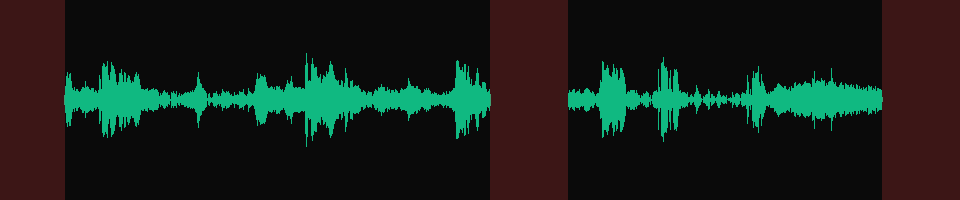
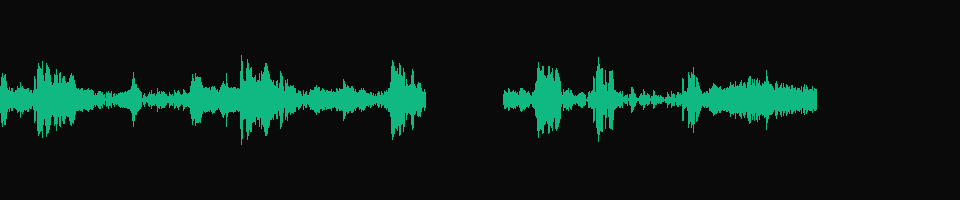
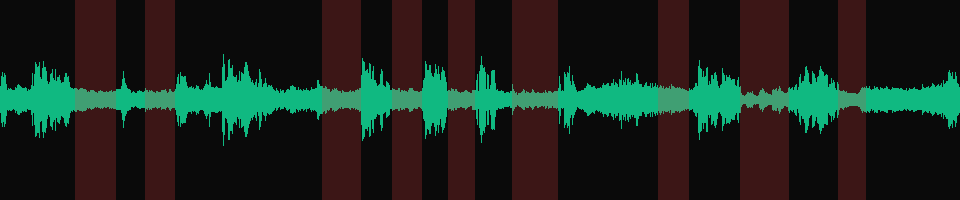
Waveforms on one time scale per input, so a shorter output leaves empty space on the right. Drawn with 12 dB of display gain so the quiet parts show. Red marks what silencedetect found.
in.mp3
37.0 sDialogue with digital silence at 0 to 2.5 s, 18.9 to 21.9 s and 34.0 to 37.0 s. silencedetect=n=-50dB:d=1 found those three and nothing else.
silenceremove, areverse twiceBoth ends trimmed, the middle gap kept
31.48 s2.50 s cut from the start and 3.01 s from the end. The 3 s gap between the lines is untouched.
stop_periods=-1:stop_duration=0.5Every gap down to half a second
29.51 sThe start is trimmed, the middle gap is 0.52 s and the end 0.51 s. The dialogue between them is the same as in the input.
in.mp4, silencedetect=n=-35dB:d=1
9 pausesThe pauses are not empty. Fire and room tone fill them, so they show as a thin band, not a flat line. At -35 dB, 9 of them last 1 s or more.
trim, atrim, concatPauses cut from picture and sound
26.70 sThe same lines, 13.30 s shorter. Pauses shorter than the 1 s minimum stay in.
out.mp4, frames 75 and 76A jump cut where the first pause was
1.75 sFrame 75 is 0:03.125 in the scene and frame 76 is 0:04.875. The picture between them went with the pause.
Returns immediately with a job id. Poll GET /jobs/{id} or register a webhook rather than blocking on the request.
Every variant
Pick the command for your case
Each one ran on the same input. The line under it is what came out. Run times are the best of three runs with FFmpeg 8.0 on one desktop machine, so read them as relative.
31.48 s from 37.0 s: 2.50 s cut at the start and 3.01 s at the end, the 3 s gap in the middle untouched. areverse turns the end into a start so the same filter can trim it.
34.50 s: the first 2.50 s are gone and nothing after the first sound changes. Byte for byte the output of silenceremove=1:0:-50dB, the short form in the accepted Stack Overflow answer.
The first two pauses silencedetect listed, 3.16 to 4.85 s and 6.06 to 7.32 s, cut from both streams. 37.06 s left, picture and sound within 15 ms of each other. Keep the parts between the pauses, one trim pair each.
10 files, part_00.m4a to part_09.m4a, 2.26 to 7.55 s each and 40.02 s together. Each split falls in the middle of a pause, and the audio is copied, not re-encoded.
339 ms run867 KB40.02 s long
Gotchas
Where it goes wrong
Why did silenceremove cut my file down to almost nothing?
stop_periods=1 does not mean trim the end. It means stop at the first silence and drop everything after it. The start-and-end command in the accepted Stack Overflow answer does that on FFmpeg 8.0:
0.41 s left of 37.0 s. With stop_duration=0, the first brief dip under -50 dB inside the first line counted as the end.
With stop_duration=1 it stops at the first full second of silence instead, and that gave 17.41 s: everything after the gap in the middle was lost. To trim the end, reverse the audio, trim its start and reverse it back:
A level under your quietest words and over the noise in your pauses. Digital silence passes any threshold. A recorded pause does not: in the test scene the pauses carry fire and room tone that peaks at -36 to -38 dB, and the speech peaks at -14 to -18 dB.
silencedetect counts a stretch as silent only when every sample in it is under the level, so measure before you cut. This counts the pauses of 1 s or more at four levels:
0, 1, 9 and 11. The 9 pauses at -35 dB add up to 13.34 s. The 11 at -30 dB add up to 22.04 s, more than half the 40 s clip.
-50 dB, the level in the accepted Stack Overflow answer, found the three inserted silences in in.mp3 and nothing at all in the film scene. Start there for clean voice tracks, and raise it toward the noise in your pauses for anything recorded in a room.
Why is my video out of sync after removing silence?
silenceremove is an audio filter. Run it on a video and the sound gets shorter while the picture keeps every frame:
Video 40.0 s, audio 17.80 s. After the first pause every line plays over the wrong picture.
The select and aselect pair that many guides show fails the other way on FFmpeg 8.0. select drops the video frames, but aselect let all 1,875 audio frames through, and did the same with aselect=0:
Cut both streams with trim and atrim and join them with concat, as the video commands on this page do. Each kept part gets a video trim and an audio trim with the same times, so the two cannot drift.
Why is there still silence left after silenceremove?
Because stop_duration is the length of pause that stays, not the shortest pause that goes. With stop_periods=-1:stop_duration=1 each 3 s gap in the test file came out 1.02 s long. With stop_duration=0.5 it came out 0.52 s.
Set it to 0 and the gaps go completely, along with more than you asked for: