Split a video into parts with FFmpeg

Use the segment muxer. -f segment -segment_time 25 with -c copy writes numbered parts in one pass, each starting on a keyframe. For parts of the exact length, re-encode and force a keyframe at every cut. Every command below ran on the same 2-minute clip, and the results are what came out.

Fast Stream copy

Instant and lossless. Each part starts on a keyframe, so lengths follow the keyframes.

ffmpeg -i in.mp4 -c copy -map 0 -f segment -segment_time 25 -reset_timestamps 1 part_%03d.mp4

Five parts of 30, 20, 30, 20 and 20 s, not 25. With -c copy each cut waits for the next keyframe, and this clip has one every 10 s.

Part lengths
30, 20, 30, 20, 20 s
Run time
103 ms
Output
29.9 MB
Exact Re-encode

Every part is the length you asked for. Re-encodes, so it takes longer.

ffmpeg -i in.mp4 -c:v libx264 -crf 20 -force_key_frames "expr:gte(t,n_forced*25)" -c:a aac -map 0 -f segment -segment_time 25 -reset_timestamps 1 part_%03d.mp4

Five parts of 25, 25, 25, 25 and 20 s, starting on frames 0, 600, 1200, 1800 and 2400. The forced keyframes put a cut exactly every 25 s.

Part lengths
25, 25, 25, 25, 20 s
Run time
9.8 s
Output
34.8 MB

Proof

Where each part starts

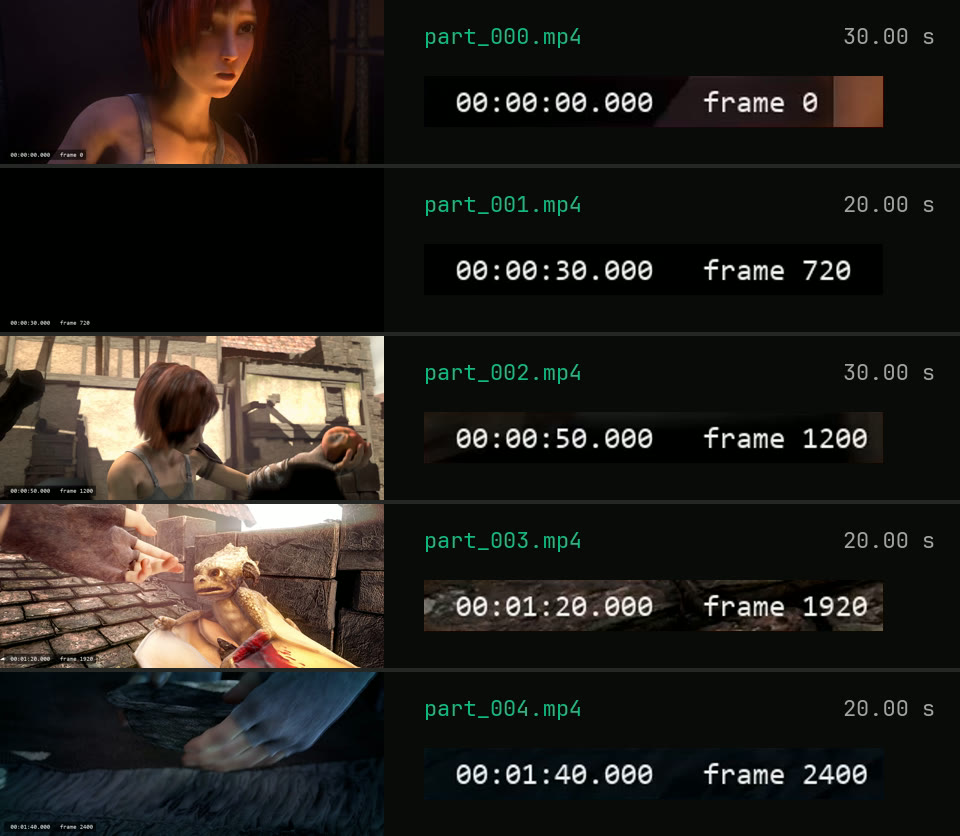
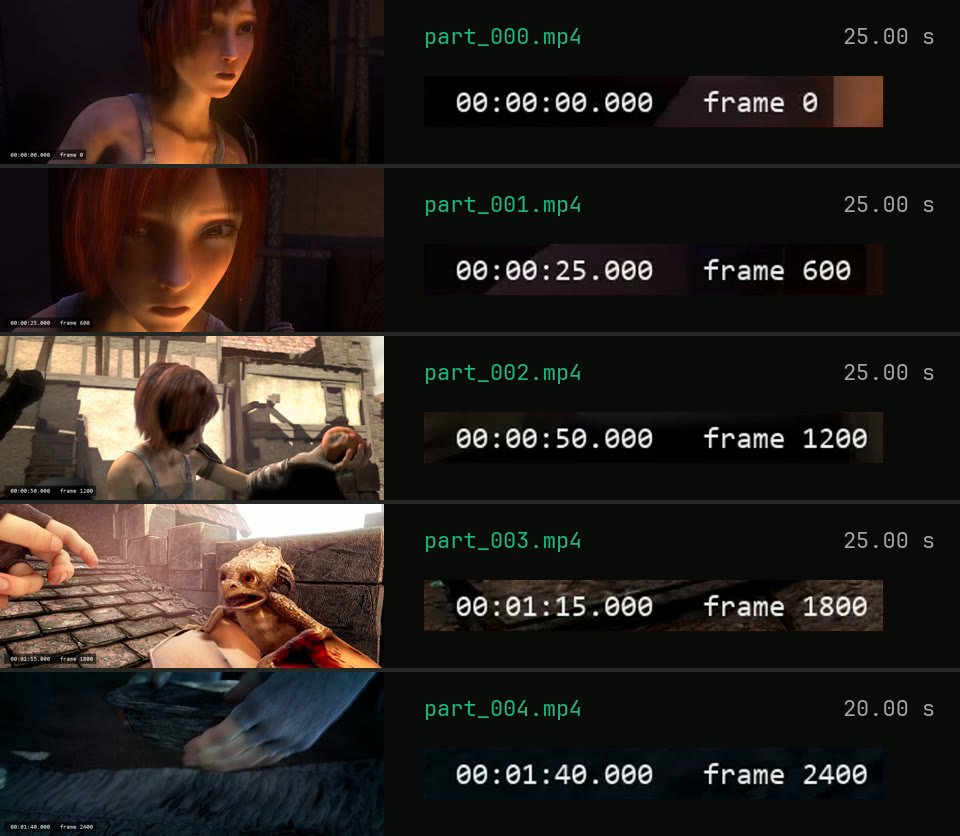
The clip has its timecode burned in and a keyframe every 10 seconds. Both commands asked for 25-second parts. Each row is the first frame of one part.
-c copy, -segment_time 25 Cuts wait for the next keyframe
First frames of the five stream-copied parts, with burned-in timecodes 0:00, 0:30, 0:50, 1:20 and 1:40
0:30, 0:50, 1:20, 1:40 The muxer cuts at the first keyframe at or after 0:25, 0:50, 1:15 and 1:40. Two of the four targets fall between keyframes, so those cuts land 5 s late.
Re-encode, -force_key_frames every 25 s A cut every 25 s
First frames of the five re-encoded parts, with burned-in timecodes 0:00, 0:25, 0:50, 1:15 and 1:40
0:25, 0:50, 1:15, 1:40 Frames 600, 1200, 1800 and 2400, exactly where 25 s parts should start. The last part holds the 20 s that are left.

Footage: Sintel, © Blender Foundation, CC BY 3.0. Timecode and chapters added by us.

Run it

Run it on Rendobar

Send the same command from your code. The job fetches each input from its URL and returns the output file's URL when it finishes.

job.ts
import { createClient } from "@rendobar/sdk";
const rb = createClient({ apiKey: process.env.RENDOBAR_API_KEY });
const job = await rb.jobs.run({
type: "ffmpeg",
inputs: {
"in.mp4": "https://cdn.rendobar.com/examples/split-video/in.mp4",
},
params: {
command: "ffmpeg -i in.mp4 -c copy -map 0 -f segment -segment_time 25 -reset_timestamps 1 part_%03d.mp4",
},
});
console.log(job.output.file.url);

Install with npm i @rendobar/sdk. jobs.run() submits and waits, so it returns the finished job in one call.

terminal
curl https://api.rendobar.com/jobs \
-H "Authorization: Bearer $RENDOBAR_API_KEY" \
-H "Content-Type: application/json" \
-d '{
"type": "ffmpeg",
"inputs": {
"in.mp4": "https://cdn.rendobar.com/examples/split-video/in.mp4"
},
"params": {
"command": "ffmpeg -i in.mp4 -c copy -map 0 -f segment -segment_time 25 -reset_timestamps 1 part_%03d.mp4"
}
}'

Returns immediately with a job id. Poll GET /jobs/{id} or register a webhook rather than blocking on the request.

Every variant

Pick the command for your case

Each one ran on the same input. The line under it is what came out. Run times are the best of three runs with FFmpeg 8.0 on one desktop machine, so read them as relative.

  1. List where each part starts and ends

    Stream copy
    ffmpeg -i in.mp4 -c copy -map 0 -f segment -segment_time 25 -segment_list parts.csv -reset_timestamps 1 part_%03d.mp4

    The same five parts, plus parts.csv with one row each, like part_001.mp4,30.083333,50.083333. The times sit 0.083 s after the cuts because this clip stores its first frame at 0.083 s.

    106 ms run 29.9 MB 120.02 s long

  2. Split into 3 equal parts

    Stream copy
    ffmpeg -i in.mp4 -c copy -map 0 -f segment -segment_time $(ffprobe -v error -show_entries format=duration -of csv=p=0 in.mp4 | awk '{print $1/3}') -reset_timestamps 1 part_%03d.mp4

    Three parts of 40 s each. awk divides the duration by 3. The cuts at 0:40 and 1:20 fall on keyframes in this clip. In a file where they do not, each cut moves to the next keyframe.

    181 ms run 29.9 MB 120.02 s long

  3. Split at given times

    Stream copy
    ffmpeg -i in.mp4 -c copy -map 0 -f segment -segment_times 45,95 -reset_timestamps 1 part_%03d.mp4

    Asked for cuts at 0:45 and 1:35, got 0:50 and 1:40, so the parts ran 50, 50 and 20 s. Stream copy moves each cut to the next keyframe.

    101 ms run 29.9 MB 120.02 s long

  4. Split at exact times

    Re-encode
    ffmpeg -i in.mp4 -c:v libx264 -crf 20 -force_key_frames 45,95 -c:a aac -map 0 -f segment -segment_times 45,95 -reset_timestamps 1 part_%03d.mp4

    Cuts at exactly 0:45 and 1:35: parts of 45, 50 and 25 s. -force_key_frames takes the same list of times as -segment_times.

    9.4 s run 34.9 MB 120.02 s long

  5. Split the audio into chunks

    Stream copy
    ffmpeg -i in.mp4 -vn -c:a copy -f segment -segment_time 30 -reset_timestamps 1 part_%03d.m4a

    Four 30 s AAC files, copied, no video. A fifth file of 21 ms holds the last audio frame, because the audio runs a little past 2:00.

    83 ms run 2.0 MB 120.02 s long

  6. Split at each chapter

    Stream copy
    ffmpeg -i chapters.mp4 -c copy -f segment -segment_times $(ffprobe -v error -show_entries chapter=end_time -of csv=p=0 chapters.mp4 | tr -d "\r" | paste -sd,) -reset_timestamps 1 chapter_%d.mp4

    Three files of 30, 50 and 40 s, one per chapter, with 720, 1200 and 960 frames: all 2880, none twice. ffprobe lists the chapter ends and paste joins them with commas. tr strips the Windows line endings.

    186 ms run 6.3 MB 120.02 s long

Gotchas

Where it goes wrong

Why are my parts not the length I asked for?

With -c copy, a part can only start on a keyframe. The segment muxer cuts at the first keyframe at or after each multiple of -segment_time. This clip has a keyframe every 10 s, so -segment_time 25 cut at 0:30, 0:50, 1:20 and 1:40, and the parts ran 30, 20, 30, 20 and 20 s.

List the keyframes to see where a copy cut can land:

ffprobe -v error -select_streams v -skip_frame nokey -show_entries frame=pts_time -of csv=p=0 in.mp4

0, 10, 20 and every 10 s up to 110. A -segment_time that is a multiple of 10 gives equal parts here. For any other length, re-encode with -force_key_frames.

Why does each part not start at 0?

Without -reset_timestamps 1, each part keeps the timestamps it had in the source, so the second part of a split starts where it sat in the original.

ffmpeg -i in.mp4 -c copy -map 0 -f segment -segment_time 25 part_%03d.mp4

part_001.mp4 starts at 30.014 s and part_004.mp4 at 100.008 s. With -reset_timestamps 1, parts 1 to 4 start at 0.000 s.

Can FFmpeg split a video by file size?

Not in one command. The segment muxer cuts by time only. -fs stops writing at a size, so it gives you the first part and nothing after it:

ffmpeg -i in.mp4 -c copy -fs 10M part.mp4

One file of 10,266,317 bytes holding the first 58.1 s. -fs 10M means 10,000,000 bytes, and the file came out 266 KB over.

Equal times do not give equal sizes on a stream copy either. Three 40 s parts of this clip came out at 6.2, 13.4 and 10.3 MB, because busy scenes take more bits. Cap the bit rate while you re-encode and the sizes even out:

ffmpeg -i in.mp4 -c:v libx264 -b:v 1500k -maxrate 1500k -bufsize 3000k -force_key_frames "expr:gte(t,n_forced*40)" -c:a aac -b:a 128k -f segment -segment_time 40 -reset_timestamps 1 part_%03d.mp4

Three 40 s parts of 7.1, 7.7 and 7.6 MB. 1,500 kbps of video plus 128 kbps of audio is 8.1 MB per 40 s, so every part stayed under that.

Segment muxer, or one -ss and -to command per part?

The segment muxer. It reads the file once and puts every frame in exactly one part. A loop of -ss and -to with -c copy is the top Stack Overflow answer for splitting by chapter, and on this clip the parts overlapped:

n=0; ffprobe -v error -show_entries chapter=start_time,end_time -of csv=p=0 chapters.mp4 | tr -d "\r" | while IFS=, read start end; do n=$((n+1)); ffmpeg -nostdin -y -ss "$start" -to "$end" -i chapters.mp4 -c copy -map_chapters -1 "chapter_$n.mp4"; done

722, 1202 and 960 frames, 2884 for a clip of 2880, so 4 frames ended up in two files. The segment muxer command above gave 720, 1200 and 960.

If you do loop, keep -map_chapters -1. Without it the three files carried 3, 3 and 2 chapter marks copied from the source, at shifted times.

Related: Trim a video, Merge videos, Extract audio, FFprobe video info.

Your command. Our infrastructure.

Bring your own commands. Run them on scalable CPU and GPU infrastructure, and pay only for compute time.