


Stack videos side by side with FFmpeg

Use hstack for side by side, vstack for top and bottom and xstack for a grid. hstack needs every input at the same height and vstack at the same width, so scale the odd one first with scale=-2:H. Stacking builds a new picture, so the video is always re-encoded. Map the audio you want with -map.

Same size Re-encode

The clips share a height. Nothing to prepare.

ffmpeg -i a.mp4 -i b.mp4 -filter_complex "[0:v][1:v]hstack=inputs=2[v]" -map "[v]" -map 0:a -c:v libx264 -crf 20 -c:a copy out.mp4

1280x272, 10.0 s, 240 frames. a.mp4 on the left, b.mp4 on the right, sound from a.mp4.

Frame
1280x272 from two 640x272
Audio
a.mp4's track, copied
Run time
762 ms
Output
1.8 MB
Any size Re-encode

The clips differ in height, frame rate or length. Scale and retime the odd one first.

ffmpeg -i a.mp4 -i phone.mp4 -filter_complex "[1:v]scale=-2:272,fps=24[p];[0:v][p]hstack=inputs=2[v]" -map "[v]" -map 0:a -c:v libx264 -crf 20 -c:a copy out.mp4

794x272 at a steady 24 fps. The vertical clip is scaled to 154x272 and holds its last frame after its 4 s run out.

Frame
794x272, 24 fps
Short clip
Holds its last frame from 0:04
Run time
491 ms
Output
967 KB

Proof

Frames from the stacked outputs

Each picture is one frame of an output. The four landscape clips are 640x272, the vertical one 360x640.
hstack=inputs=2 Same height, joined edge to edge
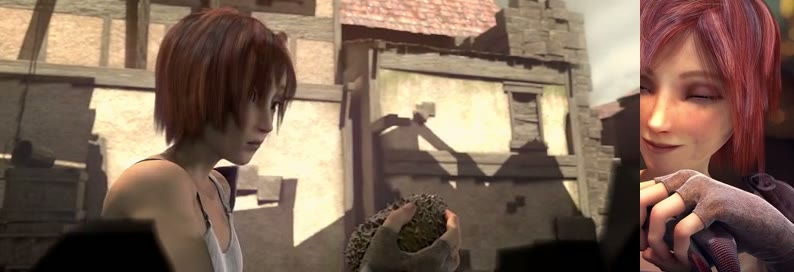
Two Sintel shots side by side: the girl in the alley on the left, the baby dragon on the right
1280x272 0:05 of the side-by-side command. The output is exactly the two widths added.
scale=-2:272, fps=24, hstack Heights matched
A landscape shot of the girl with the vertical clip of her smiling, scaled to the same height, on the right
0:02 The 360x640 clip scaled to 154x272, so the frame is 640 + 154 = 794 wide.
Same output, after the short clip ends Right side frozen
Later frame of the same output: the left side has moved on, the right side shows the vertical clip's last frame
0:08 phone.mp4 ended at 0:04. hstack repeats its last frame until the longest input ends. Add shortest=1 to stop instead.
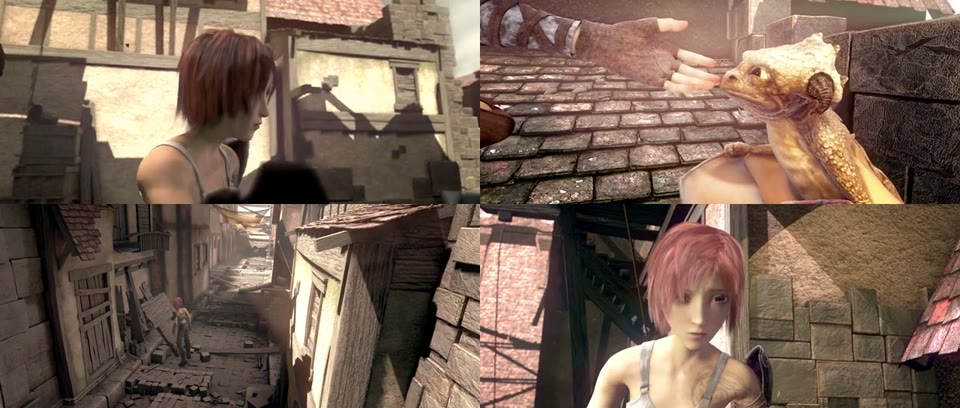
xstack=inputs=4:grid=2x2 Four clips, one frame
Four Sintel shots in a 2 by 2 grid
1280x544 a.mp4 and b.mp4 on top, c.mp4 and d.mp4 below.

Footage: Sintel, © Blender Foundation, CC BY 3.0.

Run it

Run it on Rendobar

Send the same command from your code. The job fetches each input from its URL and returns the output file's URL when it finishes.

job.ts
import { createClient } from "@rendobar/sdk";
const rb = createClient({ apiKey: process.env.RENDOBAR_API_KEY });
const job = await rb.jobs.run({
type: "ffmpeg",
inputs: {
"a.mp4": "https://cdn.rendobar.com/examples/stack-videos/a.mp4",
"b.mp4": "https://cdn.rendobar.com/examples/stack-videos/b.mp4",
},
params: {
command: "ffmpeg -i a.mp4 -i b.mp4 -filter_complex \"[0:v][1:v]hstack=inputs=2[v]\" -map \"[v]\" -map 0:a -c:v libx264 -crf 20 -c:a copy out.mp4",
},
});
console.log(job.output.file.url);

Install with npm i @rendobar/sdk. jobs.run() submits and waits, so it returns the finished job in one call.

terminal
curl https://api.rendobar.com/jobs \
-H "Authorization: Bearer $RENDOBAR_API_KEY" \
-H "Content-Type: application/json" \
-d '{
"type": "ffmpeg",
"inputs": {
"a.mp4": "https://cdn.rendobar.com/examples/stack-videos/a.mp4",
"b.mp4": "https://cdn.rendobar.com/examples/stack-videos/b.mp4"
},
"params": {
"command": "ffmpeg -i a.mp4 -i b.mp4 -filter_complex \"[0:v][1:v]hstack=inputs=2[v]\" -map \"[v]\" -map 0:a -c:v libx264 -crf 20 -c:a copy out.mp4"
}
}'

Returns immediately with a job id. Poll GET /jobs/{id} or register a webhook rather than blocking on the request.

Every variant

Pick the command for your case

Each one ran on the same input. The line under it is what came out. Run times are the best of three runs with FFmpeg 8.0 on one desktop machine, so read them as relative.

  1. Stack two videos top and bottom

    Re-encode
    ffmpeg -i a.mp4 -i b.mp4 -filter_complex "[0:v][1:v]vstack=inputs=2[v]" -map "[v]" -map 0:a -c:v libx264 -crf 20 -c:a copy out.mp4

    640x544: a.mp4 above b.mp4. vstack needs the same width where hstack needs the same height.

    553 ms run 1.8 MB 10.00 s long

  2. Make a 2x2 grid of four videos

    Re-encode
    ffmpeg -i a.mp4 -i b.mp4 -i c.mp4 -i d.mp4 -filter_complex "[0:v][1:v][2:v][3:v]xstack=inputs=4:grid=2x2[v]" -map "[v]" -map 0:a -c:v libx264 -crf 20 -c:a copy out.mp4

    1280x544. grid=2x2 places the inputs left to right, then top to bottom, with no layout to write.

    1.1 s run 4.0 MB 10.04 s long

  3. Put three videos in a grid

    Re-encode
    ffmpeg -i a.mp4 -i b.mp4 -i c.mp4 -filter_complex "[0:v][1:v][2:v]xstack=inputs=3:layout=0_0|w0_0|0_h0:fill=black[v]" -map "[v]" -map 0:a -c:v libx264 -crf 20 -c:a copy out.mp4

    1280x544 with a.mp4 top left, b.mp4 top right, c.mp4 bottom left and the fourth cell black. w0 and h0 are the first input's width and height.

    852 ms run 2.5 MB 10.00 s long

  4. Put three videos in a row

    Re-encode
    ffmpeg -i a.mp4 -i b.mp4 -i c.mp4 -filter_complex "[0:v][1:v][2:v]hstack=inputs=3[v]" -map "[v]" -map 0:a -c:v libx264 -crf 20 -c:a copy out.mp4

    1920x272. Set inputs to the number of clips.

    1.1 s run 2.5 MB 10.00 s long

  5. Add a line between the two videos

    Re-encode
    ffmpeg -i a.mp4 -i b.mp4 -filter_complex "[0:v]pad=iw+8:ih:0:0:color=white[l];[l][1:v]hstack=inputs=2[v]" -map "[v]" -map 0:a -c:v libx264 -crf 20 -c:a copy out.mp4

    1288x272 with an 8 px white strip between the two clips. pad widens the left clip before it is stacked.

    760 ms run 1.9 MB 10.00 s long

  6. Keep the sound of both videos

    Re-encode
    ffmpeg -i a.mp4 -i b.mp4 -filter_complex "[0:v][1:v]hstack=inputs=2[v];[0:a][1:a]amix=inputs=2[a]" -map "[v]" -map "[a]" -c:v libx264 -crf 20 -c:a aac out.mp4

    One stereo track with both soundtracks mixed. amix halves each input by default, see mix two audio tracks.

    794 ms run 1.8 MB 10.01 s long

  7. Stop when the shorter video ends

    Re-encode
    ffmpeg -i a.mp4 -i phone.mp4 -filter_complex "[1:v]scale=-2:272,fps=24[p];[0:v][p]hstack=inputs=2:shortest=1[v]" -map "[v]" -map 0:a -c:v libx264 -crf 20 -c:a copy -shortest out.mp4

    4.0 s, the length of phone.mp4. shortest=1 ends the picture and -shortest cuts the copied audio to match.

    312 ms run 487 KB 4.00 s long

Gotchas

Where it goes wrong

"Input 1 height does not match input 0 height": how do I fix it?

hstack refuses inputs of different heights:

ffmpeg -i a.mp4 -i phone.mp4 -filter_complex hstack out.mp4

Input 1 height 640 does not match input 0 height 272. No output.

Scale the odd one to the other's height with scale=-2:272. Use -2, not -1. With -1 the vertical clip came out 153 wide, the stacked frame 793 wide, and libx264 stopped with "width not divisible by 2 (793x272)". -2 rounds to an even width, 154.

Why is my stacked video 120 fps or choppy?

The inputs have different frame rates. hstack emits a frame whenever any input has a new one, so a 24 fps clip next to a 30 fps clip gives an uneven stream:

ffmpeg -i a.mp4 -i phone.mp4 -filter_complex "[1:v]scale=-2:272[p];[0:v][p]hstack=inputs=2[v]" -map "[v]" -map 0:a -c:v libx264 -crf 20 -c:a copy out.mp4

ffprobe reports 120 fps. The file holds 336 frames in 9.92 s, an average of 33.9 per second, at uneven intervals.

Add fps=24 to the odd input, as in the second command at the top. The same stack then came out at 24 fps with 240 frames in 10.0 s.

Where does the audio come from?

Stacking filters only touch video. When you label the filter output and map it, FFmpeg writes only what you map, so add -map 0:a for the first clip's sound or mix both as in the task above.

With no -map at all, -filter_complex hstack still produced an audio track: a.mp4's sound, re-encoded to AAC at -36.0 LUFS against -35.9 in the source. FFmpeg picked it on its own. Map it yourself so the choice does not depend on the inputs' order.

Related: Resize a video, Merge videos, Add a watermark, Mix audio tracks.

Your command. Our infrastructure.

Bring your own commands. Run them on scalable CPU and GPU infrastructure, and pay only for compute time.