


Make a contact sheet from a video with FFmpeg

Sample frames with fps or select, shrink them with scale, and lay them out with tile: ffmpeg -i in.mp4 -vf "fps=1/10,scale=320:-2,tile=4x3" -frames:v 1 -q:v 2 out.jpg. Pick the interval so the samples fill the grid: 120 s at one frame per 10 s is 12 tiles. Every sheet below came from the same 2-minute clip.

Quick Re-encode

A preview of the whole video in one image.

ffmpeg -i in.mp4 -vf "fps=1/10,scale=320:-2,tile=4x3" -frames:v 1 -q:v 2 out.jpg

One 1280x408 JPEG, 12 tiles of 320x136. The frames come from 0:04.958, 0:14.958 and so on to 1:54.958.

Tiles
12 of 320x136
Sheet
1280x408
Run time
975 ms
Output
133 KB
Labelled Re-encode

You need to know where each tile comes from, or want gaps between tiles.

ffmpeg -i in.mp4 -vf "select='eq(mod(n\,240)\,120)',scale=320:-2,drawtext=fontfile=Inter.ttf:text='%{pts\:hms}':x=8:y=8:fontsize=16:fontcolor=white:box=1:boxcolor=black@0.6:boxborderw=4,tile=4x3:padding=4:margin=4" -frames:v 1 -q:v 2 out.jpg

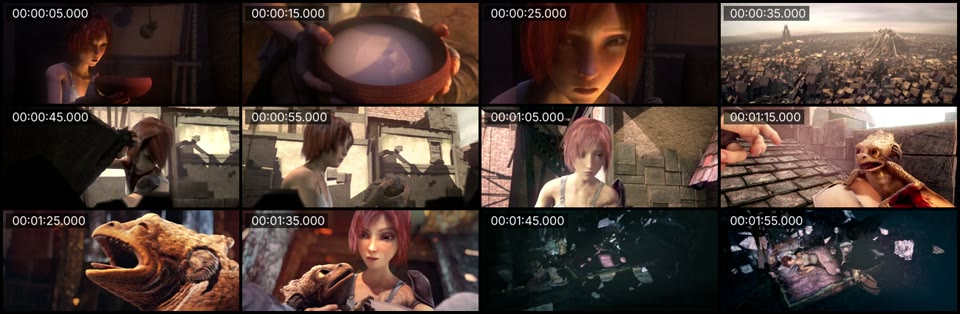
1300x424 with a 4 px gap and border. Frames from the middle of each 10 s, 0:05 to 1:55, each labelled with its real time.

Labels
match the frame, checked
Sheet
1300x424
Run time
950 ms
Output
155 KB

Proof

Three sheets from the same clip

Each sheet is the file the command wrote, scaled to 960 wide for this page.
select every 240th frame from 120, drawtext, tile=4x3 Labels match the frames
Contact sheet of 12 frames from Sintel, each labelled with its time from 0:05 to 1:55
12 tiles One frame from the middle of every 10 s, so no tile lands on a cut or a fade.
select='gt(scene,0.3)', tile=5x4 One tile per shot
Contact sheet of 20 frames, the first frame after each scene cut in the clip
20 cuts The first frame after each cut the scene detector found. 20 cuts at 0.3 filled a 5x4 grid exactly.
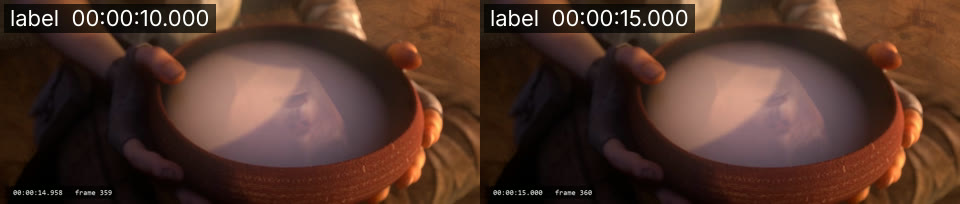
drawtext after fps vs after select After fps the label is 5 s off
Two tiles of the same moment from the timecode clip: one labelled 0:00:10.000 on a frame whose burned-in time is 0:00:14.958, one labelled 0:00:15.000 on frame 360 at 0:00:15.000
0:10 vs 0:14.958 Left, fps=1/10 then drawtext: the label says 0:10, the burned-in timecode says 0:14.958. Right, select then drawtext: both say 0:15.
fps=1/10, tile=5x5 13 empty cells
A 5x5 contact sheet with 12 frames and 13 black empty cells
12 of 25 120 s at one frame per 10 s gives 12 frames. The other 13 cells stay black.

Footage: Sintel, © Blender Foundation, CC BY 3.0.

Run it

Run it on Rendobar

Send the same command from your code. The job fetches each input from its URL and returns the output file's URL when it finishes.

job.ts
import { createClient } from "@rendobar/sdk";
const rb = createClient({ apiKey: process.env.RENDOBAR_API_KEY });
const job = await rb.jobs.run({
type: "ffmpeg",
inputs: {
"in.mp4": "https://cdn.rendobar.com/examples/video-to-images-grid/in.mp4",
"Inter.ttf": "https://cdn.rendobar.com/examples/video-to-images-grid/Inter.ttf",
},
params: {
command: "ffmpeg -i in.mp4 -vf \"select='eq(mod(n\\,240)\\,120)',scale=320:-2,drawtext=fontfile=Inter.ttf:text='%{pts\\:hms}':x=8:y=8:fontsize=16:fontcolor=white:box=1:boxcolor=black@0.6:boxborderw=4,tile=4x3:padding=4:margin=4\" -frames:v 1 -q:v 2 out.jpg",
},
});
console.log(job.output.file.url);

Install with npm i @rendobar/sdk. jobs.run() submits and waits, so it returns the finished job in one call.

terminal
curl https://api.rendobar.com/jobs \
-H "Authorization: Bearer $RENDOBAR_API_KEY" \
-H "Content-Type: application/json" \
-d '{
"type": "ffmpeg",
"inputs": {
"in.mp4": "https://cdn.rendobar.com/examples/video-to-images-grid/in.mp4",
"Inter.ttf": "https://cdn.rendobar.com/examples/video-to-images-grid/Inter.ttf"
},
"params": {
"command": "ffmpeg -i in.mp4 -vf \"select='\''eq(mod(n\\,240)\\,120)'\'',scale=320:-2,drawtext=fontfile=Inter.ttf:text='\''%{pts\\:hms}'\'':x=8:y=8:fontsize=16:fontcolor=white:box=1:boxcolor=black@0.6:boxborderw=4,tile=4x3:padding=4:margin=4\" -frames:v 1 -q:v 2 out.jpg"
}
}'

Returns immediately with a job id. Poll GET /jobs/{id} or register a webhook rather than blocking on the request.

Every variant

Pick the command for your case

Each one ran on the same input. The line under it is what came out. Run times are the best of three runs with FFmpeg 8.0 on one desktop machine, so read them as relative.

  1. One tile per scene

    Re-encode
    ffmpeg -i in.mp4 -vf "select='gt(scene,0.3)',scale=320:-2,tile=5x4" -frames:v 1 -q:v 2 out.jpg

    1600x544, 20 tiles, the first frame after each cut. A threshold of 0.4 found 17 cuts on the same clip.

    867 ms run 261 KB

  2. One typical frame per 10 seconds

    Re-encode
    ffmpeg -i in.mp4 -vf "thumbnail=240,scale=320:-2,tile=4x3" -frames:v 1 -q:v 2 out.jpg

    12 tiles. Each is the frame closest to the average colour histogram of its 240-frame batch.

    1.1 s run 138 KB

  3. Every 240th frame

    Re-encode
    ffmpeg -i in.mp4 -vf "select='not(mod(n\,240))',scale=320:-2,tile=4x3" -frames:v 1 -q:v 2 out.jpg

    Frames 0, 240, 480 and on, exactly 0:00, 0:10, 0:20. The 0:30 tile is black, because frame 720 falls on black between two shots.

    907 ms run 126 KB

  4. A grid of the keyframes

    Re-encode
    ffmpeg -skip_frame nokey -i in.mp4 -vf "scale=320:-2,tile=6x6" -frames:v 1 -q:v 2 out.jpg

    31 keyframes in a 6x6 grid, 5 cells empty. All 20 cuts the scene detector found are among them, because the encoder starts a keyframe at each shot change.

    329 ms run 345 KB

  5. Sprite sheets for a video scrubber

    Re-encode
    ffmpeg -i in.mp4 -vf "fps=1/2,scale=160:-2,tile=6x5" -q:v 2 sheet_%02d.jpg

    Two 960x340 sheets, sheet_01.jpg and sheet_02.jpg, 30 tiles each, one frame per 2 s in reading order.

    1.0 s run 222 KB

  6. Save the sheet as PNG

    Re-encode
    ffmpeg -i in.mp4 -vf "fps=1/10,scale=320:-2,tile=4x3" -frames:v 1 out.png

    The same 1280x408 sheet, lossless, 790 KB. The -q:v 2 JPEG was 133 KB.

    990 ms run 790 KB

Gotchas

Where it goes wrong

How do I pick the interval to fill the grid?

Divide the duration by the number of tiles. 120 s over a 4x3 grid is one frame every 10 s, fps=1/10. Get the duration first:

ffprobe -v error -show_entries format=duration -of csv=p=0 in.mp4

120.000000

Too few frames leaves black cells: fps=1/10 into tile=5x5 filled 12 of 25. Too many and tile starts a second sheet, which needs a pattern name or -frames:v 1, below.

Why are my tile timestamps wrong?

drawtext after fps prints the time of the fps filter's own grid, not the time the frame came from. fps=1/10 took the frame at 0:14.958 and labelled it 0:10. Moving the grid with start_time=5 made it worse: the frame from 0:05 was labelled 0:10.

select keeps each frame's own timestamp, so label after select, as the second answer does. eq(mod(n\,240)\,120) keeps frame 120 of every 240, the middle of each 10 s at 24 fps.

Why do I get "Cannot write more than one file with the same name"?

Your samples made more than one sheet. tile=4x3 emits a sheet every 12 frames, and a single file name can hold one:

ffmpeg -i in.mp4 -vf "fps=1/8,scale=320:-2,tile=4x3" -q:v 2 out.jpg

15 samples, two sheets, and FFmpeg 8.0 stopped with this error.

Add -frames:v 1 to keep only the first sheet, or name the output sheet_%02d.jpg to keep them all.

Related: Extract a thumbnail, Extract frames, Stack videos, MP4 to GIF.

Your command. Our infrastructure.

Bring your own commands. Run them on scalable CPU and GPU infrastructure, and pay only for compute time.