

rb runs FFmpeg in the cloud from your shell. Write the same ffmpeg command you’d run locally, prefix it with rb, and it uploads your inputs, runs the job, and downloads the result.
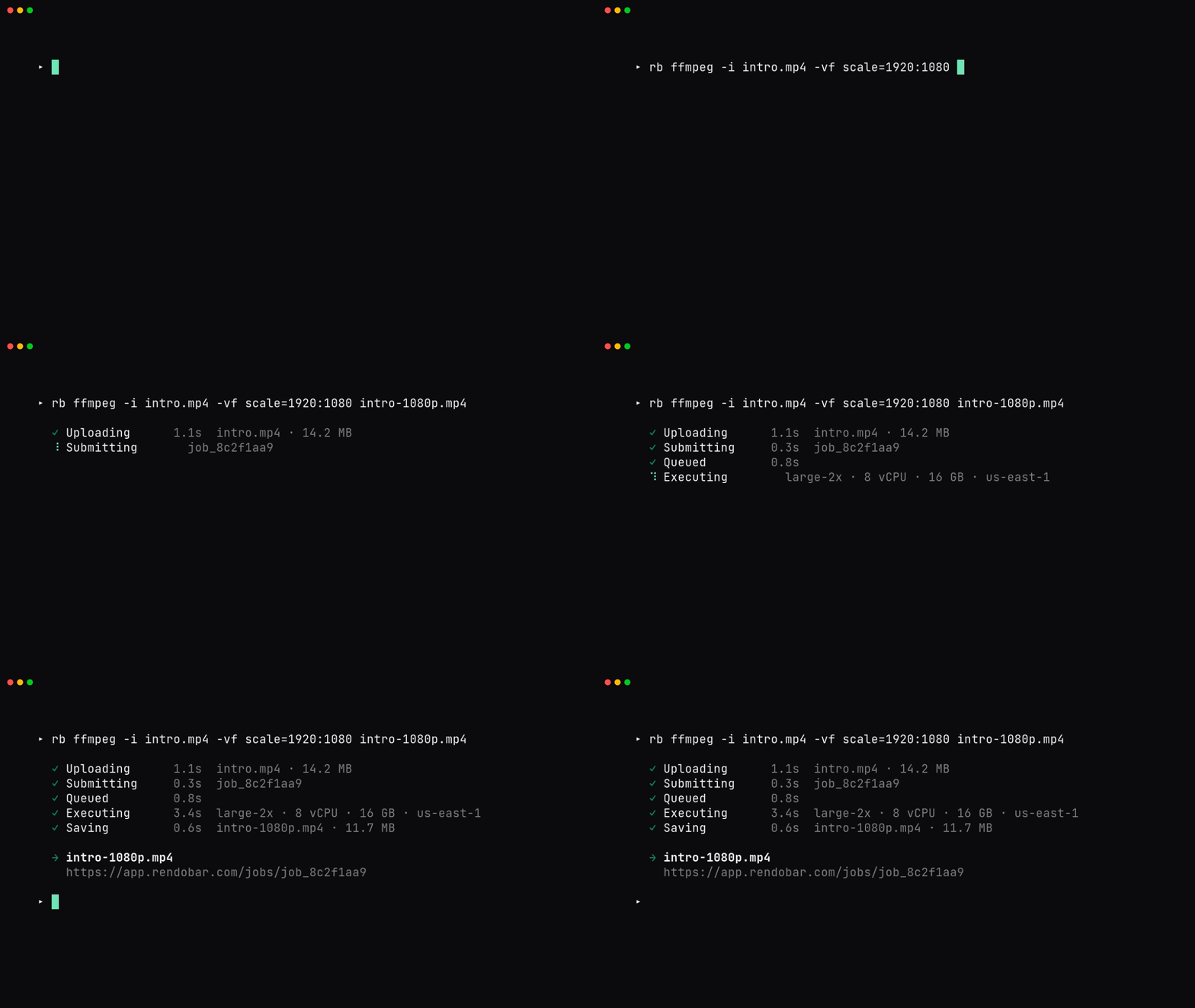
rb login opens your browser for OAuth. The render command uploads clip.mp4, runs an ffmpeg job, and writes the output to out.mp4. Progress goes to stderr, so stdout stays clean for piping.
For a Node or TypeScript program, or for any job type other than ffmpeg, use the SDK instead. The CLI runs ffmpeg jobs and the auth around them, nothing else.
Install
- macOS / Linux
- Windows
rb at ~/.rendobar/bin/rb (or %USERPROFILE%\.rendobar\bin\rb.exe), and adds it to your PATH. Open a new shell, then verify:
RENDOBAR_VERSION before piping:
rb update self-replaces the binary in place (SHA-256 verified, rolls back on failure). To remove rb, run curl -fsSL https://rendobar.com/uninstall.sh | sh (or the .ps1 on Windows).
Authenticate
The CLI reads credentials in priority order: theRENDOBAR_API_KEY env var, then a saved API key, then a saved OAuth token.
rb login runs an OAuth 2.1 PKCE flow on http://127.0.0.1:14832/callback. Access tokens expire after 1 hour and refresh automatically, so you won’t see a re-login prompt unless the token is revoked. Credentials live at ~/.config/rendobar/credentials.json (%APPDATA%\rendobar\credentials.json on Windows). Treat that file as a secret.
Get an API key from app.rendobar.com under Settings, API keys. Keys start with rb_.
Commands
rb ffmpeg flags
These flags belong torb ffmpeg. Everything else after the subcommand passes through to FFmpeg verbatim.
Local inputs (
-i ./clip.mp4) upload before submission and are rewritten to short-lived URLs. Remote inputs (-i https://...) pass through untouched. The trailing output filename is where the result downloads to.
A delivery starts after the job completes. rb waits up to five minutes for it and prints where each one landed.
rb storage needs storage access. If you signed in before rb asked for it, run rb login again, or use an API key made on or after September 13, 2026.
Exit codes
How do I run it in CI?
RENDOBAR_API_KEY is the only auth path for CI. It beats any saved credential and writes nothing to disk. Don’t run rb login in a pipeline, the browser flow will hang.
.github/workflows/render.yml
install.sh updates PATH via shell rc files that later steps don’t read, so the echo … >> "$GITHUB_PATH" line carries the install dir forward. The same pattern works in GitLab CI or Docker: install with RENDOBAR_NO_MODIFY_PATH=1, pass the key as a masked secret, and parse output with --json or --url-only.
--idempotency-key. If a retried step must not double-charge, submit via the SDK or POST /jobs with an idempotencyKey field.
What do I do when a command fails?
rb doctor runs the install and connectivity checks and prints a fix: line under any failure. Run it first. The three you’ll actually hit:
rb: command not found after install
rb: command not found after install
The shell hasn’t reloaded. Open a new terminal, or
source ~/.zshrc / ~/.bashrc. If you set RENDOBAR_NO_MODIFY_PATH=1 or a custom RENDOBAR_INSTALL_DIR, add it yourself: export PATH="$HOME/.rendobar/bin:$PATH".curl 403 or 429 during install
curl 403 or 429 during install
GitHub Releases rate-limits at 60/hr per IP when unauthenticated. Pass a token:
RENDOBAR_GITHUB_TOKEN=ghp_xxx curl -fsSL https://rendobar.com/install.sh | sh. In GitHub Actions the default GITHUB_TOKEN is picked up automatically.Login fails or port 14832 is in use
Login fails or port 14832 is in use
Another process holds the OAuth callback port, or your network blocks loopback HTTP. Skip the browser entirely:
rb login --key rb_xxx. A Refresh failed: invalid_grant means the token was revoked, so run rb logout && rb login.rb doctor --json and file a bug at github.com/rendobar/cli/issues.
See also
- FFmpeg job reference: the API the CLI calls per run
- API authentication: keys and OAuth across REST and MCP
- SDK: every job type, typed, for Node and TypeScript
- Changelog: version history and release notes